JavaScript is disabled. For a better experience, please enable JavaScript in your browser before proceeding.
You are using an out of date browser. It may not display this or other websites correctly.
You should upgrade or use an
alternative browser .
Solved Where can I locate the shine on the header bar in WSB ?
Hi everyone,
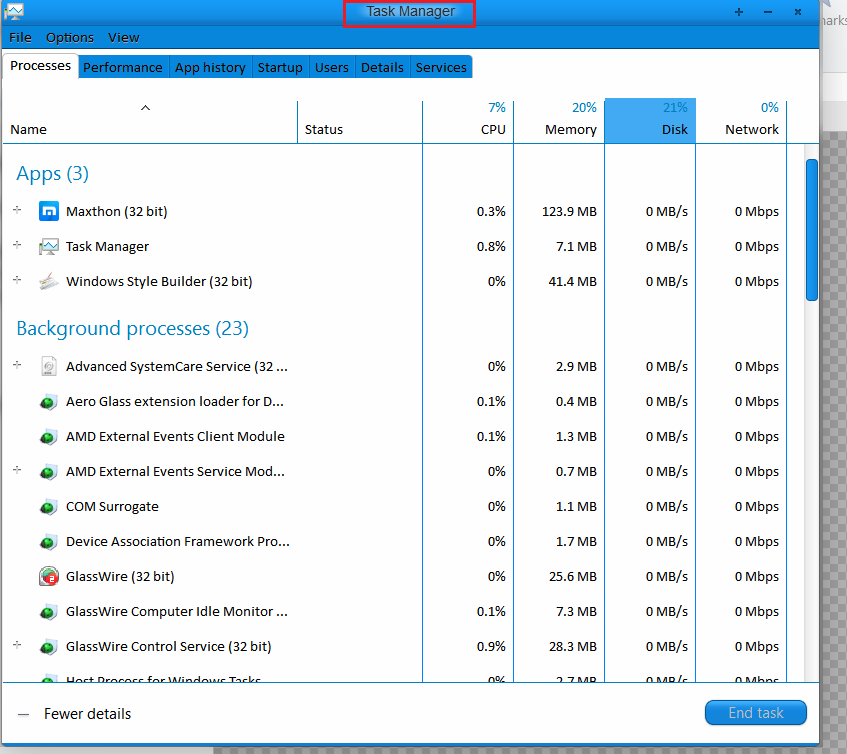
I'm trying to personalize a theme, almost done. Just can locate this property:
The Shine on the header where it's written "Task Manager" The glow behind the text doesn't go with color concept of the rest of the theme.
Could anyone please help me locate the path in Windows Style Builder ?
Thank you for reading.
Last edited: Sep 3, 2018
Laptop HP Windows 7 Ultimate x64
Jerry ☮ 1956-2019 R.I.P.
VIP
SF Team
Welcome to the Seven Forums
Win 7 Pro x64 / Win 10 Pro Intel(R) Core(TM) i7-3630QM CPU @ 2.40GHz 12 GB (1) Intel(R) HD Graphics 4000 (2) NVIDIA GeFo... Laptop Sager NP9170 Win 7 Pro x64 / Win 10 Pro Intel(R) Core(TM) i7-3630QM CPU @ 2.40GHz CLEVO P170EM 12 GB (1) Intel(R) HD Graphics 4000 (2) NVIDIA GeForce GTX 675M (1) Realtek High Definition Audio (2) Intel(R) Display Aud 17.3 1920x1080 (1) Samsung 860 EVO 500GB(OS) (1) Samsung 860 EVO 500GB(Data) Backlite MSE, Malwarebytes Pro Firefox DESKTOP: Custom-built.
New member
Member
Thread Starter
Welcome to the Seven Forums
Hi Jerry
Thank you for the help bud. Highly appreciated.
Nah, it's Windows 8.1 actually . The theme in screenshot was originally made for Win 7. I'm trying to port it.
Laptop HP Windows 7 Ultimate x64
New member
Member
Thread Starter
Jerry, One more thing I can't sort out
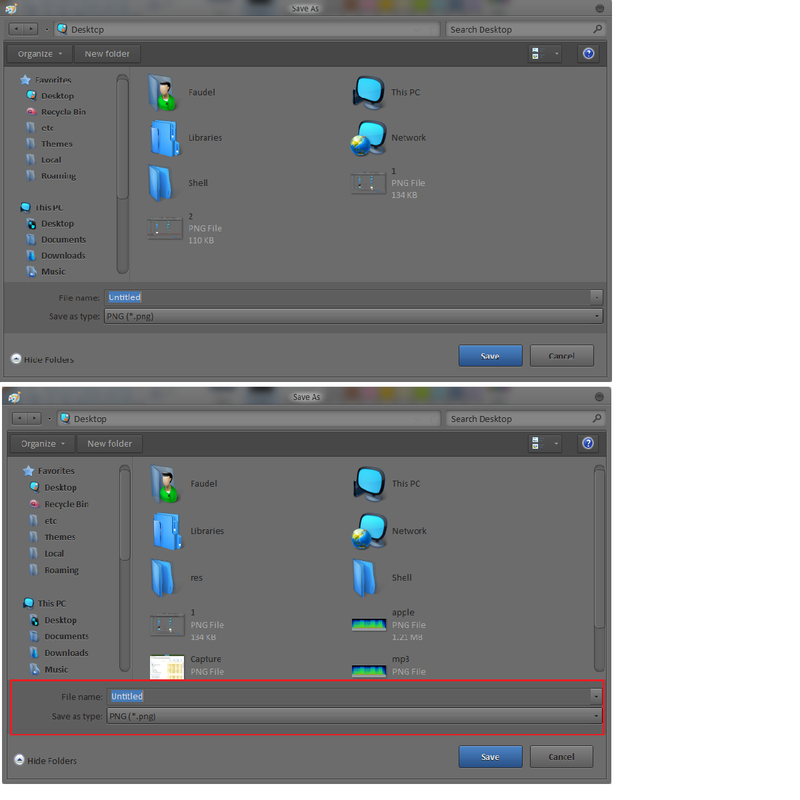
Have a look at this screenshot-
You notice that dark band (highlighted in the bottom image) How can I get rid of that ? It only appears on "Save as" dialog.
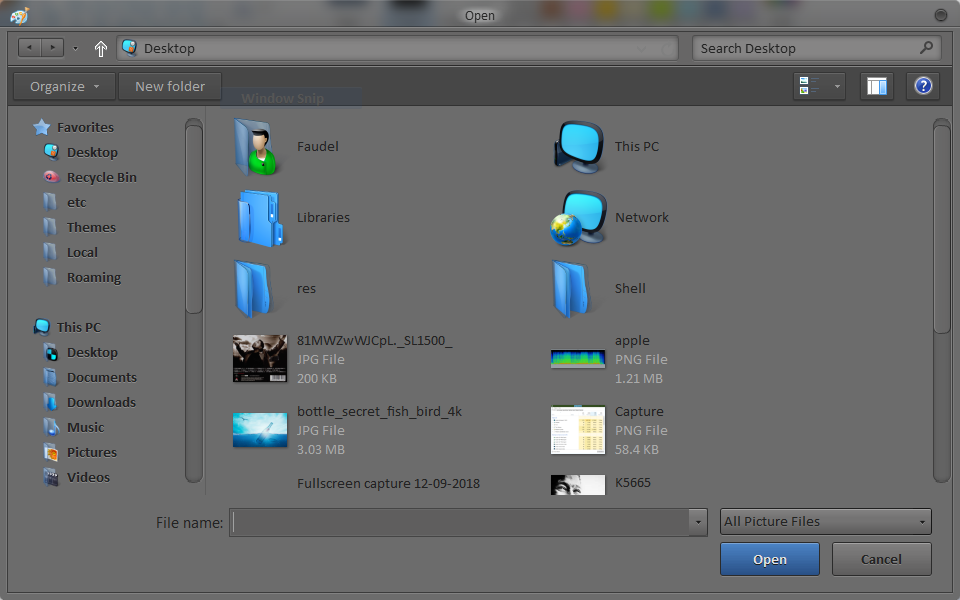
This is not related to any colors property. I changed global colors and it didn't have any effect. I'm guessing it's related to some Bordersize in the Combobox class. It's because it doesn't seem to appear on "Open" dialog.
Have a look here-
Your help is highly appreciated.
Laptop HP Windows 7 Ultimate x64
Jerry ☮ 1956-2019 R.I.P.
VIP
SF Team
It's at
Win 7 Pro x64 / Win 10 Pro Intel(R) Core(TM) i7-3630QM CPU @ 2.40GHz 12 GB (1) Intel(R) HD Graphics 4000 (2) NVIDIA GeFo... Laptop Sager NP9170 Win 7 Pro x64 / Win 10 Pro Intel(R) Core(TM) i7-3630QM CPU @ 2.40GHz CLEVO P170EM 12 GB (1) Intel(R) HD Graphics 4000 (2) NVIDIA GeForce GTX 675M (1) Realtek High Definition Audio (2) Intel(R) Display Aud 17.3 1920x1080 (1) Samsung 860 EVO 500GB(OS) (1) Samsung 860 EVO 500GB(Data) Backlite MSE, Malwarebytes Pro Firefox DESKTOP: Custom-built.
New member
Member
Thread Starter
It's at
Nah, that's not it. If you look at the screenshot. BtnFace changes the part below the band I highlighted but not the actual band. That band shouldn't be there. It's something related to either margins or border size.
Also, I've been reading your posts not just here but also on other forums too. Just wanted to show my gratitude for all the help you provide. May god bless you Jerry.
Laptop HP Windows 7 Ultimate x64
Jerry ☮ 1956-2019 R.I.P.
VIP
SF Team
That is where I changed it.
Zip up your .msstyles and post it here and I will look at it.
Jerry
Win 7 Pro x64 / Win 10 Pro Intel(R) Core(TM) i7-3630QM CPU @ 2.40GHz 12 GB (1) Intel(R) HD Graphics 4000 (2) NVIDIA GeFo... Laptop Sager NP9170 Win 7 Pro x64 / Win 10 Pro Intel(R) Core(TM) i7-3630QM CPU @ 2.40GHz CLEVO P170EM 12 GB (1) Intel(R) HD Graphics 4000 (2) NVIDIA GeForce GTX 675M (1) Realtek High Definition Audio (2) Intel(R) Display Aud 17.3 1920x1080 (1) Samsung 860 EVO 500GB(OS) (1) Samsung 860 EVO 500GB(Data) Backlite MSE, Malwarebytes Pro Firefox DESKTOP: Custom-built.
New member
Member
Thread Starter
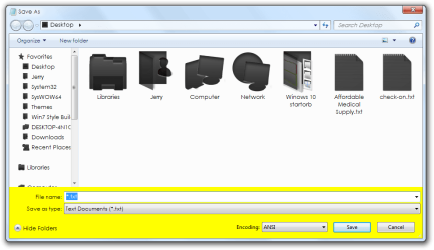
Jerry bud, please also tell me the resolution to this problem. Another theme from the same author has this anomaly. This is for 8.1
Last edited: Sep 23, 2018
Laptop HP Windows 7 Ultimate x64
Jerry ☮ 1956-2019 R.I.P.
VIP
SF Team
It's at
Win 7 Pro x64 / Win 10 Pro Intel(R) Core(TM) i7-3630QM CPU @ 2.40GHz 12 GB (1) Intel(R) HD Graphics 4000 (2) NVIDIA GeFo... Laptop Sager NP9170 Win 7 Pro x64 / Win 10 Pro Intel(R) Core(TM) i7-3630QM CPU @ 2.40GHz CLEVO P170EM 12 GB (1) Intel(R) HD Graphics 4000 (2) NVIDIA GeForce GTX 675M (1) Realtek High Definition Audio (2) Intel(R) Display Aud 17.3 1920x1080 (1) Samsung 860 EVO 500GB(OS) (1) Samsung 860 EVO 500GB(Data) Backlite MSE, Malwarebytes Pro Firefox DESKTOP: Custom-built.
New member
Member
Thread Starter
Jerry,
It's solved. Thank you from the core of my heart. First ported theme that doesn't have a bug
Can I PM you ?
Laptop HP Windows 7 Ultimate x64