Win7 Pro + SP1 (64-bit). New reinstall from scratch going on for two days now, what with lots of applications to reinstall.
I just noticed that the program icon for Internet Explorer (which is the new IE9 one) has gone "generic". This is true for both icons, the shortcut in the Start Menu as well as the program itself in the \Program Files\Internet Explorer\ieexplore.exe.
Note that this icon ABSOLUTELY WAS PRESENT until something happened (probably today) to make it disappear. I know for a fact that both icons for 64-bit and 32-bit versions of IE were present in the Start Menu.
Also, the 64-bit program itself launches and runs properly from the shortcut. It's just that the icon has vanished.
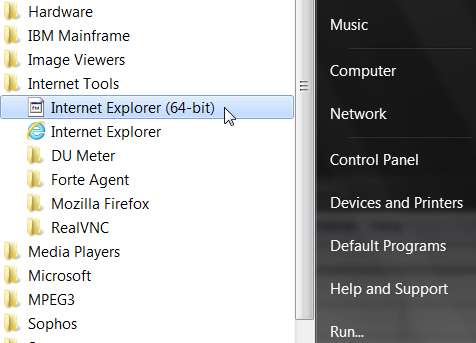
and
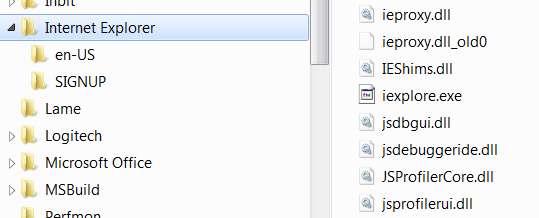
I've tried to "change icon" on the shortcuts, but the correct IE icon is already selected. This approach has no effect. Still can't recover the icon.
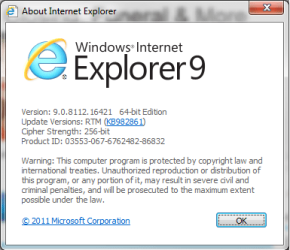
Also, the icon for IE (32-bit) (from \Program Files (x86) folder) is perfectly fine, as the first screenshot above shows. Just the 64-bit program (in the \Program Files folder) is lost.
I obviously can't just re-create the Start Menu shortcut from the program object, because the program object itself has lost its icon.
Please help. Where did that icon vanish to? At the very least, how can I recover it?
Could this have come from a recent Windows Update (to just the 64-bit version of IE9)?
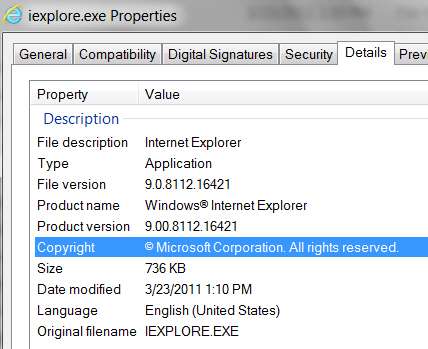
I think not, because "Versions" shows no newer updates other than the original one I installed yesterday:
Thanks.
I just noticed that the program icon for Internet Explorer (which is the new IE9 one) has gone "generic". This is true for both icons, the shortcut in the Start Menu as well as the program itself in the \Program Files\Internet Explorer\ieexplore.exe.
Note that this icon ABSOLUTELY WAS PRESENT until something happened (probably today) to make it disappear. I know for a fact that both icons for 64-bit and 32-bit versions of IE were present in the Start Menu.
Also, the 64-bit program itself launches and runs properly from the shortcut. It's just that the icon has vanished.
and
I've tried to "change icon" on the shortcuts, but the correct IE icon is already selected. This approach has no effect. Still can't recover the icon.
Also, the icon for IE (32-bit) (from \Program Files (x86) folder) is perfectly fine, as the first screenshot above shows. Just the 64-bit program (in the \Program Files folder) is lost.
I obviously can't just re-create the Start Menu shortcut from the program object, because the program object itself has lost its icon.
Please help. Where did that icon vanish to? At the very least, how can I recover it?
Could this have come from a recent Windows Update (to just the 64-bit version of IE9)?
I think not, because "Versions" shows no newer updates other than the original one I installed yesterday:
Thanks.
My Computer
At a glance
Windows 7 Pro x64 (1), Win7 Pro X64 (2)i5-3350p 3.1Ghz/6MB-cache (1); E8400 3.0Ghz/6...8GB PC3-12800 DDR3 (1); 4GB PC3-10600 DDR3 (2)ATI HD7750 (1), (see TV cards); ATI R7 250 (2)
- Computer type
- PC/Desktop
- Computer Manufacturer/Model Number
- Home-built, two systems (1) and (2)
- OS
- Windows 7 Pro x64 (1), Win7 Pro X64 (2)
- CPU
- i5-3350p 3.1Ghz/6MB-cache (1); E8400 3.0Ghz/6MB-cache (2)
- Motherboard
- ASUS P8Z77-V Pro (1); ASUS P5Q3 (2)
- Memory
- 8GB PC3-12800 DDR3 (1); 4GB PC3-10600 DDR3 (2)
- Graphics Card(s)
- ATI HD7750 (1), (see TV cards); ATI R7 250 (2)
- Sound Card
- Realtek ALC892 HD Audio (1); Realtek ALC1200 HD Audio (2)
- Monitor(s) Displays
- Eizo HD2441W LCD, Eizo S2433W (1); Eizo 24" S2433W (2)
- Screen Resolution
- 1920x1200, 1920x1200 (1); 1920x1200 (2)
- Hard Drives
- (1) 1TB SATA-II (7200RPM), 2x2TB SATA-III (7200RPM), 250GB SATA-III (10000RPM) for OS; 2x2TB external USB 3.0
(2) 320GB SATA-II (7200RPM), 750GB SATA-II (7200RPM), 150GB SATA-II (10000RPM) for OS; 2TB external USB 3.0
- PSU
- Nesteq ECS-6001 600W (1); Nesteq ECS-5001 500W (2)
- Case
- Acousti-Case 360 (1) and (2)
- Cooling
- Noctua NH-U12P SE2 for CPU, 2x120mm case fans (1) and (2)
- Keyboard
- IBM PS/2 (1) and (2)
- Mouse
- Logitech MX Revolution wireless (1); Microsoft wired (2)
- Internet Speed
- 100mbps down / 10mbps up
- Antivirus
- Microsoft Security Essentials; Malwarebyte Anti-Malware Pro
- Browser
- Firefox
- Other Info
- Ceton InfiniTV 4-tuner cablecard-enabled TV card as well as Hauppauge HVR-2250 OTA/ATSC 2-tuner TV card in (1), running under Win7 WMC