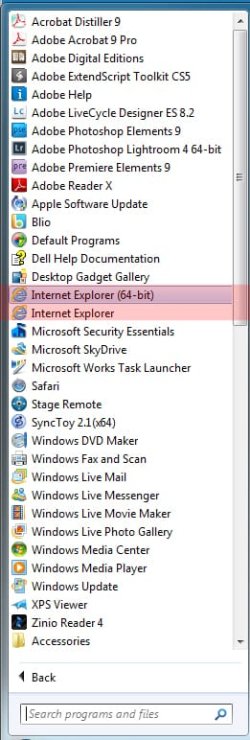
I'm running Windows 7 HP 64 bit and I have IE 9 installed. I think the IE 9 version is the 32 bit one because the executable is iexplore.exe *32 I am having some problems with IE9 at present - the task hangs around after I close the window and prevents me clicking on anything on the desktop until I cancel the various iexplore.exe taks via task manager. However each time I go to the Windows site to download the 64 bit version and execute the file I get a message saying it will not install because I am running a later version of IE9. When I compare the versions of what I have and what I am trying to get they are the same, although I believe I am running the 32 bit version (the About help gives no indication I am running 64 bit). Can anyone tell me whether I am running the 64 bit version, and if not how I can install it please?
My Computer
At a glance
Windows 7 Home Premium 64 bitCore 2 Quad Q66006 GB
- Computer Manufacturer/Model Number
- Dell XPS420
- OS
- Windows 7 Home Premium 64 bit
- CPU
- Core 2 Quad Q6600
- Motherboard
- Dell
- Memory
- 6 GB
- Monitor(s) Displays
- Dell E228WFP
- Screen Resolution
- Max
- Hard Drives
- Western Digital 500GB x 1, 1TB x 2
- Cooling
- Air
- Internet Speed
- 8 mbit