Where do you prefer your taskbar?

I'm just curious.

For some reason I've always put my task bar at the very top. I've never really even used Macs very much but I just like the task bar at the top.

Unfortunately Windows and software developers do NOT accommodate me. In XP I constantly had issues with programs starting up and their top halfs being BEHIND the task bar so I had to Space+Alt to get them down. If the task bar is at the bottom the programs don't start in the highest part of the screen so I can only assume they did it on purpose. Another problem was that when I close a file in Photoshop the top menu bar gets jacked up and I see a ghost of it until I open a new file.

I haven't noticed any issues with Windows 7 yet but I've only used iTunes and Firefox thus far.
 

My Computer

Computer Manufacturer/Model Number
HP Workstation Xw4100
OS
Windows 7 Ultimate/XP SP3
CPU
Pentium 4 HT 3.0 Ghz
Memory
2048MB DDR ECC RAM @ 200Mhz (4x512mb)
Graphics Card(s)
Nvidia Quadro FX 1100
Sound Card
Max Blaster
Monitor(s) Displays
17" MAG
Screen Resolution
1280*1024
Hard Drives
160GB IDE (WinXP Installation)
13GB IDE
250GB SATA (Win 7 installation & Storage)
PSU
280w
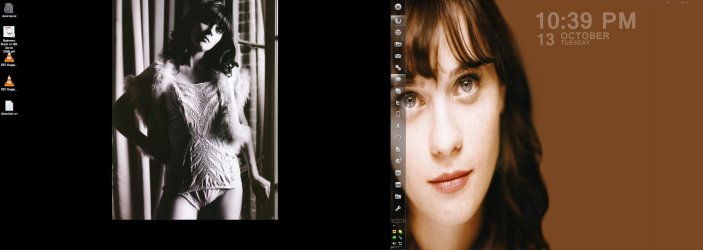
I always kept my taskbar on the bottom. However, today, quite by accident, I realized that I could put my taskbar on my second monitor. How that escaped me, I will never know.

Now I have it set up on the left side of my second monitor, which is sitting to the right of my main. I love it because it gives me a little more real estate on my main monitor, and gives my second monitor something to do when I'm not doing work. :geek:
 

Attachments

  • Untitled.jpg
    Untitled.jpg
    186.7 KB · Views: 145

My Computer

Computer type
PC/Desktop
Computer Manufacturer/Model Number
SuperBeast
OS
Windows 10 Tech Preview 9926 x64
CPU
AMD FX-8350
Motherboard
Gigabyte GA-990FXA-UD3
Memory
16GB DDR3 1333
Graphics Card(s)
Asus R9 290 DirectCU II OC, Gigabyte Windforce R9 290 OC
Sound Card
Integrated w/ Creative A250 2.1 speakers
Monitor(s) Displays
Main: Asus VN289H 28" Secondary: Acer G246HL 24"
Screen Resolution
1920x1080
Hard Drives
128 GB SanDisk Ultra Plus (Windows drive)

240 GB Crucial M500 SSD (Games drive)

1 TB WDC WD10EACS 7200RPM HDD (Data drive)

2 TB Seagate Expansion Desktop external HDD (Backup drive)
PSU
900w Antec HCG-900
Case
Raidmax Agusta Full ATX
Cooling
Corsair H80
Keyboard
Cooler Master Devastator MB24
Mouse
Cooler Master Devastator MS2K 1000/1600/2000 DPI
Internet Speed
100Mbps cable
Antivirus
Avast!
Browser
Chrome
I like it on the bottom, mainly because that's where it has been since I started to use computers and us old farts try to resist change,
Perhaps one of these days i might try another position (my wife want's me to all the time) sorry I digress.
 

My Computer

Computer type
PC/Desktop
Computer Manufacturer/Model Number
Self Built Custom Computer.
OS
Windows 10 Pro x64
CPU
i7-4770K
Motherboard
Asus Z87 Sabertooth
Memory
16Gig DDR3-2400
Graphics Card(s)
Gigabyte GT740
Sound Card
Onboard
Monitor(s) Displays
Benq 27" - Dell 23' - Benq 22"
Screen Resolution
1680x1050
Hard Drives
Samsung 840 Pro 128g SSD
1xWestern Digital Caviar Green 1tb
2xWestern Digital Caviar Green 2 tb
PSU
Seasonic 760 watt Platinum
Case
Coolermaster Haf - X
Cooling
Noctua NH-C12P CPU Cooler
Keyboard
Logitech illuminated keyboard
Mouse
Logitech Perfomance MX
Internet Speed
Cable = speeds to 20Mbps downsteam and 512kbps upsteam
Antivirus
Avast Internet Security
Browser
Firefox
^Yeah I usually don't like change either. I have no idea why I originally switched it to the top but I did it once and it just stuck.

Strangely I can only associate it with my home computer. Whenever I went to school and used the computers I was fine with the taskbar on the bottom and I didn't like it when I thought to put it on the top.

I was pretty ticked off that they did away with taskbars that could be pinned to the side of the screen. In XP I use a taskbar at the bottom with short cuts as an alternative to a dock. However, I'm enjoying the new task bar a lot. Being able to pin stuff to it is actually very similar and it keeps things more organized.

I always kept my taskbar on the bottom. However, today, quite by accident, I realized that I could put my taskbar on my second monitor. How that escaped me, I will never know.

Now I have it set up on the left side of my second monitor, which is sitting to the right of my main. I love it because it gives me a little more real estate on my main monitor, and gives my second monitor something to do when I'm not doing work. :geek:

I wish I could do a dual-monitor set up. I just can't afford to buy another monitor :P

Is that Zooey Deschanel in your signature? She rocks!
 

My Computer

Computer Manufacturer/Model Number
HP Workstation Xw4100
OS
Windows 7 Ultimate/XP SP3
CPU
Pentium 4 HT 3.0 Ghz
Memory
2048MB DDR ECC RAM @ 200Mhz (4x512mb)
Graphics Card(s)
Nvidia Quadro FX 1100
Sound Card
Max Blaster
Monitor(s) Displays
17" MAG
Screen Resolution
1280*1024
Hard Drives
160GB IDE (WinXP Installation)
13GB IDE
250GB SATA (Win 7 installation & Storage)
PSU
280w
Perhaps one of these days i might try another position (my wife want's me to all the time) sorry I digress.

HAHAHAHAHA!!! :roflmao:

It's been a long day man, thanks for the laugh. +1

Is that Zooey Deschanel in your signature? She rocks!

Yeah, that's Zooey...I'm going to marry her one day, I swear to it. lol
 

My Computer

Computer type
PC/Desktop
Computer Manufacturer/Model Number
SuperBeast
OS
Windows 10 Tech Preview 9926 x64
CPU
AMD FX-8350
Motherboard
Gigabyte GA-990FXA-UD3
Memory
16GB DDR3 1333
Graphics Card(s)
Asus R9 290 DirectCU II OC, Gigabyte Windforce R9 290 OC
Sound Card
Integrated w/ Creative A250 2.1 speakers
Monitor(s) Displays
Main: Asus VN289H 28" Secondary: Acer G246HL 24"
Screen Resolution
1920x1080
Hard Drives
128 GB SanDisk Ultra Plus (Windows drive)

240 GB Crucial M500 SSD (Games drive)

1 TB WDC WD10EACS 7200RPM HDD (Data drive)

2 TB Seagate Expansion Desktop external HDD (Backup drive)
PSU
900w Antec HCG-900
Case
Raidmax Agusta Full ATX
Cooling
Corsair H80
Keyboard
Cooler Master Devastator MB24
Mouse
Cooler Master Devastator MS2K 1000/1600/2000 DPI
Internet Speed
100Mbps cable
Antivirus
Avast!
Browser
Chrome
^Oh that was a screenshot picture, not a signature.

I like some of the new 7 skins that people have made but I'm really attached to Aero right now.
 

My Computer

Computer Manufacturer/Model Number
HP Workstation Xw4100
OS
Windows 7 Ultimate/XP SP3
CPU
Pentium 4 HT 3.0 Ghz
Memory
2048MB DDR ECC RAM @ 200Mhz (4x512mb)
Graphics Card(s)
Nvidia Quadro FX 1100
Sound Card
Max Blaster
Monitor(s) Displays
17" MAG
Screen Resolution
1280*1024
Hard Drives
160GB IDE (WinXP Installation)
13GB IDE
250GB SATA (Win 7 installation & Storage)
PSU
280w
I would like to be able to make my own Task Bars, like I could in XP or Vista ..
So I could add them to my primary or second monitor .. But W7 will not let me :mad:

It makes no sense to me, to only be able to make a new Task Bar .. in the W7 Task Bar
 

My Computer

Computer Manufacturer/Model Number
HP d4996t (upgraded)
OS
XP MCE .... XP Pro 64 .... W7 U x64
CPU
E6750, 2.67GHz C2D
Memory
4GB, PC2 6400
Graphics Card(s)
GeForce 9400GT
Monitor(s) Displays
Twin Samsung 2443BWT
Screen Resolution
1920x1200
Hard Drives
Many .. 3 Installed
PSU
460W
Internet Speed
Cable
I have it at the bottom. I read it somewhere in an article about CEIP that 97% of those who selected to send usage data to Microsoft have it at the bottom.

This is the only place that seems natural to me.
 

My Computer

Computer Manufacturer/Model Number
Asus N73SV
OS
Windows 7 x64 Ultimate SP1
CPU
Core i7-2630QM
Motherboard
Intel HM 65
Memory
6 GB DDR3
Graphics Card(s)
Nvidia GT 540M / Intel HD 3000 - Optimus switching
Sound Card
HD Audio (Intel Azalia/Realtek) ALC269
Monitor(s) Displays
LED flat panel
Screen Resolution
1920 x 1080
Hard Drives
2x Seagate Momentus 640 GB - 1,28 TB in total
Internet Speed
4 MB/256 kbps
Other Info
External HDs

WD Elements 1,5 TB
WD MyBook 500 GB

My Computer

Computer type
PC/Desktop
Computer Manufacturer/Model Number
Self Built
OS
Windows 7 Home Premium x32 SP1
CPU
x2 2.6 GHz
Motherboard
Asus
Memory
A-Data 2GB DDR2-800
Graphics Card(s)
ATI X1250
Sound Card
SB 5.1 Live!
Hard Drives
WD and Seagate FAP
PSU
Tagan TG-480-U01
Keyboard
BTC 6300
Mouse
Logitech VX Nano
Antivirus
None
I would like to be able to make my own Task Bars, like I could in XP or Vista ..
So I could add them to my primary or second monitor .. But W7 will not let me :mad:

It makes no sense to me, to only be able to make a new Task Bar .. in the W7 Task Bar

That is exactly what I was complaining about in the "What don't you like about Windows 7" thread.

What reason could they possibly have for getting rid of floating toolbars?
 

My Computer

Computer Manufacturer/Model Number
HP Workstation Xw4100
OS
Windows 7 Ultimate/XP SP3
CPU
Pentium 4 HT 3.0 Ghz
Memory
2048MB DDR ECC RAM @ 200Mhz (4x512mb)
Graphics Card(s)
Nvidia Quadro FX 1100
Sound Card
Max Blaster
Monitor(s) Displays
17" MAG
Screen Resolution
1280*1024
Hard Drives
160GB IDE (WinXP Installation)
13GB IDE
250GB SATA (Win 7 installation & Storage)
PSU
280w
There's several things in W7 that makes no sense to me ...
Other than it looks like M$ is more interested in making money than a good OS.
But I seem to be in the minority here.
 

My Computer

Computer Manufacturer/Model Number
HP d4996t (upgraded)
OS
XP MCE .... XP Pro 64 .... W7 U x64
CPU
E6750, 2.67GHz C2D
Memory
4GB, PC2 6400
Graphics Card(s)
GeForce 9400GT
Monitor(s) Displays
Twin Samsung 2443BWT
Screen Resolution
1920x1200
Hard Drives
Many .. 3 Installed
PSU
460W
Internet Speed
Cable
...
Other than it looks like M$ is more interested in making money than a good OS.
But I seem to be in the minority here.

While i am no MS fanboy I do think Win7 is a good OS, Not perfect but what company can make a perfect(to me) OS? Mac OS is ugly and Linux is too hard for most people to use.

Stand in MS's shoes for a minute. Make any product that will make 80% of the people in this world completely happy about it and you will fail just like MS does... Wait it doesn't. You might find some things missing or would of done them differently but think about the number of people they have to please.

O and by the way i have my taskbar on the right because i hate widescreens and this makes it more 4:3 feeling
 

My Computer

Computer Manufacturer/Model Number
Custom Built
OS
Windows 7 Ultimate 64bit
CPU
Phenom II 1055T @ 3.1 Ghz (+.3 Ghz OC)
Motherboard
Asus
Memory
8GB
Graphics Card(s)
2x Nvidia GTX 260 core 216
Sound Card
Intergrated 7.1
Monitor(s) Displays
dual 23"
Screen Resolution
3840x1080
Hard Drives
C: 30GB intel ssd
D: 2x 500GB WD black raid 0
NAS: 6TB WB green raid 5
PSU
750w
Case
Black
Cooling
Oxygen, Nitrogen, other various gases.
Keyboard
QWERTY and clicky
Mouse
logitech wireless
Internet Speed
12Mbit down; 4Mbit up | 6Mbit down; 1Mbit up (Both DSL)
Other Info
blue led fans look nice
think about the number of people they have to please.

I get what you're saying but in the particular case of floating toolbars it makes no sense.

It's a feature that already existed, was always optional and only benefited people. You'd think it would be more trouble to get rid of an unpopular feature than to just leave it be.

As an alternative I've used dock programs like YZ Dock and Rocket Dock but I feel like it's just wasted RAM (Yes a tiny amount but waste is waste).


The other thing that baffles me is why they keep increasing the vertical size of things. Another person pointed out that the status bar is 3x its old height and the task bar is almost 2x the height of XP's and a little larger than Vista's. This makes even less sense considering the over all trend of wide-screen monitors that have less vertical real estate and more horizontal real estate.

The taskbar icons are also unnecessarily spread apart from each other. All you need is 5 or 10 pixels in between, not 32!

I tried putting my task bar on the side but the start menu got really annoying. The top is still my favorite spot. Of course I sit with the top of my monitor at eye level. If I had a desk that placed my monitor very high I might prefer it on the bottom.
 

My Computer

Computer Manufacturer/Model Number
HP Workstation Xw4100
OS
Windows 7 Ultimate/XP SP3
CPU
Pentium 4 HT 3.0 Ghz
Memory
2048MB DDR ECC RAM @ 200Mhz (4x512mb)
Graphics Card(s)
Nvidia Quadro FX 1100
Sound Card
Max Blaster
Monitor(s) Displays
17" MAG
Screen Resolution
1280*1024
Hard Drives
160GB IDE (WinXP Installation)
13GB IDE
250GB SATA (Win 7 installation & Storage)
PSU
280w
think about the number of people they have to please.

I get what you're saying but in the particular case of floating toolbars it makes no sense.

It's a feature that already existed, was always optional and only benefited people. You'd think it would be more trouble to get rid of an unpopular feature than to just leave it be.

As an alternative I've used dock programs like YZ Dock and Rocket Dock but I feel like it's just wasted RAM (Yes a tiny amount but waste is waste).


The other thing that baffles me is why they keep increasing the vertical size of things. Another person pointed out that the status bar is 3x its old height and the task bar is almost 2x the height of XP's and a little larger than Vista's. This makes even less sense considering the over all trend of wide-screen monitors that have less vertical real estate and more horizontal real estate.

The taskbar icons are also unnecessarily spread apart from each other. All you need is 5 or 10 pixels in between, not 32!

I tried putting my task bar on the side but the start menu got really annoying. The top is still my favorite spot. Of course I sit with the top of my monitor at eye level. If I had a desk that placed my monitor very high I might prefer it on the bottom.
Yeah this is what I was talking about, top position is more efficient/ergonomic in these days. Almost every software has own toolbar on the top, we have to sometimes move mouse cursor from top to bottom position when we need to change window or open another software from menu Start, etc, etc.
 

My Computer

Computer type
PC/Desktop
Computer Manufacturer/Model Number
Self Built
OS
Windows 7 Home Premium x32 SP1
CPU
x2 2.6 GHz
Motherboard
Asus
Memory
A-Data 2GB DDR2-800
Graphics Card(s)
ATI X1250
Sound Card
SB 5.1 Live!
Hard Drives
WD and Seagate FAP
PSU
Tagan TG-480-U01
Keyboard
BTC 6300
Mouse
Logitech VX Nano
Antivirus
None
I switch back and forth between on top or on bottom (that could be taken the wrong way).

:eek: Mostly on top though.
 

My Computer

Computer Manufacturer/Model Number
Custom | Whitebox
OS
Windows 7 Ultimate, OS X 10.7, Ubuntu 11.04
CPU
Intel E6750 @ 3.80GHz
Motherboard
Gigabyte GA-EP45-UD3L (Revision 1.1)
Memory
2x2GB & 2x1GB (6GB) OCZ Reaper 1066MHz @ 1080MHz
Graphics Card(s)
EVGA nVidia GTX 260 896mb (216 Core) FTW Edition
Sound Card
Realtek ALC888
Monitor(s) Displays
21" VIZIO TV
Screen Resolution
1680x1050 @ 60Hz
Hard Drives
Western Digital WD6401AALS - 640GB
Hitachi HDP725016GLA380 - 160GB
PSU
Corsair 750W
Case
NZXT Nemesis Elite
Cooling
Thermaltake SpinQ
Keyboard
Logitech Wireless S520
Mouse
Logitech Wireless S520 - Microsoft Wireless Arc Mouse
Internet Speed
Download: 20mbps, Upload: 3mbps
I have it on the bottom :)
 

My Computer

Computer Manufacturer/Model Number
iMac 24inch alu 9,1
OS
Mac OSX Snow Leopard & Windows 7 Ultimate 64bits
CPU
3.06GHz Intel Core 2 Duo
Memory
4GB 1066MHz DDR3 SDRAM - 2x2GB
Graphics Card(s)
NVIDIA GeForce GT 130 512MB
Screen Resolution
1920 x 1200
Hard Drives
1TB internal
I lock mine and put it at the bottom. I find the bottom to be the most convenient place to put it.
 

My Computer

Computer Manufacturer/Model Number
eMachines ET1161-07
OS
Windows Vista Ultimate
CPU
AMD Athlon(tm) Dual Core Processor 4050e 2.10GHz
Memory
4GB
Graphics Card(s)
nVidia Geforce 6150SE
Monitor(s) Displays
eMachines E181H
I have mine on the right with autohide on. Honestly I'd prefer it on the bottom (or I'd even be willing to try it on the top) but I prefer the way the taskbar works on the sides.

Here's a couple screenshots to show what I mean.

Taskbar on right side

Without ANY settings changed other than placing the taskbar on the top, here's the second screenshot.

Taskbar on Top

Simply put, on the right side it just shows the icon, but on the top/bottom it will show the window title as well. I prefer my icons to not be grouped up, but I don't want to see all the text from the window title. If only there was a way...
 

My Computer

OS
Windows 7 Ultimate 64 bit
Left. Always.

desktop_taskbar_left.PNG
 

My Computer

Computer type
Laptop
Computer Manufacturer/Model Number
HP ENVY 17-1150eg
OS
Windows 10 Pro x64 EN-GB
CPU
1.6 GHz Intel Core i7-720QM Processor
Memory
6 GB
Graphics Card(s)
ATI Mobility Radeon HD 5850 Graphics
Sound Card
Beats sound system with integrated subwoofer
Monitor(s) Displays
17" laptop display, 22" LED and 32" Full HD TV through HDMI
Screen Resolution
1600*900 (1), 1920*1080 (2&3)
Hard Drives
Internal: 2 x 500 GB SATA Hard Disk Drive 7200 rpm
External: 2TB for backups, 3TB USB3 network drive for media
Cooling
As Envy runs a bit warm, I have it on a Cooler Master pad
Keyboard
Logitech diNovo Media Desktop Laser (bluetooth)
Mouse
Logitech Performance Mouse MX
Internet Speed
50/10 Mbps VDSL
Antivirus
Windows Defender 4.3.9431.0
Browser
Maxthon 3.5.2., IE11
Back
Top