Solved Where is arabic keyboard layout with DIGITS in w7???

  • Thread starter Thread starter tedtlogan
  • Start date Start date
T

tedtlogan

Guest
XP and vista had keyboard layouts for arabic + digits, so you could use the hindi digits.

It seems in w7, you can only choose arabic 101 without digits, no matter which country you choose, so there's no way for me to type the hindi digits like
٠ ٩ ٨ ٧ ٦ ٥ ٤ ٣ ٢ ١

what to do??? Where is this layout so I can have arabic characters and hindi digits?
 
XP and vista had keyboard layouts for arabic + digits, so you could use the hindi digits.

It seems in w7, you can only choose arabic 101 without digits, no matter which country you choose, so there's no way for me to type the hindi digits like
٠ ٩ ٨ ٧ ٦ ٥ ٤ ٣ ٢ ١

what to do??? Where is this layout so I can have arabic characters and hindi digits?

Dont know if Hindi is included, but you can read our tutorial written by our Administrator Brink

http://www.sevenforums.com/tutorials/3527-format-regional-language-change.html
 

My Computer My Computer

At a glance

Windows 10, Home Clean InstallIntel Core2 processsor Q8200(2.33Ghz 1333FSB)...6 gbATI Radeon 256MB HD3650
Computer type
PC/Desktop
Computer Manufacturer/Model Number
Dell XPS 420
OS
Windows 10, Home Clean Install
CPU
Intel Core2 processsor Q8200(2.33Ghz 1333FSB) Quad Core Tech
Motherboard
Dell
Memory
6 gb
Graphics Card(s)
ATI Radeon 256MB HD3650
Sound Card
Intergrated 7.1 Channel Audio
Monitor(s) Displays
Dell SP2009W 20"
Hard Drives
640 GB Serial ATA Hard drive
Cooling
Fan
Keyboard
Dell USB Keyboard
Mouse
Dell Premium Optical USB
Internet Speed
DSL 2.85
I'm asking about temporary input that you can change from and to with a key combination. This is more of a permanent setting.
 
XP and vista had keyboard layouts for arabic + digits, so you could use the hindi digits.

It seems in w7, you can only choose arabic 101 without digits, no matter which country you choose, so there's no way for me to type the hindi digits like
٠ ٩ ٨ ٧ ٦ ٥ ٤ ٣ ٢ ١

what to do??? Where is this layout so I can have arabic characters and hindi digits?
1) If your windows7 version include the arabic language option you can just add it ..
2) Hindi digits ?? what you typed in your message is arabic numbers not Hindi digits and it will be in cluded in the arabic add on language .
 

My Computer My Computer

At a glance

win7 ultimate 32 , 64 ,XP3.404 GBGeForce GTX 480
Computer Manufacturer/Model Number
Mesh
OS
win7 ultimate 32 , 64 ,XP
CPU
3.40
Memory
4 GB
Graphics Card(s)
GeForce GTX 480
Sound Card
Realtek
Monitor(s) Displays
LG 28" LCD
Screen Resolution
1600X1024
Hard Drives
2X500GB HDD sata
Western Digital Usb 2TB
PSU
650w
Keyboard
Wireless Logitech
Mouse
Wireless Logitech
Internet Speed
50 MB
madmansam, those are called hindi digits.

i typed them from linux because i CANT type them from windows. they are not installed.
 
madmansam, those are called hindi digits.

i typed them from linux because i CANT type them from windows. they are not installed.
Control Panel -- > region & language --> add the Arabic Language.

Then you can type your numbers.
 

My Computer My Computer

At a glance

Windows 7 - UltimateIntel core 2 Duo 1.66GHz2GB
Computer Manufacturer/Model Number
Toshiba Satelitte P205 - S8810
OS
Windows 7 - Ultimate
CPU
Intel core 2 Duo 1.66GHz
Memory
2GB
Sound Card
HD Audio Device
Monitor(s) Displays
1440 * 900
Hard Drives
251GB
Internet Speed
Don't ask :P
No offense, but can you guys not just be trying to go off memory and actually verify that the setting is where you are talking about before saying this?

you cant "go to region and settings" and "add the arabic language". If you went to the region and settings you would have seen this.

im talking about keyboard layout. there are keyboard layouts that include only the arabic letters and then those which include arabic letters and digits. in windows 7, they only include the ones with the arabic letters, apparently. I'm not trying to change the numbers on my programs, etc, only the keyboard INPUT which I only use on occasion.
 
apparently an LIP is also impossible to install on my version of windows 7 cuz it wont show the link
 
Hindi digits

Hi... I found your thread thru Google and I have been working on iternationalization and localization of software and need some input from people who understand Arabic keyboards...

I have developed localization software for Linux such that programs written in English can be translated transparently to the programmer into other languages and this extends to reformatting numeric output in Chinese or Hindi digits or whatever you want really... however it only works for Linux atm... anyway.. that's not why I am here...


I just want to know more about what Arabic people expect from their keyboard... like say you wanted hexadecimal with hindi digits... do you have preference of what letters to substitute for digits "A" to "F"... and say you want to kill the current process with a Control-C... what key combination would you like to use on your Arabic keyboard... and does anyone know of a good discussion forum I can join for this?

Thanx in Advance
Chris
 

My Computer My Computer

At a glance

Ubuntu 64 bit
OS
Ubuntu 64 bit
I just want to know more about what Arabic people expect from their keyboard... like say you wanted hexadecimal with hindi digits... do you have preference of what letters to substitute for digits "A" to "F"... and say you want to kill the current process with a Control-C... what key combination would you like to use on your Arabic keyboard... and does anyone know of a good discussion forum I can join for this?

Well to be honest, I am a native English speaker. I just also do work involving writing and translating the Arabic language. So, personally, I find it easiest if the commands such as CTRL +C stay the same. I also know from experience that the Middle Eastern version of Win7 has commands in the same position as the English versions. If this isn't what you were asking please let me know so i can help out more!
 

My Computer My Computer

At a glance

Windows 7
OS
Windows 7
Yes that is exactly the sort of thing I wanted to know... you see I'm trying to write a new terminal emulator that understands about bidirectional text and I wasn't sure what to do with control keys... come to think of it I'm also not sure of the shift and caps lock keys because even though Arabic has 4 different forms for each character there is no way to control it from the keyboard: It all has to be in the display driver apparently.

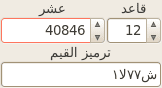
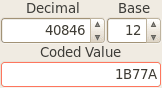
The digits issue is related to translatable software: Below is picture of same simple little program showing how even the numeric output can be automatically translated when we switch locale... except I didn't know what Arabic people might want to use for digits A and B in numbers with base 12.
 

Attachments

  • base12US.png
    base12US.png
    1.5 KB · Views: 1,103
  • base12SA.png
    base12SA.png
    1.4 KB · Views: 1,103

My Computer My Computer

At a glance

Ubuntu 64 bit
OS
Ubuntu 64 bit
Here's how to use Hindi numbers in Windows 7:
  • Install Arabic 101 or 102 keyboard layout
  • Open Region and Language settings
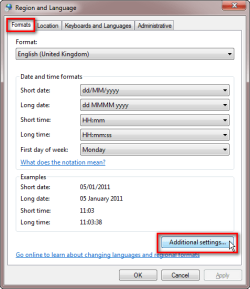
  • Click Format tab > Additional settings
    .
    Arabic_numbers_1.png
    .
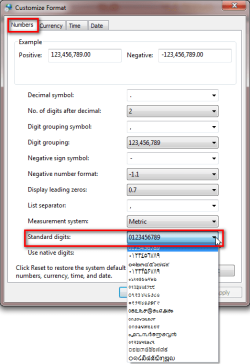
  • Open Standard digits drop down menu in Numbers tab, select the format of digits you want to use
    .
    Arabic_numbers_2.png
    .
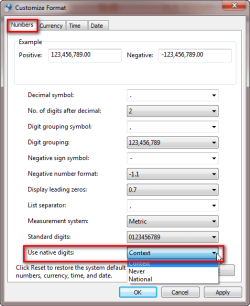
  • Open Use native digits drop down menu in Numbers tab, select when you want to use native digits. Selecting National uses digits of chosen keyboard layout, for instance Hindi digits with Arabic layout, if Hindi digits were selected in previous step
    .
    Arabic_numbers_3.png
That's it.

Kari
 
Last edited:

My Computer My Computer

At a glance

Windows 10 Pro x64 EN-GB1.6 GHz Intel Core i7-720QM Processor6 GBATI Mobility Radeon HD 5850 Graphics
Computer type
Laptop
Computer Manufacturer/Model Number
HP ENVY 17-1150eg
OS
Windows 10 Pro x64 EN-GB
CPU
1.6 GHz Intel Core i7-720QM Processor
Memory
6 GB
Graphics Card(s)
ATI Mobility Radeon HD 5850 Graphics
Sound Card
Beats sound system with integrated subwoofer
Monitor(s) Displays
17" laptop display, 22" LED and 32" Full HD TV through HDMI
Screen Resolution
1600*900 (1), 1920*1080 (2&3)
Hard Drives
Internal: 2 x 500 GB SATA Hard Disk Drive 7200 rpm
External: 2TB for backups, 3TB USB3 network drive for media
Cooling
As Envy runs a bit warm, I have it on a Cooler Master pad
Keyboard
Logitech diNovo Media Desktop Laser (bluetooth)
Mouse
Logitech Performance Mouse MX
Internet Speed
50/10 Mbps VDSL
Antivirus
Windows Defender 4.3.9431.0
Browser
Maxthon 3.5.2., IE11
@Worksofcraft

When it comes to shift and caps, typing tends to lead to the short vowel characters, probably around 50% of the shift keys on the letters are short vowels or phonetic helpers. However, the numbers shifted stay the exact same. So i think for what you want to do, in order for most people to be happy with what you are making is to keep it the same as the english controls.

@Kari, no its not. Please read the entire thread before posting something like that.
 

My Computer My Computer

At a glance

Windows 7
OS
Windows 7
Jarrex, please can you tell me what was / is wrong in my post? I admit there was one typo which I have fixed now; instead of choosing Never in Use native digits, I have to choose National. Doing this, I get whatever digits I choose from Standard Digits.

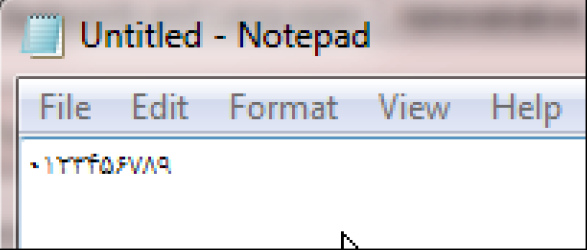
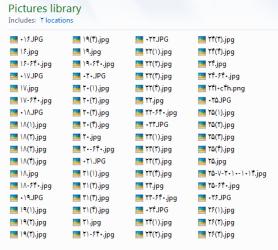
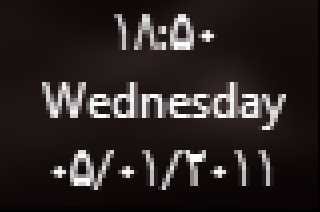
Choosing it even changes how Windows Explorer shows the digits. These examples from Notepad showing digits 0 to 9, Taskbar clock showing time and date, and Pictures library with image names that are only digits. Of course, not speaking or understanding Arabic, I do not know if these really are Arabic digits, but they sure look like them to me.

Arabic_1.png

Arabic_2.png

Arabic_3.png

Kari


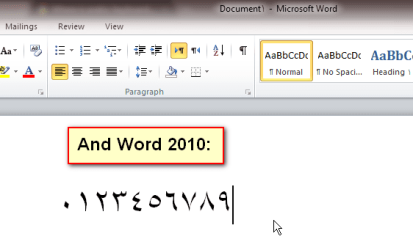
EDIT: Added this snip from Word, to show it really works. Digits 0 to 9 in Arabic:

Arabic_4.png
 

My Computer My Computer

At a glance

Windows 10 Pro x64 EN-GB1.6 GHz Intel Core i7-720QM Processor6 GBATI Mobility Radeon HD 5850 Graphics
Computer type
Laptop
Computer Manufacturer/Model Number
HP ENVY 17-1150eg
OS
Windows 10 Pro x64 EN-GB
CPU
1.6 GHz Intel Core i7-720QM Processor
Memory
6 GB
Graphics Card(s)
ATI Mobility Radeon HD 5850 Graphics
Sound Card
Beats sound system with integrated subwoofer
Monitor(s) Displays
17" laptop display, 22" LED and 32" Full HD TV through HDMI
Screen Resolution
1600*900 (1), 1920*1080 (2&3)
Hard Drives
Internal: 2 x 500 GB SATA Hard Disk Drive 7200 rpm
External: 2TB for backups, 3TB USB3 network drive for media
Cooling
As Envy runs a bit warm, I have it on a Cooler Master pad
Keyboard
Logitech diNovo Media Desktop Laser (bluetooth)
Mouse
Logitech Performance Mouse MX
Internet Speed
50/10 Mbps VDSL
Antivirus
Windows Defender 4.3.9431.0
Browser
Maxthon 3.5.2., IE11
Kari, you aren't reading the posts before you. The issue is that only works in terms of Microsoft Office and other Microsoft Applications (This is caused by the fact that the Keyboard Layout doesn't include hindi digits, but the OS does). Otherwise, Hindi Digits will not work. This is why I made Arabic 103 and posted the download on the first page.


Let me explain visually.

Here is what Microsoft's Arabic 102 looks like on KLC:

71048_arabfail.jpg


And here is what I altered the KLC to do:

72624_myfix.jpg


If you notice, they don't include the actual Hindi Digits in their KLC, they include Roman Numerals. This means that you have to change every microsoft app to "Context" whenever you want to have the ability to switch between languages and type Hindi Digits. However, with the 103 I made, you can just switch languages and not alter anything in terms of context. 103 Also allows you to use hindi digits on google chrome, firefox and every other program that runs on Windows.
 

My Computer My Computer

At a glance

Windows 7
OS
Windows 7
I can understand your frustration, when someone not even understanding Arabic comes here and posts that users don't have to download your layout only to get Arabic numbers, that this feature is natively in Windows 7, but that's not a reason to give wrong information.

Changing the digits as I described, the setting is global; you do not have to do it separately for each program. It also works in every application, not only those from Microsoft. When changed from Regional and Language settings, every single application, Microsoft or third party, uses Arabic digits until the setting is changed to something else.

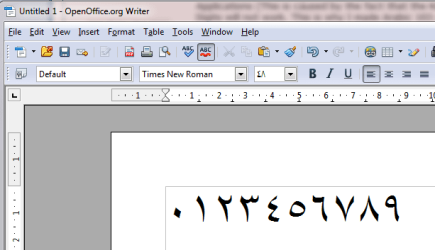
Just for your information, here are Arabic digits produced as I described in Oracle's OpenOffice Writer:

Arabic_5.png

As far from Microsoft product as possible.

Kari
 

My Computer My Computer

At a glance

Windows 10 Pro x64 EN-GB1.6 GHz Intel Core i7-720QM Processor6 GBATI Mobility Radeon HD 5850 Graphics
Computer type
Laptop
Computer Manufacturer/Model Number
HP ENVY 17-1150eg
OS
Windows 10 Pro x64 EN-GB
CPU
1.6 GHz Intel Core i7-720QM Processor
Memory
6 GB
Graphics Card(s)
ATI Mobility Radeon HD 5850 Graphics
Sound Card
Beats sound system with integrated subwoofer
Monitor(s) Displays
17" laptop display, 22" LED and 32" Full HD TV through HDMI
Screen Resolution
1600*900 (1), 1920*1080 (2&3)
Hard Drives
Internal: 2 x 500 GB SATA Hard Disk Drive 7200 rpm
External: 2TB for backups, 3TB USB3 network drive for media
Cooling
As Envy runs a bit warm, I have it on a Cooler Master pad
Keyboard
Logitech diNovo Media Desktop Laser (bluetooth)
Mouse
Logitech Performance Mouse MX
Internet Speed
50/10 Mbps VDSL
Antivirus
Windows Defender 4.3.9431.0
Browser
Maxthon 3.5.2., IE11
I can understand your frustration, when someone not even understanding Arabic comes here and posts that users don't have to download your layout only to get Arabic numbers, that this feature is natively in Windows 7, but that's not a reason to give wrong information.

Changing the digits as I described, the setting is global; you do not have to do it separately to each program. It also works in every application, not only those from Microsoft. When changed from Regional and Language settings, every single application, Microsoft or third party, uses Arabic digits until the setting is changed to something else.

Just for your information, here's Arabic digits produced as I described in Oracle's OpenOffice Writer:

View attachment 129362

As far from Microsoft product as possible.

Kari

what version of windows 7 do you use? because that is not that case for mine and judging by the other forum posters (not just this forum) I am not the only one with this issue.

I am not frustrated, but as you can see the OP of this thread tried that when the first person told them to do the exact same thing. It most likely has something to do with windows 7 version, since it seems that the google search results for this issue seem to just produce a bunch of people on 7 Professional who can not seem to get numbers working outside of office.
 

My Computer My Computer

At a glance

Windows 7
OS
Windows 7
Retail version of Windows 7 Ultimate x64.
 

My Computer My Computer

At a glance

Windows 10 Pro x64 EN-GB1.6 GHz Intel Core i7-720QM Processor6 GBATI Mobility Radeon HD 5850 Graphics
Computer type
Laptop
Computer Manufacturer/Model Number
HP ENVY 17-1150eg
OS
Windows 10 Pro x64 EN-GB
CPU
1.6 GHz Intel Core i7-720QM Processor
Memory
6 GB
Graphics Card(s)
ATI Mobility Radeon HD 5850 Graphics
Sound Card
Beats sound system with integrated subwoofer
Monitor(s) Displays
17" laptop display, 22" LED and 32" Full HD TV through HDMI
Screen Resolution
1600*900 (1), 1920*1080 (2&3)
Hard Drives
Internal: 2 x 500 GB SATA Hard Disk Drive 7200 rpm
External: 2TB for backups, 3TB USB3 network drive for media
Cooling
As Envy runs a bit warm, I have it on a Cooler Master pad
Keyboard
Logitech diNovo Media Desktop Laser (bluetooth)
Mouse
Logitech Performance Mouse MX
Internet Speed
50/10 Mbps VDSL
Antivirus
Windows Defender 4.3.9431.0
Browser
Maxthon 3.5.2., IE11
Additional features include support for Multilingual User Interface (MUI) packages

I am guessing that somehow the MUI for Arabic for 7 professional somehow doesn't include the hindi digits on the keyboard, because the digits were quite literally missing from my KLC.
 

My Computer My Computer

At a glance

Windows 7
OS
Windows 7
Back
Top