Where is Computer Name Stored?

jermhoosierfan

New member
Local time
6:35 AM
Messages
8
I have a hard drive that crashed in an office, and I am trying to find the computer name off of the hard drive. I can get to most of the files I need. I am more curious than anything.
 

My Computer

OS
Windows 7 Enterprise 32bit
The computer name is stored within the registry files of Windows.
 

My Computer

Computer Manufacturer/Model Number
Self-Built in July 2009
OS
Windows 7 Ultimate x64
CPU
Intel Q9550 2.83Ghz OC'd to 3.40Ghz
Motherboard
Gigabyte GA-EP45-UD3R rev. 1.1, F12 BIOS
Memory
8GB G.Skill PI DDR2-800, 4-4-4-12 timings
Graphics Card(s)
EVGA 1280MB Nvidia GeForce GTX570
Sound Card
Realtek ALC899A 8 channel onboard audio
Monitor(s) Displays
23" Acer x233H
Screen Resolution
1920x1080
Hard Drives
Intel X25-M 80GB Gen 2 SSD
Western Digital 1TB Caviar Black, 32MB cache. WD1001FALS
PSU
Corsair 620HX modular
Case
Antec P182
Cooling
stock
Keyboard
ABS M1 Mechanical
Mouse
Logitech G9 Laser Mouse
Internet Speed
15/2 cable modem
Other Info
Windows and Linux enthusiast. Logitech G35 Headset.
That narrows it down.
 

My Computer

Computer type
PC/Desktop
Computer Manufacturer/Model Number
Apple 17" iMac MA199LL (Early 2006)
OS
Windows 8 Pro (32-bit)
CPU
1.83GHz Intel Core Duo
Memory
2GB 667MHz DDR2 SDRAM (PC2-5300) (upgrade)
Graphics Card(s)
ATI Radeon X1600 with 128MB GDDR3 memory
Monitor(s) Displays
17-inch TFT active-matrix LCD, millions of colors
Screen Resolution
1440 x 900
Hard Drives
Hitachi 320GB HDT721032SLA360 7200RPM SATA II (upgrade)
Keyboard
Microsoft Wired Keyboard 600
Mouse
Microsoft Basic Optical Mouse v2.0
Internet Speed
4 Mbps
Antivirus
Microsoft Security Essentials
Browser
Google Chrome
Other Info
WEI:
Base Score: 3.9 Processor: 4.4 Memory 4.7
Graphics: 3.9 Gaming Graphics: 4.1 Primary HD: 5.9
Assuming you're booting from that drive, pressing win + pause should bring up a popup which includes the computer name.
 

My Computer

Computer Manufacturer/Model Number
Self-built rig
OS
Win7 Pro x64
CPU
Koa i5-2550K
Memory
8 GB
Graphics Card(s)
Sapphire ATI 6870 1GB GDDR5
Sound Card
RealTek HD Audio / ATI HDMI Audio
Monitor(s) Displays
Samsung HDTV Monitor T23A350
Screen Resolution
1920 x 1080
Hard Drives
- SSD (C:)
- HDD (D:)
- BD-ROM (E:)
Keyboard
Logitech G110
Internet Speed
Unifi home (5mbps)
Assuming you're booting from that drive, pressing win + pause should bring up a popup which includes the computer name.

What happens if your keyboard doesn't have a play/pause button?
 

My Computer

Computer type
PC/Desktop
Computer Manufacturer/Model Number
Apple 17" iMac MA199LL (Early 2006)
OS
Windows 8 Pro (32-bit)
CPU
1.83GHz Intel Core Duo
Memory
2GB 667MHz DDR2 SDRAM (PC2-5300) (upgrade)
Graphics Card(s)
ATI Radeon X1600 with 128MB GDDR3 memory
Monitor(s) Displays
17-inch TFT active-matrix LCD, millions of colors
Screen Resolution
1440 x 900
Hard Drives
Hitachi 320GB HDT721032SLA360 7200RPM SATA II (upgrade)
Keyboard
Microsoft Wired Keyboard 600
Mouse
Microsoft Basic Optical Mouse v2.0
Internet Speed
4 Mbps
Antivirus
Microsoft Security Essentials
Browser
Google Chrome
Other Info
WEI:
Base Score: 3.9 Processor: 4.4 Memory 4.7
Graphics: 3.9 Gaming Graphics: 4.1 Primary HD: 5.9
If you're looking for the location in the registry, it's:

HKEY_LOCAL_MACHINE\SYSTEM\CurrentControlSet\Control\ComputerName\ActiveComputerName

Of course if you were booting from that drive AND you didn't have a pause/break button you could right click on the Computer icon and click preferences. Or if you can't find a Computer icon you could go to Control Panel/System and Security/System...

But from the word crashed, I have to assume you're not booting from the drive in question.
 
Last edited:

My Computer

OS
Windows 7 Ultimate x64
CPU
Intel i5 750
Motherboard
ASUS P7P55D Pro
Memory
GSkill 8GB DDR3-1600
Graphics Card(s)
EVGA Nvidia GTX 460
Sound Card
Onboard and external Presonus Firestudio Project
Monitor(s) Displays
2 x NEC LCD 1850E
Screen Resolution
1280x1024 x2
Hard Drives
lots of 'em
PSU
Thermaltake ToughPower 750W
Case
NZXT Lexa
Cooling
Air cooled
Keyboard
Logitech G15
Mouse
Logitech MX Revolution
Internet Speed
25 Mb/s down 1.5 Mb/s up
Other Info
This is my recording studio PC. I also have a gaming rig, a HTPC, an old dual-core system I set up as a server, and a few old dinosaurs (the oldest is an Intel P-90) that I use for DOS and Win95 gaming when I feel nostalgic.
Last edited by a moderator:

My Computer

Computer type
Laptop
Computer Manufacturer/Model Number
Toshiba P775-S7100
OS
Windows 7 Professional SP1 64-bit
CPU
Intel Core i5-2450M @2.5 GHz
Memory
6 GB DDR3 1333MHz
Graphics Card(s)
Intel HD 3000
Monitor(s) Displays
Built-in 17.3" LED; 22" Insignia NS-L22Q-10A
Screen Resolution
1600x900; 1360x768
Hard Drives
750 GB Hitachi
1TB Seagate FreeAgent External
Internet Speed
Verizon DSL Speed(Down/Up): 3360 Kbps / 800 Kbps
Antivirus
MSE and MBAM Pro
Browser
IE10
Do you just want to find out what the Computer Name is or do you want to change it?

Go to Control Panel\All Control Panel Items\System and there you shall find the Computer Name as well as a link to System Properties to change the settings.
 

My Computer

Computer Manufacturer/Model Number
Custom Built
OS
Windows 7 Pro with SP1 32bit
Motherboard
Intel D845GVS1 X86-based PC
Memory
2 gigs of RAM
Graphics Card(s)
Intel(R) 82845G/GL/GE/PE/GV Graphics Controller
Sound Card
Realtek AC'97 Audio
Monitor(s) Displays
Samsung SyncMaster 931BF Black 19" LCD Monitor
Screen Resolution
1280X960
Hard Drives
1. SAMSUNG SP0822N ATA Device ~ 80 GigaBytes

2. Seagate FreeAgent Go USB Device ~ 500 GigaBytes
Keyboard
COMPAQ Standard PS/2 Keyboard
Mouse
iBall Laser Precise Speedster
Internet Speed
4 mb/sec
Assuming you're booting from that drive, pressing win + pause should bring up a popup which includes the computer name.

What happens if your keyboard doesn't have a play/pause button?
*insert conspiracykeanu stare* :shock:

They make keyboards without the pause button?

-
On a serious note, the OP sounds like he's booting off another PC and just has the HDD slaved to it. In that case I don't think the suggestions here are going to help as they're only going to return the ID of the booting machine.
 

My Computer

Computer Manufacturer/Model Number
Self-built rig
OS
Win7 Pro x64
CPU
Koa i5-2550K
Memory
8 GB
Graphics Card(s)
Sapphire ATI 6870 1GB GDDR5
Sound Card
RealTek HD Audio / ATI HDMI Audio
Monitor(s) Displays
Samsung HDTV Monitor T23A350
Screen Resolution
1920 x 1080
Hard Drives
- SSD (C:)
- HDD (D:)
- BD-ROM (E:)
Keyboard
Logitech G110
Internet Speed
Unifi home (5mbps)
Although the registry (referred to as registry hives) appears to be in one file, it is actually placed in several files on your computer.

Depending on your system configuration, registry files can be found in the following locations:

The HKEY_CLASSES_ROOT, HKEY_CURRENT_CONFIG and HKEY_LOCAL_MACHINE hives are stored in the Default, SAM, Security, Software, System files in C:\Windows\System32\Config\.

The HKEY_CURRENT_USER hive is stored in the NTUSER.DAT in that user's profile folder usually C:\Users\username.

To load a particular hive from a second hard disk connected to your system, follow these instructions.

1 Click the "Start" button and type "regedit" into the Search field, then click the "Registry Editor" program.

2 Click "HKEY_LOCAL_MACHINE" in the left pane of the Registry Editor window.

3 Click the "File" menu and choose "Load Hive."

4 Browse to the secondary hard drive's "windows\system32\config" directory from the "Load Hive" dialog box.

5 Click to select the "System" or "Software" file (no file suffixes) to open the respective registry hives. Type a temporary name and click "Open" to open the hive.

6 Once the registry hive is loaded into the registry editor, traverse down to the below path

HKEY_LOCAL_MACHINE\SYSTEM\CurrentControlSet\Control\ComputerName\ActiveComputerName

Here you will find the Computer name for the second hard disk.

Important: Once you have done with browsing the registry, Click the "File" menu and choose "Unload Hive" before closing the registry editor.

 

My Computer

Computer Manufacturer/Model Number
Toshiba Satellite P775-S7232
OS
MS Windows 7 Ultimate 64-bit SP1
CPU
i5-2410M 2.3GHz (2.9GHz Turbo-Boost) Sandy Bridge 32nm
Motherboard
Toshiba PHRAA ver. PSBY1U-00F003
Memory
4GB+4GB Samsung DDR3 PC3-10700 (1333 MHz)
Graphics Card(s)
Video Intel(R) HD Graphics Family, 1696MB available memory
Sound Card
Realtek High Definition Audio version=6.0.1.6323
Monitor(s) Displays
17.3 " Trubrite TFT LCD, LED Backlit
Screen Resolution
1600x900 32 bit, Native support for 720P content
Hard Drives
TOSHIBA MK6476GSXN
580.614 [GB] partitioned C: 80GB and D: 500GB with hidden recovery partitons.

Spare bay for 2nd HDD but no SATA connector :-(
PSU
Toshiba AC/DC Adapter
Case
Notebook
Cooling
Built-in Fan
Keyboard
Premium Raised Tile keyboard
Mouse
Logitech M215 wireless mouse
Internet Speed
Not fast enough
Other Info
Built-in Harman Kardon speakers with Dolby Advanced Audio, Waves MaxxAudio® 3. HDMI, 1xUSB3+3xUSB2 ports, WebCam, Battery life 4hrs 11mins, 4GB Readyboost SDHC card, WD My Book Essential Ext HDDs 2 TB, 2x1TB, My Passport SE 1TB and WDTV 1st Gen for Multimedia playing on a Sony Wega 32" LCD.
Recent addition to my toys are Asus Transformer Pad TF300T with 32GB onboard sd card + 32GB microsd card.
Assuming you're booting from that drive, pressing win + pause should bring up a popup which includes the computer name.

What happens if your keyboard doesn't have a play/pause button?
*insert conspiracykeanu stare* :shock:

They make keyboards without the pause button?

Not the play/pause on multimedia keyboards... the Pause/Break button. Its on every one. Usually further across from F12, or around the page-up page-down groupings.
 

My Computer

OS
Windows 7 Enterprise
CPU
Intel Pentium Dual E2200 @2.2GHz
Motherboard
Gigabyte II-G31
Memory
4GB
Graphics Card(s)
Palit GForce 9500GT 1GB
Sound Card
onBoard
Hard Drives
WesternDigital: 250GB + 1TB + 1TB + 2TB
PSU
450W
Case
CoolerMaster CM690
Cooling
Corsair H50
Mouse
Logitech MX518

My Computer

Computer type
PC/Desktop
Computer Manufacturer/Model Number
Apple 17" iMac MA199LL (Early 2006)
OS
Windows 8 Pro (32-bit)
CPU
1.83GHz Intel Core Duo
Memory
2GB 667MHz DDR2 SDRAM (PC2-5300) (upgrade)
Graphics Card(s)
ATI Radeon X1600 with 128MB GDDR3 memory
Monitor(s) Displays
17-inch TFT active-matrix LCD, millions of colors
Screen Resolution
1440 x 900
Hard Drives
Hitachi 320GB HDT721032SLA360 7200RPM SATA II (upgrade)
Keyboard
Microsoft Wired Keyboard 600
Mouse
Microsoft Basic Optical Mouse v2.0
Internet Speed
4 Mbps
Antivirus
Microsoft Security Essentials
Browser
Google Chrome
Other Info
WEI:
Base Score: 3.9 Processor: 4.4 Memory 4.7
Graphics: 3.9 Gaming Graphics: 4.1 Primary HD: 5.9
This did it for me, thanks!!!

Although the registry (referred to as registry hives) appears to be in one file, it is actually placed in several files on your computer.

Depending on your system configuration, registry files can be found in the following locations:

The HKEY_CLASSES_ROOT, HKEY_CURRENT_CONFIG and HKEY_LOCAL_MACHINE hives are stored in the Default, SAM, Security, Software, System files in C:\Windows\System32\Config\.

The HKEY_CURRENT_USER hive is stored in the NTUSER.DAT in that user's profile folder usually C:\Users\username.

To load a particular hive from a second hard disk connected to your system, follow these instructions.

1 Click the "Start" button and type "regedit" into the Search field, then click the "Registry Editor" program.

2 Click "HKEY_LOCAL_MACHINE" in the left pane of the Registry Editor window.

3 Click the "File" menu and choose "Load Hive."

4 Browse to the secondary hard drive's "windows\system32\config" directory from the "Load Hive" dialog box.

5 Click to select the "System" or "Software" file (no file suffixes) to open the respective registry hives. Type a temporary name and click "Open" to open the hive.

6 Once the registry hive is loaded into the registry editor, traverse down to the below path

HKEY_LOCAL_MACHINE\SYSTEM\CurrentControlSet\Control\ComputerName\ActiveComputerName

Here you will find the Computer name for the second hard disk.

Important: Once you have done with browsing the registry, Click the "File" menu and choose "Unload Hive" before closing the registry editor.

This answers the original question perfectly. You have considered the information provided and explained precisely how to get the answer. In fact, this worked for a remote VHD which I had mounted on on Windows 7 x64. Thank you!!
 

My Computer

Computer type
PC/Desktop
OS
7 Ultimate x64
Host name can be found here c:/windows/debug/netsetup :party:
 

My Computer

Computer type
PC/Desktop
Computer Manufacturer/Model Number
Dell
OS
windows Version 6.1.7601
CPU
Intel core i5-3570 cpu @3.40Ghz
Late Reply

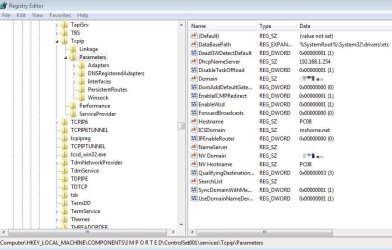
CurrentControlSet may not be available when loading hive from slave.
Computername and Domain are also available in ControlSet001\services\Tcpip\Parameters
 

Attachments

  • Win7-Computername-2.JPG
    Win7-Computername-2.JPG
    78.3 KB · Views: 0

My Computer

Computer type
PC/Desktop
Computer Manufacturer/Model Number
Dell Optiplex 3040
OS
Windows 7 Pro - 64bit (and many others)
CPU
i5
Motherboard
Dell
Memory
8GB
Graphics Card(s)
Intel HD whatever
Hard Drives
2x500GB RAID 1
Antivirus
none - as they are all garbage
Browser
Chrome & Firefox
c:/windows/debug/netsetup is Windows XP (maybe Vista), but not Windows 7
 

My Computer

Computer type
PC/Desktop
Computer Manufacturer/Model Number
Dell Optiplex 3040
OS
Windows 7 Pro - 64bit (and many others)
CPU
i5
Motherboard
Dell
Memory
8GB
Graphics Card(s)
Intel HD whatever
Hard Drives
2x500GB RAID 1
Antivirus
none - as they are all garbage
Browser
Chrome & Firefox

My Computer

Computer type
PC/Desktop
Computer Manufacturer/Model Number
Skylake Special #666
OS
Windows 10 Pro x64
CPU
Intel Core i7 6700K
Motherboard
Asus Sabertooth Z170 Mark 1
Memory
GSkill TridentZ RGB 16GB 3600 16-16-16-36
Graphics Card(s)
EVGA GTX 980 Ti SC x2
Sound Card
Realtek High Definition
Monitor(s) Displays
AOC G2460PG
Screen Resolution
1920 x 1080 144Hz
Hard Drives
Samsung 860 Pro 256GB, Seagate Barracuda 4TB x2
PSU
EVGA 1000 P2, EVGA White Custom Braided Cables
Case
Corsair Vengeance C70 Gunmetal Black
Cooling
Corsair H100i v2, Corsair ML120 x2, Thermal Grizzly Kryonaut
Keyboard
Logitech G910 Orion Spectrum
Mouse
Logitech G700s
Internet Speed
Verizon Fios Quantum Gateway 75/75
Antivirus
Windows Defender, Malwarebytes Free 3.8.3
Browser
Chrome
Other Info
Corsair SP120 x4, LG Blu-ray Drive, Durabrand HT-395 100 Watt Dolby Digital Amp, Corsair H2100 Wireless 7.1 Headset
Back
Top