Solved Where is Win7 wallpaper stored

bstafford

New member
Local time
3:10 PM
Messages
3
C:\Windows\Resources\Themes\DesktopBackground

C:\Windows\Resources\DesktopBackground

C:\Users\{username}\AppData\Local\Microsoft\Windows\Themes

Need some help since this post is so old now. Where can I find the actual original location that should have the wallpapers stored at? I would like to now save some new ones and just starting to learn Win7. Much harder, feels like starting all over again in some cases. Thanks for any help you all can give me.

Cheers

Bill
 

My Computer My Computer

At a glance

Windows Ultimate x64
OS
Windows Ultimate x64

My Computer My Computer

At a glance

64-bit Windows 11 Pro for WorkstationsIntel i7-8700K OC'd to 5 GHz64 GB (4x16GB) G.SKILL TridentZ RGB DDR4 3600...ASUS ROG-STRIX-GTX1080TI-O11G-GAMING
Computer type
PC/Desktop
Computer Manufacturer/Model Number
Self built custom
OS
64-bit Windows 11 Pro for Workstations
CPU
Intel i7-8700K OC'd to 5 GHz
Motherboard
ASUS ROG Maximus XI Formula Z390
Memory
64 GB (4x16GB) G.SKILL TridentZ RGB DDR4 3600 MHz
Graphics Card(s)
ASUS ROG-STRIX-GTX1080TI-O11G-GAMING
Sound Card
Integrated
Monitor(s) Displays
2 x Samsung Odyssey G7 27"
Screen Resolution
2560x1440
Hard Drives
1TB Samsung 990 PRO M.2,
4TB Samsung 990 PRO PRO M.2,
TerraMaster F8 SSD Plus NAS
PSU
Seasonic Prime Titanium 850W
Case
Thermaltake Core P3
Cooling
Corsair Hydro H115i
Keyboard
Logitech wireless K800
Mouse
Logitech MX Master 4
Internet Speed
2 Gb/s Download and 100 Mb/s Upload
Antivirus
Malwarebyte Anti-Malware Premium
Browser
Google Chrome
Other Info
Logitech Z625 speaker system,
Logitech BRIO 4K Pro webcam,
HP Color LaserJet Pro MFP M477fdn,
APC SMART-UPS RT 1000 XL - SURT1000XLI,
Galaxy S23 Plus phone
Hi Shawn, thanks for the reply, have found the files, but seems that they are in 2 places on my computer. Have the theme files .theme in: C:\Users\Admin\AppData\Local\Microsoft\Windows\Themes

Then I find some other files in: C:\Windows\Resources\Themes

Also have wallpaper files in: C:\Windows\Web\Wallpaper

Can you tell me if I need to fix this and put files in 1 location, seems to me they should not be in all these places.

thanks again for any help.

Cheers
Bill
 

My Computer My Computer

At a glance

Windows Ultimate x64
OS
Windows Ultimate x64
Welcome to Seven Forums Bill. Those are the default locations, and they are correct :thumbsup:

A Guy
 

My Computer My Computer

At a glance

Windows 10 Home x64INTEL Core i5-750 Quad-Core 3.37GHzHyperX Fury Black Series 8GB (2 x 4GB) 1866MhzEVGA GeForce GTX 750 Superclocked 1GB 128-Bit...
Computer type
PC/Desktop
OS
Windows 10 Home x64
CPU
INTEL Core i5-750 Quad-Core 3.37GHz
Motherboard
ASUS P7P55D
Memory
HyperX Fury Black Series 8GB (2 x 4GB) 1866Mhz
Graphics Card(s)
EVGA GeForce GTX 750 Superclocked 1GB 128-Bit GDDR5
Monitor(s) Displays
LG 32MA68HY 32" IPS
Screen Resolution
1920 x 1080
Hard Drives
Samsung 840 Evo 120GB, SEAGATE 500GB Barracuda® 7200.12, SATA 3 Gb/s, 7200 RPM, 16MB cache
PSU
ANTEC TruePower New TP-550, 80 PLUS, 550W
Case
ANTEC Three Hundred Illusion
Cooling
COOLER MASTER Hyper 212 Plus, 4 x 120mm 1 x 140mm Noctua's
Internet Speed
85 + Mbps
Antivirus
Avast
Browser
Vivaldi
Hi Shawn, thanks for the reply, have found the files, but seems that they are in 2 places on my computer. Have the theme files .theme in: C:\Users\Admin\AppData\Local\Microsoft\Windows\Themes

Then I find some other files in: C:\Windows\Resources\Themes

Also have wallpaper files in: C:\Windows\Web\Wallpaper

Can you tell me if I need to fix this and put files in 1 location, seems to me they should not be in all these places.

thanks again for any help.

Cheers

Bill

Hello bstafford these folders should be left as they are as deleting the wrong folder, Example - "C:\Windows\Resources\Themes" will delete the default themes that came with Windows 7 and you would lose the ability to use Aero themes requiring a repair install.

Note the first 2 folders mentioned below are Theme folders and not Wallpaper.

I will attempt to explain the significance of each folder.

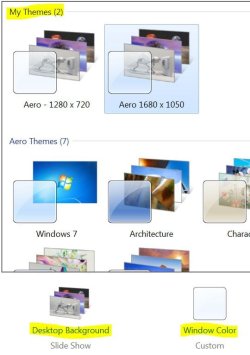
The folder at C:\Users\Admin\AppData\Local\Microsoft\Windows\Themes contains your saved themes when you select the Personalization panel then change the Desktop background, Window color, Sounds - etc and save the theme under My themes.

Capture 1.JPG

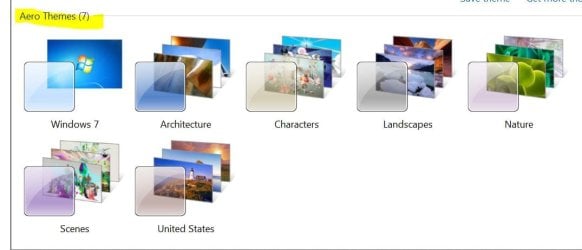
The folder at C:\Windows\Resources\Themes contains the default themes that came with windows 7 but can also contain themes added manually by the user.

Capture 2.JPG

The folder at C:\Windows\Web\Wallpaper just contains the default wallpaper that came installed with windows 7 but is used by the default Windows themes.
 

My Computer My Computer

At a glance

Windows 10 Pro x 2/Windows 11 HomeIntel i7 2600K @ 3.40 GHzCorsair Vengeance 16GB DDR3 1600MHz CL8 Dual ...EVGA GeForce RTX 3080 XC3 ULTRA GAMING 10GB G...
Computer type
PC/Desktop
Computer Manufacturer/Model Number
My own abomination, I call it the Money Pit
OS
Windows 10 Pro x 2/Windows 11 Home
CPU
Intel i7 2600K @ 3.40 GHz
Motherboard
ASUS Sabertooth P67
Memory
Corsair Vengeance 16GB DDR3 1600MHz CL8 Dual Channel Kit
Graphics Card(s)
EVGA GeForce RTX 3080 XC3 ULTRA GAMING 10GB GDDR6X
Sound Card
Onboard Realtek or Nvidia High Definition Audio (HDMI)
Monitor(s) Displays
Samsung JS7000 50" SUHD TV or Samsung 27" FHD 60Hz 8ms GTG V
Screen Resolution
1920 x 1080
Hard Drives
1 x Samsung 870 EVO 250 GB SSD (Windows 10 Pro), 1 x Samsung 850 EVO 250 GB SSD (Windows 10 Pro)
PSU
Corsair AX860 - 860W Modular Power Supply
Case
Phanteks Enthoo Luxe Full Tower Case - Black
Cooling
CORSAIR Hydro Series H150i PRO RGB 360mm Liquid CPU Cooler
Keyboard
Logitech K830 Illuminated Living-Room Keyboard
Mouse
Logitech MX Anywhere 2S Wireless Mouse
Internet Speed
100 Mbps
Antivirus
ESET Internet Security
Browser
Latest Version Of Firefox & Microsoft Edge Chromium Stable
Other Info
LG Super Multi Blue Internal Blu-ray Disk Rewriter - BH10LS30
6x2 HDMI Switcher (6 inputs, 2 outputs) so I can send the output of my Cable Box, Roku, or any my 4 computers to either my TV or Monitor separately or simultaneously.
Hi " IownAmoneyPit

This has been really helpful and now fully understand why they are in their current locations. I guess just to familiar with Win XP and still learning Win 7 and some of the logic. Thanks again for the explanation, really appreciate this.

Cheers

Bill
 

My Computer My Computer

At a glance

Windows Ultimate x64
OS
Windows Ultimate x64
Hi " IownAmoneyPit

This has been really helpful and now fully understand why they are in their current locations. I guess just to familiar with Win XP and still learning Win 7 and some of the logic. Thanks again for the explanation, really appreciate this.

Cheers

Bill

I am happy that you understood my explanation Bill, sometimes I tend to confuse myself with my own explanations.
 

My Computer My Computer

At a glance

Windows 10 Pro x 2/Windows 11 HomeIntel i7 2600K @ 3.40 GHzCorsair Vengeance 16GB DDR3 1600MHz CL8 Dual ...EVGA GeForce RTX 3080 XC3 ULTRA GAMING 10GB G...
Computer type
PC/Desktop
Computer Manufacturer/Model Number
My own abomination, I call it the Money Pit
OS
Windows 10 Pro x 2/Windows 11 Home
CPU
Intel i7 2600K @ 3.40 GHz
Motherboard
ASUS Sabertooth P67
Memory
Corsair Vengeance 16GB DDR3 1600MHz CL8 Dual Channel Kit
Graphics Card(s)
EVGA GeForce RTX 3080 XC3 ULTRA GAMING 10GB GDDR6X
Sound Card
Onboard Realtek or Nvidia High Definition Audio (HDMI)
Monitor(s) Displays
Samsung JS7000 50" SUHD TV or Samsung 27" FHD 60Hz 8ms GTG V
Screen Resolution
1920 x 1080
Hard Drives
1 x Samsung 870 EVO 250 GB SSD (Windows 10 Pro), 1 x Samsung 850 EVO 250 GB SSD (Windows 10 Pro)
PSU
Corsair AX860 - 860W Modular Power Supply
Case
Phanteks Enthoo Luxe Full Tower Case - Black
Cooling
CORSAIR Hydro Series H150i PRO RGB 360mm Liquid CPU Cooler
Keyboard
Logitech K830 Illuminated Living-Room Keyboard
Mouse
Logitech MX Anywhere 2S Wireless Mouse
Internet Speed
100 Mbps
Antivirus
ESET Internet Security
Browser
Latest Version Of Firefox & Microsoft Edge Chromium Stable
Other Info
LG Super Multi Blue Internal Blu-ray Disk Rewriter - BH10LS30
6x2 HDMI Switcher (6 inputs, 2 outputs) so I can send the output of my Cable Box, Roku, or any my 4 computers to either my TV or Monitor separately or simultaneously.
4 years on, but only came to W7 (Ultimate) earlier this year!
The above is interesting, but still does not say how to get back to the original installed W7 desktop, effectively NO wallpaper. That's not the one called 'Basic', which has blue sky, and is stored at C:\Windows\Web\Wallper\Windows\img0.jpg, with a big MSoft flag logo in the middle. What I want to get back to is the original cleaner screen, sky, with just two little leaves on a stalk and a little white bird. That is not offered anywhere that I can find, under themes, background, or the folders mentioned above.
Can anyone point me there?
 

My Computer My Computer

At a glance

Windows 7 ultimate x64
Computer type
PC/Desktop
OS
Windows 7 ultimate x64
P.S. to mine just now. It's the screen you get if you do Ctrl-Alt-Del.

And I have searched the whole of \Windows and \Users folders for *.jpg, not there.
 

My Computer My Computer

At a glance

Windows 7 ultimate x64
Computer type
PC/Desktop
OS
Windows 7 ultimate x64
What I want to get back to is the original cleaner screen, sky, with just two little leaves on a stalk and a little white bird. That is not offered anywhere that I can find, under themes, background, or the folders mentioned above.
Can anyone point me there?

C:\Windows\System32\oobe\background.bmp
 

My Computer My Computer

At a glance

Windows 7 Ultimate x64 sp1Intel i5 4590 Haswell refresh 3.30GHz(3.7GHz ...G.Skill Ripjaws F3-12800CL9D-8GBRL 16GB (4x4G...Gigabyte GeForce GT 740 4GB
Computer type
PC/Desktop
Computer Manufacturer/Model Number
Custom 2014 Upgrade.
OS
Windows 7 Ultimate x64 sp1
CPU
Intel i5 4590 Haswell refresh 3.30GHz(3.7GHz Turbo) Quad.
Motherboard
Gigabyte GA-H97-HD3 LGA 1150
Memory
G.Skill Ripjaws F3-12800CL9D-8GBRL 16GB (4x4GB) (1600MHz)
Graphics Card(s)
Gigabyte GeForce GT 740 4GB
Sound Card
Onboard. Realtek High Definition Audio
Monitor(s) Displays
Asus VW266H x 2
Screen Resolution
1920x1200 @ 60Hz
Hard Drives
Samsung 840 EVO 120GB SSD /
Samsung 850 Pro Series 1TB SSD x 2 /
Western Digital WD Black 1TB /
Western Digital VelociRaptor 150 GB.
PSU
Corsair 650 hx modular
Case
Cooler Master
Cooling
3x fans
Keyboard
Logitech Media Keyboard 600
Mouse
Logitech Performance Mouse MX
Internet Speed
Cable Broadband 100mbs/D, 2mbs/U
Antivirus
MSE, Malwarebytes, AdwCleaner, SUPERAntiSpyware
Browser
Mozilla Firefox, Google Chrome
Other Info
1GB DataRam
Hi rustberger

Thanks for that. Ace, spot on. Back where I started -great.
 

My Computer My Computer

At a glance

Windows 7 ultimate x64
Computer type
PC/Desktop
OS
Windows 7 ultimate x64
Welcome to Seven Forums oldajas. A Guy
 

My Computer My Computer

At a glance

Windows 10 Home x64INTEL Core i5-750 Quad-Core 3.37GHzHyperX Fury Black Series 8GB (2 x 4GB) 1866MhzEVGA GeForce GTX 750 Superclocked 1GB 128-Bit...
Computer type
PC/Desktop
OS
Windows 10 Home x64
CPU
INTEL Core i5-750 Quad-Core 3.37GHz
Motherboard
ASUS P7P55D
Memory
HyperX Fury Black Series 8GB (2 x 4GB) 1866Mhz
Graphics Card(s)
EVGA GeForce GTX 750 Superclocked 1GB 128-Bit GDDR5
Monitor(s) Displays
LG 32MA68HY 32" IPS
Screen Resolution
1920 x 1080
Hard Drives
Samsung 840 Evo 120GB, SEAGATE 500GB Barracuda® 7200.12, SATA 3 Gb/s, 7200 RPM, 16MB cache
PSU
ANTEC TruePower New TP-550, 80 PLUS, 550W
Case
ANTEC Three Hundred Illusion
Cooling
COOLER MASTER Hyper 212 Plus, 4 x 120mm 1 x 140mm Noctua's
Internet Speed
85 + Mbps
Antivirus
Avast
Browser
Vivaldi
Back
Top