Solved Where's disk space going??

splodrod

New member
Local time
6:55 AM
Messages
11
Hi there one and all. New to the forum. I have a laptop with a solid state drive. Says 111G.

Went to the C drive and added all the different things like windows, prog' files etc. All up it came to about 83Gb. Windows being 30.6Gb. Looking at disk space it says 13.8 of 111 empty. That makes 97.2Gb. Not the 83Gb. No doubt there are hidden files and some memory set aside.

Does this sound about right or are things sneakily using my disk space? If so where should I be looking?
I'll just add I'm no computer whizz so any thoughts at numb nuts level please.
Thanks in advance for any advice.
 

My Computer

Computer type
Laptop
Computer Manufacturer/Model Number
HP EliteBook 8440p
OS
Windows 7 pro 64bit
CPU
Intel i5 M540 2.53
Memory
4 Gb Ram
Hard Drives
Solid state approx 111gb
Hi splodrod,

Welcome to SevenForums!

Try WinDirStat - Windows Directory Statistics to view what on your drive.

You can also use Device Manager to view you drives, not what's on them, just partitions, space, etc.

Click :orb: in searchbox type
windows disk management
select it when it appears.

Nic
 

My Computer

Computer type
PC/Desktop
Computer Manufacturer/Model Number
HP Desktop & Compaq Laptop
OS
Win 10 x64, Linux Lite, Win 7 x64, BlackArch, & Kali
Hard Drives
Samsung 850 Pro 256Gb,
Hitachi HDD 1Tb,
Crucial MX SSD 250Gb
Segate 3Tb USB 3.0 Ext. Backup HDD
Internet Speed
150Mbps dn, 20Mbps up
Antivirus
Avast Free, Malwarebytes Anti-Exploit & Anti-Ransomware
Browser
Firefox, Chrome, Opera, & VPN
Thanks Nic.
I used WinDirStat. Basically confirmed what I'd found. Windows using 29Gb.
Of which winsxs uses 19Gb.
Typed in windows disk management. Nothing found.
Are these figures about right or are they excessive?
Cheers.
 

My Computer

Computer type
Laptop
Computer Manufacturer/Model Number
HP EliteBook 8440p
OS
Windows 7 pro 64bit
CPU
Intel i5 M540 2.53
Memory
4 Gb Ram
Hard Drives
Solid state approx 111gb
Appears to be about normal.

Slipped my mind that I indexed several additional areas of my drive beyond the default settings, which is why it appears in my search and not yours.

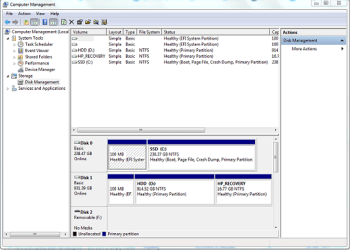
Click :orb:, on right side of menu right-click computer, choose manage. On left side of Computer Management window, click on disk management. You will now see the drives, partitions, etc.

Capture.PNG

If it's not there you have to left-click :orb: choose Properties, click customize. very first entry is computer click radio button right below it and computer will now appear. I believe it is enabled by default, however, I've added several entries here too.

Nic
 

My Computer

Computer type
PC/Desktop
Computer Manufacturer/Model Number
HP Desktop & Compaq Laptop
OS
Win 10 x64, Linux Lite, Win 7 x64, BlackArch, & Kali
Hard Drives
Samsung 850 Pro 256Gb,
Hitachi HDD 1Tb,
Crucial MX SSD 250Gb
Segate 3Tb USB 3.0 Ext. Backup HDD
Internet Speed
150Mbps dn, 20Mbps up
Antivirus
Avast Free, Malwarebytes Anti-Exploit & Anti-Ransomware
Browser
Firefox, Chrome, Opera, & VPN
I think your comment that it appears to be about normal answers the question best.

I followed instructions. Couldn't see anything weird there.
Thanks again.
 

My Computer

Computer type
Laptop
Computer Manufacturer/Model Number
HP EliteBook 8440p
OS
Windows 7 pro 64bit
CPU
Intel i5 M540 2.53
Memory
4 Gb Ram
Hard Drives
Solid state approx 111gb
Awesome, if you would please mark thread resolved.
Happy Computing!
Nic
 

My Computer

Computer type
PC/Desktop
Computer Manufacturer/Model Number
HP Desktop & Compaq Laptop
OS
Win 10 x64, Linux Lite, Win 7 x64, BlackArch, & Kali
Hard Drives
Samsung 850 Pro 256Gb,
Hitachi HDD 1Tb,
Crucial MX SSD 250Gb
Segate 3Tb USB 3.0 Ext. Backup HDD
Internet Speed
150Mbps dn, 20Mbps up
Antivirus
Avast Free, Malwarebytes Anti-Exploit & Anti-Ransomware
Browser
Firefox, Chrome, Opera, & VPN
will do
 

My Computer

Computer type
Laptop
Computer Manufacturer/Model Number
HP EliteBook 8440p
OS
Windows 7 pro 64bit
CPU
Intel i5 M540 2.53
Memory
4 Gb Ram
Hard Drives
Solid state approx 111gb
Back
Top