Which Browser Has NO Suggestions

indianacarnie

Good News!
Guru
Gold Member
VIP
Local time
9:46 AM
Messages
3,036
Location
Kentucky/Florida U.S.A.
I've had it. Just reinstalled again and the newer (I guess)beta of opera11 I downloaded has a drop down suggestion box in both the address bar and search box. I could turn off the "suggestions" from the address bar but not the search box. I guess I'm the only person in the world who really hates these things but I do. Already stopped using chrome because of it , firefox too for that matter (but its been a long time). Now my beloved opera has sunk to that level too. I just tried slim browser and iron browser and they too have this dubious "feature".

My question is.... does anyone know of a web browser that does not have this odious drop down distraction? Any help/advice would be greatly appreciated.
 

My Computer My Computer

Computer type
Laptop
Computer Manufacturer/Model Number
MSI GE72VR Apache Pro-416
OS
Windows 10x64 Build 1709
CPU
Intel i7 7700HQ Kaby Lake
Motherboard
Micro-Star Intl. MS-179B (U3C1)
Memory
16 GB DDR4 @2400
Graphics Card(s)
Nvidia Geforce GTX 1060
Screen Resolution
1920x1080 120Hz
Hard Drives
256 GB Nvme M.2 SSD

1TB HDD@7200
Cooling
Cooler Blast 4
Keyboard
Steel Series
Antivirus
Bit Defender Free
Browser
Edge
In IE8 use Internet Options/Content/Auto Complete/Settings
 

My Computer My Computer

Computer type
PC/Desktop
Computer Manufacturer/Model Number
OQO 2+
OS
Windows 8 Pro w/MC 32-bit
CPU
Intel Atom 1.86 GHz
Motherboard
OQO 2+
Memory
2 GB
Graphics Card(s)
Intel GMA 500
Sound Card
IDT
Monitor(s) Displays
LCD
Screen Resolution
800 x 480 (portable) 1280 x 1024 (docked)
Hard Drives
64 GB SSD
PSU
9 Ah Battery (portable) or OQO Brick (docked)
Case
Shirt Pocket Sized
Cooling
Tiny Fan
Keyboard
Slide out (portable) DiNovo Edge (docked)
Mouse
Eraser head (portable) Logitech Bluetooth (docked)
Internet Speed
WWAN or 802.11G (portable) T1 (docked)
Browser
IE 10
Other Info
DVD-RW OQO Docking Station
Thank you! Hadnt even thought of ie to tell you the truth. I had tried ie9 but just for a couple of minutes before i did a reinstall. Again thank you and now to see if ie is even installed yet.:)
 

My Computer My Computer

Computer type
Laptop
Computer Manufacturer/Model Number
MSI GE72VR Apache Pro-416
OS
Windows 10x64 Build 1709
CPU
Intel i7 7700HQ Kaby Lake
Motherboard
Micro-Star Intl. MS-179B (U3C1)
Memory
16 GB DDR4 @2400
Graphics Card(s)
Nvidia Geforce GTX 1060
Screen Resolution
1920x1080 120Hz
Hard Drives
256 GB Nvme M.2 SSD

1TB HDD@7200
Cooling
Cooler Blast 4
Keyboard
Steel Series
Antivirus
Bit Defender Free
Browser
Edge
well, i thank you for the quick reply but auto complete really isnt what i was looking for. its the drop down suggestion box that gets my goat. hate it!
am trying acoo browser as we speak and if i stay away from google i think i found it. again thank you for the suggestion
 

My Computer My Computer

Computer type
Laptop
Computer Manufacturer/Model Number
MSI GE72VR Apache Pro-416
OS
Windows 10x64 Build 1709
CPU
Intel i7 7700HQ Kaby Lake
Motherboard
Micro-Star Intl. MS-179B (U3C1)
Memory
16 GB DDR4 @2400
Graphics Card(s)
Nvidia Geforce GTX 1060
Screen Resolution
1920x1080 120Hz
Hard Drives
256 GB Nvme M.2 SSD

1TB HDD@7200
Cooling
Cooler Blast 4
Keyboard
Steel Series
Antivirus
Bit Defender Free
Browser
Edge
In FF Minefield (my specific examples are from 4.0b8pre but FF 3.x is similar), one can make changes in two locations (Google bar and location bar).

For Search suggestions, right click the search bar and uncheck "Show Suggestions":

ScreenShot00183.jpg

You can achieve this same thing by changing the "about:config" entry "browser.search.suggest.enabled" to "false."

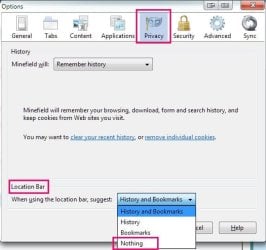
In "Options", select "Privacy" then select "Nothing" from the drop down box in the "Location Bar" Area:

ScreenShot00185.jpg

You can achieve this same thing by changing the "about:config" entry "browser.urlbar.autocomplete.enabled" to "false." If you want to leave either "History" or "Bookmarks" in the suggestion drop down, select the appropriate choice above or (leaving the aforementioned "About:config" entry set to "True") change the "about:config" entry "browser.urlbar.default.behavior" to "1" for "History" or to "2" for "Bookmarks" (reset it to "0" for both to be in the suggestion drop down). Note: the settings for the "browser.urlbar.default.behavior" entry have no effect if the "browser.urlbar.autocomplete.enabled" entry is set to "false."

The above should turn off the "features" you dislike.
 

My Computer My Computer

Computer Manufacturer/Model Number
Toshiba L355D
OS
Windows 7 Ultimate x64 SP1
CPU
Core2 Duo
Motherboard
Intel
Memory
4 GB
Graphics Card(s)
GM965 on-board
Sound Card
RealTek on-board
Monitor(s) Displays
19"+17"(laptop)
Screen Resolution
1440x900 (x 2)
Hard Drives
500GB Ext. 200GB Internal
PSU
N/A
Case
N/A
Cooling
N/A
In Opera, I remove the search box. I do all my searching from the address bar anyway. Just a thought. No need for a separate search box. A Guy
 

My Computer My Computer

Computer type
PC/Desktop
OS
Windows 10 Home x64
CPU
INTEL Core i5-750 Quad-Core 3.37GHz
Motherboard
ASUS P7P55D
Memory
HyperX Fury Black Series 8GB (2 x 4GB) 1866Mhz
Graphics Card(s)
EVGA GeForce GTX 750 Superclocked 1GB 128-Bit GDDR5
Monitor(s) Displays
LG 32MA68HY 32" IPS
Screen Resolution
1920 x 1080
Hard Drives
Samsung 840 Evo 120GB, SEAGATE 500GB Barracuda® 7200.12, SATA 3 Gb/s, 7200 RPM, 16MB cache
PSU
ANTEC TruePower New TP-550, 80 PLUS, 550W
Case
ANTEC Three Hundred Illusion
Cooling
COOLER MASTER Hyper 212 Plus, 4 x 120mm 1 x 140mm Noctua's
Internet Speed
85 + Mbps
Antivirus
Avast
Browser
Vivaldi
You can turn them of in Opera
opera:config search for auto d (Its in user prefs auto dropdown) don't forget to save.

In Opera, I remove the search box. I do all my searching from the address bar anyway. Just a thought. No need for a separate search box. A Guy

No need for the Address bar either just F2 & type
 

My Computer My Computer

Computer type
PC/Desktop
Computer Manufacturer/Model Number
self build
OS
Windows 7 Ultimate 64 bit
CPU
Intel Core i7 4770K overclocked to 4.7GHz Quad Core Haswell
Motherboard
Asus Z87 Pro (Socket 1150) ATX Motherboard
Memory
16GB Team Group Vulcan Gold 2133MHz
Graphics Card(s)
ATI Radeon HD 7880 Series Display adapter
Monitor(s) Displays
NEC LCD2690WUXi2
Screen Resolution
26" 1920 x 1200
Hard Drives
Samsung 500GB SSD 840 EVO SATA 6Gb/s
Samsung 250GB SSD 840 EVO SATA 6Gb/s
PSU
Corsair AX760 Platinum
Case
Cooler Master HAF X Gaming Tower
Cooling
XSPC RayStorm 750 RS360 Water cooling
Mouse
Razer Death Adder left handed
Internet Speed
126Mb download 11.5Mb up
Antivirus
Avast free
Browser
Opera
Other Info
Main Browser is Opera
Favorite software Adobe Lightroom & Photoshop
best plugins Nik software
Firewall : Private firewall 7
In IE8 disable suggested sites by unchecking: Internet Options/Advanced/Browsing/"enable suggested sites".
 

My Computer My Computer

Computer type
PC/Desktop
Computer Manufacturer/Model Number
OQO 2+
OS
Windows 8 Pro w/MC 32-bit
CPU
Intel Atom 1.86 GHz
Motherboard
OQO 2+
Memory
2 GB
Graphics Card(s)
Intel GMA 500
Sound Card
IDT
Monitor(s) Displays
LCD
Screen Resolution
800 x 480 (portable) 1280 x 1024 (docked)
Hard Drives
64 GB SSD
PSU
9 Ah Battery (portable) or OQO Brick (docked)
Case
Shirt Pocket Sized
Cooling
Tiny Fan
Keyboard
Slide out (portable) DiNovo Edge (docked)
Mouse
Eraser head (portable) Logitech Bluetooth (docked)
Internet Speed
WWAN or 802.11G (portable) T1 (docked)
Browser
IE 10
Other Info
DVD-RW OQO Docking Station
stve - Have tried that user:pref thing. Have autodrop unchecked and it still gives me those annoying "helpful"
hints in a dropdown box. and yes i saved them.
A Guy- How did you get rid of the search box anyway? Am heading over to ff now to check on mikedls suggestion.
Oh..... i have posted to operas forums too with no happiness. Will really bum me out changing too! have loved and recommended opera for years now.
roncerr - have done that too with no luck.

Thank you to all who replied!
 
Last edited:

My Computer My Computer

Computer type
Laptop
Computer Manufacturer/Model Number
MSI GE72VR Apache Pro-416
OS
Windows 10x64 Build 1709
CPU
Intel i7 7700HQ Kaby Lake
Motherboard
Micro-Star Intl. MS-179B (U3C1)
Memory
16 GB DDR4 @2400
Graphics Card(s)
Nvidia Geforce GTX 1060
Screen Resolution
1920x1080 120Hz
Hard Drives
256 GB Nvme M.2 SSD

1TB HDD@7200
Cooling
Cooler Blast 4
Keyboard
Steel Series
Antivirus
Bit Defender Free
Browser
Edge
We have a winner folks! I guess that after many years and many many recommendations I'll be leaving what I always considered to be the best browser ever. In this quest for happiness i've tried
acoo
iron
avant
opera
Ie8 and 9
chrome
And Firefox is the only one who let me do what i wanted. Imagine that.
A very huge thank you to all who replied. I will be checking back to this thread , maybe someone can advise me of a hack for opera to get rid of that patronizing bit of behavior. (Guess i'm still in denial about leaving my favorite browser ever.)
Again thank you to all, and especially mikedl.
 

My Computer My Computer

Computer type
Laptop
Computer Manufacturer/Model Number
MSI GE72VR Apache Pro-416
OS
Windows 10x64 Build 1709
CPU
Intel i7 7700HQ Kaby Lake
Motherboard
Micro-Star Intl. MS-179B (U3C1)
Memory
16 GB DDR4 @2400
Graphics Card(s)
Nvidia Geforce GTX 1060
Screen Resolution
1920x1080 120Hz
Hard Drives
256 GB Nvme M.2 SSD

1TB HDD@7200
Cooling
Cooler Blast 4
Keyboard
Steel Series
Antivirus
Bit Defender Free
Browser
Edge

My Computer My Computer

Computer type
PC/Desktop
OS
Windows 10 Home x64
CPU
INTEL Core i5-750 Quad-Core 3.37GHz
Motherboard
ASUS P7P55D
Memory
HyperX Fury Black Series 8GB (2 x 4GB) 1866Mhz
Graphics Card(s)
EVGA GeForce GTX 750 Superclocked 1GB 128-Bit GDDR5
Monitor(s) Displays
LG 32MA68HY 32" IPS
Screen Resolution
1920 x 1080
Hard Drives
Samsung 840 Evo 120GB, SEAGATE 500GB Barracuda® 7200.12, SATA 3 Gb/s, 7200 RPM, 16MB cache
PSU
ANTEC TruePower New TP-550, 80 PLUS, 550W
Case
ANTEC Three Hundred Illusion
Cooling
COOLER MASTER Hyper 212 Plus, 4 x 120mm 1 x 140mm Noctua's
Internet Speed
85 + Mbps
Antivirus
Avast
Browser
Vivaldi
Back
Top