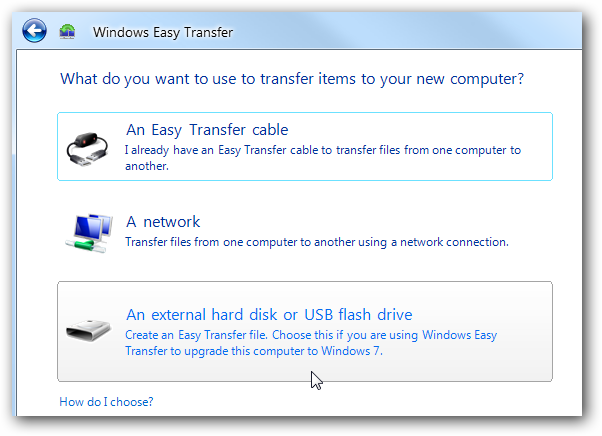
Which external harddrive do I use for Windows Easy Transfer(XP to W7)?

Skooby

New member
Local time
11:50 PM
Messages
4
Hello,

I'm trying to tranfer files from my XP pc to my new pc with Windows 7. I know I need W.E.T. and an external HD. I found this one that I wanted to get:

Newegg.com - TOSHIBA Canvio 320GB USB 2.0 Raven Black Portable External Hard Drive E05A032CAU2XK

However, when I started reading reviews on it on Amazon.com...one of the users stated that he could not use it for the transfer since the preloaded software isn't compatible windows 7, even though the website for the product says the harddrive is.

So my question is which external hard drive (brand or type) do I have to choose to do this?
 

My Computer My Computer

At a glance

Windows 7 home premium 64 bit
OS
Windows 7 home premium 64 bit
I did it using a USB 32Gb flash drive since I doubt you'll need more than 32Gb that should work as long as you have downloaded and installed Windows Easy Transfer on your XP PC.

21.png
 

My Computer My Computer

At a glance

Vista 64 Ultimate, Windows 7 64 Ultimate, Ubu...i7 975 3.3 GHz Extreme (Factory OC'd to 3.6 GHz)18 Gb Tri-Channel 1066ATI 5970 2048 Mb
Computer Manufacturer/Model Number
DELL XPS Studio 435T
OS
Vista 64 Ultimate, Windows 7 64 Ultimate, Ubuntu 9.10
CPU
i7 975 3.3 GHz Extreme (Factory OC'd to 3.6 GHz)
Motherboard
DELL provided
Memory
18 Gb Tri-Channel 1066
Graphics Card(s)
ATI 5970 2048 Mb
Sound Card
X-Fi Extreme Gamer
Monitor(s) Displays
Vizio 37" HD-TV
Screen Resolution
1920 x 1080
Hard Drives
1.5 Tb HDD
1.5 Tb HDD
2.0 Tb Network Drive
512 Gb Crucial SSD
PSU
DELL Provided 475 watts
Case
DELL
Cooling
3 fans
Keyboard
Logitech Performance K350 Wireless
Mouse
Logitech Performance MX Wireless
Internet Speed
3 Mb up 750 Kb down
Other Info
Bamboo Fun Tablet, Belkin N+ Wireless router, Pioneer Dolby System Wireless Headphones, Bose 5.1 Dolby Surround Sound System, LifeCam VX 3000 Webcam, Blu-Ray/Hi Def DVD +RW combo and Blu-ray +RW,l 15 in 1 media card reader, Logitech Rumblepad 2, Hauppauge 2250 DTV Tuner with MS Media Center Remote

Laptop:Alienware M17x, Q9100 CPU, 8Gb RAM, 1920x1200 WUXGA LCD driven by 4870's in CrossFireX, Bl
Thanks.

But I have about 100-120 gb worth of music, movies, and documents to move over.

I thought everything had to be moved at once...can they be moved over in chunks?

Also, I really didn't want to go over $60.
 

My Computer My Computer

At a glance

Windows 7 home premium 64 bit
OS
Windows 7 home premium 64 bit
Start the Easy Transfer Program & see if it gives you an estimate how much HD space you will need. :)
 

My Computer My Computer

At a glance

Win7 Enterprise, Win7 x86 (Ult 7600), Win7 x6...AMD fx8350 4ghz, AMD-32 2400mhz, AMD-64 3200m...2gb, 4gb on the Ult 7600, 4gb on Technet RTM,...Draw my own Graphics, several nVidia cards
Computer type
PC/Desktop
Computer Manufacturer/Model Number
Built them myself, Science Experiments !
OS
Win7 Enterprise, Win7 x86 (Ult 7600), Win7 x64 Ult 7600, TechNet RTM on AMD x64 (2.8Ghz)
CPU
AMD fx8350 4ghz, AMD-32 2400mhz, AMD-64 3200mhz, AMDx64 2.8G
Motherboard
SIS 755, ECS-K8M890M-M (Ult 7600), GigaByte & others
Memory
2gb, 4gb on the Ult 7600, 4gb on Technet RTM, 32gb on FX8350
Graphics Card(s)
Draw my own Graphics, several nVidia cards
Sound Card
on motherboard
Monitor(s) Displays
19" flat scr, 28" I-Inc widescr,22" Emprex Widescr, 23" Acer
Screen Resolution
1280 x 1024, 1440 x 900, 1920 x 1080
Hard Drives
6 pata Ide HD's & 2 Sata HD's
added 80gb external on Ult 7600 computer,
numerous extra 1tb, 2TB, 3Tb SATA HD's
A collection of ext HD Docks w/ HDs
PSU
430w, 550w, 600w, 700, 800, etc
Case
All Generic Full Towers
Cooling
Open Air & a few fans, some w/ colored LEDs
Keyboard
Compaq & Dell recycled from GoodWill
Mouse
Made in China Optical Wired Mouse
Internet Speed
Fast Cable InterNet
Antivirus
AVG Free on 24 different Desktops, NO Problems!
Browser
IE 8 is preferred, but use FireFox sometimes
Other Info
Linksys Routers, switches, & Hubs
Too Many USB Flash Drives to count, Biggest is 64GB !
Eight computers in my home network.
Sixteen computers at my business network.
Linked via TeamViewer !
Lots of old used spare computer parts everywhere!
Any external hard drive would work, assuming it is large enough to hold your data. I would recommend doing it manually, rather than letting some program try to decide what is important to you or not. This way, you are sure to get everything you need.
 

My Computer My Computer

At a glance

Windows 7 Ultimate x64 SP1Intel Core i7-260012 GB Patriot Extreme DDR3-1333Nvidia GTX 470
OS
Windows 7 Ultimate x64 SP1
CPU
Intel Core i7-2600
Motherboard
Gigabyte GA-P67A-UD3P-B3
Memory
12 GB Patriot Extreme DDR3-1333
Graphics Card(s)
Nvidia GTX 470
Monitor(s) Displays
Dell UltraSharp 2209WA
Hard Drives
OCZ Agility3 240 GB, WD5001AALS, WD7501AALS
PSU
OCZ ModStream 700W
Case
CoolerMaster HAF 912 Advanced
Cooling
CoolerMaster Hyper 212 Plus
Any external hard drive would work, assuming it is large enough to hold your data. I would recommend doing it manually, rather than letting some program try to decide what is important to you or not. This way, you are sure to get everything you need.
So the one I put in the first post should work?

What do you mean manually?
 

My Computer My Computer

At a glance

Windows 7 home premium 64 bit
OS
Windows 7 home premium 64 bit
Yes, that should work fine, but if you can go bigger, there's no harm in that. Manually means don't rely on some wizard to guess at what data is important. Just cut/copy and paste what you need to the external drive. I wouldn't ever trust some software to do that for me, when it is so simple to do it myself. Besides...I know what apps and data I store on my computer, so I'll know what I need to save.
 

My Computer My Computer

At a glance

Windows 7 Ultimate x64 SP1Intel Core i7-260012 GB Patriot Extreme DDR3-1333Nvidia GTX 470
OS
Windows 7 Ultimate x64 SP1
CPU
Intel Core i7-2600
Motherboard
Gigabyte GA-P67A-UD3P-B3
Memory
12 GB Patriot Extreme DDR3-1333
Graphics Card(s)
Nvidia GTX 470
Monitor(s) Displays
Dell UltraSharp 2209WA
Hard Drives
OCZ Agility3 240 GB, WD5001AALS, WD7501AALS
PSU
OCZ ModStream 700W
Case
CoolerMaster HAF 912 Advanced
Cooling
CoolerMaster Hyper 212 Plus
http://www.newegg.com/Product/Produ...ba_external_hard_drive-_-22-149-179-_-Product

I'm probably going to it.

But could you guess as to why this person said this, what could they have done wrong?:


"I purchased this in order to backup my files so I could upgrade from Windows XP to Windows 7. The product says that it is compatible with both so I didn't worry. Now that I have Windows 7 on my computer I can't restore my files because it says that the preloaded software is not compatible with Windows 7. How can the hard drive be compatible and the software not! You can't get them off manually because the file type is not supported by Windows 7 either."
 

My Computer My Computer

At a glance

Windows 7 home premium 64 bit
OS
Windows 7 home premium 64 bit
Some drives come with pre-loaded software that's usually junk and might not be compatible. Honestly, I format my external drives as soon as I take them out of the box, because I don't need/use any of the preloaded junk.
 

My Computer My Computer

At a glance

Windows 7 Ultimate x64 SP1Intel Core i7-260012 GB Patriot Extreme DDR3-1333Nvidia GTX 470
OS
Windows 7 Ultimate x64 SP1
CPU
Intel Core i7-2600
Motherboard
Gigabyte GA-P67A-UD3P-B3
Memory
12 GB Patriot Extreme DDR3-1333
Graphics Card(s)
Nvidia GTX 470
Monitor(s) Displays
Dell UltraSharp 2209WA
Hard Drives
OCZ Agility3 240 GB, WD5001AALS, WD7501AALS
PSU
OCZ ModStream 700W
Case
CoolerMaster HAF 912 Advanced
Cooling
CoolerMaster Hyper 212 Plus
Any external hard drive would work, assuming it is large enough to hold your data. I would recommend doing it manually, rather than letting some program try to decide what is important to you or not. This way, you are sure to get everything you need.
+1 absolutely. Too many people had trouble with Easy Transfer. Just copy the files from XP to any external drive. Then at least you know that it works. On the Win7 side, copy them back into the appropriate folders in the library.

You can use this function in XP and Win7 (beats Copy/paste): http://www.sevenforums.com/tutorials/516-context-menu-add-copy-folder-move-folder.html
 

My Computer My Computer

At a glance

Vista, Windows7, Mint Mate, Zorin, Windows 8from 1.6GHz Duo to i7
Computer Manufacturer/Model Number
HP, Dell, Gateway, Toshiba - 4 laptops and 2 desktops
OS
Vista, Windows7, Mint Mate, Zorin, Windows 8
CPU
from 1.6GHz Duo to i7
Monitor(s) Displays
2x HP w2207
Hard Drives
5x HDD, 7x SSD, 12x Externals
Keyboard
with trackball - no mices
Mouse
Trackball mice
Internet Speed
DSL 6000
Drag n drop to external, another computer on network, another HD, or DVD's.

You can get it all in one swoop by copying your active User account folder.

If you need to split up the data or make the space used even leaner, drag the active User folders: Documents, music, Videos, Favorites, etc.

To copy back into your new install, open the folder, on Organize tab "Select All" then drag the group to the library or User folder on explorer bar on left margin, hold left click until explorer expands to make sure you are releasing file grouping into correct folder.

Fast and easy, no complications or ridiculous space usage.

Don't import AppData settings as they provide a corruption path from old install into fresh clean install.
 
Back
Top