Solved Which programs are safe to disable with MSCONFIG Startup tab?

x BlueRobot

Closed by request
Local time
9:34 PM
Messages
6,784
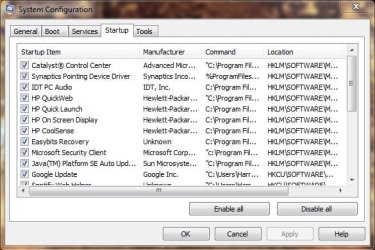
I have a few remaining programs which I would like to disable, however, do not want to disable any programs which will result in me losing some functionality.

I'm mostly unsure about the HP programs, but that seem to me, just some form of OEM bloatware.

Thanks,

Harry

Please see attached screenshot:
 

Attachments
  • msconfig.JPG
    msconfig.JPG
    58.5 KB · Views: 53

My Computer My Computer

Computer type
Laptop
Have just rebooted after making changes to msconfig , and everything is working fine, here's another screenshot:
 

Attachments

  • msconfig update.JPG
    msconfig update.JPG
    61.7 KB · Views: 53

My Computer My Computer

Computer type
Laptop
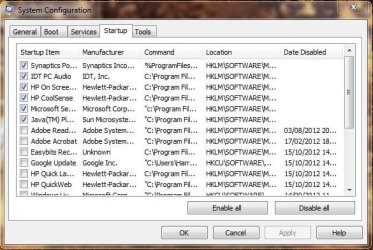
You can remove anything you don't use, pretty much. Those two HP ones are most likely bloatware, as you said, but double-check to make sure they're not required for special features of your PC. It may be better to just uninstall them completely.

The Java one, bearing in mind we can't read the full name and path, is probably the updater program. You can disable this, but obviously then won't receive any updates for Java unless you have something else checking for them.

The Synaptics one I usually leave on - it provides functions for the touchpad that prevent "palm-clicks" and aid with scrolling and things like that. The IDT PC Audio will be sound card related - best to leave that running for sound enhancements. And "Microsoft Se..." I'm assuming is Microsoft Security Essentials, so leave that on, as you have :)

Basically, if you're not sure, leave it enabled and do some research into what it is and does.
 

My Computer My Computer

At a glance

Windows 7 Ultimate x64Intel Core i5-2500 3.3GHz8GB DDR3 1333MHzOn-board
Computer Manufacturer/Model Number
CreepinJesus Mk. IV
OS
Windows 7 Ultimate x64
CPU
Intel Core i5-2500 3.3GHz
Motherboard
Asus P8H67-M PRO
Memory
8GB DDR3 1333MHz
Graphics Card(s)
On-board
Sound Card
On-board
Monitor(s) Displays
Samsung SyncMaster BX2250 22.5" LED-backlit LCD
Screen Resolution
1920 * 1080
Hard Drives
OCZ Agility 3 120GB, SATA-III
PSU
Thermaltake Toughpower Grand TPG-650M
Case
Lian-Li PC-A04
Cooling
Standard fans. They blow.
Keyboard
Logitech K360
Mouse
Generic Logitech from the bargain-bin by the checkout
Internet Speed
Over 9000! ...Mbps.
Other Info
Chocolate digestives are my favourite biscuit.
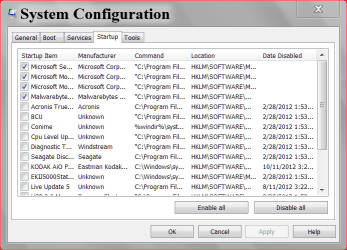
Just keep in mind when you disable things like Adobe or Java auto updater you must do it yourself manually. I check every 1 or 2 days. I use filehippo updater to check.
FileHippo.com Update Checker - FileHippo.com
10 15.PNG

10 15 2.PNG
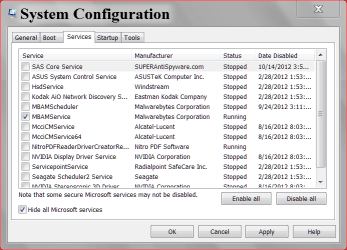
Please notice check mark in Hide all Microsoft Services.
 

My Computer My Computer

At a glance

Windows 10 Pro. 64/ version 1709 Windows 7 Pr...Intel i7-6800K @ 4.3Corsair Platinum 16 gig @2400EVGA GTX 1070 OC
Computer type
PC/Desktop
Computer Manufacturer/Model Number
Home made Desktop
OS
Windows 10 Pro. 64/ version 1709 Windows 7 Pro/64
CPU
Intel i7-6800K @ 4.3
Motherboard
ASUS X-99 Deluxe II
Memory
Corsair Platinum 16 gig @2400
Graphics Card(s)
EVGA GTX 1070 OC
Monitor(s) Displays
Asus 27" LED LCD/VE278Q
Screen Resolution
1920-1080 or 1280-720 HDMI
Hard Drives
INTEL SSD 730-240 Gb Sata 3.0/
PSU
EVGA Platium 1200W
Case
Phanteks Luxe Tempered Glass 8 fans/ one radiator
Cooling
XSPC/ Water Cooled CPU
Keyboard
Das 4 Professional
Mouse
Logitech M705/MX Anywhere 2-S
Internet Speed
100 mbits
Antivirus
Microsoft Security Essentials/ Malwarebytes Premium 3.0/ SAS
Browser
I.E. 11 default/Firefox/ ISP Time Warner Cable/Spectrum
Other Info
LG BluRay Burner/
Sound system-KLipsch-THX/
Icy Dock ssd Hot Swap bays.
Thanks Layback Bear, that's why didn't want to disable my Java Updater :P
 

My Computer My Computer

Computer type
Laptop
Back
Top