
Which SSDs is the better, an External SSD or internal SSD?

Hadramawt

New member
Local time
9:33 PM
Messages
177
Hi

While reading
How to Create a Portable OS on an External Drive published by Whs, I found the point below marked in red brought my attention:::

For obvious reasons, the SSD works the best. Operations on the HDD will be slower. I have also tried a fast USB3 stick. But that was too slow. See performance section for details.

I found a $55 'value pack' -a SSD and a USB3 enclosure including cable. The 30GB SSD is large enough to accommodate Windows 8 or any Linux distro with room to spare.


My questions are:
Firstly: Which is the better the an External SSD or internal SSD?

Secondly: Is any brand USB3 SSD with a size of 30GB or 120GB really enough?
These SSDs were suggested for me:

$199.99 (3yr, 480GB TLC): SanDisk Ultra II
$199.99 (3yr, 512GB MLC): Crucial MX100
$212.99 (5yr, 500GB TLC): Samsung 850 EVO
$229.98 (3yr, 500GB TLC): Samsung 840 EVO
$259.99 (10yr, 480GB MLC): SanDisk Extreme Pro
$289.99 (5yr, 480GB MLC): Intel 730 Series
$289.99 (10yr, 512GB MLC): Samsung 850 Pro
$373.36 (10yr, 512GB MLC): Samsung 840 Pro

However,in the local market 'Yemen', I only found this 'Kingston Digital 480GB SSDNow V300 SATA 3 2.5-Inch Solid State Drive with Adapter (SV300S3N7A/480G)' . However, I was told that the Kingston SSDs are not good.
With respect to SSD brands, in my own country 'Yemen', I really didn't find other than 'Kingston Digital 480GB SSDNow V300 SATA 3 2.5-Inch Solid State Drive with Adapter (SV300S3N7A/480G)', and with a price of $350. However, I would be still looking for another brand as I was told the Kingston SSDs are not good.

Also, Amazon.com doesn't ship to my own country, or it would be much better since their prices are much better than ebay.com. Also, there are many problems with shipping to Yemen. The products shipped to Yemen are stolen in the Yemen customs department. Do you know that other online seller can ship to my own country other than ebay.com, and Amazon.com. I only knew 'mydvddrive.com' the only online seller who ship to my own country. However, all what they sell is optical drives.
Yemen is going to be really problem.

I was told:
any of those SSDs will be so much faster than your HDD that you probably wouldn't notice the slight difference between the different SSDs.


A SSD will not:

  • Increase your machine's ability to play back HD video or stream YouTube smoothly.
  • Make your computer encode/process audio/video faster.
  • Allow you to play games at a higher FPS.
  • Keep your computer from being infected with viruses.
A SSD will:

  • Make your computer boot, hibernate/resume, shutdown much (2-8x) faster.
  • Make programs open instantly (or much quicker) after clicking on them.
  • Make your computer more responsive, and able to handle more open programs before bogging down.
  • Increase your battery life.
  • Reduce game load times/delays.
  • Allow you to accidentally drop, or throw your laptop across the room without losing your data (now your laptop may break, but the SSD and your data should be OK!).
Any comments would highly appreciated.
 

My Computer My Computer

At a glance

Windows 7 Home Premium 64BitIntel Core i5, 2.3GHzDDR3- 6GBIntel Graphics Family, Radeon HD 6770M
Computer type
Laptop
Computer Manufacturer/Model Number
HP, Pavilion
OS
Windows 7 Home Premium 64Bit
CPU
Intel Core i5, 2.3GHz
Motherboard
Hewlett-Packard- Model 1657
Memory
DDR3- 6GB
Graphics Card(s)
Intel Graphics Family, Radeon HD 6770M
Hard Drives
Toshiba 700GB
Antivirus
Microsot Secuirty Eessentials
Browser
MS IE, Google Chrom, and FireFox
Which is the better the an External SSD or internal SSD?

There is no single right answer for everybody. The question of internal or extern anything always depends on how you want to use it.
 

My Computer My Computer

At a glance

Windows 7 Pro 64 bitXeon W35208 GBNvidia Geforce 210
Computer type
PC/Desktop
Computer Manufacturer/Model Number
HP
OS
Windows 7 Pro 64 bit
CPU
Xeon W3520
Memory
8 GB
Graphics Card(s)
Nvidia Geforce 210
Which is the better the an External SSD or internal SSD?

There is no single right answer for everybody. The question of internal or extern anything always depends on how you want to use it.


Thank you so much indeed,
Yes, but I think SSD can only speed the performance of OS, and the maximum size of OS can be more than 30GB. So, SSDs are used to install OS on them, however, the user data can be saved in any normal HDD. So you don't tell me if 30GB of SSD with any brand is enough or not.


Also, I was told that Samsung 850 Pro 512GB 2.5-Inch SATA III Internal SSD (MZ-7KE512BW) is the best SSD model, and brand.

But, You don't tell me which SSD models and brands are the best. In the local market 'Yemen', I only found this 'Kingston Digital 480GB SSDNow V300 SATA 3 2.5-Inch Solid State Drive with Adapter (SV300S3N7A/480G)' . However, I was told that the Kingston SSDs are not good.
With respect to SSD brands, in my own country 'Yemen', I really didn't find other than 'Kingston Digital 480GB SSDNow V300 SATA 3 2.5-Inch Solid State Drive with Adapter (SV300S3N7A/480G)', and with a price of $350. However, I would be still looking for another brand as I was told the Kingston SSDs are not good.

Also, Amazon.com doesn't ship to my own country, or it would be much better since their prices are much better than ebay.com. Also, there are many problems with shipping to Yemen. The products shipped to Yemen are stolen in the Yemen customs department. Do you know that other online seller can ship to my own country other than ebay.com, and Amazon.com. I only knew 'mydvddrive.com' the only online seller who ship to my own country. However, all what they sell is optical drives.
 

My Computer My Computer

At a glance

Windows 7 Home Premium 64BitIntel Core i5, 2.3GHzDDR3- 6GBIntel Graphics Family, Radeon HD 6770M
Computer type
Laptop
Computer Manufacturer/Model Number
HP, Pavilion
OS
Windows 7 Home Premium 64Bit
CPU
Intel Core i5, 2.3GHz
Motherboard
Hewlett-Packard- Model 1657
Memory
DDR3- 6GB
Graphics Card(s)
Intel Graphics Family, Radeon HD 6770M
Hard Drives
Toshiba 700GB
Antivirus
Microsot Secuirty Eessentials
Browser
MS IE, Google Chrom, and FireFox
Hi, here is my opinion. If this is for you laptop (you didn't mention which model it is) if it doesn't have USB3 port's it will be best to install SSD internally. Regarding the size I would recommend to have 120GB or 250GB SSD(or more if $ is not important), this will be sufficient for OS, applications and user data. Kingston are not "bad" if you don't mind "cat in a box" - they have changed some parts after original product was released..
 

My Computer My Computer

At a glance

w7 ultimate 64-bit sp1i5 2500K @4.52x4GB G.Skill Ripjaws-X 2,133 CL9GTX 560Ti
Computer type
PC/Desktop
Computer Manufacturer/Model Number
custom build
OS
w7 ultimate 64-bit sp1
CPU
i5 2500K @4.5
Motherboard
MSI P67A-GD65 rev2
Memory
2x4GB G.Skill Ripjaws-X 2,133 CL9
Graphics Card(s)
GTX 560Ti
Sound Card
on board
Monitor(s) Displays
BenQ G2410HD
Screen Resolution
1920x1080
Hard Drives
Samsung 2.5-Inch 250 GB 850 EVO
PSU
BeQuiet 600W
Keyboard
K65
Mouse
Razer Deathadder Ergonomic Gaming Mouse
Internet Speed
35Mbps
An internal SSD will always perform faster than an external one in a USB enclosure. The only reason to run your OS from an external drive is to make it portable. It can be a lot of fiddling around to make your OS run from an external drive. Even then, it may not run on another PC. Unless your running an official Windows To Go setup that is. What you want to do determines if you go internal or external. If all you want to do is run Windows on that PC from an SSD, go with an internal drive. If your trying to gear up a Windows To go install then go with an external drive in an enclosure.
 

My Computer My Computer

At a glance

Windows 10 Education 64 bitAMD Phenom II X4 980 Black Edition Deneb 3.7GHz8GB 4GBx2 Kingston PC10600 DDR3 1333 MemoryZotac NVIDIA Geforce GT640 2 Gig DDR3 PCIe
Computer type
PC/Desktop
Computer Manufacturer/Model Number
Home Built
OS
Windows 10 Education 64 bit
CPU
AMD Phenom II X4 980 Black Edition Deneb 3.7GHz
Motherboard
Asus M4N68T-M V2 µATX Motherboard
Memory
8GB 4GBx2 Kingston PC10600 DDR3 1333 Memory
Graphics Card(s)
Zotac NVIDIA Geforce GT640 2 Gig DDR3 PCIe
Sound Card
VIA VT1708s High Definition Audio 8-channel Onboard
Monitor(s) Displays
22" LG E2242 1080p and 2 19" I-INC AG191D
Screen Resolution
1280x1024 - 1920x1080 - 1280x1024
Hard Drives
Crucial M100 256 GB SSD and 500 GB WD Blue SATA
PSU
Thermaltake TR 620
Case
Power Up Black ATX Mid-Tower Case
Cooling
Stock heatsink and fan
Keyboard
Logitech Wireless K350 Wave
Mouse
Logitech Wireless M570 Trackman Wheel
Internet Speed
80 Mbps Down 30 Mbps Up
Antivirus
Windows Defender
Browser
Internet Explorer 11
Other Info
HP DVD1040e Lightscribe - External USB2
The 30GB SSD is large enough to accommodate Windows 8 or any Linux distro with room to spare.

No it isn't.

Samsung 850 Pro EVO and Intel 730 Series are probably the best.
 

My Computer My Computer

At a glance

W7 Pro x64 SP1 | W10 Pro IP x64 | W8.1 Pro x6...i7-4790k @ 4GHz (4.4GHz Boost)16GB DDR3 Kingston HyperX Fury @ 1600MHz CL 9...EVGA GTX 980 Classified
Computer type
PC/Desktop
Computer Manufacturer/Model Number
Custom Build
OS
W7 Pro x64 SP1 | W10 Pro IP x64 | W8.1 Pro x64 VM | Linux Mint VM
CPU
i7-4790k @ 4GHz (4.4GHz Boost)
Motherboard
ASUS Sabertooth Z87 (BIOS Rev 2004)
Memory
16GB DDR3 Kingston HyperX Fury @ 1600MHz CL 9-9-9-27
Graphics Card(s)
EVGA GTX 980 Classified
Sound Card
Realtek Onboard
Monitor(s) Displays
Samsung S27D390
Screen Resolution
1920 x 1080
Hard Drives
240GB Intel 520 Series SSD |
Samsung 850 EVO 120GB SSD |
2TB WD Caviar Black |
2TB WD Caviar Green
PSU
Corsair HX850-80 Gold Modular
Case
Cooler Master Silencio 650
Cooling
Corsair H80i w/2 x Corsair SP120 | 2 x 120mm Noctua NF-S12B
Keyboard
Microsoft Sidewinder X4
Mouse
Gigabyte M6900 optical
Internet Speed
152mb
Antivirus
F-Secure
Browser
Firefox 38.0
Other Info
Backup Rig: Win 7 Pro 64-bit | AMD A10-5800k | ASUS F2A85-V Pro | 8GB Samsung DDR3 @1600MHz | 120GB Toshiba SDD | 2TB Seagate HDD | Cooler Master Silencio 550
So you don't tell me if 30GB of SSD with any brand is enough or not.


You don't tell me which SSD models and brands are the best.

Size: a simple Windows installation takes about 20 GB. With a few dozen typical applications installed, it might use 30 GB. I have about 55 applications installed and use 38 GB. Most people will do fine with an 80 or 120 GB SSD, but you have to decide your own space requirements. If you install a lot of games, you might need much more space.

If the SSD is your ONLY drive and must store data as well as Windows itself, then of course you will have to make adjustments for that. None of us know how much data you have or if you need to store it on an SSD.

Brands: Crucial, Intel, Samsung are very popular in the USA. Kingston is a reliable manufacturer. I think that particular Kingston model (V300) was the subject of complaints because Kingston changed the type of memory cells used in it without changing the model number and without any publicity. Some thought that was sneaky.

But if it is your only choice, I'd go ahead and get it IF it's the only choice and you actually need an SSD. You have to decide if you actually need 480 GB. The price in Yemen is ridiculous, but there is nothing you can do about that.
 

My Computer My Computer

At a glance

Windows 7 Home Premium SP1, 64-bitIntel Skylake i5-6600K, not overclocked8 GB HyperX DDR4-2666 (2 x 4 GB)none; graphics are integrated on CPU
Computer type
PC/Desktop
Computer Manufacturer/Model Number
Ignatz Special; 4 speed manual gearbox; factory air conditioning; one of one
OS
Windows 7 Home Premium SP1, 64-bit
CPU
Intel Skylake i5-6600K, not overclocked
Motherboard
AsRock Z170M Extreme 4, micro ATX
Memory
8 GB HyperX DDR4-2666 (2 x 4 GB)
Graphics Card(s)
none; graphics are integrated on CPU
Sound Card
onboard: Realtek ALC1150; external: USB Behringer UF0-202
Monitor(s) Displays
Dell S2340M 23 inch IPS
Screen Resolution
1600 x 900
Hard Drives
System: Crucial MX100 series SSD, 128 GB;
Data: Samsung Spinpoint 103SJ, 1 TB;
Backup: WD Caviar Green WD30EZRX-00D8PB0, 3 TB
PSU
Rosewill SilentNight 500 watt fanless, semi-modular
Case
Antec Solo II
Cooling
Noctua NH-U12S; Noctua F12 intake, Noctua S12A exhaust
Keyboard
Microsoft 200 6JH-00001 USB
Mouse
Dell or Microsoft optical wired; USB
Antivirus
Microsoft Security Essentials and Malwarebytes Premium
Browser
Pale Moon
Other Info
All fans PWM; speeds at idle: CPU circa 500 rpm; intake circa 600 rpm; exhaust circa 600 rpm; CPU temps 27 idle and 47 C load in a warm room (27 C/81 F) when running Intel Extreme Tuning Utility stress test.
No member here has control of pricing where ever one lives. So that is a moot point.

If I had to choose one brand and only one brand I would choose Intel.
I have 5 of them. I chose them because Intel has never failed me on anything they make.
Reliability is my main concern. How fast it is today and doesn't work tomorrow does not impress me. The only problem I find with Intel SSD's is you seldom can find a good discount (sale) price.
 

My Computer My Computer

At a glance

Windows 10 Pro. 64/ version 1709 Windows 7 Pr...Intel i7-6800K @ 4.3Corsair Platinum 16 gig @2400EVGA GTX 1070 OC
Computer type
PC/Desktop
Computer Manufacturer/Model Number
Home made Desktop
OS
Windows 10 Pro. 64/ version 1709 Windows 7 Pro/64
CPU
Intel i7-6800K @ 4.3
Motherboard
ASUS X-99 Deluxe II
Memory
Corsair Platinum 16 gig @2400
Graphics Card(s)
EVGA GTX 1070 OC
Monitor(s) Displays
Asus 27" LED LCD/VE278Q
Screen Resolution
1920-1080 or 1280-720 HDMI
Hard Drives
INTEL SSD 730-240 Gb Sata 3.0/
PSU
EVGA Platium 1200W
Case
Phanteks Luxe Tempered Glass 8 fans/ one radiator
Cooling
XSPC/ Water Cooled CPU
Keyboard
Das 4 Professional
Mouse
Logitech M705/MX Anywhere 2-S
Internet Speed
100 mbits
Antivirus
Microsoft Security Essentials/ Malwarebytes Premium 3.0/ SAS
Browser
I.E. 11 default/Firefox/ ISP Time Warner Cable/Spectrum
Other Info
LG BluRay Burner/
Sound system-KLipsch-THX/
Icy Dock ssd Hot Swap bays.
If your trying to gear up a Windows To go install then go with an external drive in an enclosure.


Thank you so much indeed for all of those participating in this thread of mine.
I would like you to kindly let me know why I will need to have an external drive in an enclosure If my trying to gear up a Windows To go install.

Why will I need to an external drive in an enclosure? I have a lot of USB3 External HDDs which can work without needing to insert them in an enclosure.
Are there two kinds of external hard disks, one of them must be inserted in an enclosure which will be connected to a PC via USB wire, and the other one can be connected directly into a PC via USB wire?
 

My Computer My Computer

At a glance

Windows 7 Home Premium 64BitIntel Core i5, 2.3GHzDDR3- 6GBIntel Graphics Family, Radeon HD 6770M
Computer type
Laptop
Computer Manufacturer/Model Number
HP, Pavilion
OS
Windows 7 Home Premium 64Bit
CPU
Intel Core i5, 2.3GHz
Motherboard
Hewlett-Packard- Model 1657
Memory
DDR3- 6GB
Graphics Card(s)
Intel Graphics Family, Radeon HD 6770M
Hard Drives
Toshiba 700GB
Antivirus
Microsot Secuirty Eessentials
Browser
MS IE, Google Chrom, and FireFox
I use external SSDs on an eSata port. But my USB3 is slower. That depends on the USB3 implementation in your mobo - mine is not so good (Dell XPS 8300). Internal would obviously be the fastest.
My 6 systems on the external SSD (Mushkin 240GB) are all virtual systems running under VMware Player. I notice very little performance degradation. My Windows 8.1 boots in 25 seconds and the Linux systems are faster.

The SSD prices you quoted are very high. In the US you can get a 120GB SSD for less than $50. But in Yemen that might be different.

Regarding SSD makes - I own 10 SSDs from 5 different companies. They are all good but my favorites are the Mushkins. They are reasonably priced and very fast. I always buy special offers at low prices. Only my first 60GB OCZ was expensive - $265 in 2008.
 

My Computer My Computer

At a glance

Vista, Windows7, Mint Mate, Zorin, Windows 8from 1.6GHz Duo to i7
Computer Manufacturer/Model Number
HP, Dell, Gateway, Toshiba - 4 laptops and 2 desktops
OS
Vista, Windows7, Mint Mate, Zorin, Windows 8
CPU
from 1.6GHz Duo to i7
Monitor(s) Displays
2x HP w2207
Hard Drives
5x HDD, 7x SSD, 12x Externals
Keyboard
with trackball - no mices
Mouse
Trackball mice
Internet Speed
DSL 6000
I use external SSDs on an eSata port. But my USB3 is slower. That depends on the USB3 implementation in your mobo - mine is not so good (Dell XPS 8300). Internal would obviously be the fastest.
My 6 systems on the external SSD (Mushkin 240GB) are all virtual systems running under VMware Player. I notice very little performance degradation. My Windows 8.1 boots in 25 seconds and the Linux systems are faster.


Thank you so much indeed.
I am sorry to say that I still don't get on what you have said about USB external HDs which can be connected directly to a USB port of a PC without needing to be inserted into an enclosure which will be connected to a USB port of a PC via SUB wire.
I don't think there is an eSata port on a PC, like the USB ports. So, why you say you use external SSDs on an eSata port. But your USB3 is slower. That depends on the USB3 implementation in your mobo - mine is not so good (Dell XPS 8300). Internal would obviously be the fastest.

I would like you to kindly let me know why I will need to have an external drive in an enclosure which will be connected to a USB port of a PC via USB wire If my trying to gear up a Windows To go install.

Why will I need to have an external drive in an enclosure? Enclosure just converts a HD based on SATA port into USB port, which can be connected then to any USB port. If I have a HD based on USB3 port, then no need to have enclosure. I have a lot of USB3 External HDDs which can be connected directly to a USB port of a PC without needing to insert them in an enclosure.?

Are there two kinds of external hard disks, one of them must be inserted in an enclosure which will be connected to a USB port of a PC via USB wire, and the other one can be connected directly to a USB port of a PC via USB wire?

The SSD prices you quoted are very high. In the US you can get a 120GB SSD for less than $50. But in Yemen that might be different.

Regarding SSD makes - I own 10 SSDs from 5 different companies. They are all good but my favorites are the Mushkins. They are reasonably priced and very fast. I always buy special offers at low prices. Only my first 60GB OCZ was expensive - $265 in 2008.

In Yemen, there are only Kingston SSDs, with that high price which is 500GB with $350. It is also not internal it is just external with enclosure, and USB wire.
 

My Computer My Computer

At a glance

Windows 7 Home Premium 64BitIntel Core i5, 2.3GHzDDR3- 6GBIntel Graphics Family, Radeon HD 6770M
Computer type
Laptop
Computer Manufacturer/Model Number
HP, Pavilion
OS
Windows 7 Home Premium 64Bit
CPU
Intel Core i5, 2.3GHz
Motherboard
Hewlett-Packard- Model 1657
Memory
DDR3- 6GB
Graphics Card(s)
Intel Graphics Family, Radeon HD 6770M
Hard Drives
Toshiba 700GB
Antivirus
Microsot Secuirty Eessentials
Browser
MS IE, Google Chrom, and FireFox
Yes there are Esata ports, they are on your motherboard if it comes with them, my Sabertooth has 2 Esata ports.
 

Attachments

  • ASUSSabertoothZ77 IO Plate.jpg
    ASUSSabertoothZ77 IO Plate.jpg
    23.8 KB · Views: 30

My Computer My Computer

At a glance

Windows 10 Pro x64Intel Core i7 6700KGSkill TridentZ RGB 16GB 3600 16-16-16-36EVGA GTX 980 Ti SC x2
Computer type
PC/Desktop
Computer Manufacturer/Model Number
Skylake Special #666
OS
Windows 10 Pro x64
CPU
Intel Core i7 6700K
Motherboard
Asus Sabertooth Z170 Mark 1
Memory
GSkill TridentZ RGB 16GB 3600 16-16-16-36
Graphics Card(s)
EVGA GTX 980 Ti SC x2
Sound Card
Realtek High Definition
Monitor(s) Displays
AOC G2460PG
Screen Resolution
1920 x 1080 144Hz
Hard Drives
Samsung 860 Pro 256GB, Seagate Barracuda 4TB x2
PSU
EVGA 1000 P2, EVGA White Custom Braided Cables
Case
Corsair Vengeance C70 Gunmetal Black
Cooling
Corsair H100i v2, Corsair ML120 x2, Thermal Grizzly Kryonaut
Keyboard
Logitech G910 Orion Spectrum
Mouse
Logitech G700s
Internet Speed
Verizon Fios Quantum Gateway 75/75
Antivirus
Windows Defender, Malwarebytes Free 3.8.3
Browser
Chrome
Other Info
Corsair SP120 x4, LG Blu-ray Drive, Durabrand HT-395 100 Watt Dolby Digital Amp, Corsair H2100 Wireless 7.1 Headset
Internal or external - those are the same SSDs. You can attach to the USB with an enclosure or a USB wire. They perform the same function.

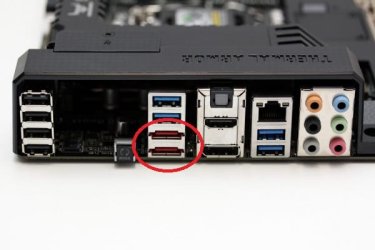
Not all systems have eSata - in fact that is pretty rare. But you can always add it with a PCI-e card. And for laptops they look like this - that is if you have an Express Card slot.

Kingston SSDs are good. In fact they were the first in the industry to produce SSDs.
 

My Computer My Computer

At a glance

Vista, Windows7, Mint Mate, Zorin, Windows 8from 1.6GHz Duo to i7
Computer Manufacturer/Model Number
HP, Dell, Gateway, Toshiba - 4 laptops and 2 desktops
OS
Vista, Windows7, Mint Mate, Zorin, Windows 8
CPU
from 1.6GHz Duo to i7
Monitor(s) Displays
2x HP w2207
Hard Drives
5x HDD, 7x SSD, 12x Externals
Keyboard
with trackball - no mices
Mouse
Trackball mice
Internet Speed
DSL 6000
A ssd is a ssd. They all have the same connections methods.
You choose whether to install it external using cables or a enclosure with cables. You can install it using cables internally to the motherboard.

Same ssd can be used either way or all the ways. It's your choice.

I use ssd in a external enclosure, hot swap bay and internal. It just depends how I want to use the ssd. It's the same ssd.
 

My Computer My Computer

At a glance

Windows 10 Pro. 64/ version 1709 Windows 7 Pr...Intel i7-6800K @ 4.3Corsair Platinum 16 gig @2400EVGA GTX 1070 OC
Computer type
PC/Desktop
Computer Manufacturer/Model Number
Home made Desktop
OS
Windows 10 Pro. 64/ version 1709 Windows 7 Pro/64
CPU
Intel i7-6800K @ 4.3
Motherboard
ASUS X-99 Deluxe II
Memory
Corsair Platinum 16 gig @2400
Graphics Card(s)
EVGA GTX 1070 OC
Monitor(s) Displays
Asus 27" LED LCD/VE278Q
Screen Resolution
1920-1080 or 1280-720 HDMI
Hard Drives
INTEL SSD 730-240 Gb Sata 3.0/
PSU
EVGA Platium 1200W
Case
Phanteks Luxe Tempered Glass 8 fans/ one radiator
Cooling
XSPC/ Water Cooled CPU
Keyboard
Das 4 Professional
Mouse
Logitech M705/MX Anywhere 2-S
Internet Speed
100 mbits
Antivirus
Microsoft Security Essentials/ Malwarebytes Premium 3.0/ SAS
Browser
I.E. 11 default/Firefox/ ISP Time Warner Cable/Spectrum
Other Info
LG BluRay Burner/
Sound system-KLipsch-THX/
Icy Dock ssd Hot Swap bays.
I use external SSDs on an eSata port. But my USB3 is slower. That depends on the USB3 implementation in your mobo - mine is not so good (Dell XPS 8300). Internal would obviously be the fastest.
My 6 systems on the external SSD (Mushkin 240GB) are all virtual systems running under VMware Player. I notice very little performance degradation. My Windows 8.1 boots in 25 seconds and the Linux systems are faster.


Thank you so much indeed.
I am sorry to say that I still don't get on what you have said about USB external HDs which can be connected directly to a USB port of a PC without needing to be inserted into an enclosure which will be connected to a USB port of a PC via SUB wire.
I don't think there is an eSata port on a PC, like the USB ports. So, why you say you use external SSDs on an eSata port. But your USB3 is slower. That depends on the USB3 implementation in your mobo - mine is not so good (Dell XPS 8300). Internal would obviously be the fastest.

I would like you to kindly let me know why I will need to have an external drive in an enclosure which will be connected to a USB port of a PC via USB wire If my trying to gear up a Windows To go install.

Why will I need to have an external drive in an enclosure? Enclosure just converts a HD based on SATA port into USB port, which can be connected then to any USB port. If I have a HD based on USB3 port, then no need to have enclosure. I have a lot of USB3 External HDDs which can be connected directly to a USB port of a PC without needing to insert them in an enclosure.?

Are there two kinds of external hard disks, one of them must be inserted in an enclosure which will be connected to a USB port of a PC via USB wire, and the other one can be connected directly to a USB port of a PC via USB wire?

The SSD prices you quoted are very high. In the US you can get a 120GB SSD for less than $50. But in Yemen that might be different.

Regarding SSD makes - I own 10 SSDs from 5 different companies. They are all good but my favorites are the Mushkins. They are reasonably priced and very fast. I always buy special offers at low prices. Only my first 60GB OCZ was expensive - $265 in 2008.

In Yemen, there are only Kingston SSDs, with that high price which is 500GB with $350. It is also not internal it is just external with enclosure, and USB wire.

With a computer and a debit card, you should be able to order just about any ssd you want.
 

My Computer My Computer

At a glance

Windows 10 Pro x64Intel Core i7 6700KGSkill TridentZ RGB 16GB 3600 16-16-16-36EVGA GTX 980 Ti SC x2
Computer type
PC/Desktop
Computer Manufacturer/Model Number
Skylake Special #666
OS
Windows 10 Pro x64
CPU
Intel Core i7 6700K
Motherboard
Asus Sabertooth Z170 Mark 1
Memory
GSkill TridentZ RGB 16GB 3600 16-16-16-36
Graphics Card(s)
EVGA GTX 980 Ti SC x2
Sound Card
Realtek High Definition
Monitor(s) Displays
AOC G2460PG
Screen Resolution
1920 x 1080 144Hz
Hard Drives
Samsung 860 Pro 256GB, Seagate Barracuda 4TB x2
PSU
EVGA 1000 P2, EVGA White Custom Braided Cables
Case
Corsair Vengeance C70 Gunmetal Black
Cooling
Corsair H100i v2, Corsair ML120 x2, Thermal Grizzly Kryonaut
Keyboard
Logitech G910 Orion Spectrum
Mouse
Logitech G700s
Internet Speed
Verizon Fios Quantum Gateway 75/75
Antivirus
Windows Defender, Malwarebytes Free 3.8.3
Browser
Chrome
Other Info
Corsair SP120 x4, LG Blu-ray Drive, Durabrand HT-395 100 Watt Dolby Digital Amp, Corsair H2100 Wireless 7.1 Headset
Windows To Go (http://en.wikipedia.org/wiki/Windows_To_Go) is mainly for corporations, no real benefit for Home/small office users. It gives you ability to connect a USB storage device to "*any" computer and in 5~10 minutes be able to work from it as if you were working on your corporate device (*any - not all computers will work you may see few "oops, something went wrong" messages).

If you not planning to move the hdd/ssd from your room/office and not worried you might spill some coffee or damage it in some way no enclosure is required.
 

My Computer My Computer

At a glance

w7 ultimate 64-bit sp1i5 2500K @4.52x4GB G.Skill Ripjaws-X 2,133 CL9GTX 560Ti
Computer type
PC/Desktop
Computer Manufacturer/Model Number
custom build
OS
w7 ultimate 64-bit sp1
CPU
i5 2500K @4.5
Motherboard
MSI P67A-GD65 rev2
Memory
2x4GB G.Skill Ripjaws-X 2,133 CL9
Graphics Card(s)
GTX 560Ti
Sound Card
on board
Monitor(s) Displays
BenQ G2410HD
Screen Resolution
1920x1080
Hard Drives
Samsung 2.5-Inch 250 GB 850 EVO
PSU
BeQuiet 600W
Keyboard
K65
Mouse
Razer Deathadder Ergonomic Gaming Mouse
Internet Speed
35Mbps
I use external SSDs on an eSata port. But my USB3 is slower. That depends on the USB3 implementation in your mobo - mine is not so good (Dell XPS 8300). Internal would obviously be the fastest.
My 6 systems on the external SSD (Mushkin 240GB) are all virtual systems running under VMware Player. I notice very little performance degradation. My Windows 8.1 boots in 25 seconds and the Linux systems are faster.


Thank you so much indeed.
I am sorry to say that I still don't get on what you have said about USB external HDs which can be connected directly to a USB port of a PC without needing to be inserted into an enclosure which will be connected to a USB port of a PC via SUB wire.
I don't think there is an eSata port on a PC, like the USB ports. So, why you say you use external SSDs on an eSata port. But your USB3 is slower. That depends on the USB3 implementation in your mobo - mine is not so good (Dell XPS 8300). Internal would obviously be the fastest.

I would like you to kindly let me know why I will need to have an external drive in an enclosure which will be connected to a USB port of a PC via USB wire If my trying to gear up a Windows To go install.

Why will I need to have an external drive in an enclosure? Enclosure just converts a HD based on SATA port into USB port, which can be connected then to any USB port. If I have a HD based on USB3 port, then no need to have enclosure. I have a lot of USB3 External HDDs which can be connected directly to a USB port of a PC without needing to insert them in an enclosure.?

Are there two kinds of external hard disks, one of them must be inserted in an enclosure which will be connected to a USB port of a PC via USB wire, and the other one can be connected directly to a USB port of a PC via USB wire?

The SSD prices you quoted are very high. In the US you can get a 120GB SSD for less than $50. But in Yemen that might be different.

Regarding SSD makes - I own 10 SSDs from 5 different companies. They are all good but my favorites are the Mushkins. They are reasonably priced and very fast. I always buy special offers at low prices. Only my first 60GB OCZ was expensive - $265 in 2008.

In Yemen, there are only Kingston SSDs, with that high price which is 500GB with $350. It is also not internal it is just external with enclosure, and USB wire.

With a computer and a debit card, you should be able to order just about any ssd you want.

Thank you so much,
Although it is out of topic, yes, that is absolutely right all over the world, except in Yemen, for clear reasons.
I heard that usually items are stolen in the Yemeni customs department, and then will not be arrived by the buyer, in particular if they are priced with more than a hundred dollars.

Even if I were stupid, I'd order/purchased items, for instance at eBay.com, How would I be able to be one hundred percent sure that items are really stolen in Yemeni customs department, and the persons in the US really sent my items to Yemen. However, once my items got arrived in Yemen, then the items got stolen in the Yemeni customs department. Also, what should I do if my items hadn't been received by me.
No thing in Yemen is going as you think.
 

My Computer My Computer

At a glance

Windows 7 Home Premium 64BitIntel Core i5, 2.3GHzDDR3- 6GBIntel Graphics Family, Radeon HD 6770M
Computer type
Laptop
Computer Manufacturer/Model Number
HP, Pavilion
OS
Windows 7 Home Premium 64Bit
CPU
Intel Core i5, 2.3GHz
Motherboard
Hewlett-Packard- Model 1657
Memory
DDR3- 6GB
Graphics Card(s)
Intel Graphics Family, Radeon HD 6770M
Hard Drives
Toshiba 700GB
Antivirus
Microsot Secuirty Eessentials
Browser
MS IE, Google Chrom, and FireFox
Internal or external - those are the same SSDs. You can attach to the USB with an enclosure or a USB wire. They perform the same function.

.


Thank you all of you very much indeed,
If I can attach a HD(HDD/SSD) to the USB with an enclosure or a USB wire. They perform the same function. Then, what benefit from an enclosure?
I am a little bit confused with a HD which can be inserted to an enclosure which then can be connected to a USB port , and HDs can be directly connected to a USB port.


Not all systems have eSata - in fact that is pretty rare. But you can always add it with a PCI-e card. And for laptops they look like this - that is if you have an Express Card slot.

I don't know if it is quite good to have eSata port or not. So, if quite good, I can purchase 'esata pci-e card' for my laptop 'HP Pavilion dv6', and I will install it.
However, where can it be installed on my motherboard, since I don't see any free ports in my right or left side.

bnGHwD.jpg


sRLxAI.jpg


Kingston SSDs are good. In fact they were the first in the industry to produce SSDs

I was told these disadvantages of Kingston SSD.

Everyone has their favorite brand. Intel, Samsung and Crucial are generally better regarded than Sandisk and Kingston.
The Kingston SSD you mention is capable of being an external drive because it comes with a USB/SATA adapter. The purpose of the adapter is to allow you to clone your current drive to the SSD to perform an easy upgrade. This is for people with laptops that only have one drive bay. However, I would strongly recommend avoiding this particular drive because Kingston switched out for cheaper parts after the initial reviews and specifications were done. The newer shipments no longer perform as advertised, which was a very dishonest move, IMHO.
 
Last edited:

My Computer My Computer

At a glance

Windows 7 Home Premium 64BitIntel Core i5, 2.3GHzDDR3- 6GBIntel Graphics Family, Radeon HD 6770M
Computer type
Laptop
Computer Manufacturer/Model Number
HP, Pavilion
OS
Windows 7 Home Premium 64Bit
CPU
Intel Core i5, 2.3GHz
Motherboard
Hewlett-Packard- Model 1657
Memory
DDR3- 6GB
Graphics Card(s)
Intel Graphics Family, Radeon HD 6770M
Hard Drives
Toshiba 700GB
Antivirus
Microsot Secuirty Eessentials
Browser
MS IE, Google Chrom, and FireFox
If I can attach a HD(HDD/SSD) to the USB with an enclosure or a USB wire. They perform the same function. Then, what benefit from an enclosure?
I am a little bit confused with a HD which can be inserted to an enclosure which then can be connected to a USB port , and HDs can be directly connected to a USB port.

If you not planning to move the hdd/ssd from your room/office and not worried you might spill some coffee or damage it in some way no enclosure is required.

It's to protect the HDD/SSD
 

My Computer My Computer

At a glance

w7 ultimate 64-bit sp1i5 2500K @4.52x4GB G.Skill Ripjaws-X 2,133 CL9GTX 560Ti
Computer type
PC/Desktop
Computer Manufacturer/Model Number
custom build
OS
w7 ultimate 64-bit sp1
CPU
i5 2500K @4.5
Motherboard
MSI P67A-GD65 rev2
Memory
2x4GB G.Skill Ripjaws-X 2,133 CL9
Graphics Card(s)
GTX 560Ti
Sound Card
on board
Monitor(s) Displays
BenQ G2410HD
Screen Resolution
1920x1080
Hard Drives
Samsung 2.5-Inch 250 GB 850 EVO
PSU
BeQuiet 600W
Keyboard
K65
Mouse
Razer Deathadder Ergonomic Gaming Mouse
Internet Speed
35Mbps
Could anyone please re-read my final post since I have made some changes since mike009 replied to that post of mine.
 

My Computer My Computer

At a glance

Windows 7 Home Premium 64BitIntel Core i5, 2.3GHzDDR3- 6GBIntel Graphics Family, Radeon HD 6770M
Computer type
Laptop
Computer Manufacturer/Model Number
HP, Pavilion
OS
Windows 7 Home Premium 64Bit
CPU
Intel Core i5, 2.3GHz
Motherboard
Hewlett-Packard- Model 1657
Memory
DDR3- 6GB
Graphics Card(s)
Intel Graphics Family, Radeon HD 6770M
Hard Drives
Toshiba 700GB
Antivirus
Microsot Secuirty Eessentials
Browser
MS IE, Google Chrom, and FireFox
Back
Top