Which SSDs is the better, an External SSD or internal SSD?

Kingston makes dozens of SSDs.

Here’s a list of a bunch of them, ranging from $38 to $498, ranging in size from 30 GB to 960 GB.

Computer Hardware, Hard Drives, SSDs, Internal SSDs, Kingston Technology Corp., Newegg - Newegg.com

A $48 fee to ship something as small as an SSD to Yemen sounds ridiculously high to me. They don’t weigh any more than maybe 3 packs of cigarettes.

The 480 GB Kingston you were looking at for about $350 on Ebay is $213 on the above list.

The Samsung 850 Pro 512 GB is $320 from Newegg.com in the USA as of today.

Your attachments do not show on my screen. I get an “invalid” error message.

Here is a list of SSDs between 480 GB and 512 GB in size. You can see that there are many that are cheaper than the Samsung 850 Pro.

Computer Hardware, Hard Drives, SSDs, Internal SSDs, Newegg, 500GB, 512GB, 480GB - Newegg.com

Not sure why you think I don't like Kingston. I own some Kingston USB flash drives, which have a long warranty and I know they have good customer service. Unlike some brands.
 

My Computer My Computer

At a glance

Windows 7 Home Premium SP1, 64-bitIntel Skylake i5-6600K, not overclocked8 GB HyperX DDR4-2666 (2 x 4 GB)none; graphics are integrated on CPU
Computer type
PC/Desktop
Computer Manufacturer/Model Number
Ignatz Special; 4 speed manual gearbox; factory air conditioning; one of one
OS
Windows 7 Home Premium SP1, 64-bit
CPU
Intel Skylake i5-6600K, not overclocked
Motherboard
AsRock Z170M Extreme 4, micro ATX
Memory
8 GB HyperX DDR4-2666 (2 x 4 GB)
Graphics Card(s)
none; graphics are integrated on CPU
Sound Card
onboard: Realtek ALC1150; external: USB Behringer UF0-202
Monitor(s) Displays
Dell S2340M 23 inch IPS
Screen Resolution
1600 x 900
Hard Drives
System: Crucial MX100 series SSD, 128 GB;
Data: Samsung Spinpoint 103SJ, 1 TB;
Backup: WD Caviar Green WD30EZRX-00D8PB0, 3 TB
PSU
Rosewill SilentNight 500 watt fanless, semi-modular
Case
Antec Solo II
Cooling
Noctua NH-U12S; Noctua F12 intake, Noctua S12A exhaust
Keyboard
Microsoft 200 6JH-00001 USB
Mouse
Dell or Microsoft optical wired; USB
Antivirus
Microsoft Security Essentials and Malwarebytes Premium
Browser
Pale Moon
Other Info
All fans PWM; speeds at idle: CPU circa 500 rpm; intake circa 600 rpm; exhaust circa 600 rpm; CPU temps 27 idle and 47 C load in a warm room (27 C/81 F) when running Intel Extreme Tuning Utility stress test.
our attachments do not show on my screen. I get an “invalid” error message.


Yes, thanks a lot, newegg.com doesn't ship to Yemen anything at all like amzon.com, so I wouldn't like to look at them even if I found a SSD with one dollar. However, eBay.com can ship SOME products to Yemen.
I have been now seeing my images, screen shots well. So, could you please go back to my same previous post and go through it since I made some changes since your last look?
 

My Computer My Computer

At a glance

Windows 7 Home Premium 64BitIntel Core i5, 2.3GHzDDR3- 6GBIntel Graphics Family, Radeon HD 6770M
Computer type
Laptop
Computer Manufacturer/Model Number
HP, Pavilion
OS
Windows 7 Home Premium 64Bit
CPU
Intel Core i5, 2.3GHz
Motherboard
Hewlett-Packard- Model 1657
Memory
DDR3- 6GB
Graphics Card(s)
Intel Graphics Family, Radeon HD 6770M
Hard Drives
Toshiba 700GB
Antivirus
Microsot Secuirty Eessentials
Browser
MS IE, Google Chrom, and FireFox
I see your attachments, but I don't know what else to tell you.

If you need an SSD with an eSata port, then find one and buy it.

If you can only get Kingston in your country and want an SSD, then buy a Kingston or buy nothing.

I generally would be suspicious about buying computer hardware on eBay if it had to be shipped to Yemen. Regardless of brand or price. It's entirely up to you to decide if you want to take the risk.

Personally, I'd be willing to buy SSDs from Crucial, Intel, Kingston, and Mushkin. Samsung makes me nervous because of the multiple complaints I have seen about their customer support and service. But that's the least of your worries in your situation.

I wouldn't buy on the basis of benchmarks. I'd be more concerned about reliability, customer service and support, how easily it could be returned if defective, and the possibility of being ripped off by the seller or customs. Reliability is hard to judge since most of the evidence is only anecdotal.

Good luck.
 

My Computer My Computer

At a glance

Windows 7 Home Premium SP1, 64-bitIntel Skylake i5-6600K, not overclocked8 GB HyperX DDR4-2666 (2 x 4 GB)none; graphics are integrated on CPU
Computer type
PC/Desktop
Computer Manufacturer/Model Number
Ignatz Special; 4 speed manual gearbox; factory air conditioning; one of one
OS
Windows 7 Home Premium SP1, 64-bit
CPU
Intel Skylake i5-6600K, not overclocked
Motherboard
AsRock Z170M Extreme 4, micro ATX
Memory
8 GB HyperX DDR4-2666 (2 x 4 GB)
Graphics Card(s)
none; graphics are integrated on CPU
Sound Card
onboard: Realtek ALC1150; external: USB Behringer UF0-202
Monitor(s) Displays
Dell S2340M 23 inch IPS
Screen Resolution
1600 x 900
Hard Drives
System: Crucial MX100 series SSD, 128 GB;
Data: Samsung Spinpoint 103SJ, 1 TB;
Backup: WD Caviar Green WD30EZRX-00D8PB0, 3 TB
PSU
Rosewill SilentNight 500 watt fanless, semi-modular
Case
Antec Solo II
Cooling
Noctua NH-U12S; Noctua F12 intake, Noctua S12A exhaust
Keyboard
Microsoft 200 6JH-00001 USB
Mouse
Dell or Microsoft optical wired; USB
Antivirus
Microsoft Security Essentials and Malwarebytes Premium
Browser
Pale Moon
Other Info
All fans PWM; speeds at idle: CPU circa 500 rpm; intake circa 600 rpm; exhaust circa 600 rpm; CPU temps 27 idle and 47 C load in a warm room (27 C/81 F) when running Intel Extreme Tuning Utility stress test.
...Not sure why you think I don't like Kingston. I own some Kingston USB flash drives, which have a long warranty and I know they have good customer service. Unlike some brands.

I've also had excellent luck with Kingston flash drives, both USB sticks and SD cards, but I haven't heard too much good about their SSDs.
 

My Computer My Computer

At a glance

Win 7 Ultimate 64 bitIntel i7-3930KKingston HyperX Genesis 32GB Kit (8x4GB Modul...MSI R7850 Twin Frozr 2GD5/OC Radeon HD 7850 2...
Computer type
PC/Desktop
Computer Manufacturer/Model Number
Custom Build
OS
Win 7 Ultimate 64 bit
CPU
Intel i7-3930K
Motherboard
ASUS P9X79 WS
Memory
Kingston HyperX Genesis 32GB Kit (8x4GB Modules) 1600MHz DDR
Graphics Card(s)
MSI R7850 Twin Frozr 2GD5/OC Radeon HD 7850 2GB 256-bit GDDR
Sound Card
Asus Xonar Essence STX
Monitor(s) Displays
3x Asus VG248QE 24", Vizio 32" TV
Screen Resolution
1920 x 1080, ?
Hard Drives
Samsung 128GB 840 Pro SSD (1),
Samsung 4TB 850 EVO SSDs (4)
Samsung 4TB 850 EVO SSDs (16) external backup drives used in 2.5" hot swap bays in the computer.
PSU
Corsair HX750w
Case
Antec Two Hundred v2 (modified)
Cooling
Cooler Master GeminII S524 120mm (fan replaced with a 140mm)
Keyboard
Logitech G510s
Mouse
Logitech M525 (two in use)
Internet Speed
=< 32Mbps down, 8Mbps up
Antivirus
AVAST!, MBAM, SAS, Spybot S&D (all but MBAM free) Glary Util
Browser
IE11
Other Info
LSI 9211-8i HBA card (8 SATA III ports), 2.5" & 3.5" Hot Swap Bays, HooToo HT-CR001 PCI-E to USB 3.0 Internal Hub + 6 Slot Card Reader, and LG Model CH12LS28 BD-ROM Optical Drive. Also, ScanSnap S1500 ADF duplexing scanner, Canon 9000F flat bed scanner, Corsair SP2500 2.1 speakers, Samsung CLP 415nw laser color printer, Cyberpower PP2200SW UPS
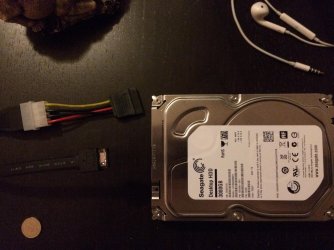
eSata ports are on the PC and you connect the disk with an eSata enclosure. The cable looks like this:


You use bare bone disks in the enclosure because there are very few (expensive) external disks in a housing that come with an eSata connector. But you have to have an eSata port on your PC in the first place.


Thank you so much indeed, although I am still a little bit confused with the cables used to connect internal disks as external disks to a USB port of PC, and to connect external disks as internal disk to eSata port of PC. I think the faulty is not from my side. However, you only show me the images without getting a change to get one, and try it. Like telling a person how to drive a car, and he never ever sat in one. So, be a little bit patient with me.


So, could you please take some of your precious time out and go through my points below, and address these points for mine, and don't ignore them?

1- what is mentioned in my scree shot below is correct?
357883d1430560730-ssds-better-external-ssd-internal-ssd-usb3.0-esata-cable.jpg


2- the usb3_external_sata_cable in the first image above is a different two-sided cable(two different connectors). One connector is eSata to be connected to the eSata of a PC, and the other one is USB to be connected to USB 3.0 interface port of a disk. However, the other Coboc Model SC-SATA3 below is a a same two-sided cable(two same connectors), both sides look eSata connectors.
View attachment 357933

3- there is a difference in eSata connector side in both two-sided cables. The eSata connector of usb3_external_sata_cable looks different from the eSata connector of the SC-SATA3?


4-
You use bare bone disks in the enclosure because there are very few (expensive) external disks in a housing that come with an eSata connector. But you have to have an eSata port on your PC in the first place.

You mean with 'bare bone disks' with ALL of those disks are installed internally(locally) into an eSata interface port inside a laptop? So, they don't have USB interface port, in order to let them be connected externally to a USB interface port of PC, then they needs to be inserted to a enclosure, from which we can get output of USB interface port which then can be connected to USB port of PC.

5- I really don't see any eSata port on the case of my laptop, such as USB3, USB2, and other connectors, such VGA, and HDMI, and so on.
So, I don't know if my existing internal Toshiba HDD drive is connected to an eSata interface port of my laptop or not. Yes. I was told that my HP Pavilion dv6-6093ex Entertainment Notebook PC support does NOT have eSATA/USB combination port.. Moreover, What I know is that an eSata port can be a port inside a PC, and not shown in the left/right side of the case of a PC like USB3/2. As a result, if I want to convert my existing internal Toshiba HDD drive as an external HDD to be connected to a USB 3.0/2.0 port, how could I do as long as my existing internal Toshiba HDD drive has only eSata interface port, or otherwise it cannot be installed inside my laptop via eSata port. how can I use my local internal HDD as an external Hard disk drive. I think all internal hard disks have only an eSata interface port, and not a USB 3.0 interface port. So, Which kind of cable would I need to attach my HDD to a USB3 port?

6- I have never ever saw a local(internal) HDD for a laptop, even the Internal Toshiba HDD for my laptop, I didn't see it. ALL disks I saw external Western Digital Hard Disk Drives(Portable Hard Drive), and all of them have USB Interface port.

7-
I think you are still mixing things up. Any disk can be used as an external disk or internal disk - if the form factor fits (e.g. you cannot put a 3.5" disk into a laptop but into a desktop).

357884d1430608696-ssds-better-external-ssd-internal-ssd-usb-3.0-interface-port.jpg


357885d1430608696-ssds-better-external-ssd-internal-ssd-usb-cable.jpg


I don't know if such (External Portable) external Western Digital Hard Disk Drives(Portable Hard Drive) whose screen shots are above can be fitted into inside my laptop 2.5 inch hard drive bay or not. There is no dimensions of that external Western Digital Hard Disk Drives(Portable Hard Drive). If they could be fitted to it, then which kind of cable would I need to attach my HDD to a USB3 port?
 

My Computer My Computer

At a glance

Windows 7 Home Premium 64BitIntel Core i5, 2.3GHzDDR3- 6GBIntel Graphics Family, Radeon HD 6770M
Computer type
Laptop
Computer Manufacturer/Model Number
HP, Pavilion
OS
Windows 7 Home Premium 64Bit
CPU
Intel Core i5, 2.3GHz
Motherboard
Hewlett-Packard- Model 1657
Memory
DDR3- 6GB
Graphics Card(s)
Intel Graphics Family, Radeon HD 6770M
Hard Drives
Toshiba 700GB
Antivirus
Microsot Secuirty Eessentials
Browser
MS IE, Google Chrom, and FireFox
1- what is mentioned in my scree shot below is correct?
it is not correct:
1 - it is not eSATA it is SATA connector, this is connected to SATA device like an HDD or SSD
2 - USB connects to usb port on your laptop

this is just a conversion cable to connect SATA device to PC using USB port.

Serial ATA - Wikipedia, the free encyclopedia

I don't know if such (External Portable) external Western Digital Hard Disk Drives(Portable Hard Drive) whose screen shots are above can be fitted into inside my laptop 2.5 inch hard drive bay or not.

This is external drive, it's a HDD inside a HDD enclosure - all you want is HDD enclosure or the cable from 1st point
 

My Computer My Computer

At a glance

w7 ultimate 64-bit sp1i5 2500K @4.52x4GB G.Skill Ripjaws-X 2,133 CL9GTX 560Ti
Computer type
PC/Desktop
Computer Manufacturer/Model Number
custom build
OS
w7 ultimate 64-bit sp1
CPU
i5 2500K @4.5
Motherboard
MSI P67A-GD65 rev2
Memory
2x4GB G.Skill Ripjaws-X 2,133 CL9
Graphics Card(s)
GTX 560Ti
Sound Card
on board
Monitor(s) Displays
BenQ G2410HD
Screen Resolution
1920x1080
Hard Drives
Samsung 2.5-Inch 250 GB 850 EVO
PSU
BeQuiet 600W
Keyboard
K65
Mouse
Razer Deathadder Ergonomic Gaming Mouse
Internet Speed
35Mbps
You don't need an Esata enclosure if you want to use Esata. Here is how I do it:

Esata connections.jpg

The cable is Esata to Sata (Sata II capable).

Esata power supply.jpg

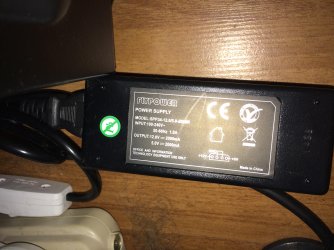
Power supply: Connected to mains, molex end, which in turn has a molex to sata power converter. The white switch - an electrician installed it, $3 USD for switch and workmanship.
 

My Computer My Computer

At a glance

Windows 7 Ultimate x64 SP1AMD Phenom 2 1090T2x8GB Kingston HyperX Fury Black 1600Mhz Unga...MSI GTX 970 Gaming 4G
Computer type
PC/Desktop
Computer Manufacturer/Model Number
Custom Build
OS
Windows 7 Ultimate x64 SP1
CPU
AMD Phenom 2 1090T
Motherboard
Gigabyte GA-890FXA-UD5
Memory
2x8GB Kingston HyperX Fury Black 1600Mhz Unganged
Graphics Card(s)
MSI GTX 970 Gaming 4G
Sound Card
Realtek On-Board HD 7.1 Audio / Logitech G35
Monitor(s) Displays
3xAcer GD245HQ
Screen Resolution
1920x1080
Hard Drives
Samsung 850 Pro 512GB SSD - OS /
WD Caviar Black SATA 3 - 1 TBx2 - Dynamic RAID 0 /
WD Caviar Green SATA 2 - 640GBx2 - Dynamic RAID 0 /
WD Caviar Green SATA 2 - 640GB - Internal Backup /
Seagate Barracude SATA 3 - 3TB - External Backup/ Sync
PSU
HighPower 1000W
Case
Cooler Master HAF 932
Cooling
Noctua NH-D14
Keyboard
Logitech G19
Mouse
Logitech G500
Internet Speed
100/4 Mbit Cable (100GB quota)
Antivirus
ZoneAlarm Extreme Security / MBAM Pro / MBAE Free / SAS Free
Browser
IE 11 - Firefox - Chrome
Other Info
Logitech F710/ G27/ G940/ Z5500 // TrackIR 5 // Nvidia 3D Surround Vision
Back
Top