
Which temps should I trust?

hatehereyes

New member
Member
VIP
Local time
10:33 PM
Messages
37
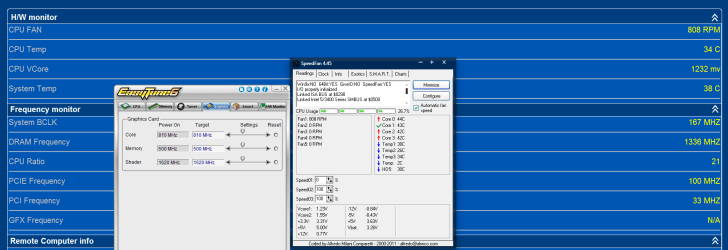
Usually I pay attention to the SpeedFan cpu temps but then the other day I downloaded Gigabyte's Cloud OC tool and I noticed that it's reading my temps around 35c which is 10degrees cooler than what SpeedFan tells me. With summer temps around 90/100 and I don't usually run my AC, I idle around 48/50c and load temps are about 65.

So Speedfan temp readings look more believable but this is a Gigabyte board and Cloud OC is Gigabyte software...
 

Attachments
  • Capture.PNG
    Capture.PNG
    41.6 KB · Views: 36

My Computer

Computer Manufacturer/Model Number
Gigabyte
OS
Windows 7 Ultimate
CPU
Core i5
Motherboard
Gigabyte P55M-UD2
Memory
Kingston HyperXBlu 8GB DDR3 1333MH/4gb Avexir AVD3U13330902G
Graphics Card(s)
Nvidia GT520 1gb
Monitor(s) Displays
Samsung SyncMaster P2770HD/Vizio 26in. Monitor
Screen Resolution
1920x1080/1920x1200
Hard Drives
120gb OCZ Agility 3
300gb Western Digital Velociraptor
1tb Western Digital Black
1tb Western Digital Green
1tb Seagate Spinpoint

2x 320gb Western Digital Caviar
PSU
Thermaltake 750w
Case
Antec Mini P180
Cooling
Cooler Master V8
Keyboard
Apple Wired Keyboard with Number Pad
Mouse
Logitech MX518
I would trust speedfan. My MSI motherboard shows temperatures in bios that are much higher than the actual temperature also.
 

My Computer

Computer Manufacturer/Model Number
Homebuilt
OS
Windows 7 Professional 64
CPU
i5 2500k
Motherboard
MSI p67-gd55
Memory
8gb gskill ripjaws, 1600
Graphics Card(s)
gtx 560
Monitor(s) Displays
Acer G215HV
Hard Drives
Seagate Barracuda 1tb 7200 rpm
PSU
Thermaltake 750W Bronze
Case
Antec DF85
Cooling
Air
Thanks for the reply. I just realized the "Temp 1 and Temp 3" in SpeedFan are the same as the CPU and System/Case temp so I guess I should trust SpeedFan
 

My Computer

Computer Manufacturer/Model Number
Gigabyte
OS
Windows 7 Ultimate
CPU
Core i5
Motherboard
Gigabyte P55M-UD2
Memory
Kingston HyperXBlu 8GB DDR3 1333MH/4gb Avexir AVD3U13330902G
Graphics Card(s)
Nvidia GT520 1gb
Monitor(s) Displays
Samsung SyncMaster P2770HD/Vizio 26in. Monitor
Screen Resolution
1920x1080/1920x1200
Hard Drives
120gb OCZ Agility 3
300gb Western Digital Velociraptor
1tb Western Digital Black
1tb Western Digital Green
1tb Seagate Spinpoint

2x 320gb Western Digital Caviar
PSU
Thermaltake 750w
Case
Antec Mini P180
Cooling
Cooler Master V8
Keyboard
Apple Wired Keyboard with Number Pad
Mouse
Logitech MX518
I'd like to add something, I agree with alpalpa by going with speendfan, but if you flash your bios to the latest version,then the readings the boards extra's will give you will be as accurate as you can get, for example, asus has the AI suite, so u can use MSI's features if you find it easier.
 

My Computer

Computer type
PC/Desktop
Computer Manufacturer/Model Number
Custom built
OS
64bit Windows 10
CPU
Intel i9
Motherboard
MSI X299 Carbon pro
Memory
64g-8x8gig DDR4 3600
Graphics Card(s)
Asus ROg Strix 1080ti
Monitor(s) Displays
Samsung 49" Odyssey g9
Screen Resolution
5210x1440
Hard Drives
1 x 512GB m.2 OS Drive
2 x 512gb ssd
1 x 2tb

4x 1TB's
PSU
Corsair AX1200w
Case
Silverstone TJ11 B-W
Cooling
AIC
Keyboard
Asus Rog Claymore 2
Mouse
Asus Rog Apatha
Internet Speed
1gb Fibre
Its my opinion but all times i have used speedfan (laptops and desktops) the temps have been all wrong (-130 110c etc)

but thats my results.
 

My Computer

Computer Manufacturer/Model Number
CGR Watsonator Custom rig
OS
Genuine Windows 7 Home Premium x64
CPU
AMG Athlon II X2 255 3.1/2MB/2000MHz 45nm AM3
Motherboard
Gigabyte GA-MA78LMT-S2 AM3, 760G, Ultra Durable 3, M-ATX
Memory
2X 4GB Kingston DDR3 1066MHz @ 1600MHz Dual Channel
Graphics Card(s)
HIS HD Radeon 7770 GHz Edition iCooler Core: 1000MHz
Sound Card
Genius Sound Maker Value 5.1
Monitor(s) Displays
Dell E2311H DVI/VGA 5ms response, 1080p
Screen Resolution
1920x1080 @ 60Hz
Hard Drives
Western Digital Caviar Blue 500GB 16MB Cache 7200rpm SATA III
PSU
Cooler Master eXtreme Power Plus 700w
Case
Lian-Li PC-6010 With Side Window
Cooling
Aywun A4 80mm fan
Keyboard
Logitech K120 Wired Keyboard
Mouse
Logitech K120 Wired Mouse
Internet Speed
802.11N 300Mbps+ ADSL2+ Max 12.12Mbps
Other Info
Speakers: Logitech LS21 2.1 Satellites + Sub woofer

AMD Catalyst 12.11 BETA
Linksys x2000 Dual Band Wireless N 300Mbps ADSL2+
LiteON CD/DVD Player


GAME PERFORMANCE:
Battlefield 3: 41 FPS Ultra 1x AA @ 1980x1080
Mass Effect 2 and 3: 60 FPS Highest 4x AA @ 1920x1080
Counter Strike Source (and other Valve games):
300 FPS (max FPS in game) Highest settings 8x AA 16x AF @ 1920x1080!!!
You can always cross check with AIDA64 - choose the app that agrees with aida.


Its my opinion but all times i have used speedfan (laptops and desktops) the temps have been all wrong (-130 110c etc)

but thats my results.

It's picky with the chipsets it supports. But yeah, when it gets it wrong - it gets it wrong. But when it's right - it's right.
 

My Computer

Computer type
PC/Desktop
Computer Manufacturer/Model Number
Systems by SmartEyeball
OS
8 Pro x64
CPU
i7 3770K 4.6GHz
Motherboard
ASUS P8Z77 WS
Memory
16GB G.Skill Trident X 2666mhz
Graphics Card(s)
x2 EVGA 780 Ti Superclocked SLI
Sound Card
SB X-FI Surround 5.1 PRO USB / ATH-AD900 Headphones
Monitor(s) Displays
x3 Dell U2410 / 58" Samsung
Screen Resolution
5760*1200/ 1920*1200
Hard Drives
2x Intel 520 240GB (RAID 0) * 2x WD Caviar Blacks 2TB (RAID 0) * 2TB WD Caviar Black * Sony Optirac DVD
PSU
Silverstone Strider Evolution 1200W
Case
Thermaltake Level 10 GT Snow Edition
Cooling
Noctua NH-D14
Keyboard
Topre Realforce // Ducky Shine MX Black // Filco Ninja TKL
Mouse
Thermaltake Theron (Highly Recommended) + Razer Imperator
Antivirus
MSE
Browser
IE, FF, WaterFox
Other Info
GT Extreme V2 Sim Racing Cockpit + 40" LCD and K/B Mouse stand ▼
Fanatec CSR Elite Wheel + Clubsport V1 Pedals + CSR shifter/7G-H ▼Saitek X52 Pro ▼ TrackIR 5 Pro
Buttkicker v2 Seat Rumbler with Dedicated 5.1 and Sub Woofer attached to frame ▼
=
Bloody Big Grin
Thanks. I downloaded the trial version of AIDA64 and it's almost identical to EVEREST with some minor differences.

Looking at it, there is a CPU Temp and then separate core temps. Should I focus on the individual core temps instead of the "CPU" temp?
 

Attachments

  • Capture.PNG
    Capture.PNG
    63 KB · Views: 22

My Computer

Computer Manufacturer/Model Number
Gigabyte
OS
Windows 7 Ultimate
CPU
Core i5
Motherboard
Gigabyte P55M-UD2
Memory
Kingston HyperXBlu 8GB DDR3 1333MH/4gb Avexir AVD3U13330902G
Graphics Card(s)
Nvidia GT520 1gb
Monitor(s) Displays
Samsung SyncMaster P2770HD/Vizio 26in. Monitor
Screen Resolution
1920x1080/1920x1200
Hard Drives
120gb OCZ Agility 3
300gb Western Digital Velociraptor
1tb Western Digital Black
1tb Western Digital Green
1tb Seagate Spinpoint

2x 320gb Western Digital Caviar
PSU
Thermaltake 750w
Case
Antec Mini P180
Cooling
Cooler Master V8
Keyboard
Apple Wired Keyboard with Number Pad
Mouse
Logitech MX518
The cpu temps are used as a guide to the overall heat, so watch it, cause it's the hole cpu you need to look at,not just one core,right? :D
 

My Computer

Computer type
PC/Desktop
Computer Manufacturer/Model Number
Custom built
OS
64bit Windows 10
CPU
Intel i9
Motherboard
MSI X299 Carbon pro
Memory
64g-8x8gig DDR4 3600
Graphics Card(s)
Asus ROg Strix 1080ti
Monitor(s) Displays
Samsung 49" Odyssey g9
Screen Resolution
5210x1440
Hard Drives
1 x 512GB m.2 OS Drive
2 x 512gb ssd
1 x 2tb

4x 1TB's
PSU
Corsair AX1200w
Case
Silverstone TJ11 B-W
Cooling
AIC
Keyboard
Asus Rog Claymore 2
Mouse
Asus Rog Apatha
Internet Speed
1gb Fibre
That's what I was thinking also but I just wanted to make sure since speedfan only shows the core temps mainly and Temps 1-3 don't specify what sensor it is.
 

My Computer

Computer Manufacturer/Model Number
Gigabyte
OS
Windows 7 Ultimate
CPU
Core i5
Motherboard
Gigabyte P55M-UD2
Memory
Kingston HyperXBlu 8GB DDR3 1333MH/4gb Avexir AVD3U13330902G
Graphics Card(s)
Nvidia GT520 1gb
Monitor(s) Displays
Samsung SyncMaster P2770HD/Vizio 26in. Monitor
Screen Resolution
1920x1080/1920x1200
Hard Drives
120gb OCZ Agility 3
300gb Western Digital Velociraptor
1tb Western Digital Black
1tb Western Digital Green
1tb Seagate Spinpoint

2x 320gb Western Digital Caviar
PSU
Thermaltake 750w
Case
Antec Mini P180
Cooling
Cooler Master V8
Keyboard
Apple Wired Keyboard with Number Pad
Mouse
Logitech MX518
Personally I only use the temp monitoring software that I get with my board, and I just watch the main temp. So I dont have any experience with speedfan.
 

My Computer

Computer type
PC/Desktop
Computer Manufacturer/Model Number
Custom built
OS
64bit Windows 10
CPU
Intel i9
Motherboard
MSI X299 Carbon pro
Memory
64g-8x8gig DDR4 3600
Graphics Card(s)
Asus ROg Strix 1080ti
Monitor(s) Displays
Samsung 49" Odyssey g9
Screen Resolution
5210x1440
Hard Drives
1 x 512GB m.2 OS Drive
2 x 512gb ssd
1 x 2tb

4x 1TB's
PSU
Corsair AX1200w
Case
Silverstone TJ11 B-W
Cooling
AIC
Keyboard
Asus Rog Claymore 2
Mouse
Asus Rog Apatha
Internet Speed
1gb Fibre
Now that I know watching the core temps aren't too important as I have the overall CPU temp, I don't need to worry about load temps too much.
 

My Computer

Computer Manufacturer/Model Number
Gigabyte
OS
Windows 7 Ultimate
CPU
Core i5
Motherboard
Gigabyte P55M-UD2
Memory
Kingston HyperXBlu 8GB DDR3 1333MH/4gb Avexir AVD3U13330902G
Graphics Card(s)
Nvidia GT520 1gb
Monitor(s) Displays
Samsung SyncMaster P2770HD/Vizio 26in. Monitor
Screen Resolution
1920x1080/1920x1200
Hard Drives
120gb OCZ Agility 3
300gb Western Digital Velociraptor
1tb Western Digital Black
1tb Western Digital Green
1tb Seagate Spinpoint

2x 320gb Western Digital Caviar
PSU
Thermaltake 750w
Case
Antec Mini P180
Cooling
Cooler Master V8
Keyboard
Apple Wired Keyboard with Number Pad
Mouse
Logitech MX518
You can always cross check with AIDA64 - choose the app that agrees with aida.


Its my opinion but all times i have used speedfan (laptops and desktops) the temps have been all wrong (-130 110c etc)

but thats my results.

It's picky with the chipsets it supports. But yeah, when it gets it wrong - it gets it wrong. But when it's right - it's right.


I recommend personally CPUID Hardware Monitor (from the makers of CPU-Z) and GPU-Z for my graphics card monitoring
 

My Computer

Computer Manufacturer/Model Number
CGR Watsonator Custom rig
OS
Genuine Windows 7 Home Premium x64
CPU
AMG Athlon II X2 255 3.1/2MB/2000MHz 45nm AM3
Motherboard
Gigabyte GA-MA78LMT-S2 AM3, 760G, Ultra Durable 3, M-ATX
Memory
2X 4GB Kingston DDR3 1066MHz @ 1600MHz Dual Channel
Graphics Card(s)
HIS HD Radeon 7770 GHz Edition iCooler Core: 1000MHz
Sound Card
Genius Sound Maker Value 5.1
Monitor(s) Displays
Dell E2311H DVI/VGA 5ms response, 1080p
Screen Resolution
1920x1080 @ 60Hz
Hard Drives
Western Digital Caviar Blue 500GB 16MB Cache 7200rpm SATA III
PSU
Cooler Master eXtreme Power Plus 700w
Case
Lian-Li PC-6010 With Side Window
Cooling
Aywun A4 80mm fan
Keyboard
Logitech K120 Wired Keyboard
Mouse
Logitech K120 Wired Mouse
Internet Speed
802.11N 300Mbps+ ADSL2+ Max 12.12Mbps
Other Info
Speakers: Logitech LS21 2.1 Satellites + Sub woofer

AMD Catalyst 12.11 BETA
Linksys x2000 Dual Band Wireless N 300Mbps ADSL2+
LiteON CD/DVD Player


GAME PERFORMANCE:
Battlefield 3: 41 FPS Ultra 1x AA @ 1980x1080
Mass Effect 2 and 3: 60 FPS Highest 4x AA @ 1920x1080
Counter Strike Source (and other Valve games):
300 FPS (max FPS in game) Highest settings 8x AA 16x AF @ 1920x1080!!!
Back
Top