J jinglejangle New member Local time 1:47 PM Messages 2 Aug 31, 2010 #1 Really weird, see attachment.. Tried resetting the icon cache. It's like this on all of my desktop icons.. any ideas? Attachments Untitled.jpg 9.5 KB · Views: 5 My Computer My Computer At a glance Windows 7 Ultimate x64OSWindows 7 Ultimate x64
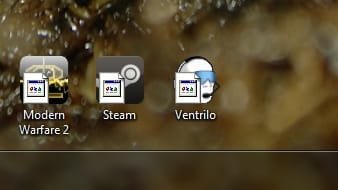
Really weird, see attachment.. Tried resetting the icon cache. It's like this on all of my desktop icons.. any ideas?
Brink Administrator Staff member Local time 12:47 PM Messages 74,945 Location Oklahoma Aug 31, 2010 #2 Hello JingleJangle, and welcome to Seven Forums. It looks like your shortcut arrow overlay icon got messed up somehow. You can use either method in the tutorial below to restore the arrow icon. Method Two is the easiest way with the program. http://www.sevenforums.com/tutorials/3606-shortcut-arrow-change-remove-restore.html Hope this helps, Shawn My Computer My Computer At a glance 64-bit Windows 11 Pro for WorkstationsIntel i7-8700K OC'd to 5 GHz64 GB (4x16GB) G.SKILL TridentZ RGB DDR4 3600...ASUS ROG-STRIX-GTX1080TI-O11G-GAMINGComputer typePC/DesktopComputer Manufacturer/Model NumberSelf built customOS64-bit Windows 11 Pro for WorkstationsCPUIntel i7-8700K OC'd to 5 GHzMotherboardASUS ROG Maximus XI Formula Z390Memory64 GB (4x16GB) G.SKILL TridentZ RGB DDR4 3600 MHzGraphics Card(s)ASUS ROG-STRIX-GTX1080TI-O11G-GAMINGSound CardIntegratedMonitor(s) Displays2 x Samsung Odyssey G7 27"Screen Resolution2560x1440Hard Drives1TB Samsung 990 PRO M.2, 4TB Samsung 990 PRO PRO M.2, TerraMaster F8 SSD Plus NASPSUSeasonic Prime Titanium 850WCaseThermaltake Core P3CoolingCorsair Hydro H115iKeyboardLogitech wireless K800MouseLogitech MX Master 4Internet Speed2 Gb/s Download and 100 Mb/s UploadAntivirusMalwarebyte Anti-Malware PremiumBrowserGoogle ChromeOther InfoLogitech Z625 speaker system, Logitech BRIO 4K Pro webcam, HP Color LaserJet Pro MFP M477fdn, APC SMART-UPS RT 1000 XL - SURT1000XLI, Galaxy S23 Plus phone
Hello JingleJangle, and welcome to Seven Forums. It looks like your shortcut arrow overlay icon got messed up somehow. You can use either method in the tutorial below to restore the arrow icon. Method Two is the easiest way with the program. http://www.sevenforums.com/tutorials/3606-shortcut-arrow-change-remove-restore.html Hope this helps, Shawn
J jinglejangle New member Thread Starter Local time 1:47 PM Messages 2 Aug 31, 2010 #3 Great, thank you for the reply, worked perfect My Computer My Computer At a glance Windows 7 Ultimate x64OSWindows 7 Ultimate x64
Brink Administrator Staff member Local time 12:47 PM Messages 74,945 Location Oklahoma Aug 31, 2010 #4 You're most welcome. My Computer My Computer At a glance 64-bit Windows 11 Pro for WorkstationsIntel i7-8700K OC'd to 5 GHz64 GB (4x16GB) G.SKILL TridentZ RGB DDR4 3600...ASUS ROG-STRIX-GTX1080TI-O11G-GAMINGComputer typePC/DesktopComputer Manufacturer/Model NumberSelf built customOS64-bit Windows 11 Pro for WorkstationsCPUIntel i7-8700K OC'd to 5 GHzMotherboardASUS ROG Maximus XI Formula Z390Memory64 GB (4x16GB) G.SKILL TridentZ RGB DDR4 3600 MHzGraphics Card(s)ASUS ROG-STRIX-GTX1080TI-O11G-GAMINGSound CardIntegratedMonitor(s) Displays2 x Samsung Odyssey G7 27"Screen Resolution2560x1440Hard Drives1TB Samsung 990 PRO M.2, 4TB Samsung 990 PRO PRO M.2, TerraMaster F8 SSD Plus NASPSUSeasonic Prime Titanium 850WCaseThermaltake Core P3CoolingCorsair Hydro H115iKeyboardLogitech wireless K800MouseLogitech MX Master 4Internet Speed2 Gb/s Download and 100 Mb/s UploadAntivirusMalwarebyte Anti-Malware PremiumBrowserGoogle ChromeOther InfoLogitech Z625 speaker system, Logitech BRIO 4K Pro webcam, HP Color LaserJet Pro MFP M477fdn, APC SMART-UPS RT 1000 XL - SURT1000XLI, Galaxy S23 Plus phone