Who is running and will continue to run XP / W2003 server

My Computers My Computers

  • At a glance

    WIN10AMD Ryzen 5 3600 6-Core Processor 3.59 GHz16.0 GB
    Computer type
    PC/Desktop
    Computer Manufacturer/Model Number
    PowerSpec G164
    OS
    WIN10
    CPU
    AMD Ryzen 5 3600 6-Core Processor 3.59 GHz
    Memory
    16.0 GB
    Internet Speed
    VERY FAST>>>!!!
  • Antivirus
    ESET Security Premium
XP is dead and buried for me, XP takes way to long to reinstall and I never liked XP much at all anyway, no offence to anyone still using it....

I just tore apart my last original P4 XP machine so I could use the old box for one of my still very useful dual core's that I had laying around. I have a new ASUS socket 775 DDR3-DDR2 combo board and some GSkill DDR3 coming in the mail today for that one. It's going to have Windows 7 Ultimate on it and it's going to be my garage machine :geek:.

After that I'm setting up my old Dell P4 machine to use Windows VAIL server software, I had to add a 250GB drive to that one because VAIL requires at least 160GB. Those were the last two XP machines I had but XP's time has come and gone,...it's time to move on. :)
 

My Computer My Computer

At a glance

Windows 7 Ult, Windows 8.1 Pro,Q9650-4.275GHz, E8600 4.5GHz, E6750-3.8GHzG.Skill PC2 9600 1200Mhz 5 5 5 15 2TGTX480
Computer type
PC/Desktop
Computer Manufacturer/Model Number
Home built
OS
Windows 7 Ult, Windows 8.1 Pro,
CPU
Q9650-4.275GHz, E8600 4.5GHz, E6750-3.8GHz
Motherboard
Evga 780i FTW
Memory
G.Skill PC2 9600 1200Mhz 5 5 5 15 2T
Graphics Card(s)
GTX480
Sound Card
Asus Xonar D2
Monitor(s) Displays
HannsG
Screen Resolution
1680X1050
Hard Drives
GSkill Phoenix Pro 120GB SSD
PSU
ThermalTake Toughpower 1000Watt modular
Case
ThermalTake XaserV
Cooling
Xigmatek S1283
Keyboard
Logitech G15
Mouse
Logitech G9
Internet Speed
T1
my current laptop and desktop are W7 Pro.

But I have an old laptop with broken screen hooked up to my TV. I use that to watch Netflix etc. and that has XP and probably will have till it dies. If I had to use it for real stuff, I sure would switch to 7.

at work (where I do most PC time and most complex work) we still have XP and I hate hate hate it. Probably more due the fact that my applicatiosn have 8 GB recommended and I'm tinkering around with a 32-bit system... Frequent crashes etc.

But at work I also needed to install all kind of goofy tools that are standard in W7 (screen capture etc.) and my desktop looks very cluttered without the fancy W7 task bar.
 

My Computer My Computer

At a glance

W7 Pro 64Intel i3 3220 @ 3.3 GHz2x8GB DDR 3 1600 Kingstononboard
Computer Manufacturer/Model Number
homemade
OS
W7 Pro 64
CPU
Intel i3 3220 @ 3.3 GHz
Motherboard
ASRock H77M
Memory
2x8GB DDR 3 1600 Kingston
Graphics Card(s)
onboard
Sound Card
onboard
Monitor(s) Displays
two 21" LCD
Hard Drives
128 GB Samsung 830
PSU
OCZ400MXSP
Cooling
Stock
Internet Speed
DSL
and my desktop looks very cluttered without the fancy Windows 7 task bar.
Make a new folder (on your desktop) with sub-folders in it. Clear the 'clutter' and get organized ;)
 

My Computer My Computer

At a glance

Windows 7 Ultimate 32bit SP1Intel(R) Core(TM)2 Quad CPU @ 2.40GHz, 2400 MHz4 GBATI Radeon HD 2600 Pro
Computer type
PC/Desktop
Computer Manufacturer/Model Number
Bruce ... somewhere in his 40's
OS
Windows 7 Ultimate 32bit SP1
CPU
Intel(R) Core(TM)2 Quad CPU @ 2.40GHz, 2400 MHz
Motherboard
INTEL/D975XBX2
Memory
4 GB
Graphics Card(s)
ATI Radeon HD 2600 Pro
Monitor(s) Displays
Samsung SyncMaster 914v
Screen Resolution
1280 x 1024
Hard Drives
2/500GB each ... ST3500630AS ATA Device.
One is not connected
PSU
Rocketfish 700 W
Case
G.Skill Gigabyte Chassis
Keyboard
Standard PS/2 Keyboard
Mouse
Microsoft PS/2 Mouse
Internet Speed
DSL
Antivirus
Avira Internet Security
Browser
IE 11
Other Info
ATI HDMI Audio
I used XP from launchdate, until starting with the Beta of Seven, from that moment I knew XP for me was a dead duck, old hat, call it what you will, yes I had some software that didn't work, but its no good living in the past, bin it.

Theres plenty of excellent software on the market far in advance of the old stuff, maybe you can't afford it, but there is the freeware option in many fields.

No one really needs to be running old and unsupported software, its strange but I've found its the older silver surfer that is more up-to-date, than the younger ones, they seem to find it harder to accept change.

Odd very odd.
 

My Computer My Computer

At a glance

Vista Ultimate 32 bit, Win 7 Pro 32 bit, Win ...Intel i5 CPU 750 @ 2.67 GHZ, OC 3.7 GHZ4 GigNvidia GeForce GTS450
Computer Manufacturer/Model Number
Home build.
OS
Vista Ultimate 32 bit, Win 7 Pro 32 bit, Win 7 Pro 64 bit
CPU
Intel i5 CPU 750 @ 2.67 GHZ, OC 3.7 GHZ
Motherboard
Asus P7P55D
Memory
4 Gig
Graphics Card(s)
Nvidia GeForce GTS450
Monitor(s) Displays
Acer 24"
Screen Resolution
1440 x 900
Hard Drives
1000 GIG
1000 GIG
PSU
650
Case
Antec Nine Hundred Two
Internet Speed
14 MB (APPROX)
I use XP mode on VMWare
Either that's a typo, or that would be EXTREMELY redundant.


You heard of XP mode on VirtualPC?

Well, I dumped VirtualPC because it ran slow and installed XP mode using VMWare.

Run XP Mode on Windows 7 Machines Without Hardware Virtualization - How-To Geek
I don't think you are getting what I am asking. XP Mode IS a VM already...somewhat like VMWare. You don't need both to virtualize XP. If you want to virtualize XP, you can use XP Mode, assuming you have a compatable Windows 7 version. If you need to virtualize XP and other OSes, you'll need a full-blown VM app, like VMWare, VirtualPC, etc. You don't need both just to virtualize XP. VMWare shouldn't be entering the picture if you just want to have an XP VM on your existing system using XP Mode.
 

My Computer My Computer

At a glance

Windows 7 Ultimate x64 SP1Intel Core i7-260012 GB Patriot Extreme DDR3-1333Nvidia GTX 470
OS
Windows 7 Ultimate x64 SP1
CPU
Intel Core i7-2600
Motherboard
Gigabyte GA-P67A-UD3P-B3
Memory
12 GB Patriot Extreme DDR3-1333
Graphics Card(s)
Nvidia GTX 470
Monitor(s) Displays
Dell UltraSharp 2209WA
Hard Drives
OCZ Agility3 240 GB, WD5001AALS, WD7501AALS
PSU
OCZ ModStream 700W
Case
CoolerMaster HAF 912 Advanced
Cooling
CoolerMaster Hyper 212 Plus
i will keep a workstation wth xp pro running on a dell gx 520 its ideal for the guest room:)
 

My Computer My Computer

At a glance

Operating System : Windows 7 Home Premium Edi...Processor : Intel Core 2 Quad Q8300 @ 2500 MHzPhysical Memory :8GB Corsair4x 2GB 800MHz C5 ...Video Card : XFX 6700 AMD
Computer Manufacturer/Model Number
packard bell IXTREME M5722
OS
Operating System : Windows 7 Home Premium Edition 6.01.7600 SP1 (x64)
CPU
Processor : Intel Core 2 Quad Q8300 @ 2500 MHz
Motherboard
Mainboard : Packard Bell (Acer EG43M )
Memory
Physical Memory :8GB Corsair4x 2GB 800MHz C5 DDR2
Graphics Card(s)
Video Card : XFX 6700 AMD
Monitor(s) Displays
Maestro 234DL - BenQ V2220 - BenQ VW2420H
Screen Resolution
Current Display :1920x1080p pixels at 60 Hz in HD LED
Hard Drives
Hard Disks : WDC (1000 GB)
Drive C: (Hard Disk) : 428 GB available on 491 GB
Drive D: (Hard Disk) : 426 GB available on 492 GB
SAMSUNG spinpoint HD103SJ 1000.2 GB
(X 2) KINGSTON SSD NOW V 30GB
PSU
XFX ProSeries 550W PSU
Case
PACKARD BELL IXTREME
Cooling
System Blower Current: 150mA Air Flow16CFM ;Akasa 90mm rear
Keyboard
Gigabyte Aivia K8100
Mouse
TRUST-Wireless Laser Mouse - Carbon edition MI-7770C
Internet Speed
TP-LINK > TL-WN951N / AV500 Gigabit Powerline Adapters
Browser
chrome dev
Other Info
EXTRA COOLING>(FAN CONTROLLER) PC Bay Cooler 3 x 40mm fans; Akasa AK-HD-BL Blue hard drive cooler 2 x 40 mm fan 4500 rpm 29.7 dBA
Bios> American Megatrends Inc.
Version : P01-A1
Date : 08/31/2009
Either that's a typo, or that would be EXTREMELY redundant.


You heard of XP mode on VirtualPC?

Well, I dumped VirtualPC because it ran slow and installed XP mode using VMWare.

Run XP Mode on Windows 7 Machines Without Hardware Virtualization - How-To Geek
I don't think you are getting what I am asking. XP Mode IS a VM already...somewhat like VMWare. You don't need both to virtualize XP. If you want to virtualize XP, you can use XP Mode, assuming you have a compatable Windows 7 version. If you need to virtualize XP and other OSes, you'll need a full-blown VM app, like VMWare, VirtualPC, etc. You don't need both just to virtualize XP. VMWare shouldn't be entering the picture if you just want to have an XP VM on your existing system using XP Mode.

Wel,l I no longer have an XP Disk and key, so this is how I get to use XP. So I guess you misunderstood me, because it wouldn't make any sense to use it that way if I already had XP.
 

My Computers My Computers

  • At a glance

    WIN10AMD Ryzen 5 3600 6-Core Processor 3.59 GHz16.0 GB
    Computer type
    PC/Desktop
    Computer Manufacturer/Model Number
    PowerSpec G164
    OS
    WIN10
    CPU
    AMD Ryzen 5 3600 6-Core Processor 3.59 GHz
    Memory
    16.0 GB
    Internet Speed
    VERY FAST>>>!!!
  • Antivirus
    ESET Security Premium
Wel,l I no longer have an XP Disk and key, so this is how I get to use XP. So I guess you misunderstood me, because it wouldn't make any sense to use it that way if I already had XP.
That's the benefit of XP Mode...that you don't need your own XP license...it gives you a fully functional copy. But my point was, to use XP Mode, you don't need/shouldn't need/shouldn't use VMWare. VMWare would be if you did have your own XP license to use, and also planned on using other OSes in VMs as well.
 

My Computer My Computer

At a glance

Windows 7 Ultimate x64 SP1Intel Core i7-260012 GB Patriot Extreme DDR3-1333Nvidia GTX 470
OS
Windows 7 Ultimate x64 SP1
CPU
Intel Core i7-2600
Motherboard
Gigabyte GA-P67A-UD3P-B3
Memory
12 GB Patriot Extreme DDR3-1333
Graphics Card(s)
Nvidia GTX 470
Monitor(s) Displays
Dell UltraSharp 2209WA
Hard Drives
OCZ Agility3 240 GB, WD5001AALS, WD7501AALS
PSU
OCZ ModStream 700W
Case
CoolerMaster HAF 912 Advanced
Cooling
CoolerMaster Hyper 212 Plus
Hi all
Just a little tiddly teaser to see as much as we like W7 on this Forum who is still going to continue to run XP or Windows 2003 server on at least ONE machine - Real or Virtual and roughly for how much longer.

I am running full time a Windows 2003 server and a Windows XP pro box both as Virtual Machines and will probably run them for at least the next TWO years.

I have some old but VERY useful hardware such as a Plotter and an Archtects blueprint producing printer for which the manufacturers no longer exist but it works perfectly on the XP / 2003 server Virtual Machines.

Similarly I have an old Firewire Agfa negative (35 MM ) film scanner -- have got 1000's of old negs I want to digitise, and several Minidisc recorders who need XP to transfer music to MD. I LIKE these MD recorders and I'm not going to bin them yet.

So for me XP / W2003 server is staying AROUND. I might consolodate the XP system so I only keep W2003 server but that box is also running a Web MySQL application and a proxy VPN so I can logon to it wherever I am overseas so can get "localised" restricted content.

So although a VERY happy W7 user XP for me (and the 2003 server which is essentially the server version of XP pro) is staying around for a while even if only on a virtual machine.

Interested to hear what others keeping XP for a while are running on these machines.

Cheers
jimbo

Well, I used to work for a company that had to maintain a Win95 box because the call center had this one call center program they just wouldn't let go of and it would only work on Windows 95. While you now have the ability to do virtualizing for XP and 2003, what will come to head will mostly be software support for it in the long run.

What I found even more funny is, for instance, as hardware changes, and keeping legacy hardware as mentioned above... The problems of eventually having to abandon those legacy hardware due to the fact that certain interfaces will be lost forever, namely the old serial and parallel port interfaces. Laptops use to have serial interfaces and nowadays, you need to get a USB adapter for it, but eventually those will be relics as well.

The one thing I know that will eventually nip you in the butt will be the eventual "can't resurrect it" due to lack of legacy hardware/interface capability that visualization can't make up for.
 

My Computer My Computer

At a glance

Windows 7 Ultimate x64 and Home Premium x64Intel i7 960 (3.2 GHz Quad Core)12 Gigs (Triple Channel)Alienware OEM nVidia GTX 560 Ti (1.25 Gig)
Computer Manufacturer/Model Number
Alienware Area 51 Desktop and Dell Inspirion 17R (N7010)
OS
Windows 7 Ultimate x64 and Home Premium x64
CPU
Intel i7 960 (3.2 GHz Quad Core)
Motherboard
Alienware Intel based X58
Memory
12 Gigs (Triple Channel)
Graphics Card(s)
Alienware OEM nVidia GTX 560 Ti (1.25 Gig)
Sound Card
Creative Labs X-Fi Titanium
Monitor(s) Displays
Samsung PX2370 LED 23" Monitor
Screen Resolution
1920x1080
Hard Drives
2 320 Gig SATA in Raid 1 Configuration (System/App)
1 1 Tera SATA (Games)
1 1 Tera SATA (Data/Music/Videos)
PSU
750 Watt Power Supply
Case
Alienware Area 51 Desktop
Cooling
Liquid Cooled
Keyboard
Logitech G510
Mouse
Microsoft Trackball Explorer
Internet Speed
Cable
Wel,l I no longer have an XP Disk and key, so this is how I get to use XP. So I guess you misunderstood me, because it wouldn't make any sense to use it that way if I already had XP.
That's the benefit of XP Mode...that you don't need your own XP license...it gives you a fully functional copy. But my point was, to use XP Mode, you don't need/shouldn't need/shouldn't use VMWare. VMWare would be if you did have your own XP license to use, and also planned on using other OSes in VMs as well.

It runs sluggish for me on VirtualPC, but when I use it in VMWare it runs great.
 

Attachments

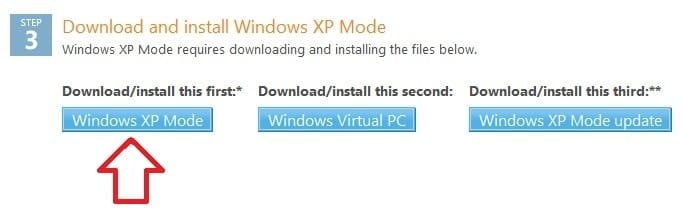
  • Download_XP-Mode.jpg
    Download_XP-Mode.jpg
    15.3 KB · Views: 2

My Computers My Computers

  • At a glance

    WIN10AMD Ryzen 5 3600 6-Core Processor 3.59 GHz16.0 GB
    Computer type
    PC/Desktop
    Computer Manufacturer/Model Number
    PowerSpec G164
    OS
    WIN10
    CPU
    AMD Ryzen 5 3600 6-Core Processor 3.59 GHz
    Memory
    16.0 GB
    Internet Speed
    VERY FAST>>>!!!
  • Antivirus
    ESET Security Premium
It runs sluggish for me on VirtualPC, but when I use it in VMWare it runs great.
So you swapped out VirtualPC, and converted/loaded the VM to a VMWare format. I see. that's all you had to say from the beginning. On a side note, if you were seeing a performance difference, you have another issue somewhere. I have two systems running XP Mode and both outperform VMWare and VirtualBox for a base XP install, if there is any difference between them. One system has Intel VT, and the other doesn't. In addition to the speed, you also give up the integration features that make XP Mode...well...XP Mode.

I can't tell you what to do, but if it was my system, I'd rather solve the issue and use XP Mode as intended, rather than frankenstein it.
 

My Computer My Computer

At a glance

Windows 7 Ultimate x64 SP1Intel Core i7-260012 GB Patriot Extreme DDR3-1333Nvidia GTX 470
OS
Windows 7 Ultimate x64 SP1
CPU
Intel Core i7-2600
Motherboard
Gigabyte GA-P67A-UD3P-B3
Memory
12 GB Patriot Extreme DDR3-1333
Graphics Card(s)
Nvidia GTX 470
Monitor(s) Displays
Dell UltraSharp 2209WA
Hard Drives
OCZ Agility3 240 GB, WD5001AALS, WD7501AALS
PSU
OCZ ModStream 700W
Case
CoolerMaster HAF 912 Advanced
Cooling
CoolerMaster Hyper 212 Plus
It runs sluggish for me on VirtualPC, but when I use it in VMWare it runs great.
So you swapped out VirtualPC, and converted/loaded the VM to a VMWare format. I see. that's all you had to say from the beginning. On a side note, if you were seeing a performance difference, you have another issue somewhere. I have two systems running XP Mode and both outperform VMWare and VirtualBox for a base XP install, if there is any difference between them. One system has Intel VT, and the other doesn't. In addition to the speed, you also give up the integration features that make XP Mode...well...XP Mode.

I can't tell you what to do, but if it was my system, I'd rather solve the issue and use XP Mode as intended, rather than frankenstein it.

So why was it so difficult for you to understand...LOL...Had you read the article in the link I sent, it would have made sense. Although, don't understand why it didn't at first.

In Linux there are many distros where the image has already been set up; (pre-installed) and you just have to add them to your virtualization program, and then your up and running. (Like XP mode)
 

My Computers My Computers

  • At a glance

    WIN10AMD Ryzen 5 3600 6-Core Processor 3.59 GHz16.0 GB
    Computer type
    PC/Desktop
    Computer Manufacturer/Model Number
    PowerSpec G164
    OS
    WIN10
    CPU
    AMD Ryzen 5 3600 6-Core Processor 3.59 GHz
    Memory
    16.0 GB
    Internet Speed
    VERY FAST>>>!!!
  • Antivirus
    ESET Security Premium
So why was it so difficult for you to understand...LOL...Had you read the article in the link I sent, it would have made sense. Although, don't understand why it didn't at first.
Because I couldn't imagine why anyone would want to switch from an integrated product to something that's bulkier and slower. It also was confusing because I asked a few times, and it took a few replies to lay it out simply. I still don't understand the change, like I said, I'd rather work on figuring out why XP Mode wasn't running properly the way it was intended.
In Linux there are many distros where the image has already been set up; (pre-installed) and you just have to add them to your virtualization program, and then your up and running. (Like XP mode)
You seem to be under the impression I don't know much about virtualization. I know Linux distros are available this way, and so are tons of Windows setups as well. I'm not sure how that fits into our discussion though.

If you really want to see something impressive with virtualization, setup a server running ESXi 4.
 

My Computer My Computer

At a glance

Windows 7 Ultimate x64 SP1Intel Core i7-260012 GB Patriot Extreme DDR3-1333Nvidia GTX 470
OS
Windows 7 Ultimate x64 SP1
CPU
Intel Core i7-2600
Motherboard
Gigabyte GA-P67A-UD3P-B3
Memory
12 GB Patriot Extreme DDR3-1333
Graphics Card(s)
Nvidia GTX 470
Monitor(s) Displays
Dell UltraSharp 2209WA
Hard Drives
OCZ Agility3 240 GB, WD5001AALS, WD7501AALS
PSU
OCZ ModStream 700W
Case
CoolerMaster HAF 912 Advanced
Cooling
CoolerMaster Hyper 212 Plus
I'm not sure how that fits into our discussion though.

Very true, but you insisted.

Good luck,
 

My Computers My Computers

  • At a glance

    WIN10AMD Ryzen 5 3600 6-Core Processor 3.59 GHz16.0 GB
    Computer type
    PC/Desktop
    Computer Manufacturer/Model Number
    PowerSpec G164
    OS
    WIN10
    CPU
    AMD Ryzen 5 3600 6-Core Processor 3.59 GHz
    Memory
    16.0 GB
    Internet Speed
    VERY FAST>>>!!!
  • Antivirus
    ESET Security Premium
Back
Top