Whole Folder heirarchy deleted by Windows instead of file

mccaths

New member
Local time
1:07 PM
Messages
4
I have had this problem a few times now and wondered if anyone else has experienced it or can shed light on this.

Firstly - not on my own computer but using a network drive at work.
(has happended on My Documents and a shared resource folder)
From Explorer I select a single file to delete and it works, select a file to move and it works fine. Then on another occasion I select the file to delete and it deletes the whole Folder structure above and below it! It comes up with the dialog e.g. 'Deleting 930 files' and before I can press cancel most have gone! It does not put any of the files or folders in the recycle bin. One time it even deleted the My Documents folder!
This has happened on about 5 occasions - at two different locations (schools) and I have had varying degrees of success with recovery from the backups.
(I am not a novice user, I know what I am doing and I definitely did not pick a folder to delete.)
Just happened to me today :cry:
 

My Computer My Computer

At a glance

Windows 7 Professional
OS
Windows 7 Professional
Do I understand you correctly. This is happing on two different computers at two different schools. Or is it your computer that you are using in two different locations.
It could help if we knew what kind of filers your are removing and from where.
 

My Computer My Computer

At a glance

Windows 10 Pro. 64/ version 1709 Windows 7 Pr...Intel i7-6800K @ 4.3Corsair Platinum 16 gig @2400EVGA GTX 1070 OC
Computer type
PC/Desktop
Computer Manufacturer/Model Number
Home made Desktop
OS
Windows 10 Pro. 64/ version 1709 Windows 7 Pro/64
CPU
Intel i7-6800K @ 4.3
Motherboard
ASUS X-99 Deluxe II
Memory
Corsair Platinum 16 gig @2400
Graphics Card(s)
EVGA GTX 1070 OC
Monitor(s) Displays
Asus 27" LED LCD/VE278Q
Screen Resolution
1920-1080 or 1280-720 HDMI
Hard Drives
INTEL SSD 730-240 Gb Sata 3.0/
PSU
EVGA Platium 1200W
Case
Phanteks Luxe Tempered Glass 8 fans/ one radiator
Cooling
XSPC/ Water Cooled CPU
Keyboard
Das 4 Professional
Mouse
Logitech M705/MX Anywhere 2-S
Internet Speed
100 mbits
Antivirus
Microsoft Security Essentials/ Malwarebytes Premium 3.0/ SAS
Browser
I.E. 11 default/Firefox/ ISP Time Warner Cable/Spectrum
Other Info
LG BluRay Burner/
Sound system-KLipsch-THX/
Icy Dock ssd Hot Swap bays.
I've seen this issue on one of my computers a couple of times, never found a way to fix it, just be extra careful when deleting files, specially when using shilft+delete bypassing recycle bin.
 

My Computer My Computer

At a glance

Microsoft Windows 10 Professional / Windows 7...Intel i5-357016GB DDR3AMD Radeon HD 7850 2GB
Computer type
PC/Desktop
OS
Microsoft Windows 10 Professional / Windows 7 Professional
CPU
Intel i5-3570
Motherboard
Lenovo Mahobay
Memory
16GB DDR3
Graphics Card(s)
AMD Radeon HD 7850 2GB
Sound Card
(1) Realtek HD Audio (2) AMD HD Audio
Monitor(s) Displays
LG LS192WS
Screen Resolution
1440 x 900 @ 32bit color
Hard Drives
(1) SUV300S37A/120G (2) ST3500413AS SATA Disk Device AHCI mode enabled.
PSU
Corsair HX620
Case
Thermaltake V4 Black Edition
Cooling
Cooler Master Hyper 212 + Artic Silver 5 on CPU/GPU
Keyboard
Dell SK-8115
Mouse
Razer Copperhead with MAPED mat (awesome!)
Internet Speed
100 Mbps up/down
Browser
Chrome
Don't use the hierarchical tree to select files to delete, open the folder and delete from within the folder instead.
 

My Computer My Computer

At a glance

Windows 7 Ultimate X64 SP1Intel i5-2550K, Differing ~4.4-4.8GHz No buil...16GB G.Skill Sniper 1866MHz @ 2133MHz 2x8GBASUS GTX650TIB-DC2OC-2GD5, (650TI Boost)
Computer type
PC/Desktop
Computer Manufacturer/Model Number
Home Built Desktop By DataTech
OS
Windows 7 Ultimate X64 SP1
CPU
Intel i5-2550K, Differing ~4.4-4.8GHz No built in GPU
Motherboard
ASUS P8Z68-V PRO/GEN3
Memory
16GB G.Skill Sniper 1866MHz @ 2133MHz 2x8GB
Graphics Card(s)
ASUS GTX650TIB-DC2OC-2GD5, (650TI Boost)
Sound Card
Onboard Realtek 5-1
Monitor(s) Displays
Samsung P2570HD
Screen Resolution
1920x1080
Hard Drives
Samsung 840 Pro 256GB SSD for OS, 500GB Seagate Constellation (Enterprise drive) for Data
PSU
Corsair HX650W
Case
Inwin Dragon Rider
Cooling
Hyper 212 EVO w/two Noctua fans, push-pull, @1300 RPM
Keyboard
E-Z Eyes, bright yellow keys with large characters
Mouse
steelseries SENSEI Laser Pro Gaming
Internet Speed
48-51Mbs Mbs down, 11 Mbs up Xfinity Cable
Antivirus
Norton Internet Security 2013
Browser
IE 10, Opera, Pale Moon if needed
Other Info
4 case fans, LG BluRay-RE, ASUS DVD-RW, Mr. Fusion power supply, 1.21 gigawatts.
Thankyou for your replies.
The two different schools were at different times in the last year. Using school computers in both cases.

I did indeed open up the folders to delete just one file from within the folder. I was part-way down the heirarchy of folders.

I did not use shift-delete

I certainly am not doing anything silly here at all. Technical help in both locations could not find what happened.

It genuinely triggers a delete of a whole folder structure that is a parent of the folder I have open. e.g. As a simplistic example Folder A has sub-folders B & C. I navigate down to open folder B, delete a file and it deletes Folder C and other files (and folders) under Folder A.
 

My Computer My Computer

At a glance

Windows 7 Professional
OS
Windows 7 Professional

My Computer My Computer

At a glance

Vista, Windows7, Mint Mate, Zorin, Windows 8from 1.6GHz Duo to i7
Computer Manufacturer/Model Number
HP, Dell, Gateway, Toshiba - 4 laptops and 2 desktops
OS
Vista, Windows7, Mint Mate, Zorin, Windows 8
CPU
from 1.6GHz Duo to i7
Monitor(s) Displays
2x HP w2207
Hard Drives
5x HDD, 7x SSD, 12x Externals
Keyboard
with trackball - no mices
Mouse
Trackball mice
Internet Speed
DSL 6000
I will add that in Win Explorer it Can Look like you have selected just one file, in the right pane of WE, but in reality the actual folder is selected. Both the right and left panes can have a highlighted effect making you THINK the File is what is ACTIVE when it is really the Folder that is ACTIVE.

Best way around all of this is to Right Click On the FILE and select Delete.
 

My Computer My Computer

At a glance

7 x64
OS
7 x64
Thanks edwar that sounds plausible. I'll make sure I watch for that in the future and right click. Shame it doesn't warn you 'you are about to delete 900 odd files are you sure?!'
I will look into the recovery with the network manager that whr suggests thanks
 

My Computer My Computer

At a glance

Windows 7 Professional
OS
Windows 7 Professional
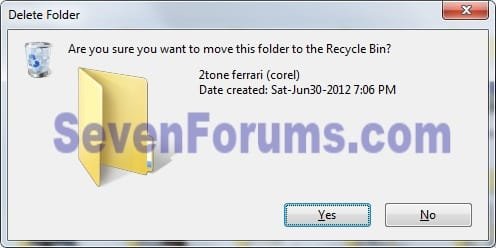
There should always be a warning dialog when you try to delete an item, like this:

Delete.jpg
Unless the recycle bin is disabled anything deleted will be there and can be restored.
 

My Computer My Computer

At a glance

Windows 7 Ultimate X64 SP1Intel i5-2550K, Differing ~4.4-4.8GHz No buil...16GB G.Skill Sniper 1866MHz @ 2133MHz 2x8GBASUS GTX650TIB-DC2OC-2GD5, (650TI Boost)
Computer type
PC/Desktop
Computer Manufacturer/Model Number
Home Built Desktop By DataTech
OS
Windows 7 Ultimate X64 SP1
CPU
Intel i5-2550K, Differing ~4.4-4.8GHz No built in GPU
Motherboard
ASUS P8Z68-V PRO/GEN3
Memory
16GB G.Skill Sniper 1866MHz @ 2133MHz 2x8GB
Graphics Card(s)
ASUS GTX650TIB-DC2OC-2GD5, (650TI Boost)
Sound Card
Onboard Realtek 5-1
Monitor(s) Displays
Samsung P2570HD
Screen Resolution
1920x1080
Hard Drives
Samsung 840 Pro 256GB SSD for OS, 500GB Seagate Constellation (Enterprise drive) for Data
PSU
Corsair HX650W
Case
Inwin Dragon Rider
Cooling
Hyper 212 EVO w/two Noctua fans, push-pull, @1300 RPM
Keyboard
E-Z Eyes, bright yellow keys with large characters
Mouse
steelseries SENSEI Laser Pro Gaming
Internet Speed
48-51Mbs Mbs down, 11 Mbs up Xfinity Cable
Antivirus
Norton Internet Security 2013
Browser
IE 10, Opera, Pale Moon if needed
Other Info
4 case fans, LG BluRay-RE, ASUS DVD-RW, Mr. Fusion power supply, 1.21 gigawatts.
Not if it's across the network and no recycle bin either.
 

My Computer My Computer

At a glance

7 x64
OS
7 x64
There was definitely no warning of deleting folders. There is a recycle bin I can access (at this location on the work computer) and I can see things that I purposely deleted in there but not these hundreds of files that spontaneously deleted.
 

My Computer My Computer

At a glance

Windows 7 Professional
OS
Windows 7 Professional
Back
Top