
Wht is This Popup?

tsram90

New member
Member
Local time
7:45 PM
Messages
46
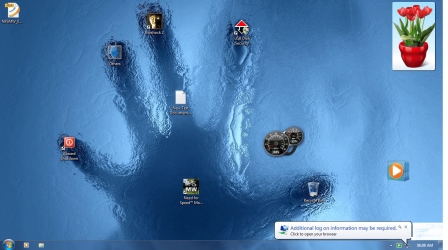
This popup ( as in attached screenshot) appears randomly in my desktop.I think it appears only when I am connected to net but I am not sure.
When I click it Internet explorer Opens with my homepage but there is no indication of any login.

I don't know its related but my homepage is being randomly changed to motive.bsnl.co.in and bsnl.co.in ( I use Bsnl broadband),These started is some time common.
 

Attachments
  • Untitled.png
    Untitled.png
    607.2 KB · Views: 76

My Computer My Computer

At a glance

Windows 7 64 bitIntel core 2 duo E7500Zion DDR2 4 GbNVIDA GForce 9400 GT 1Gb
Computer Manufacturer/Model Number
Assembeled
OS
Windows 7 64 bit
CPU
Intel core 2 duo E7500
Motherboard
Asus P5KPL AM/PS
Memory
Zion DDR2 4 Gb
Graphics Card(s)
NVIDA GForce 9400 GT 1Gb
Sound Card
Built in
Monitor(s) Displays
Samsung 19.5 " Flat
Hard Drives
320 Gb Seagate 7000rpm
PSU
Intex 450 W
Case
Zebronics
Cooling
3 External Fans, CPU,PSU,GPU
Keyboard
Logitech Wireless
Mouse
Logitech Wireless
Internet Speed
2 mbps broadband connection
Some resources:

http://www.sevenforums.com/network-sharing/42785-additional-log-may-required-warning.html

http://www.vistax64.com/vista-networking-sharing/123262-additional-logon-information-required.html

http://social.answers.microsoft.com...g/thread/fcd3da7a-57af-4e9b-9000-7f29a9bdd6c8

Apparently one of the solutions is to change from WEP Encryption to WPA encryption.

You need to log into your router's configuration page. Go to Wireless/Network area. Now go to the security area. You should be able to choose what type of wireless security to use.
 

My Computer My Computer

At a glance

W7 Ult. x64 | OS XIntel Mobile Core 2 Duo 2.93Ghz [T9800 Penryn]4096MB Samsung DDR3 Dual Channel [PC3-8500F 1...NVIDIA GeForce 9600M GT 512MB [G96M Rev. C1]
Computer Manufacturer/Model Number
Apple Macbook Pro (April 2009)
OS
W7 Ult. x64 | OS X
CPU
Intel Mobile Core 2 Duo 2.93Ghz [T9800 Penryn]
Motherboard
NVIDIA nForce 730i Rev. B1 [Mac-F2268EC8 (U2E1)]
Memory
4096MB Samsung DDR3 Dual Channel [PC3-8500F 1066Mhz]
Graphics Card(s)
NVIDIA GeForce 9600M GT 512MB [G96M Rev. C1]
Sound Card
SB X-Fi Surround 5.1 USB | Onboard Realtek (Disabled)
Monitor(s) Displays
Acer x223wbd 22" | Apple Anti-Glare 17" (Disabled)
Screen Resolution
{Current} 1440x900 {Acer} 1680x1050 {Apple} 1920x1200
Hard Drives
{Internal}
Seagate Momentus 320GB 2.5" 7200RPM [ST9320421AS]

{Externals}
LaCie 320GB USB 2.0 HDD [301284UR]
LaCie 750GB USB 2.0 FW400 eSATA HDD [301314U]
LaCie 1TB USB 2.0 HDD [301304UR]
PSU
Magsafe
Case
Aluminum/Unibody (MBP52)
Cooling
2 x 6000 RPM Fans
Keyboard
Logitech G-15v2 [PN 920-000379]
Mouse
Logitech G-9 [PN 910-000338]
Internet Speed
12Mbps/2.5Mbps w/ 24Mbps Speed Boost [Comcast]
Other Info
Logitech X-540 Speakers [PN 970223-0122]
Sennheiser PC-151 Headset
I usually see those if I am trying to connect at an airport or coffee shop. It usually means that you have to open up the browser and enter some login info on the page that pops up, or pay for some wifi time.
 

My Computer My Computer

At a glance

Windows 10 Tech Preview 9926 x64AMD FX-835016GB DDR3 1333Asus R9 290 DirectCU II OC, Gigabyte Windforc...
Computer type
PC/Desktop
Computer Manufacturer/Model Number
SuperBeast
OS
Windows 10 Tech Preview 9926 x64
CPU
AMD FX-8350
Motherboard
Gigabyte GA-990FXA-UD3
Memory
16GB DDR3 1333
Graphics Card(s)
Asus R9 290 DirectCU II OC, Gigabyte Windforce R9 290 OC
Sound Card
Integrated w/ Creative A250 2.1 speakers
Monitor(s) Displays
Main: Asus VN289H 28" Secondary: Acer G246HL 24"
Screen Resolution
1920x1080
Hard Drives
128 GB SanDisk Ultra Plus (Windows drive)

240 GB Crucial M500 SSD (Games drive)

1 TB WDC WD10EACS 7200RPM HDD (Data drive)

2 TB Seagate Expansion Desktop external HDD (Backup drive)
PSU
900w Antec HCG-900
Case
Raidmax Agusta Full ATX
Cooling
Corsair H80
Keyboard
Cooler Master Devastator MB24
Mouse
Cooler Master Devastator MS2K 1000/1600/2000 DPI
Internet Speed
100Mbps cable
Antivirus
Avast!
Browser
Chrome
Some resources:

http://www.sevenforums.com/network-sharing/42785-additional-log-may-required-warning.html

Additional Logon Information Required? - Vista Forums

'Additional log on information' when connecting to my network.

Apparently one of the solutions is to change from WEP Encryption to WPA encryption.

You need to log into your router's configuration page. Go to Wireless/Network area. Now go to the security area. You should be able to choose what type of wireless security to use.


But the thing you explained and those on the links you gave are on wireless network.. I connect to my modem using LAN and My modem( nor my PC) has any wireless network componet installed..
 

My Computer My Computer

At a glance

Windows 7 64 bitIntel core 2 duo E7500Zion DDR2 4 GbNVIDA GForce 9400 GT 1Gb
Computer Manufacturer/Model Number
Assembeled
OS
Windows 7 64 bit
CPU
Intel core 2 duo E7500
Motherboard
Asus P5KPL AM/PS
Memory
Zion DDR2 4 Gb
Graphics Card(s)
NVIDA GForce 9400 GT 1Gb
Sound Card
Built in
Monitor(s) Displays
Samsung 19.5 " Flat
Hard Drives
320 Gb Seagate 7000rpm
PSU
Intex 450 W
Case
Zebronics
Cooling
3 External Fans, CPU,PSU,GPU
Keyboard
Logitech Wireless
Mouse
Logitech Wireless
Internet Speed
2 mbps broadband connection
This popup ( as in attached screenshot) appears randomly in my desktop.I think it appears only when I am connected to net but I am not sure.
When I click it Internet explorer Opens with my homepage but there is no indication of any login.

I don't know its related but my homepage is being randomly changed to motive.bsnl.co.in and bsnl.co.in ( I use Bsnl broadband),These started is some time common.

Try changing homepage to something else

Try booting into safe mode (F8) with networking

run a virus scan
 

My Computer My Computer

At a glance

Win 8 Release candidate 8400[email protected]4 gigsNvidia 9600M
Computer Manufacturer/Model Number
HP Pavillion dv-7 1005 Tx
OS
Win 8 Release candidate 8400
CPU
[email protected]
Memory
4 gigs
Graphics Card(s)
Nvidia 9600M
Sound Card
HD built-in
Monitor(s) Displays
17" Wxga
Screen Resolution
1440x900
Cooling
none
Internet Speed
45Mb down 5Mb up
hi........ this link posted by notsograymatter might help....especially the last post
additional log on may be required warning

i would however suggest you reset the router and enter your login details again.
 

My Computer My Computer

At a glance

windows 7 ultimate 64 bit,Windows 7 ultimate ...
OS
windows 7 ultimate 64 bit,Windows 7 ultimate 32 bit,Windows XP sp3 home
Try adding your homepage to the Trusted sites list.

To do this, In Internet Explorer - Click Tools / Internet Options / Security Tab, then select Trusted Sites / Click the Sites button / add your homepage URL in the URL line for trusted sites./ Click add
 

My Computer My Computer

At a glance

Windows 7 x64 pro/ Windows 7 x86 Pro/ XP SP3 x86
Computer Manufacturer/Model Number
Too many to describe...
OS
Windows 7 x64 pro/ Windows 7 x86 Pro/ XP SP3 x86
zigzag3143;687875 Try changing homepage to something else Try booting into safe mode (F8) with networking run a virus scan[/QUOTE said:
Well I am using google as home page and I need it.Also if any virus tries to change my home page I have Norton 360 which chages homepage to its site so its not cause by a virus...

And what should I expect in safemode??

Well I am planning to let it stay and call BSNL and put up a complain...Which will take weeks to reach its destination....
 

My Computer My Computer

At a glance

Windows 7 64 bitIntel core 2 duo E7500Zion DDR2 4 GbNVIDA GForce 9400 GT 1Gb
Computer Manufacturer/Model Number
Assembeled
OS
Windows 7 64 bit
CPU
Intel core 2 duo E7500
Motherboard
Asus P5KPL AM/PS
Memory
Zion DDR2 4 Gb
Graphics Card(s)
NVIDA GForce 9400 GT 1Gb
Sound Card
Built in
Monitor(s) Displays
Samsung 19.5 " Flat
Hard Drives
320 Gb Seagate 7000rpm
PSU
Intex 450 W
Case
Zebronics
Cooling
3 External Fans, CPU,PSU,GPU
Keyboard
Logitech Wireless
Mouse
Logitech Wireless
Internet Speed
2 mbps broadband connection
This popup ( as in attached screenshot) appears randomly in my desktop.I think it appears only when I am connected to net but I am not sure.
When I click it Internet explorer Opens with my homepage but there is no indication of any login.

I don't know its related but my homepage is being randomly changed to motive.bsnl.co.in and bsnl.co.in ( I use Bsnl broadband),These started is some time common.

You've got something interfering with your browser...

In IE click TOOLS at the top right of your screen. Now click Internet Options... On the General tab, in the Home Page area, click "Use Blank".

Now go into Programs tab and click Manage Addons... disable any toolbars or helpers that you don't need.

Finally... look at that page and see what it's asking for... Your username and password with your ISP might be stored incorrectly... and you should check that also.
 

My Computer My Computer

At a glance

XP Pro SP3 X86 / Win7 Pro X86Amd 64 x2 4200 (2.4ghz)Kingston DDR2 800 2gbNvidia GF-8400
Computer Manufacturer/Model Number
Homebrew
OS
XP Pro SP3 X86 / Win7 Pro X86
CPU
Amd 64 x2 4200 (2.4ghz)
Motherboard
Asus M2N-MX SE Plus
Memory
Kingston DDR2 800 2gb
Graphics Card(s)
Nvidia GF-8400
Sound Card
Realtek on Motherboard
Monitor(s) Displays
Acer x-193bw
Screen Resolution
1440 x 900
Hard Drives
Western Digital 500g
PSU
350watt In-Win
Case
In-Win
Cooling
Air
Keyboard
yes
Mouse
yes
Internet Speed
5mpbs
Other Info
Also ASRock ION 330 as HTPC (on XP).
Acer Aspire as GP netbook (on XP).
Back
Top