why are these fonts in black and white while w8.1 are in colors?

drugo

New member
Member
VIP
Local time
7:48 PM
Messages
476
Hi

may i know why are these fonts in black and white under windows 7 , firefox 37.0.2 last version ,while are in color under w8.1 firefox 37.0.2 ?

look the screenshots

VrKvXhx.jpg


and windows 8.1

a9drlfi.jpg

thanks
 

My Computer My Computer

At a glance

windows 7 ultimate 64bit
Computer type
PC/Desktop
OS
windows 7 ultimate 64bit
Perhaps W7 only has the B&W fonts installed. Can you look in FF and see the font name? A file search on both should show up any differences.
 

My Computer My Computer

At a glance

Windows 7 32 bitAMD 5200+ dual core2 GBNVidia GeForce 6150SE 128 MB
Computer Manufacturer/Model Number
HP Media Center
OS
Windows 7 32 bit
CPU
AMD 5200+ dual core
Memory
2 GB
Graphics Card(s)
NVidia GeForce 6150SE 128 MB
Monitor(s) Displays
CRT
Screen Resolution
1280x1024
Hard Drives
500 GB Sata internal :

SIIG USB 3.0 docking stations w/WD Caviar Black 6 Gb/s drives
Keyboard
PS/2
Mouse
PS/2 Wheel Mouse
Other Info
SIIG USB 3.0 PCIexpress card.
Font name, or page URL?
 

My Computer My Computer

At a glance

Linux Lite 3.2 x64; Windows 7, 8.1Core2Duo 2.46GB ddr2nVidia
Computer type
PC/Desktop
Computer Manufacturer/Model Number
dell precision t3400 tower
OS
Linux Lite 3.2 x64; Windows 7, 8.1
CPU
Core2Duo 2.4
Memory
6GB ddr2
Graphics Card(s)
nVidia
Hard Drives
120gb SSD, 1TB HD, 2TB HD; sata II
Internet Speed
12/2
Browser
Vivaldi, Slimjet (Chromium) x64
Can you look in FF and see the font name? A file search on both should show up any differences.

hi
how can i see the font name in firefox?
thanks
 

My Computer My Computer

At a glance

windows 7 ultimate 64bit
Computer type
PC/Desktop
OS
windows 7 ultimate 64bit
Can you look in FF and see the font name? A file search on both should show up any differences.

hi
how can i see the font name in firefox?
thanks

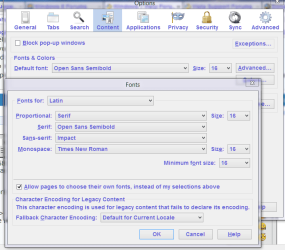
Tools => Options => Content
you have to click the Advanced Button on the default font line.

If the box is checked that says
Allow pages to choose their own fonts...

then you would have to look in the html source or style sheet to see the font name.
Otherwise it's what it says in Default Font.


Capture.PNG
 

My Computer My Computer

At a glance

Windows 7 32 bitAMD 5200+ dual core2 GBNVidia GeForce 6150SE 128 MB
Computer Manufacturer/Model Number
HP Media Center
OS
Windows 7 32 bit
CPU
AMD 5200+ dual core
Memory
2 GB
Graphics Card(s)
NVidia GeForce 6150SE 128 MB
Monitor(s) Displays
CRT
Screen Resolution
1280x1024
Hard Drives
500 GB Sata internal :

SIIG USB 3.0 docking stations w/WD Caviar Black 6 Gb/s drives
Keyboard
PS/2
Mouse
PS/2 Wheel Mouse
Other Info
SIIG USB 3.0 PCIexpress card.
Can you look in FF and see the font name? A file search on both should show up any differences.

hi
how can i see the font name in firefox?
thanks

Tools => Options => Content
you have to click the Advanced Button on the default font line.

If the box is checked that says
Allow pages to choose their own fonts...

then you would have to look in the html source or style sheet to see the font name.
Otherwise it's what it says in Default Font.
ok thanks
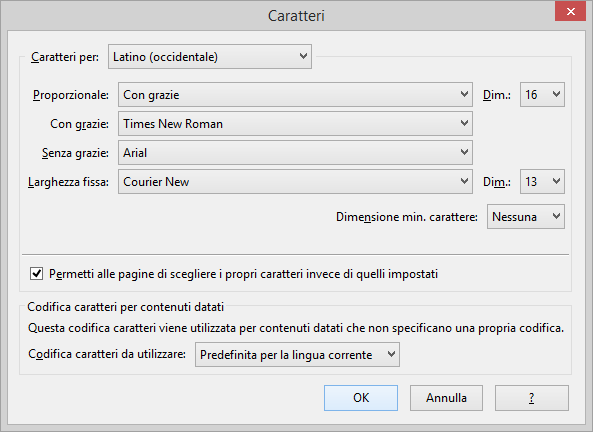
this is windows 8.1 screenshot

ez0QshH.png


windows 7 screenshot


p07fFIj.jpg
 

My Computer My Computer

At a glance

windows 7 ultimate 64bit
Computer type
PC/Desktop
OS
windows 7 ultimate 64bit
Since the option to allow sites to use their own fonts in enabled, it doesn't tell me anything. You would have to look at the page source and even then it could be overridden by a css file on the server or on your machine.

Have you contacted the web page owner to point out the discrepancy? They will know what font they are using. I cannot delve into it from here.
 

My Computer My Computer

At a glance

Windows 7 32 bitAMD 5200+ dual core2 GBNVidia GeForce 6150SE 128 MB
Computer Manufacturer/Model Number
HP Media Center
OS
Windows 7 32 bit
CPU
AMD 5200+ dual core
Memory
2 GB
Graphics Card(s)
NVidia GeForce 6150SE 128 MB
Monitor(s) Displays
CRT
Screen Resolution
1280x1024
Hard Drives
500 GB Sata internal :

SIIG USB 3.0 docking stations w/WD Caviar Black 6 Gb/s drives
Keyboard
PS/2
Mouse
PS/2 Wheel Mouse
Other Info
SIIG USB 3.0 PCIexpress card.
Since the option to allow sites to use their own fonts in enabled, it doesn't tell me anything. You would have to look at the page source and even then it could be overridden by a css file on the server or on your machine.

Have you contacted the web page owner to point out the discrepancy? They will know what font they are using. I cannot delve into it from here.
hi
thanks
the page is last.fm
maybe it's related to windows , how can i know if w8.1 uses color fonts and w7 black and white?
internet explorer under w8.1 is black and white:confused:
 

My Computer My Computer

At a glance

windows 7 ultimate 64bit
Computer type
PC/Desktop
OS
windows 7 ultimate 64bit
If you right click on the page there should be a choice in the context menu "view page source" or similar. See what the name of the font is by looking for the <font> tags. Once you know the name of the font load an editor in Windows 8.1 and the same editor in Windows 7 with that font. See if they look the same. If not it's the fonts on your systems that are different.

It's not rocket science. Just a bit of work.
 

My Computer My Computer

At a glance

Windows 7 32 bitAMD 5200+ dual core2 GBNVidia GeForce 6150SE 128 MB
Computer Manufacturer/Model Number
HP Media Center
OS
Windows 7 32 bit
CPU
AMD 5200+ dual core
Memory
2 GB
Graphics Card(s)
NVidia GeForce 6150SE 128 MB
Monitor(s) Displays
CRT
Screen Resolution
1280x1024
Hard Drives
500 GB Sata internal :

SIIG USB 3.0 docking stations w/WD Caviar Black 6 Gb/s drives
Keyboard
PS/2
Mouse
PS/2 Wheel Mouse
Other Info
SIIG USB 3.0 PCIexpress card.
Back
Top