JavaScript is disabled. For a better experience, please enable JavaScript in your browser before proceeding.
You are using an out of date browser. It may not display this or other websites correctly.
You should upgrade or use an
alternative browser .
Solved Why does my action center keeps giving the same issues?
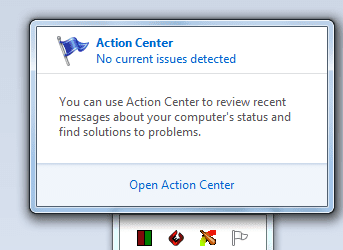
Hello, I dont if this is a problem or not, but that small flag on the notification icons tab beside the clock where it shows the PC issues and asks you to solve them. Keeps giving the same issues to solve every time I start the PC. It will ask you to run system maintenance each time and ask to change settings for windows update, even though I change it every time. Its getting very annoying. And each time I run the system maintenance it will show the same problem that I have disk volume errors.
PS: Sorry if I sounded very noobish.
Computer type PC/Desktop OS Windows 7 64 bit CPU Intel Motherboard Intel DH55TC Memory 8GB
Better Call Saul
VIP
SF Team
If it's stating you have volume errors then that's more than likely an issue with your hard drive. You need to check the HDD with diagnostic tools to check whether there is an issue with it.
Follow
http://www.sevenforums.com/tutorials/433-disk-check.html and post back the results.
Computer type PC/Desktop Computer Manufacturer/Model Number Custom Build OS W7 Pro x64 SP1 | W10 Pro IP x64 | W8.1 Pro x64 VM | Linux Mint VM CPU i7-4790k @ 4GHz (4.4GHz Boost) Motherboard ASUS Sabertooth Z87 (BIOS Rev 2004) Memory 16GB DDR3 Kingston HyperX Fury @ 1600MHz CL 9-9-9-27 Graphics Card(s) EVGA GTX 980 Classified Sound Card Realtek Onboard Monitor(s) Displays Samsung S27D390 Screen Resolution 1920 x 1080 Hard Drives 240GB Intel 520 Series SSD | PSU Corsair HX850-80 Gold Modular Case Cooler Master Silencio 650 Cooling Corsair H80i w/2 x Corsair SP120 | 2 x 120mm Noctua NF-S12B Keyboard Microsoft Sidewinder X4 Mouse Gigabyte M6900 optical Internet Speed 152mb Antivirus F-Secure Browser Firefox 38.0 Other Info Backup Rig: Win 7 Pro 64-bit | AMD A10-5800k | ASUS F2A85-V Pro | 8GB Samsung DDR3 @1600MHz | 120GB Toshiba SDD | 2TB Seagate HDD | Cooler Master Silencio 550
New member
Guru
Gold Member
VIP
Did you try right clicking on each and hiding it?
Computer type PC/Desktop Computer Manufacturer/Model Number Lenovo IdeaCenter 450 OS Windows 10 Pro X64 CPU Intel Quad Core i7-4770 @ 3.4Ghz Memory 16.0GB PC3-12800 DDR3 SDRAM 1600 MHz Graphics Card(s) Intel Integrated HD Graphics Sound Card Realtek HD Audio Monitor(s) Displays HP 22" LCD Screen Resolution 1680 x 1050 Hard Drives 250GB Samsung EVO SATA-3 SSD Keyboard Dell USB Mouse Lenovo USB Internet Speed Cable via Road Runner 3MB Upload, 30MB Download Antivirus Windows Defender, MBAM Pro, MBAE Browser Seamonkey Other Info UEFI/GPT
IT Support Pro
Guru
Gold Member
VIP
Screenshots will go a long way here but I believe its the solutions your are referring to, if so you can archive them to keep them from showing constantly.
Computer type PC/Desktop Computer Manufacturer/Model Number Custom Built OS Windows 10 Pro CPU AMD Ryzen 5 2400G Processor with Radeon RX Vega 11 Graphics Motherboard ASRock X470 Master SLI/AC AM4 AMD Promontory X470 SATA 6Gb/s Memory G.SKILL Ripjaws V Series 16GB (2 x 8GB) 288-Pin DDR4 SDRAM D Graphics Card(s) 2047MB NVIDIA GeForce GTX 1060 6GB (EVGA) Sound Card Motherboard Built in Monitor(s) Displays Acer R240HY bidx 23.8-Inch IPS HDMI DVI VGA (1920 x 1080) Wi Screen Resolution 1920 x 1080 Hard Drives 1TB Sandisk SSD PLUS (Main drive) PSU CORSAIR TX Series TX650M 650W 80+ Gold Modular Power Supply Case CORSAIR CARBIDE SPEC-02 Mid-Tower Gaming Case, Red LED Fan Cooling 220mm, two 120mm, and four 60mm fans Keyboard Wired Dell keyboard Mouse Wireless Logitech mouse Internet Speed 250mb down, 30mb up Antivirus Panda Cloud Antivirus Browser Chrome-ish x64 Other Info Your awesome for reading this.
New member
Thread Starter
Screenshots for the problem
Untitled.png
36.8 KB
· Views: 18
Computer type PC/Desktop OS Windows 7 64 bit CPU Intel Motherboard Intel DH55TC Memory 8GB
IT Support Pro
Guru
Gold Member
VIP
That is what I thought. Click open action center. Under the maintenance tab you should see some issues marked there. Like solve a problem with a driver as an example. If the solution is already applied, or everything is working fine, you can choose to archive the message. Also in action center on the left hand side look at the archived messages and you can also clear them out.
Computer type PC/Desktop Computer Manufacturer/Model Number Custom Built OS Windows 10 Pro CPU AMD Ryzen 5 2400G Processor with Radeon RX Vega 11 Graphics Motherboard ASRock X470 Master SLI/AC AM4 AMD Promontory X470 SATA 6Gb/s Memory G.SKILL Ripjaws V Series 16GB (2 x 8GB) 288-Pin DDR4 SDRAM D Graphics Card(s) 2047MB NVIDIA GeForce GTX 1060 6GB (EVGA) Sound Card Motherboard Built in Monitor(s) Displays Acer R240HY bidx 23.8-Inch IPS HDMI DVI VGA (1920 x 1080) Wi Screen Resolution 1920 x 1080 Hard Drives 1TB Sandisk SSD PLUS (Main drive) PSU CORSAIR TX Series TX650M 650W 80+ Gold Modular Power Supply Case CORSAIR CARBIDE SPEC-02 Mid-Tower Gaming Case, Red LED Fan Cooling 220mm, two 120mm, and four 60mm fans Keyboard Wired Dell keyboard Mouse Wireless Logitech mouse Internet Speed 250mb down, 30mb up Antivirus Panda Cloud Antivirus Browser Chrome-ish x64 Other Info Your awesome for reading this.
R.I.P.
Guru
Gold Member
VIP
You can also turn off notifications in Action Center.
Computer type PC/Desktop Computer Manufacturer/Model Number Skylake Special #666 OS Windows 10 Pro x64 CPU Intel Core i7 6700K Motherboard Asus Sabertooth Z170 Mark 1 Memory GSkill TridentZ RGB 16GB 3600 16-16-16-36 Graphics Card(s) EVGA GTX 980 Ti SC x2 Sound Card Realtek High Definition Monitor(s) Displays AOC G2460PG Screen Resolution 1920 x 1080 144Hz Hard Drives Samsung 860 Pro 256GB, Seagate Barracuda 4TB x2 PSU EVGA 1000 P2, EVGA White Custom Braided Cables Case Corsair Vengeance C70 Gunmetal Black Cooling Corsair H100i v2, Corsair ML120 x2, Thermal Grizzly Kryonaut Keyboard Logitech G910 Orion Spectrum Mouse Logitech G700s Internet Speed Verizon Fios Quantum Gateway 75/75 Antivirus Windows Defender, Malwarebytes Free 3.8.3 Browser Chrome Other Info Corsair SP120 x4, LG Blu-ray Drive, Durabrand HT-395 100 Watt Dolby Digital Amp, Corsair H2100 Wireless 7.1 Headset