
I Am User
New member
Currently only my SSD is inside, but I will put the HDD too, and when I do the 'Safely Remove Hardware and Eject Media' thing in the dock also shows the HDD. Why does it do that? can I make it show me only the external stuff (such as a USB)?
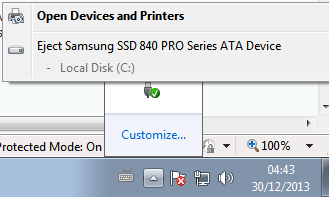
I already accidentaly clicked on my HDD when it was inside, but luckily it didnt do anything and just showed a message that it cannot eject it because it because it is in use.
But still, I wish not to see those.
Thanks in advance for replies
I already accidentaly clicked on my HDD when it was inside, but luckily it didnt do anything and just showed a message that it cannot eject it because it because it is in use.
But still, I wish not to see those.
Thanks in advance for replies
Last edited:
My Computer
At a glance
Windows 7 Home Premium 64bitIntel i7 3770kG.Skill RipjawsX 16GB (8GB x2) @1600MHzNvidia GeForce GTX 670 (EVGA)
- Computer type
- PC/Desktop
- Computer Manufacturer/Model Number
- Custom build
- OS
- Windows 7 Home Premium 64bit
- CPU
- Intel i7 3770k
- Motherboard
- Gigabyte GA-Z77X-UD5H
- Memory
- G.Skill RipjawsX 16GB (8GB x2) @1600MHz
- Graphics Card(s)
- Nvidia GeForce GTX 670 (EVGA)
- Sound Card
- Realtek ALC898 [onboard]
- Monitor(s) Displays
- Philips 273E-LH
- Screen Resolution
- 1080p
- Hard Drives
- WD Black - 2TB
Samsung 840 Pro - 256GB
- PSU
- Corsair HX850
- Case
- Cooler Master Storm Trooper
- Cooling
- Noctua NH-U9B SE2
- Keyboard
- Corsair K70 RGB
- Mouse
- Roccat Kone XTD
- Internet Speed
- DL: ~120Mbps; UL: ~4Mbps
- Antivirus
- Bitdefender
- Browser
- Mozilla Firefox


