Why has Firefox become so bad?

I'm calling bull$** on this whole issue.
trying to run 20+ tabs simultaneously might use 1.2GB.
You might need to eat that.
Chrome can handle 20+ tabs without lagging and without consuming half as much memory as firefox.
Firefox handles 20+ tabs with lagging and consuming 1.2GB of RAM.
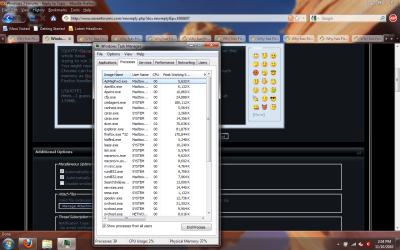
Hmm...I guess you're partially right. Here's firefox with 20+ tabs open peaked at 170MB. Doesn't lag on my laptop at all no matter what I do with it, and I'm pretty sure my laptop's slower than whatever computer you're using.
ffnolag.png
 
I'm calling bull$** on this whole issue.
trying to run 20+ tabs simultaneously might use 1.2GB.
You might need to eat that.
Chrome can handle 20+ tabs without lagging and without consuming half as much memory as firefox.
Firefox handles 20+ tabs with lagging and consuming 1.2GB of RAM.
Hmm...I guess you're partially right. Here's firefox with 20+ tabs open peaked at 170MB. Doesn't lag on my laptop at all no matter what I do with it, and I'm pretty sure my laptop's slower than whatever computer you're using.
View attachment 112839
Have you kept your laptop on for two weeks (or at least a few days) consecutively while keeping the 20 tabs there without exiting firefox or rebooting your laptop? Would the result be the same?
 

My Computer

OS
Windows 7 Pro
Have you kept your laptop on for two weeks (or at least a few days) consecutively while keeping the 20 tabs there without exiting firefox or rebooting your laptop? Would the result be the same?
you just proved my point.

Your problem with firefox has little or nothing to do with firefox itself, but the way you use your computer. Chrome rates higher on the benchmarks because it has almost no security built into it, which makes it lighter on a system, but fills it full of holes. If you leave almost any application running, then do something else and go back it it, you'll find it runs a little slower than before if your system doesn't have enough memory to avoid reverting to the pagefile for multiple running apps. I would bet the pagefile is in hundreds of fragments because you don't shut your computer down and do basic maintenance. When's the last time you cleared the browsing history, cleaned up and defragged your HDD? I would bet if you ran ccleaner it would remove at least a GB from your system.
 
Have you kept your laptop on for two weeks (or at least a few days) consecutively while keeping the 20 tabs there without exiting firefox or rebooting your laptop? Would the result be the same?
you just proved my point.

Your problem with firefox has little or nothing to do with firefox itself, but the way you use your computer. Chrome rates higher on the benchmarks because it has almost no security built into it, which makes it lighter on a system, but fills it full of holes. If you leave almost any application running, then do something else and go back it it, you'll find it runs a little slower than before if your system doesn't have enough memory to avoid reverting to the pagefile for multiple running apps. I would bet the pagefile is in hundreds of fragments because you don't shut your computer down and do basic maintenance. When's the last time you cleared the browsing history, cleaned up and defragged your HDD?.

Agreed.
I suggest the perceived problem lies with the user not Firefox.
No complaints re FF here.
 

My Computer

Computer Manufacturer/Model Number
LAPTOP. HP Pavilion dv7-4010TX .
OS
Win 7 Ultimate 64-bit. SP1.
CPU
Intel i7 -720QM.[1.6GHz Turbo Boost 2.8GHz. 6MB Cache.]
Memory
8 DDR 3 RAM. 1066MHZ
Graphics Card(s)
ATI 1024 MB. DDR3. Radeon HD5650
Monitor(s) Displays
17.3" High Definition Brightview LCD. LED Backlit.
Screen Resolution
1600 x 900.
Hard Drives
640GB
Case
Laptop / notebook.
Mouse
Logitech Anywhere mouse. MX.
Internet Speed
ADSL [ but too slow ]
have you kept your laptop on for two weeks (or at least a few days) consecutively while keeping the 20 tabs there without exiting firefox or rebooting your laptop? Would the result be the same?
you just proved my point.

your problem with firefox has little or nothing to do with firefox itself, but the way you use your computer. chrome rates higher on the benchmarks because it has almost no security built into it, which makes it lighter on a system, but fills it full of holes. If you leave almost any application running, then do something else and go back it it, you'll find it runs a little slower than before if your system doesn't have enough memory to avoid reverting to the pagefile for multiple running apps. I would bet the pagefile is in hundreds of fragments because you don't shut your computer down and do basic maintenance. when's the last time you cleared the browsing history, cleaned up and defragged your hdd?.

agreed.
I suggest the perceived problem lies with the user not firefox.
No complaints re ff here.
www.pebkac-consulting.com.jpg ;)
 

My Computer

Computer type
PC/Desktop
Computer Manufacturer/Model Number
Gigabyte Technology Co., Ltd.
OS
Win 7 Ultimate 64-bit SP1 (desktop)
CPU
Intel Core 2 Duo E8400
Motherboard
Gigabyte GA-EP35-DS3R
Memory
2x 2GB OCZ DDR II SDRAM PC2-6400
Graphics Card(s)
NVIDIA GeForce 9400GT
Monitor(s) Displays
HP 2009m(primary), Acer P191W
Screen Resolution
1600x900, 1440x900
Hard Drives
Internal:WD Caviar Black 640GB 32MB cache 7200RPM
External:Samsung Story Station 1TB HDD desktop drive
500GB Toshiba portable drive
PSU
Antec Earthwatts EA500D
Case
Antec Sonata III
Cooling
4 fans
Keyboard
Logitech Wave
Mouse
Logitech M-SBF90
Internet Speed
Slow due to home Wireless-G router
Antivirus
MSE, Hitman Pro, Malwarebytes
Browser
Chrome and Palemoon
Other Info
Laptop....Acer 5750Z-4835
15.6" HD Widescreen CineCrystal™ LED-backlit LCD Display: (1366x768 resolution, 16:9 aspect ratio)
Intel® Pentium® Processor B940 (2.0GHz, 2MB L3 cache)
Windows® 7 Home Premium,500GB Hard Drive,4GB DDR3 RAM, Intel® HD Graphics,8X DVD-Super Multi Double-Layer Drive
Multi-in-1 Digital Media Card Reader,802.11b/g/n Wi-Fi
Chrome and Palemoon, MSE, Hitman Pro

My Computer

OS
Windows 7 Ultimate 32 bit
CPU
Intel Core2Duo E8400 2.7 Ghz
Motherboard
Gigabyte G31M-ES2C
Memory
Corsair 3 GB DDR2 PC6400
Graphics Card(s)
XFX Radeon 4850 512 MB
Sound Card
Onboard
Monitor(s) Displays
GTC 16'
Screen Resolution
1024x768
Hard Drives
SATA Western Digital 750 GB
PSU
Simbadda 500w
Case
Generic
Keyboard
Logitech Keyboard
Mouse
Logitech USB
Internet Speed
2 mbps adsl
Have you kept your laptop on for two weeks (or at least a few days) consecutively while keeping the 20 tabs there without exiting firefox or rebooting your laptop? Would the result be the same?
you just proved my point.

Your problem with firefox has little or nothing to do with firefox itself, but the way you use your computer. Chrome rates higher on the benchmarks because it has almost no security built into it, which makes it lighter on a system, but fills it full of holes. If you leave almost any application running, then do something else and go back it it, you'll find it runs a little slower than before if your system doesn't have enough memory to avoid reverting to the pagefile for multiple running apps. I would bet the pagefile is in hundreds of fragments because you don't shut your computer down and do basic maintenance. When's the last time you cleared the browsing history, cleaned up and defragged your HDD?.

Agreed.
I suggest the perceived problem lies with the user not Firefox.
No complaints re FF here.
Proved what point?

Let's see. How am I supposed to defrag my hard disk when it is 0% fragmented?
 

My Computer

OS
Windows 7 Pro
As I said before, bull$h** .. Post a screenshot of FF and task manager that shows FF using more than a GB of RAM. If you simply hate firefox and are looking for sympathy, this was the wrong place to go looking for it. If you actually have the problems you're describing, clearing browsing history, running ccleaner, and defragmenting your HDD will solve it, unless you have a bunch of toolbars and addons or your system is full of spyware.
 
you just proved my point.

Your problem with firefox has little or nothing to do with firefox itself, but the way you use your computer. Chrome rates higher on the benchmarks because it has almost no security built into it, which makes it lighter on a system, but fills it full of holes. If you leave almost any application running, then do something else and go back it it, you'll find it runs a little slower than before if your system doesn't have enough memory to avoid reverting to the pagefile for multiple running apps. I would bet the pagefile is in hundreds of fragments because you don't shut your computer down and do basic maintenance. When's the last time you cleared the browsing history, cleaned up and defragged your HDD?.

Agreed.
I suggest the perceived problem lies with the user not Firefox.
No complaints re FF here.
Proved what point?

Let's see. How am I supposed to defrag my hard disk when it is 0% fragmented?

Addons, Toolbars, AVs can slow FF
 

My Computer

Computer type
PC/Desktop
Computer Manufacturer/Model Number
Custom Build
OS
Windows 10 Pro x64, Arch Linux
CPU
Intel Core 2 Quad Q8200 OC'd 3.08GHz
Motherboard
Asus Rampage formula LGA775
Memory
8GB DDR2 900Mhz
Graphics Card(s)
MSI GT730 2GB GDDR5 (Kepler)
Sound Card
Supreme FX2
Monitor(s) Displays
Samsung LS22F350 LED
Screen Resolution
1080P
Hard Drives
Kingston SSDNow UV400 120GB, 500GB Hitachi, 2TB Samsung, 500GB Seagate FreeAgent, 640GB Samsung, 160GB Toshiba (Arch)
PSU
AeroCool 500W Bronze
Cooling
Cooler Master V6 + 3X fans
Keyboard
Prolink keyboard
Mouse
Logitech M705
Internet Speed
1MiB/s
Browser
Chrome Beta
Yeah, I'm not buying it either. I use FF as well without issue.

I am seeing a Chrome commercial here.

BTW, Google's real ethics are still in huge question.
 

My Computer

Computer Manufacturer/Model Number
Self Built
OS
Win 7 Ultimate 32bit
CPU
C2D E6600 2.4Ghz
Motherboard
Intel D965WH
Memory
4G Kingston KHX5400D2
Graphics Card(s)
EVGA GTX 570 HD SC (012-P3-1573-KR)
Sound Card
On-Board
Monitor(s) Displays
Samsung 226BW
Screen Resolution
1680 x 1050
Hard Drives
2 x 250 Seagate Barracuda
2 x 500 Seagate Barracuda (Raid1)
PSU
Corsair TX750W
Case
In-Win C589
Cooling
Stock Intel Cooling

My Computer

Computer Manufacturer/Model Number
HP dv6519tx
OS
Windows 7 Ultimate x64
CPU
1.80 GHz Intel Core 2 Duo processor T7100
Memory
3 gig ddr2
Graphics Card(s)
NVIDIA GeForce 8400M GS
Sound Card
Realtek High Definition Audio
Monitor(s) Displays
15.4” WXGA High Definition BrightView Widescreen
Screen Resolution
1280 x 800
Hard Drives
Hitachi 320 GB (5400 rpm)
PSU
90 W AC Power Adapter
Cooling
Kitchen plate under the lappy
Keyboard
101 key compatible
Mouse
Touch Pad with On/Off button and dedicated vertical Scroll
Internet Speed
Three Wireless internet prepaid using E160G USB dongle
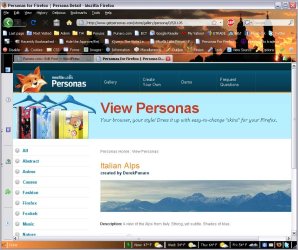
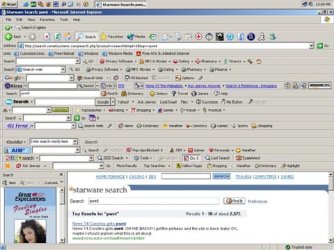
The first pic is how I see some people actually running FF.

The second was actually a joke pic by someone trying to see how many toolbars they could get installed at once. :)
 

My Computer

Computer Manufacturer/Model Number
Scratch built
OS
Windows 7 x64 Ultimate
CPU
i7 960
Motherboard
Asus P6X58D
Memory
12 Gig Corsair Dominator
Graphics Card(s)
Nvidia 480
Sound Card
Maudio Delta 44 + breakout box
Monitor(s) Displays
Dell UltraSharp U2410 24in and Samsung 21 dual monitors
Screen Resolution
1920x1200 and 1280x1024
Hard Drives
Primary: Intel X-25M G2 160G SSD
Secondary: Segate baracuda 1.0 TB
HDs in AHCI mode.
PSU
Corasair TX850
Case
Cooler Master HAF
Cooling
Corsair H50
Keyboard
Logitech G15 + N52 game pad
Mouse
Logitech MX518
Internet Speed
15kbs down 4.5kbps up
Other Info
WEI 7.6
CPU & RAM 7.6
Graphics 7.9
Hard disk 7.7
How is that anything to do with a benchmark test? Chrome has no privacy (that's why ChromePlus, SRWare Iron and others exist) but it uses lots of security.
 

My Computer

OS
Arch Linux 64-bit
Unless a person wants to tell someone, it is nobody else's business who they talk to, what they search for, what they read, what videos they watch, where they live, what they buy, where they're planning to go on vacation, what religion they have, their mother's maiden name, what political views they have ..I could go on ad infinitum.. If you have no privacy, you have no security. Therefore chrome has no security... but besides that fact.. chrome has been the #3 reason my xp-and-vista-using customers ended up with rouge AVs, trojans, spyware and other infestations. Malware in P2P downloads and IE were #1 and #2 respectively. Until very recently (the past 15 days to be exact) Google has done absolutely nothing to protect people from malicious sites. And besides that, benchmarks don't always reflect real world performance. It wouldn't matter if a browser could render a 50MB java app in 3 milliseconds if it crashes at least once every time you use it
 
I hate to use Chrome over Firefox but it's proving to be superior to Firefox in the most important areas of memory consumption, lag speed and stability. Chrome has major problems ensuring that downloads do not become corrupted, which is a nail to its heart.

Firefox, please take care of the important core issues before fiddling around with issues concerning user-created plugin...

No download issues for me, downloaded burnout paradise demo with out any issues, I swapped to chrome a few months back (great browser) IE 9 is better in my opinion than FF 3.6/4 beta
 

My Computer

Computer type
PC/Desktop
Computer Manufacturer/Model Number
GIGABYTE Rig (Custom)
OS
Windows 7 Professional (x64/SP1) /Linux Mint 16
CPU
Intel i5-3570k 3.40 GHz @ 4.6 GHz
Motherboard
GIGABYTE Z77X-D3H
Memory
8GB (2133MHz) DDR3
Graphics Card(s)
Asus GTX560 Ti (Nvidia)
Monitor(s) Displays
HP 23", Acer 19" and a Dell 17"
Screen Resolution
1080p, 1440x900 and 1280x1024
Hard Drives
Sandisk Extreme 120GB (SSD), WD 2TB green and 4 other HDDs
PSU
Antec 620w High Current Gamer
Case
Corsair Obsidian 600D
Cooling
CPU - Antec KÜHLER H₂O 920
Keyboard
Steelseries 6Gv2
Mouse
Roccat LUA
Internet Speed
4 - 6mb/s
Antivirus
ESET NOD32
Browser
Chrome/Firefox
Other Info
Intel Gigabit CT (PCIE NIC) and Thinkpad T61p,
Chrome has never crashed for me or for many others while other browsers have crashed on every use for some.

What has Google started doing recently that protect people from malicious sites? They already have Google Safe Browsing API - Google Code

What percentage of your customers became infected while using Chrome without any interaction from the customer and how do you know it wasn't caused by a Flash or Java or other exploit and how do you know if they were using another browser at the time that they wouldn't get infected?
 
Last edited:

My Computer

OS
Arch Linux 64-bit
Why do have the people on this thread assume the user is to blame for his/her problem with firefox. You will find that a lot of people don't like firefox, which is why chrome has become as popular as it has in such a short time. A lot of people have problems with firefox running slowly or crashing regularly, even after deleting cookies, browsing data, and what have you. If you don't have problems, good for you, but don't assume everyone that does run into a problem is to blame, just like we don't like people blaming their problems on Bill Gates or Win7.

BTW can I see some secondary source stating that all your browsing data gets sent to google? I see people saying it, but no evidence for it. And chromes speed and reliability has a lot to do with the fact that it opens a new process for all tabs and plug-ins.
 

My Computer

Computer type
Laptop
Computer Manufacturer/Model Number
Toshiba P775-S7100
OS
Windows 7 Professional SP1 64-bit
CPU
Intel Core i5-2450M @2.5 GHz
Memory
6 GB DDR3 1333MHz
Graphics Card(s)
Intel HD 3000
Monitor(s) Displays
Built-in 17.3" LED; 22" Insignia NS-L22Q-10A
Screen Resolution
1600x900; 1360x768
Hard Drives
750 GB Hitachi
1TB Seagate FreeAgent External
Internet Speed
Verizon DSL Speed(Down/Up): 3360 Kbps / 800 Kbps
Antivirus
MSE and MBAM Pro
Browser
IE10
Back
Top