Why I can't see my SD Card on My Computer

agra05

New member
Local time
2:02 PM
Messages
4
Location
Manila, Philippines
Hi Guys, new here
I just need some help of urs to fix my problem. Well, I have a MicroSD 1GB and a SanDisk SD, this is the first time I encounter this, after I put the SD in it, nothing happens, even a sound! Actually I used the same type of SD reader and memory card for almost half a year and this is the first time I encountered this, I'm currently using NEO laptop Basic series. Please help me!
God Bless
Wish you could answer after I post this one!
:)
 

My Computer My Computer

At a glance

Windows 7 Ultimate x32
OS
Windows 7 Ultimate x32
Hi agra05,

Welcome to SevenForums.

Is it an external SD Card Reader? Yes/No

Does it have a detachable cable? Yes/No

Does your laptop read other USB devices in all the ports?

Have you tried the SD Card Reader in another computer with your SD Card/MicroSD adapter?
 

My Computer My Computer

At a glance

Windows 7 Home Premium 32 bit
OS
Windows 7 Home Premium 32 bit
Is it an external SD Card Reader? Yes

Does it have a detachable cable? No

Does your laptop read other USB devices in all the ports? Yes

Have you tried the SD Card Reader in another computer with your SD Card/MicroSD adapter?
Nope, but its the first time I had experience problems with my card reader, even days before tonight, my laptop can read the SD Card Reader. I just don't know why this happen.
 
Last edited:

My Computer My Computer

At a glance

Windows 7 Ultimate x32
OS
Windows 7 Ultimate x32
Machines are no different than men. Here today, gone tomorrow - in many cases :).

Try your SD Card Reader on another Windows 7 computer.

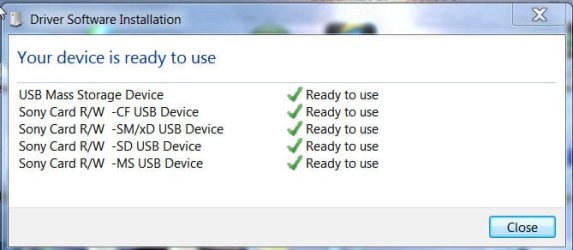
When you plug it in, the PC should install the device drivers and get ready to read , if it is alive.

14-11-2012 18-46-46.jpg

(If the same brand device was already plugged-in before in that PC, your SD Card Reader should straightaway show as Removable Disks in My Computer.)

If not, replace the reader. (buy one with a detachable cable. In most cases it may only be a defective cable, due to repeated flexing.)
 

My Computer My Computer

At a glance

Windows 7 Home Premium 32 bit
OS
Windows 7 Home Premium 32 bit
Tnx for ur help, I'll try to do it, but the problem is, I only have 1 windows 7 laptop, my PC is only Windows XP Professional.
Any other help? Or I'll try to change the SD Card Reader?
 

My Computer My Computer

At a glance

Windows 7 Ultimate x32
OS
Windows 7 Ultimate x32
You may plug it in your XP machine and see whether it works. If it does not work,it may still be preferable to check it on a Windows 7 machine. Why? I have come across reports from users complaining that a new USB device is not recognised by Windows XP, while the old ones used on it still work.:)

Try on a friend's Windows 7 PC. That will be more conclusive as we will not be putting it in a different environment.
 

My Computer My Computer

At a glance

Windows 7 Home Premium 32 bit
OS
Windows 7 Home Premium 32 bit
Tnx! I appreciate ur help, I'll try doing this
 

My Computer My Computer

At a glance

Windows 7 Ultimate x32
OS
Windows 7 Ultimate x32
Back
Top