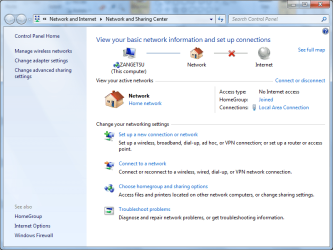
Why is a cross shown between Network and Internet?

RustiX

New member
Local time
6:49 PM
Messages
8
My laptop is connected to a router (DLink DSL 524T) via network cable. Although I could still connect to the net through the router there is a cross shown between the Network and Internet in the Networks and Sharing Center.

This isn't a big deal (since I connect to the internet) but I was wondering why the cross is there? Is there a way I could get it off?

P.S. - I've attached a screenshot of the networkd and sharing center in case my explanation was a bit confusing :)
 

Attachments

  • NASC.png
    NASC.png
    47.9 KB · Views: 49

My Computer

Computer Manufacturer/Model Number
Compaq Presario C563TU
OS
Windows 7 RC
CPU
Intel Dual Core T2080 @ 1.73GHz
Memory
1.5GB DDR2
Graphics Card(s)
Mobile Intel 945
Screen Resolution
1280 x 800
Hard Drives
80GB
Internet Speed
Down: 512kbps
My laptop is connected to a router (DLink DSL 524T) via network cable. Although I could still connect to the net through the router there is a cross shown between the Network and Internet in the Networks and Sharing Center.

This isn't a big deal (since I connect to the internet) but I was wondering why the cross is there? Is there a way I could get it off?

P.S. - I've attached a screenshot of the networkd and sharing center in case my explanation was a bit confusing :)

Can you click on "see full map" on that screen and make a screenshot of it?

Greetz
 

My Computer

OS
Win7 Build 7600 x86
CPU
Pentium II 300MHz
Motherboard
Asus
Memory
32mb EDO RAM
Graphics Card(s)
Diamond Viper
Sound Card
Soundblaster 16
Monitor(s) Displays
14" AOC CRT 16K color
Screen Resolution
800x600
Hard Drives
300mb Quantum fireball
PSU
110 Watts
Cooling
Passive
Keyboard
Trust Ergonomic
Mouse
Generic
Internet Speed
256K u 128K d
My laptop is connected to a router (DLink DSL 524T) via network cable. Although I could still connect to the net through the router there is a cross shown between the Network and Internet in the Networks and Sharing Center.

This isn't a big deal (since I connect to the internet) but I was wondering why the cross is there? Is there a way I could get it off?

P.S. - I've attached a screenshot of the networkd and sharing center in case my explanation was a bit confusing :)

click the cross and post back what happens
 

My Computer

Computer Manufacturer/Model Number
tw33k
OS
Windows 7 Ultimate (x64) SP1
CPU
Intel 3770k 4.6GHz
Motherboard
ASUS Maximus V Formula
Memory
8GB (2x 4GB) Crucial Ballistix
Graphics Card(s)
Sapphire 7950 (1060/1600)
Sound Card
On Board Realtek HD Audio
Monitor(s) Displays
27" Acer B273HU (via HDMI)
Screen Resolution
2048 x 1152
Hard Drives
Crucial M4 128GB
2TB WD Black
1TB Samsung F3 SATA
1TB WD Elite External
2TB WD USB 3.0
PSU
Corsair AX750 Gold
Case
Corsair Obsidian 800DW
Cooling
Corsair H100 (2x AP-121/2x UK-3000 push/pull)
Keyboard
Microsoft Wireless 5000
Mouse
Microsoft Wireless 5000
Internet Speed
5mb/s
Other Info
Logitech z-2300 2.1 speakers
Lamptron FC-5 v2
Plz help me too

hi all
same problem here
but i was able to connect my internet exactly 6 months back when windows beta 7 was released i have been using cable net through rj 45 port
but dont what happened it suddenly stopped detecting ( Rj 45} my network access
right now i am using windows 7 ultimate and the problem persists as usual
my network Also also shows same problem
because i have been not able to connect thru my rj 45 i have shift to using usb to lan card in vista
that usb to lan is also not working in windows 7
can any one plz tell me the solution
 

My Computer

OS
windows 7 32 bit
Can you click on "see full map" on that screen and make a screenshot of it?

Greetz

The following message is shown

por3r.jpg


click the cross and post back what happens

It asks me what type of networking prob i'm facing

1yrb6r.jpg
 

My Computer

Computer Manufacturer/Model Number
Compaq Presario C563TU
OS
Windows 7 RC
CPU
Intel Dual Core T2080 @ 1.73GHz
Memory
1.5GB DDR2
Graphics Card(s)
Mobile Intel 945
Screen Resolution
1280 x 800
Hard Drives
80GB
Internet Speed
Down: 512kbps
help? anyone?
 

My Computer

Computer Manufacturer/Model Number
Compaq Presario C563TU
OS
Windows 7 RC
CPU
Intel Dual Core T2080 @ 1.73GHz
Memory
1.5GB DDR2
Graphics Card(s)
Mobile Intel 945
Screen Resolution
1280 x 800
Hard Drives
80GB
Internet Speed
Down: 512kbps
Have you checked the D-Link website for a firmware update for your router?
 

My Computer

Computer Manufacturer/Model Number
Dell XPS 15 L502x
OS
Windows 7 Ultimate x64 SP1
CPU
Core i7-2670QM
Memory
8GB DDR3 PC3-10600
Graphics Card(s)
Intel HD Graphics 3000 + GeForce GT 540M
Screen Resolution
1920x1080
Hard Drives
1TB 5400RPM Seagate
No I didn't since I didn't consider that it could be an issue with the router but there seems to be an update which came out this year. I shall give this a try. Thank you
 

My Computer

Computer Manufacturer/Model Number
Compaq Presario C563TU
OS
Windows 7 RC
CPU
Intel Dual Core T2080 @ 1.73GHz
Memory
1.5GB DDR2
Graphics Card(s)
Mobile Intel 945
Screen Resolution
1280 x 800
Hard Drives
80GB
Internet Speed
Down: 512kbps
Back
Top