why is audacity playback too fast by default

web

New member
Member
VIP
Local time
2:49 AM
Messages
350
I have been using audacity to record live streams not used for a while must of had an update because three things are different now I use it

one it waits for noise to start recording, not just start recording ?

two the recording plays back at a faster rate by default ?

three no stereo mix option (have to use wasapi?) I was api before :rolleyes:

can turn recording down to 0.01 rate what's this?, but why do this in first place is there an alternative programme u use I cant believe they have done this to the program unusable for me now
 

My Computer

Computer type
PC/Desktop
Computer Manufacturer/Model Number
Antec 300
OS
Windows 7 Ultimate 64bit + Windows 10 pro 64bit duel boot
CPU
i7-4770k cpu @ 350GHz FC LGA1150
Motherboard
Asus Maximus VI Formula
Memory
32GB ballistik DDR3 1866 pc3-14900 cl9 1.5v w.X
Graphics Card(s)
Geforce GTX 1050 Ti Windforce 2x OC GDDR5
Sound Card
SupremeFX audio 8-channel on board
Monitor(s) Displays
AOC 12269Vwm x 2
Screen Resolution
1920 x 1080
Hard Drives
loads raid this that operating system on SSD
PSU
650 watt corsair erm still next upgrade
Case
antec 300
Cooling
Noctua NH-D14
Keyboard
CM Storm QuickFire Cherry MX Blue
Mouse
5500 dpi
Internet Speed
virgin 70mb
Antivirus
Kaspersky 2016
Other Info
Self build
As far as the playback speed is concerned, you need to make sure the sample rate of the sound you are trying to record/playback matches the sample rate of your playback device in Windows (for example, 44.1kHz versus 48kHz)

Windows sound properties are in the control panel.
 

My Computer

Computer type
PC/Desktop
OS
Win 7 Home Premium 64-bit
As far as the playback speed is concerned, you need to make sure the sample rate of the sound you are trying to record/playback matches the sample rate of your playback device in Windows (for example, 44.1kHz versus 48kHz)

Windows sound properties are in the control panel.

audacity use to do this for u why have they changed it ? plus I cant find what you are on about I think its more a program thing than my settings thing but cant be sure cheers anyway
 

My Computer

Computer type
PC/Desktop
Computer Manufacturer/Model Number
Antec 300
OS
Windows 7 Ultimate 64bit + Windows 10 pro 64bit duel boot
CPU
i7-4770k cpu @ 350GHz FC LGA1150
Motherboard
Asus Maximus VI Formula
Memory
32GB ballistik DDR3 1866 pc3-14900 cl9 1.5v w.X
Graphics Card(s)
Geforce GTX 1050 Ti Windforce 2x OC GDDR5
Sound Card
SupremeFX audio 8-channel on board
Monitor(s) Displays
AOC 12269Vwm x 2
Screen Resolution
1920 x 1080
Hard Drives
loads raid this that operating system on SSD
PSU
650 watt corsair erm still next upgrade
Case
antec 300
Cooling
Noctua NH-D14
Keyboard
CM Storm QuickFire Cherry MX Blue
Mouse
5500 dpi
Internet Speed
virgin 70mb
Antivirus
Kaspersky 2016
Other Info
Self build
As an audio engineer of 30 years, who has used Audacity since it came out, I can tell you then when you have unexpected things happen with playback/recording speed, 99% of the time it is a frequency mismatch between software and hardware.
 

My Computer

Computer type
PC/Desktop
OS
Win 7 Home Premium 64-bit
I have the latest Audacity version. I don't use it as I have a recording studio and use Sonar. But, I have it for testing and support for my clients. I still have the Stereo Mix option and set as source.

I would suggest uninstalling Audacity, restart the PC and then do a fresh install and see what happens. If you are just using the PC's audio, make sure Stereo Mix is set as the default recording device.
 

My Computer

Computer type
PC/Desktop
Computer Manufacturer/Model Number
My Own Build
OS
Windows 10 64 bit
CPU
Intel i7 6700K
Motherboard
ASUS ROG Maximus VIII Hero
Memory
16GB Corsair Dominator
Graphics Card(s)
Intel CPU Graphics
Sound Card
RealTek
Monitor(s) Displays
27" Dell S2719dgf
Screen Resolution
2560X1440
Hard Drives
1 TB Samsung 850 EVO SSD for Win 10 Pro
500GB Samsung 850 EVO SSD for Win 10 Insider
2 TB drive for backup
PSU
EVGA Supernova 750G2
Case
BeQuiet Silent Base 600
Cooling
Deepcool Captain 120EX
Keyboard
Microsoft Wireless 2000
Mouse
Microsoft wireless
Internet Speed
100 MB/sec (Cable)
Antivirus
Microsoft Defender and Malwarebytes
Browser
Edge/Firefox
Other Info
Cakewalk (Sonar) by BandLab and Studio One 4.1 Pro recording studio software. MOTU 896Mk3 Hybrid recording interface, Frontier Tranzport wireless control unit, Behringer X-Touch Control Surface.
Five USB connected optical drives for CD Audio production using Nero BurningROM
I have the latest Audacity version. I don't use it as I have a recording studio and use Sonar. But, I have it for testing and support for my clients. I still have the Stereo Mix option and set as source.

I would suggest uninstalling Audacity, restart the PC and then do a fresh install and see what happens. If you are just using the PC's audio, make sure Stereo Mix is set as the default recording device.

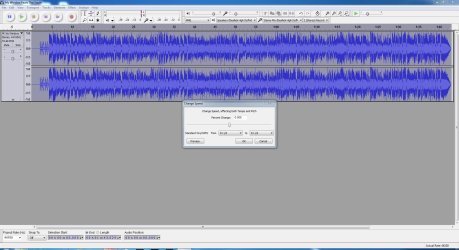
I did this but still having problems, thinks its more the program has evolved since I last used, not for a while, but in my opinion not in a good way? ... or I got a virus I cant find, see screen shot below


screen capture windows 7

also just noticed I got sony sound forge audio studio, free with a copy Vegas movie studio hd platinum 11

but would still like to no where im going wrong, or if I have a problem, by the way the sound forge works perfectly and probably use in future
 

My Computer

Computer type
PC/Desktop
Computer Manufacturer/Model Number
Antec 300
OS
Windows 7 Ultimate 64bit + Windows 10 pro 64bit duel boot
CPU
i7-4770k cpu @ 350GHz FC LGA1150
Motherboard
Asus Maximus VI Formula
Memory
32GB ballistik DDR3 1866 pc3-14900 cl9 1.5v w.X
Graphics Card(s)
Geforce GTX 1050 Ti Windforce 2x OC GDDR5
Sound Card
SupremeFX audio 8-channel on board
Monitor(s) Displays
AOC 12269Vwm x 2
Screen Resolution
1920 x 1080
Hard Drives
loads raid this that operating system on SSD
PSU
650 watt corsair erm still next upgrade
Case
antec 300
Cooling
Noctua NH-D14
Keyboard
CM Storm QuickFire Cherry MX Blue
Mouse
5500 dpi
Internet Speed
virgin 70mb
Antivirus
Kaspersky 2016
Other Info
Self build
That's the same thing as mine but I'm not getting speed ups. I found this setting under the Effect drop down menu.

Check yours and see if its something other than zero
 

Attachments

  • Capture.JPG
    Capture.JPG
    204.8 KB · Views: 4

My Computer

Computer type
PC/Desktop
Computer Manufacturer/Model Number
My Own Build
OS
Windows 10 64 bit
CPU
Intel i7 6700K
Motherboard
ASUS ROG Maximus VIII Hero
Memory
16GB Corsair Dominator
Graphics Card(s)
Intel CPU Graphics
Sound Card
RealTek
Monitor(s) Displays
27" Dell S2719dgf
Screen Resolution
2560X1440
Hard Drives
1 TB Samsung 850 EVO SSD for Win 10 Pro
500GB Samsung 850 EVO SSD for Win 10 Insider
2 TB drive for backup
PSU
EVGA Supernova 750G2
Case
BeQuiet Silent Base 600
Cooling
Deepcool Captain 120EX
Keyboard
Microsoft Wireless 2000
Mouse
Microsoft wireless
Internet Speed
100 MB/sec (Cable)
Antivirus
Microsoft Defender and Malwarebytes
Browser
Edge/Firefox
Other Info
Cakewalk (Sonar) by BandLab and Studio One 4.1 Pro recording studio software. MOTU 896Mk3 Hybrid recording interface, Frontier Tranzport wireless control unit, Behringer X-Touch Control Surface.
Five USB connected optical drives for CD Audio production using Nero BurningROM
That's the same thing as mine but I'm not getting speed ups. I found this setting under the Effect drop down menu.

Check yours and see if its something other than zero

below is what I got when I did what u got above but not sure what it means cheers


free upload pictures
 

My Computer

Computer type
PC/Desktop
Computer Manufacturer/Model Number
Antec 300
OS
Windows 7 Ultimate 64bit + Windows 10 pro 64bit duel boot
CPU
i7-4770k cpu @ 350GHz FC LGA1150
Motherboard
Asus Maximus VI Formula
Memory
32GB ballistik DDR3 1866 pc3-14900 cl9 1.5v w.X
Graphics Card(s)
Geforce GTX 1050 Ti Windforce 2x OC GDDR5
Sound Card
SupremeFX audio 8-channel on board
Monitor(s) Displays
AOC 12269Vwm x 2
Screen Resolution
1920 x 1080
Hard Drives
loads raid this that operating system on SSD
PSU
650 watt corsair erm still next upgrade
Case
antec 300
Cooling
Noctua NH-D14
Keyboard
CM Storm QuickFire Cherry MX Blue
Mouse
5500 dpi
Internet Speed
virgin 70mb
Antivirus
Kaspersky 2016
Other Info
Self build
That's the same thing I have, I accidentally opened the old version. I have the new version and get what you are seeing.
 

My Computer

Computer type
PC/Desktop
Computer Manufacturer/Model Number
My Own Build
OS
Windows 10 64 bit
CPU
Intel i7 6700K
Motherboard
ASUS ROG Maximus VIII Hero
Memory
16GB Corsair Dominator
Graphics Card(s)
Intel CPU Graphics
Sound Card
RealTek
Monitor(s) Displays
27" Dell S2719dgf
Screen Resolution
2560X1440
Hard Drives
1 TB Samsung 850 EVO SSD for Win 10 Pro
500GB Samsung 850 EVO SSD for Win 10 Insider
2 TB drive for backup
PSU
EVGA Supernova 750G2
Case
BeQuiet Silent Base 600
Cooling
Deepcool Captain 120EX
Keyboard
Microsoft Wireless 2000
Mouse
Microsoft wireless
Internet Speed
100 MB/sec (Cable)
Antivirus
Microsoft Defender and Malwarebytes
Browser
Edge/Firefox
Other Info
Cakewalk (Sonar) by BandLab and Studio One 4.1 Pro recording studio software. MOTU 896Mk3 Hybrid recording interface, Frontier Tranzport wireless control unit, Behringer X-Touch Control Surface.
Five USB connected optical drives for CD Audio production using Nero BurningROM
That's the same thing I have, I accidentally opened the old version. I have the new version and get what you are seeing.

since I used the sound forge programme audacity seems to be working normally again but wasn't so don't know what happened or why..... but also it has changed all programs evolve but I don't like it, maybe I did some thing wrong ?
 

My Computer

Computer type
PC/Desktop
Computer Manufacturer/Model Number
Antec 300
OS
Windows 7 Ultimate 64bit + Windows 10 pro 64bit duel boot
CPU
i7-4770k cpu @ 350GHz FC LGA1150
Motherboard
Asus Maximus VI Formula
Memory
32GB ballistik DDR3 1866 pc3-14900 cl9 1.5v w.X
Graphics Card(s)
Geforce GTX 1050 Ti Windforce 2x OC GDDR5
Sound Card
SupremeFX audio 8-channel on board
Monitor(s) Displays
AOC 12269Vwm x 2
Screen Resolution
1920 x 1080
Hard Drives
loads raid this that operating system on SSD
PSU
650 watt corsair erm still next upgrade
Case
antec 300
Cooling
Noctua NH-D14
Keyboard
CM Storm QuickFire Cherry MX Blue
Mouse
5500 dpi
Internet Speed
virgin 70mb
Antivirus
Kaspersky 2016
Other Info
Self build
Hard to know what is or has happened. Just hope it stays fixed.
 

My Computer

Computer type
PC/Desktop
Computer Manufacturer/Model Number
My Own Build
OS
Windows 10 64 bit
CPU
Intel i7 6700K
Motherboard
ASUS ROG Maximus VIII Hero
Memory
16GB Corsair Dominator
Graphics Card(s)
Intel CPU Graphics
Sound Card
RealTek
Monitor(s) Displays
27" Dell S2719dgf
Screen Resolution
2560X1440
Hard Drives
1 TB Samsung 850 EVO SSD for Win 10 Pro
500GB Samsung 850 EVO SSD for Win 10 Insider
2 TB drive for backup
PSU
EVGA Supernova 750G2
Case
BeQuiet Silent Base 600
Cooling
Deepcool Captain 120EX
Keyboard
Microsoft Wireless 2000
Mouse
Microsoft wireless
Internet Speed
100 MB/sec (Cable)
Antivirus
Microsoft Defender and Malwarebytes
Browser
Edge/Firefox
Other Info
Cakewalk (Sonar) by BandLab and Studio One 4.1 Pro recording studio software. MOTU 896Mk3 Hybrid recording interface, Frontier Tranzport wireless control unit, Behringer X-Touch Control Surface.
Five USB connected optical drives for CD Audio production using Nero BurningROM
Note that there are two green arrow play buttons. The one on the left always plays at normal speed. You can use the smaller one on the right (in your screen shot) to play faster or slower.

The change speed in the effect dropdown is applied to your selection (defaults to whole clip) to change the speed of that portion permanently.
 

My Computer

Computer type
PC/Desktop
Computer Manufacturer/Model Number
Dell Inspiron 560
OS
Windows 7 Home Premium 64bit
CPU
Pentium E5400
Memory
4G
Note that there are two green arrow play buttons. The one on the left always plays at normal speed. You can use the smaller one on the right (in your screen shot) to play faster or slower.

The change speed in the effect dropdown is applied to your selection (defaults to whole clip) to change the speed of that portion permanently.

think I sort off know what u hitting at, but permanently, is a bit much even u got there by mistake, will try to reconstruct
 

My Computer

Computer type
PC/Desktop
Computer Manufacturer/Model Number
Antec 300
OS
Windows 7 Ultimate 64bit + Windows 10 pro 64bit duel boot
CPU
i7-4770k cpu @ 350GHz FC LGA1150
Motherboard
Asus Maximus VI Formula
Memory
32GB ballistik DDR3 1866 pc3-14900 cl9 1.5v w.X
Graphics Card(s)
Geforce GTX 1050 Ti Windforce 2x OC GDDR5
Sound Card
SupremeFX audio 8-channel on board
Monitor(s) Displays
AOC 12269Vwm x 2
Screen Resolution
1920 x 1080
Hard Drives
loads raid this that operating system on SSD
PSU
650 watt corsair erm still next upgrade
Case
antec 300
Cooling
Noctua NH-D14
Keyboard
CM Storm QuickFire Cherry MX Blue
Mouse
5500 dpi
Internet Speed
virgin 70mb
Antivirus
Kaspersky 2016
Other Info
Self build
Back
Top