Why is bluetooth so terrible?

Dynentan

New member
Member
VIP
Local time
12:12 AM
Messages
329
I bought a tp link ub 500 bluetooth usb dongle, and i pair og jvc ha-s22w.

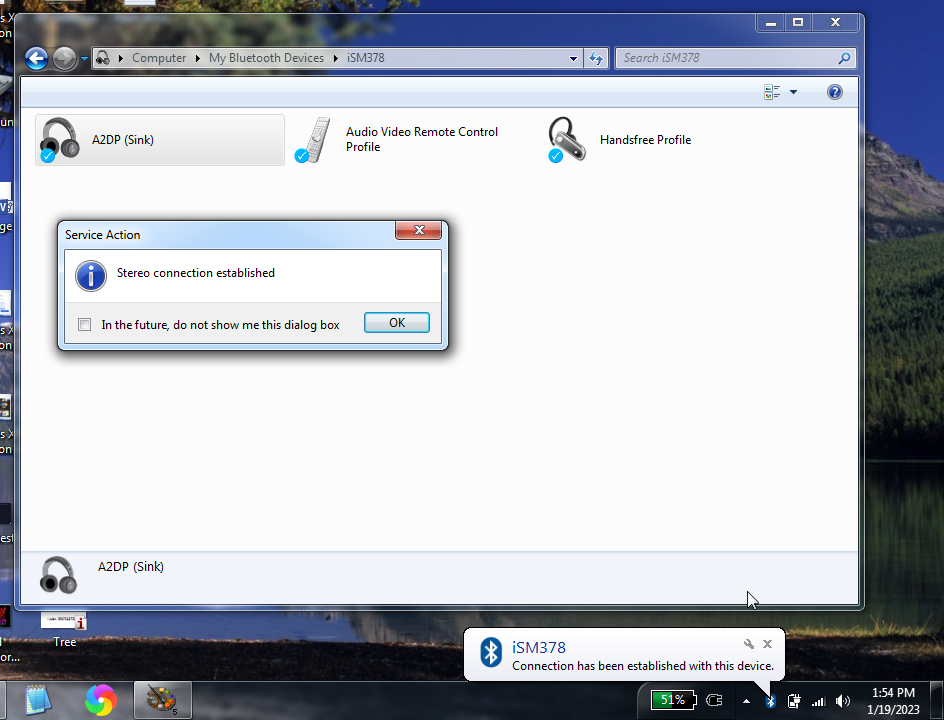
At first, they wouldn't pair, because of three drivers that failed to install properly. I searched for a solution on google, which is full of ads and no help. I read the troubleshooting guide on tp links website, which wasn't very helpful.

I installed their driver, which didn't solve the problems.

I found a solution myself, i had to download their drivers, then go to device manager, click update driver, select the tp lik drivers and install them.

After some more failed attempts to pair the headphones they suddenly worked. The sound quality, however, is awful. It's hissing and the sound is distorted.

I read some suggestions on google, which is to disable handsfree telephony, which i did.

The sound quality is still as bad after restarting my computer. The sound quality is so bad that it kills the joy of listening to music.

Why is this so bad, we're in 2023?
 

My Computer

Computer type
PC/Desktop
OS
Windows 7 home premium
CPU
Intel core i5 4440
Motherboard
Asus h81m-k
Memory
Samsung 8gb ddr3
Graphics Card(s)
Asus gtx 1050
Monitor(s) Displays
Lg 27ea33
Hard Drives
Teamgroup gx2 512gb
PSU
Lenovo 400 watt
Case
Bitfenix nova
Browser
Microsoft edge
I can't speak for that TP-link adapter but I purchased a CSR 4.0 Bluetooth dongle a few years ago and am very satisfied with the sound quality. I have 2 bluetooth speakers (one 3W and one 20W) that I like to play music through and the sound quality is excellent. I also have a pair of Jabra headphones with mic that I use with Teams/Zoom and I hear conversations clearly and I am also heard clearly.

Amazon.com

The drivers work with Windows XP, 7 and 10. I have tested with all three systems and can confirm it works perfectly. Haven't tried Windows 8 or 11.

CSR Bluetooth(R) Dongle Drivers - West Mountain Radio

The drivers installed without issue on all three systems (I don't recall if a reboot was required). Once installed simply put your device in pairing and wait till you see a prompt to pair and Windows will install all the necessary drivers (A2DP etc.)

image.png


I am aware of the differences between BT 4 and 5 but am happy with my BT adapter so have no interest in buying another and experimenting with bad/incompatible drivers.

I'm not deriding TP-LINK products. I have a TP-LINK powerline WIFI adapter that I use to get WIFI in my backyard that works perfectly. This doesn't require any drivers to install however, my devices just see it as another WIFI hotspot.
 

My Computer

Computer type
PC/Desktop
OS
Windows 7 Pro x64
It all depends what version od BT you have on both devices the difference between 4 and 5 is big Different Bluetooth Versions: What You Need to Know - Headphonesty

It's bluetooth 5.0, as it says on their website.

- - - Updated - - -
YmodemYNot I bought a couple of those a year ago. They didn't work very well, and when they did, they would barely work.

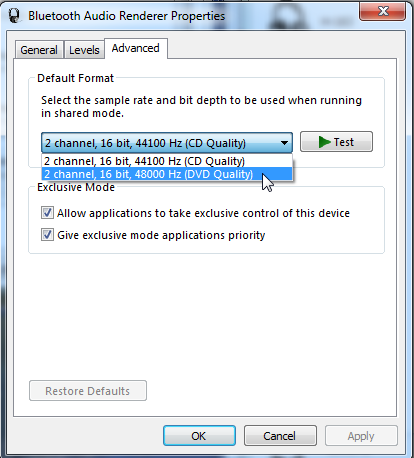
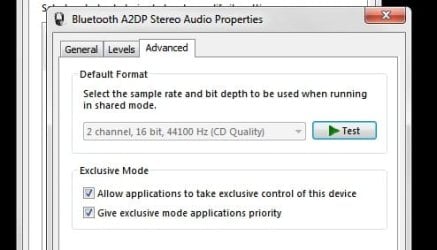
The settings to change the sound quality on my bluetooth headphones is greyed out on my computer, is it greyed out on your computer too?
 

My Computer

Computer type
PC/Desktop
OS
Windows 7 home premium
CPU
Intel core i5 4440
Motherboard
Asus h81m-k
Memory
Samsung 8gb ddr3
Graphics Card(s)
Asus gtx 1050
Monitor(s) Displays
Lg 27ea33
Hard Drives
Teamgroup gx2 512gb
PSU
Lenovo 400 watt
Case
Bitfenix nova
Browser
Microsoft edge
I don't have a sound quality option for my headphones, just sample rate.

image.png


This may be due to the headphones themselves or a limitation of BT 4.0.

The fact that you're having problems with 2 different bluetooth adapters indicates a problem with the computer itself, not the adapters. As I said, I have used that CSR BT 4.0 adapter on 3 different computers with 3 different OSes (XP, 7 and 10) using the same drivers I linked to and they worked perfectly with all my bluetooth devices. I even paired my Samsung Galaxy phone and was able to transfer files to/from the phone over Bluetooth.

I don't know what additional software you have, sometimes antivirus programs will flag some drivers as suspicious and prevent proper install. It is for this and several other reasons I have no antivirus programs installed on any of my computers but then I'm hardcore.

Other software that could interfere with driver install are those Magic PC Cleaner/Sooper Dooper Registry Booster/Elite Driver Updater etc. programs. They are straight garbage, no PC expert uses those.
 

My Computer

Computer type
PC/Desktop
OS
Windows 7 Pro x64
Yes, that's what i meant. It's greyed out on my computer.
I keep my computer free from bloatware. I don't have that many programs installed.

I have no problems sending files from my phone to my computer.

bluetooth.jpg
 
Last edited:

My Computer

Computer type
PC/Desktop
OS
Windows 7 home premium
CPU
Intel core i5 4440
Motherboard
Asus h81m-k
Memory
Samsung 8gb ddr3
Graphics Card(s)
Asus gtx 1050
Monitor(s) Displays
Lg 27ea33
Hard Drives
Teamgroup gx2 512gb
PSU
Lenovo 400 watt
Case
Bitfenix nova
Browser
Microsoft edge
I tested it on my laptop. It sounds just as bad. Why are you able to change the sound quality, when im not?
 
Last edited:

My Computer

Computer type
PC/Desktop
OS
Windows 7 home premium
CPU
Intel core i5 4440
Motherboard
Asus h81m-k
Memory
Samsung 8gb ddr3
Graphics Card(s)
Asus gtx 1050
Monitor(s) Displays
Lg 27ea33
Hard Drives
Teamgroup gx2 512gb
PSU
Lenovo 400 watt
Case
Bitfenix nova
Browser
Microsoft edge
Back
Top