Solved Why is HDD speed related to ReadyBoost?

More questions than answers...
I've never bothered with Ready Boost and don't really understand how it could give you much benefit. If you look at the R/W performance of the run of the mill USB flash drive vs a 7200rpm HDD the HDD wins hands down. Most USB flash drives are relatively slow. Run something like CrystalDiskMark on both. :confused:
Also, given that RAM is so cheap wouldn't making sure you have 4-8GB RAM be the best approach?
I understand (sort of) how an SSD can improve the performance of your HDD using the likes of Intel Smart Response. But even then isn't the caching ability of your internal RAM better?
 

My Computer My Computer

At a glance

Windows 7x64 Home Premium SP1Intel i7 2600kG.Skill Ripjaws (DDR3-1600) 2x4GBNvidia GeForce GTS 450; Intel HD Graphics 300...
Computer type
PC/Desktop
Computer Manufacturer/Model Number
Own build
OS
Windows 7x64 Home Premium SP1
CPU
Intel i7 2600k
Motherboard
ASUS P8Z68 Deluxe
Memory
G.Skill Ripjaws (DDR3-1600) 2x4GB
Graphics Card(s)
Nvidia GeForce GTS 450; Intel HD Graphics 3000(GT2+)
Monitor(s) Displays
Dell Ultrasharp IPS panel U2311H, Samsung SyncMaster P2350
Screen Resolution
1920x1080
Hard Drives
Samsung 850 Pro SSD 256GB, Samsung SSD 840 120GB, Seagates 1TB Barracuda ST31000528AS x2
PSU
Seasonic M12II 520W
Case
Lian Li Lancool PC-K60
Cooling
Case: 1x120mm, 3x140mm CPU: Hyper 212+
Keyboard
Logitech MK520 (wireless)
Mouse
Logitech MK520
Internet Speed
6-7 Mbps
Antivirus
Norton Security Premium, Malwarebytes on 2 (MSE on 3rd PC)
Browser
FireFox
Other Info
Audio: Logitech Z523 2.1
Michael, you have to understand that Ready Boost is a relict of the past. The early Vista systems were sold with 512MB of RAM - 1GB if you were lucky. And RAM was not that chesp in those days.

With a modern PC it certainly makes no sense. Even after upgrading my first Vista PC to 2GB, I threw RB out.

But regarding the speed of the devices - it is not the data transfer speed (where HDDs are certainly faster than sticks) but the access time that makes the difference. Fast access time is also the main reason for SSDs being so fast. Now that is particular to the way the OS works - with small 4K blocks and mostly random reads. For large block data in sequential reads that would be a different story.
 

My Computer My Computer

At a glance

Vista, Windows7, Mint Mate, Zorin, Windows 8from 1.6GHz Duo to i7
Computer Manufacturer/Model Number
HP, Dell, Gateway, Toshiba - 4 laptops and 2 desktops
OS
Vista, Windows7, Mint Mate, Zorin, Windows 8
CPU
from 1.6GHz Duo to i7
Monitor(s) Displays
2x HP w2207
Hard Drives
5x HDD, 7x SSD, 12x Externals
Keyboard
with trackball - no mices
Mouse
Trackball mice
Internet Speed
DSL 6000
This may help to explain Ready Boost & how it is used. This was copied from the Windows Help files.

Using memory in your storage device to speed up your computer

ReadyBoost can speed up your computer by using storage space on most USB flash drives and flash memory cards. When you plug a ReadyBoost-compatible storage device into your computer, the AutoPlay dialog box offers you the option to speed up your computer using ReadyBoost. If you select this option, you can choose how much memory on the device to use for this purpose.

When you set up a device to work with ReadyBoost, Windows shows you how much space it recommends you allow it to use for optimal performance. For ReadyBoost to effectively speed up your computer, the flash drive or memory card should have at least 1 gigabyte (GB) of available space. If your device doesn't have enough available space for ReadyBoost, you'll see a message telling you to free some space on the device if you want to use it to speed up your system.

You can enable or disable ReadyBoost for a specific flash drive or other removable storage device. For more information, see Turn ReadyBoost on or off for a storage device.

Picture of the ReadyBoost tabThe ReadyBoost tab lets you decide how much storage space on a removable device to use for boosting your system speed.

Show contentHide content What to look for in a flash memory device
Here are some tips on what to look for when selecting a USB flash drive or flash memory card to use with ReadyBoost:

The minimum amount of available space recommended for ReadyBoost to effectively speed up your computer is 1 GB.

For best results, use a flash drive or flash memory card with available space of at least double the amount of memory (RAM) in your computer, and preferably four times as much memory. For example, if your computer has 1 GB of RAM and you plug in a 4 GB USB flash drive, set aside at least 2 GB on the flash drive to get the best performance gain from ReadyBoost, and preferably the entire 4 GB. How much memory you need depends on how you use your computer. Keeping a lot of programs open at once uses more memory.

Give ReadyBoost 2 GB to 4 GB of space for best results on most computers. You can reserve more than 4 GB of space for ReadyBoost on most flash drives and flash memory cards. (Storage devices formatted with the older FAT32 file system can't store more than 4 GB.) You can use a maximum of 32 GB of available space on any single removable storage device with ReadyBoost and up to 256 GB total per computer (by inserting up to eight USB flash drives or flash memory cards into the same computer).

To work with ReadyBoost, a USB flash drive must support USB 2.0 or higher. Your computer must have at least one free USB 2.0 port where you can plug in the flash drive. ReadyBoost works best if you plug the flash drive into a USB port directly on the computer, rather than into an external USB hub shared with other USB devices.

If you want to be sure a USB flash drive works with ReadyBoost, look for a note from the manufacturer that the flash drive is "Enhanced for ReadyBoost." Not all manufacturers list this on their packaging. If there is no mention of ReadyBoost compatibility, the flash drive still might work with ReadyBoost.

There are many different kinds of flash memory cards, such as CompactFlash and Secure Digital (SD) memory cards. Most memory cards work with ReadyBoost. Some SD memory cards don't work well with ReadyBoost due to issues with the SD card interface. ReadyBoost will display a warning message if you attempt to use one of these cards.

Notes
If your computer has a hard disk that uses solid-state drive (SSD) technology, you might not see an option to speed up your computer with ReadyBoost when you plug in a USB flash drive or flash memory card. You may instead receive the message, "Readyboost is not enabled on this computer because the system disk is fast enough that ReadyBoost is unlikely to provide any additional benefit." This is because some SSD drives are so fast they're unlikely to benefit from ReadyBoost.

In some situations, you might not be able to use all of the memory on your device to speed up your computer. For example, some flash memory devices contain both slow and fast flash memory, but ReadyBoost can only use fast flash memory to speed up your computer.

 

My Computer My Computer

At a glance

Windows 7 Home Premium 64 bit sp1Intel i5 3570 3.4Ghz Ivy Bridge SKT 1155 quad...G-Skill Rip Jaws 16Gb (8x2) DDR3 -1600 PC3 12...Gigabyte NVIDIA GT610 1Gb DDR3 810/1200 PCI-E...
Computer type
PC/Desktop
Computer Manufacturer/Model Number
Self built using existing case
OS
Windows 7 Home Premium 64 bit sp1
CPU
Intel i5 3570 3.4Ghz Ivy Bridge SKT 1155 quad core
Motherboard
Gigabyte Z77-HD3 SKT 1155 2xSata 3, 4x USB 3.0
Memory
G-Skill Rip Jaws 16Gb (8x2) DDR3 -1600 PC3 12800 CL 10 red
Graphics Card(s)
Gigabyte NVIDIA GT610 1Gb DDR3 810/1200 PCI-E 2.0 Silent
Sound Card
NVIDIA High Definition & Realtech High Definition Audio
Monitor(s) Displays
2 x Philips 226V4L 16:9 aspect ratio
Screen Resolution
1920 x 1080 HD
Hard Drives
Samsung 840 Pro 256gb SSD, SATA 3.
Hitachi Touro Portable 1tb, USB 3.0 HDD used for image b/ups.
PSU
Corsair VS450
Case
Codeng
Cooling
PSU fan & CPU fan
Keyboard
Logitech
Mouse
Logitech Wireless trackball M570
Internet Speed
Wireless 3G. 3mg down & 550kb up.
Antivirus
Bitdefender Internet Security 2020
Browser
Opera (Current Version) & Firefox
Other Info
MS Office 2013 Pro. Davis weather station software. MGE Nova 600 avr UPS.
Lots of pointless answers that don't address the question

ReadyBoost is used to improve caching speeds, it is a false popular belief that it provides more RAM or acts as RAM. It primarily uses data in the SuperFetch cache at first, however, later on once all the apportiate ReadyBoost services have been loaded, the Ecache.sys reads all disk I/O to the connected hard-drives, and then begins writing any data from these disk I/Os into a cache file stored on the USB flash drive.
This nails it on the head however. But what exactly is the "cache" in this case? Is it the stuff that gets loaded into SuperFetch? And why does SuperFetch cache to the HDD instead of RAM?
 

My Computer My Computer

At a glance

Windows 7 Professional x64Intel Core i5 4690KCorsair Vengeance 16GB DDR3-1600Sapphire Radeon R9 290 Tri-X OC
Computer type
PC/Desktop
OS
Windows 7 Professional x64
CPU
Intel Core i5 4690K
Motherboard
Gigabyte Z97X Gaming-3
Memory
Corsair Vengeance 16GB DDR3-1600
Graphics Card(s)
Sapphire Radeon R9 290 Tri-X OC
Sound Card
ONBOARD SOUND :D
Monitor(s) Displays
Samsung S24A450BW
Screen Resolution
1920x1200 (16:10 forever)
Hard Drives
250GB Samsung 840 EVO + 2TB Seagate Barracudea
PSU
Fractal Design Newton R3 1000W
Case
Corsair Graphite 230T
Cooling
Cooler Master Hyper 212X
Keyboard
Logitech G710+, CM Storm TK
Mouse
Steelseries Rival
Internet Speed
Australian
Antivirus
Avast, because I'm cheap
Browser
All the browsers!
More questions than answers...
I've never bothered with Ready Boost and don't really understand how it could give you much benefit. If you look at the R/W performance of the run of the mill USB flash drive vs a 7200rpm HDD the HDD wins hands down. Most USB flash drives are relatively slow. Run something like CrystalDiskMark on both.

Conventional drives do indeed have a faster transfer rate than a flash drive. The faster transfer rate will be a benefit when doing large sequential reads. But in most real world situations that just doesn't happen very often in a modern OS. Typical usage patterns are small random reads from multiple files. In that case it is seek time that is more important than transfer rate. The primary performance characteristics are usually seek time, rotation delay, transfer rate. In that order. Typically a hard drive will spend more time seeking data than reading it, and by a considerable margin.

Flash drives have slower transfer rate but much better seek times. ReadyBoost takes advantage of this. When doing small random reads ReadyBoost will read the data from the flash drive if it is present there. This takes advantage of the faster seek time of the flash drive and the slower transfer rate doesn't matter much. But when doing large sequential reads the file system will go directly to the hard drive and bypass the flash drive.

The NT platform has long had an efficient system cache for the hard drive. The problem is that the efficiency of the system varies with the amount of RAM available for the purpose. On systems with limited RAM there just isn't enough for a decent size cache.

ReadyBoost was introduced with Vista that had a minimum RAM specification of 512 MB for the home basic edition. Some time ago I read of ReadyBoost testing on such a system. ReadyBoost significantly improved performance, but upping the RAM to 1 GB helped more. Under favorable conditions ReadyBoost could be of some benefit with as much as 2GB RAM.

ReadyBoost was retained in Windows 7 and Windows 8 for situations where it would be a benefit. But on modern systems with 4 GB RAM and more and with fast conventional or SSD drives it benefits nothing.
 

My Computer My Computer

At a glance

Windows 7 Pro 64 bitXeon W35208 GBNvidia Geforce 210
Computer type
PC/Desktop
Computer Manufacturer/Model Number
HP
OS
Windows 7 Pro 64 bit
CPU
Xeon W3520
Memory
8 GB
Graphics Card(s)
Nvidia Geforce 210
Lots of pointless answers that don't address the question

ReadyBoost is used to improve caching speeds, it is a false popular belief that it provides more RAM or acts as RAM. It primarily uses data in the SuperFetch cache at first, however, later on once all the apportiate ReadyBoost services have been loaded, the Ecache.sys reads all disk I/O to the connected hard-drives, and then begins writing any data from these disk I/Os into a cache file stored on the USB flash drive.
This nails it on the head however. But what exactly is the "cache" in this case? Is it the stuff that gets loaded into SuperFetch? And why does SuperFetch cache to the HDD instead of RAM?
There is still a lot of confusion - e.g. 'caching' that has really nothing to do with it. If there is not enough RAM, then there is no caching. And Ready Boost only comes in when there is not enough RAM.

If you read my post #20, you may understand the mechanism and the speed relationship of sticks and disks in this case.
 

My Computer My Computer

At a glance

Vista, Windows7, Mint Mate, Zorin, Windows 8from 1.6GHz Duo to i7
Computer Manufacturer/Model Number
HP, Dell, Gateway, Toshiba - 4 laptops and 2 desktops
OS
Vista, Windows7, Mint Mate, Zorin, Windows 8
CPU
from 1.6GHz Duo to i7
Monitor(s) Displays
2x HP w2207
Hard Drives
5x HDD, 7x SSD, 12x Externals
Keyboard
with trackball - no mices
Mouse
Trackball mice
Internet Speed
DSL 6000
Ok I'm going to mark this solved then since perhaps only Microsoft truly knows what the hell is going on inside this thing
 

My Computer My Computer

At a glance

Windows 7 Professional x64Intel Core i5 4690KCorsair Vengeance 16GB DDR3-1600Sapphire Radeon R9 290 Tri-X OC
Computer type
PC/Desktop
OS
Windows 7 Professional x64
CPU
Intel Core i5 4690K
Motherboard
Gigabyte Z97X Gaming-3
Memory
Corsair Vengeance 16GB DDR3-1600
Graphics Card(s)
Sapphire Radeon R9 290 Tri-X OC
Sound Card
ONBOARD SOUND :D
Monitor(s) Displays
Samsung S24A450BW
Screen Resolution
1920x1200 (16:10 forever)
Hard Drives
250GB Samsung 840 EVO + 2TB Seagate Barracudea
PSU
Fractal Design Newton R3 1000W
Case
Corsair Graphite 230T
Cooling
Cooler Master Hyper 212X
Keyboard
Logitech G710+, CM Storm TK
Mouse
Steelseries Rival
Internet Speed
Australian
Antivirus
Avast, because I'm cheap
Browser
All the browsers!
I'm not so sure about pointless answers reference - we are all here to learn as well as generally give solid advice.
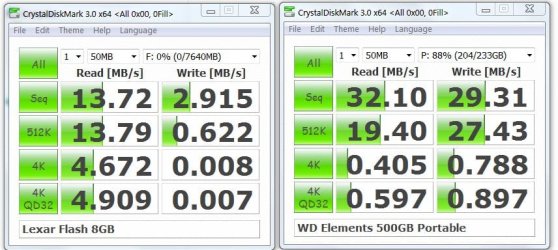
Here is a speed test on an external usb HDD vs a bog standard USB flash drive. Ok the read 4k speeds are significantly faster but the write flash speeds are very poor. Maybe the 4k flash read speeds give the gain if you have tiny internal RAM.
Flash-HDD.JPG
 

My Computer My Computer

At a glance

Windows 7x64 Home Premium SP1Intel i7 2600kG.Skill Ripjaws (DDR3-1600) 2x4GBNvidia GeForce GTS 450; Intel HD Graphics 300...
Computer type
PC/Desktop
Computer Manufacturer/Model Number
Own build
OS
Windows 7x64 Home Premium SP1
CPU
Intel i7 2600k
Motherboard
ASUS P8Z68 Deluxe
Memory
G.Skill Ripjaws (DDR3-1600) 2x4GB
Graphics Card(s)
Nvidia GeForce GTS 450; Intel HD Graphics 3000(GT2+)
Monitor(s) Displays
Dell Ultrasharp IPS panel U2311H, Samsung SyncMaster P2350
Screen Resolution
1920x1080
Hard Drives
Samsung 850 Pro SSD 256GB, Samsung SSD 840 120GB, Seagates 1TB Barracuda ST31000528AS x2
PSU
Seasonic M12II 520W
Case
Lian Li Lancool PC-K60
Cooling
Case: 1x120mm, 3x140mm CPU: Hyper 212+
Keyboard
Logitech MK520 (wireless)
Mouse
Logitech MK520
Internet Speed
6-7 Mbps
Antivirus
Norton Security Premium, Malwarebytes on 2 (MSE on 3rd PC)
Browser
FireFox
Other Info
Audio: Logitech Z523 2.1
As far as I can work out HDD speed is in no way related to Readyboost. In other words - using Readyboost doesn't speed up read/ write access. It just allows some frequently used programs to load faster.

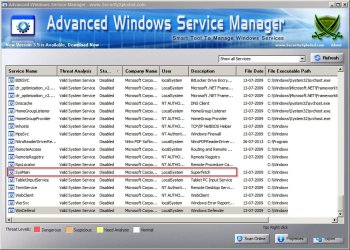
On my machine I see no need to use either readyboost or superfetch. I prefer to allocate a chunk of RAM to a persitent RAMdisk. It's configured so that USER temp and WINDOWS temp files are written onto it. This directly relates to HDD speed.

Pagefile is swapped onto a non-windows partition and set to a fixed size of "system recommended plus 200Mb" - the page file on the windows partition is fixed at 16MB only. No need for superfetch.

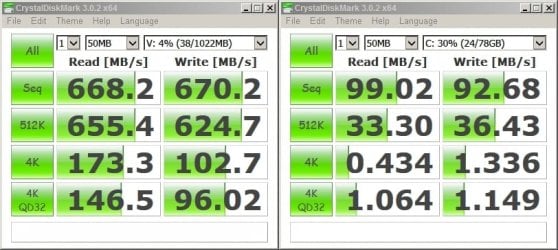
Screenshot shows Windows partition (C: ) vs RAMdisk (V: ) - an insane speed boost.
 

Attachments

  • V-RAM vs HDD.jpg
    V-RAM vs HDD.jpg
    60.8 KB · Views: 1
  • 2013-11-23 18_44_14-Advanced Windows Service Manager - www.SecurityXploded.jpg
    2013-11-23 18_44_14-Advanced Windows Service Manager - www.SecurityXploded.jpg
    133.6 KB · Views: 1

My Computer My Computer

At a glance

Microsoft Windows 7 Home Premium 64-bit 7601 ...AMD C-60 APU with Radeon(tm) HD Graphics4.00 GBAMD Radeon HD 6290 Graphics
Computer type
Laptop
Computer Manufacturer/Model Number
ASUS
OS
Microsoft Windows 7 Home Premium 64-bit 7601 Multiprocessor Free Service Pack 1
CPU
AMD C-60 APU with Radeon(tm) HD Graphics
Motherboard
ASUSTeK COMPUTER INC. X501U
Memory
4.00 GB
Graphics Card(s)
AMD Radeon HD 6290 Graphics
Sound Card
(1) AMD High Definition Audio Device (2) Realtek High Defi
Screen Resolution
1366 x 768 x 32 bits (4294967296 colors) @ 60 Hz
Hard Drives
Hitachi HTS545050A7E380 SATA Disk Device
Antivirus
Comodo CIS & FW, SecureAplus App Whitelisting, Threatfire
Browser
Cyberfox 64bit, Opera 64bit, Airfox
Other Info
Spy-The-Spy, HitmanPro.Alert, Norton Connect Safe, MJRegWatcher, BitDefender TrafficLight, Voodoo Shield, Zemana AntiMalware
ReadyBoost has everything to do with Disk speed. ReadyBoost is essentially a disk cache. A basic concept of caching is that the media used as the cache, a flash drive, must be faster than the media being cached, the hard drive. RAM is also being used as a disk cache but on low memory systems there just isn't enough. A flash drive has slower transfer rate but seek time is much better. The slower the hard disk the more effective ReadyBoost will be.

The benchmarks shown do indeed favor the RAMDisk by a wide margin. But the numbers have little relevance to real world performance. All modern operating systems has a sophisticated system cache that provide most of the benefits of a RAMDisk with fewer of the problems. If files are frequently accessed then they will be in the cache and the speed of the disk is of no consequence except for the initial read. If files are not frequently why would you want then in the RAMDisk? RAMDisks tend to be a poor use of memory. The OS will usually make better use of it.

A pagefile on a non-system partition will impair performance unless it is also on a separate physical drive.
 

My Computer My Computer

At a glance

Windows 7 Pro 64 bitXeon W35208 GBNvidia Geforce 210
Computer type
PC/Desktop
Computer Manufacturer/Model Number
HP
OS
Windows 7 Pro 64 bit
CPU
Xeon W3520
Memory
8 GB
Graphics Card(s)
Nvidia Geforce 210
Fragmentation is the keything to consider

The point of swapping the page file onto another partition (for me) is the that file remains contiguous and is therefore written and read fast. Windows usually creates the file as a contiguous entity - assuming that there is enough free contiguous space.

Windows tries to grow the paging file dynamically. This means that the growing and shrinking paging file gets fragmented rapidly and starts decreasing overall performance.

For the above reasons I've found it better to set the page file to a fixed size.

I'd agree that a better performance boost can be had by swapping the page file onto another drive! However I've not needed to do this. I did consider swapping the page file onto Virtual RAM but for system stability reasons I decided against doing this.

As for loading programs - Virtual RAM does essentially the same job as superfetch and so superfetch isn't needed. It actually hinders performance if left enabled on my machine.
 

My Computer My Computer

At a glance

Microsoft Windows 7 Home Premium 64-bit 7601 ...AMD C-60 APU with Radeon(tm) HD Graphics4.00 GBAMD Radeon HD 6290 Graphics
Computer type
Laptop
Computer Manufacturer/Model Number
ASUS
OS
Microsoft Windows 7 Home Premium 64-bit 7601 Multiprocessor Free Service Pack 1
CPU
AMD C-60 APU with Radeon(tm) HD Graphics
Motherboard
ASUSTeK COMPUTER INC. X501U
Memory
4.00 GB
Graphics Card(s)
AMD Radeon HD 6290 Graphics
Sound Card
(1) AMD High Definition Audio Device (2) Realtek High Defi
Screen Resolution
1366 x 768 x 32 bits (4294967296 colors) @ 60 Hz
Hard Drives
Hitachi HTS545050A7E380 SATA Disk Device
Antivirus
Comodo CIS & FW, SecureAplus App Whitelisting, Threatfire
Browser
Cyberfox 64bit, Opera 64bit, Airfox
Other Info
Spy-The-Spy, HitmanPro.Alert, Norton Connect Safe, MJRegWatcher, BitDefender TrafficLight, Voodoo Shield, Zemana AntiMalware
If the initial size of the pagefile is adequate then it will NEVER resize. There will be no continuous resizing, even if the pagefile is system managed. The pagefile will only be resized if this is necessary to prevent exceeding the commit limit. I have confirmed this by observation many times.
 

My Computer My Computer

At a glance

Windows 7 Pro 64 bitXeon W35208 GBNvidia Geforce 210
Computer type
PC/Desktop
Computer Manufacturer/Model Number
HP
OS
Windows 7 Pro 64 bit
CPU
Xeon W3520
Memory
8 GB
Graphics Card(s)
Nvidia Geforce 210
Back
Top