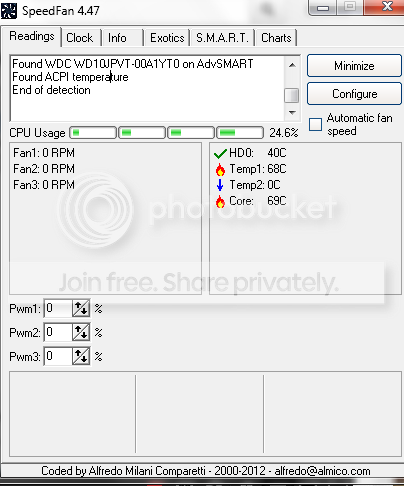
Why is my computer overheating? How do i change my fan speeds and temp

NBAPwns13

New member
Member
Local time
9:12 PM
Messages
36
Im using FanSpeed. And my Temps are high! how do i put them lower? I just downloaded Speefan and for some reason its not showing my RPM speeds iunno what to do. Is this good or bad? and how do i make it so that my temps go lower?

Also how do i make it so that my computer won't overheat? i heard something about thermal paste but it looks dangerous listening to it.

Please help im a newbie and i want to learn from the experts!:(

Capture1.png


Capture2.png
 
Last edited:

My Computer My Computer

At a glance

Windows 7 Home Premium 64-Bit
OS
Windows 7 Home Premium 64-Bit
Help help!
 

My Computer My Computer

At a glance

Windows 7 Home Premium 64-Bit
OS
Windows 7 Home Premium 64-Bit
This is one of the better tutorials I've seen on how to use SpeedFan.

Using SpeedFan to automatically control your PC’s fan speeds » unitstep.net

As far as keeping your temps down, it would help to know more about your computer. At the top of any Forum page click on "User CP" and then in the left column click on "Edit System Spec". Fill in as much info about your computer as you can. A free tool called Speccy can help, as well as give you real time monitoring of temps just to double check against SpeedFan's readings.

Speccy - System Information - Free Download

Thermal paste is a very high heat conductive paste that is used between two objects (usually a heatsink and a CPU/GPU) to get better heat conduction. It fills in all those microscopic imperfections on the heatsink and CPU/GPU that can trap air in them and cause a loss in the heatsink’s performance. Air is a very poor conductor of heat. Thermal Interface Materials (TIM) can be up to a 100 times greater conductor of heat than air and is extremely critical when trying to draw heat away from a component. If your computer was manufactured you probably don't have to worry about replacing the thermal paste. But if it was home built it's possible the paste wasn't applied correctly (too little or too much can both cause cooling problems.)

If you're using a laptop a cooling pad can drop temps by several degrees. Also never put a laptop on your lap or any other soft surface like a pillow, bedspread, etc. The cooling vents and fan will certainly be blocked. Compressed air can be used to blow dust out from the vents and fan. If a desktop make sure the case has ventilation around all sides and the vents/fans are free from dust. It can also help to have a small portable fan directed at the case for additional air flow.
 

My Computer My Computer

At a glance

Win 7 Pro 64-bitIntel i5 2.4 Ghz8GB DDR3Intel HD 3000
Computer type
Laptop
Computer Manufacturer/Model Number
Sony Vaio VPCEB47GM Laptop
OS
Win 7 Pro 64-bit
CPU
Intel i5 2.4 Ghz
Memory
8GB DDR3
Graphics Card(s)
Intel HD 3000
Sound Card
IDT High Definition
Monitor(s) Displays
15.6 WGXA Anti-Glare LED
Screen Resolution
1280x800
Hard Drives
640Gb 7200rpm
Antivirus
MSE
Browser
Opera (primary) with IE9 backup
Back
Top