Why is my recovery drive taking up 179GB of my 750gb hard drive?

James1258

New member
Local time
11:03 PM
Messages
6
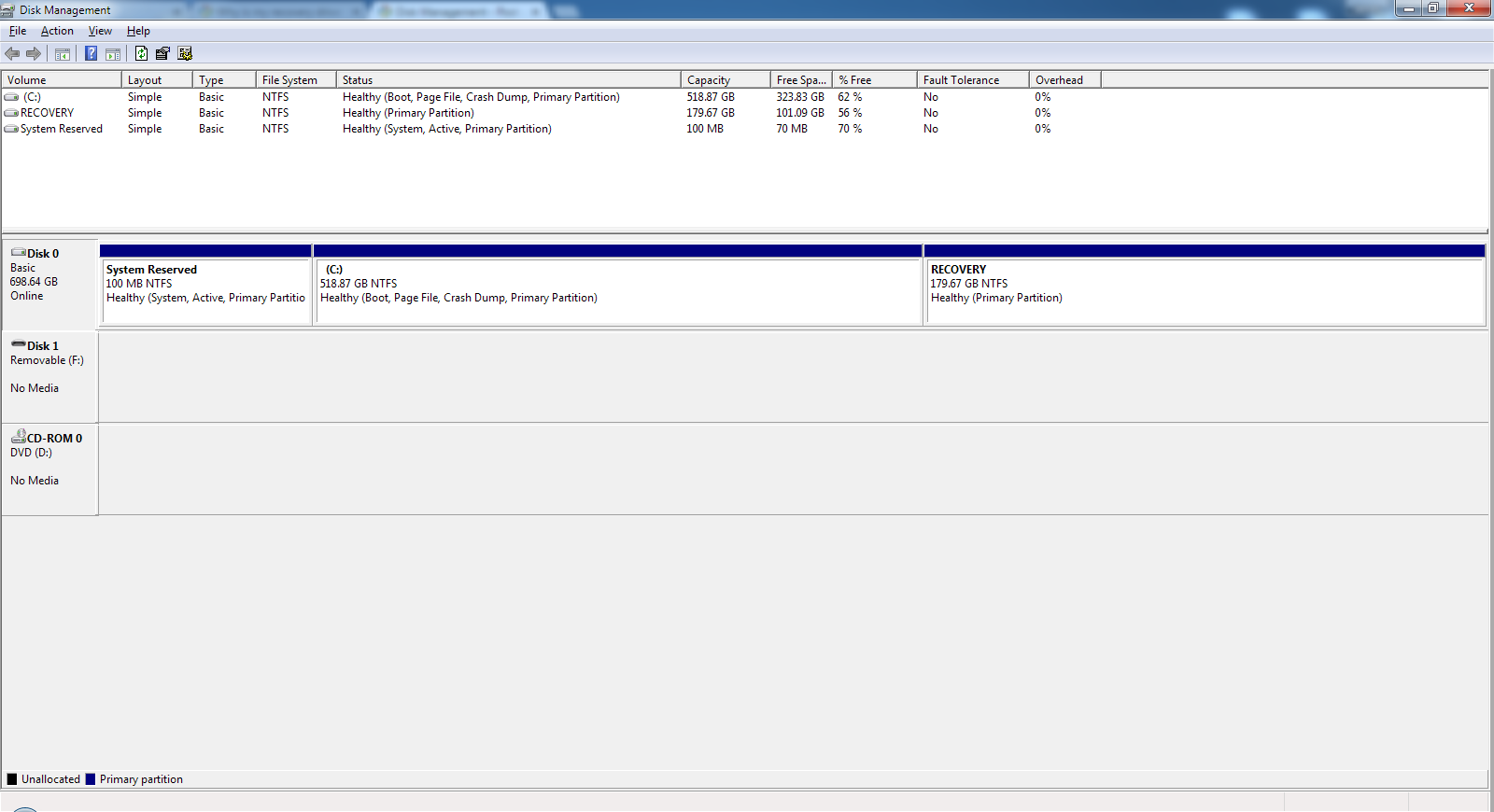
I just noticed that I am only able to use ~500GB of the 750GB I have on my hard drive. On Disk Management, it says that "System Reserved" takes up 100MB, "RECOVERY" takes up 179.67GB and "C:" takes up 518.87GB.
 

My Computer My Computer

At a glance

Windows 7 Home Premium 64 Biti7-2670QM @ 2.20GHz8GBNvidia GT 525M
Computer type
Laptop
Computer Manufacturer/Model Number
Dell Inspiron N7110
OS
Windows 7 Home Premium 64 Bit
CPU
i7-2670QM @ 2.20GHz
Motherboard
Not sure
Memory
8GB
Graphics Card(s)
Nvidia GT 525M
Hard Drives
WD Black 750GB 7200rpm
Antivirus
None
Browser
Google Chrome

My Computer My Computer

At a glance

Windows 7 Ultimate x64 SP1AMD Phenom 2 1090T2x8GB Kingston HyperX Fury Black 1600Mhz Unga...MSI GTX 970 Gaming 4G
Computer type
PC/Desktop
Computer Manufacturer/Model Number
Custom Build
OS
Windows 7 Ultimate x64 SP1
CPU
AMD Phenom 2 1090T
Motherboard
Gigabyte GA-890FXA-UD5
Memory
2x8GB Kingston HyperX Fury Black 1600Mhz Unganged
Graphics Card(s)
MSI GTX 970 Gaming 4G
Sound Card
Realtek On-Board HD 7.1 Audio / Logitech G35
Monitor(s) Displays
3xAcer GD245HQ
Screen Resolution
1920x1080
Hard Drives
Samsung 850 Pro 512GB SSD - OS /
WD Caviar Black SATA 3 - 1 TBx2 - Dynamic RAID 0 /
WD Caviar Green SATA 2 - 640GBx2 - Dynamic RAID 0 /
WD Caviar Green SATA 2 - 640GB - Internal Backup /
Seagate Barracude SATA 3 - 3TB - External Backup/ Sync
PSU
HighPower 1000W
Case
Cooler Master HAF 932
Cooling
Noctua NH-D14
Keyboard
Logitech G19
Mouse
Logitech G500
Internet Speed
100/4 Mbit Cable (100GB quota)
Antivirus
ZoneAlarm Extreme Security / MBAM Pro / MBAE Free / SAS Free
Browser
IE 11 - Firefox - Chrome
Other Info
Logitech F710/ G27/ G940/ Z5500 // TrackIR 5 // Nvidia 3D Surround Vision
7yJFEGn.png
 

My Computer My Computer

At a glance

Windows 7 Home Premium 64 Biti7-2670QM @ 2.20GHz8GBNvidia GT 525M
Computer type
Laptop
Computer Manufacturer/Model Number
Dell Inspiron N7110
OS
Windows 7 Home Premium 64 Bit
CPU
i7-2670QM @ 2.20GHz
Motherboard
Not sure
Memory
8GB
Graphics Card(s)
Nvidia GT 525M
Hard Drives
WD Black 750GB 7200rpm
Antivirus
None
Browser
Google Chrome
System Reserved is very very small, which is normal and causing you no problems.

The recovery partition is about 179 GB, of which 101 GB is unused.

Dell does funny things.

Have you deliberately enlarged the recovery partition? Or is it possible that it has always been 179 GB? You are using about 78 GB of that 179, which is more than I'd expect, but may be normal on a Dell.

Can you look inside the recovery partition? Maybe not, as I see it has no drive letter.

Are you using any sort of Dell backup software?

Do you ever deliberately use the recovery partition, perhaps storing files on it?
 

My Computer My Computer

At a glance

Windows 7 Home Premium SP1, 64-bitIntel Skylake i5-6600K, not overclocked8 GB HyperX DDR4-2666 (2 x 4 GB)none; graphics are integrated on CPU
Computer type
PC/Desktop
Computer Manufacturer/Model Number
Ignatz Special; 4 speed manual gearbox; factory air conditioning; one of one
OS
Windows 7 Home Premium SP1, 64-bit
CPU
Intel Skylake i5-6600K, not overclocked
Motherboard
AsRock Z170M Extreme 4, micro ATX
Memory
8 GB HyperX DDR4-2666 (2 x 4 GB)
Graphics Card(s)
none; graphics are integrated on CPU
Sound Card
onboard: Realtek ALC1150; external: USB Behringer UF0-202
Monitor(s) Displays
Dell S2340M 23 inch IPS
Screen Resolution
1600 x 900
Hard Drives
System: Crucial MX100 series SSD, 128 GB;
Data: Samsung Spinpoint 103SJ, 1 TB;
Backup: WD Caviar Green WD30EZRX-00D8PB0, 3 TB
PSU
Rosewill SilentNight 500 watt fanless, semi-modular
Case
Antec Solo II
Cooling
Noctua NH-U12S; Noctua F12 intake, Noctua S12A exhaust
Keyboard
Microsoft 200 6JH-00001 USB
Mouse
Dell or Microsoft optical wired; USB
Antivirus
Microsoft Security Essentials and Malwarebytes Premium
Browser
Pale Moon
Other Info
All fans PWM; speeds at idle: CPU circa 500 rpm; intake circa 600 rpm; exhaust circa 600 rpm; CPU temps 27 idle and 47 C load in a warm room (27 C/81 F) when running Intel Extreme Tuning Utility stress test.

My Computer My Computer

At a glance

Windows 7 Ultimate x64 SP1AMD Phenom 2 1090T2x8GB Kingston HyperX Fury Black 1600Mhz Unga...MSI GTX 970 Gaming 4G
Computer type
PC/Desktop
Computer Manufacturer/Model Number
Custom Build
OS
Windows 7 Ultimate x64 SP1
CPU
AMD Phenom 2 1090T
Motherboard
Gigabyte GA-890FXA-UD5
Memory
2x8GB Kingston HyperX Fury Black 1600Mhz Unganged
Graphics Card(s)
MSI GTX 970 Gaming 4G
Sound Card
Realtek On-Board HD 7.1 Audio / Logitech G35
Monitor(s) Displays
3xAcer GD245HQ
Screen Resolution
1920x1080
Hard Drives
Samsung 850 Pro 512GB SSD - OS /
WD Caviar Black SATA 3 - 1 TBx2 - Dynamic RAID 0 /
WD Caviar Green SATA 2 - 640GBx2 - Dynamic RAID 0 /
WD Caviar Green SATA 2 - 640GB - Internal Backup /
Seagate Barracude SATA 3 - 3TB - External Backup/ Sync
PSU
HighPower 1000W
Case
Cooler Master HAF 932
Cooling
Noctua NH-D14
Keyboard
Logitech G19
Mouse
Logitech G500
Internet Speed
100/4 Mbit Cable (100GB quota)
Antivirus
ZoneAlarm Extreme Security / MBAM Pro / MBAE Free / SAS Free
Browser
IE 11 - Firefox - Chrome
Other Info
Logitech F710/ G27/ G940/ Z5500 // TrackIR 5 // Nvidia 3D Surround Vision
System Reserved is very very small, which is normal and causing you no problems.

The recovery partition is about 179 GB, of which 101 GB is unused.

Dell does funny things.

Have you deliberately enlarged the recovery partition? Or is it possible that it has always been 179 GB? You are using about 78 GB of that 179, which is more than I'd expect, but may be normal on a Dell.

Can you look inside the recovery partition? Maybe not, as I see it has no drive letter.

Are you using any sort of Dell backup software?

Do you ever deliberately use the recovery partition, perhaps storing files on it?


You can assign a drive letter temporarily in Disk Management for the recovery partition and see what's inside. Remove the drive letter again after you are done.

Get portable version of https://antibody-software.com/web/s...using-the-most-disk-space-on-your-hard-drive/
and expand the folders inside recovery partition (if there are any), post that screenshot as well if you can't figure out

I have never accessed the recovery partition and I do not backup anything on my computer.

Win7 - Album on Imgur

Is it safe to just delete those files or make the RECOVERY drive smaller?
 

My Computer My Computer

At a glance

Windows 7 Home Premium 64 Biti7-2670QM @ 2.20GHz8GBNvidia GT 525M
Computer type
Laptop
Computer Manufacturer/Model Number
Dell Inspiron N7110
OS
Windows 7 Home Premium 64 Bit
CPU
i7-2670QM @ 2.20GHz
Motherboard
Not sure
Memory
8GB
Graphics Card(s)
Nvidia GT 525M
Hard Drives
WD Black 750GB 7200rpm
Antivirus
None
Browser
Google Chrome
You'd be extremely foolish to delete that partition without knowing what is on it.

Which is why GoKay asked you to download, run, and post a picture of WizTree.

A picture of Windows Disk Management would help also. That pic you posted has little value.

Ideally, that partition contains stuff ONLY related to recovery. But you don't know that. As I said, Dell does funny things. Who knows what's on that partition.

If it does contain stuff ONLY related to recovery and you have NO interest in recovery, then you don't need it and could delete it. But we don't know what's on it and we don't know if you have any interest in recovery.

It could contain critical boot files. Dell does funny things. We can't tell about that because we don't have a screen shot of Windows Disk Management, which you can find by typing "Disk Management" into the start button search box.
 

My Computer My Computer

At a glance

Windows 7 Home Premium SP1, 64-bitIntel Skylake i5-6600K, not overclocked8 GB HyperX DDR4-2666 (2 x 4 GB)none; graphics are integrated on CPU
Computer type
PC/Desktop
Computer Manufacturer/Model Number
Ignatz Special; 4 speed manual gearbox; factory air conditioning; one of one
OS
Windows 7 Home Premium SP1, 64-bit
CPU
Intel Skylake i5-6600K, not overclocked
Motherboard
AsRock Z170M Extreme 4, micro ATX
Memory
8 GB HyperX DDR4-2666 (2 x 4 GB)
Graphics Card(s)
none; graphics are integrated on CPU
Sound Card
onboard: Realtek ALC1150; external: USB Behringer UF0-202
Monitor(s) Displays
Dell S2340M 23 inch IPS
Screen Resolution
1600 x 900
Hard Drives
System: Crucial MX100 series SSD, 128 GB;
Data: Samsung Spinpoint 103SJ, 1 TB;
Backup: WD Caviar Green WD30EZRX-00D8PB0, 3 TB
PSU
Rosewill SilentNight 500 watt fanless, semi-modular
Case
Antec Solo II
Cooling
Noctua NH-U12S; Noctua F12 intake, Noctua S12A exhaust
Keyboard
Microsoft 200 6JH-00001 USB
Mouse
Dell or Microsoft optical wired; USB
Antivirus
Microsoft Security Essentials and Malwarebytes Premium
Browser
Pale Moon
Other Info
All fans PWM; speeds at idle: CPU circa 500 rpm; intake circa 600 rpm; exhaust circa 600 rpm; CPU temps 27 idle and 47 C load in a warm room (27 C/81 F) when running Intel Extreme Tuning Utility stress test.
You'd be extremely foolish to delete that partition without knowing what is on it.

Which is why GoKay asked you to download, run, and post a picture of WizTree.

A picture of Windows Disk Management would help also. That pic you posted has little value.

Ideally, that partition contains stuff ONLY related to recovery. But you don't know that. As I said, Dell does funny things. Who knows what's on that partition.

If it does contain stuff ONLY related to recovery and you have NO interest in recovery, then you don't need it and could delete it. But we don't know what's on it and we don't know if you have any interest in recovery.

It could contain critical boot files. Dell does funny things. We can't tell about that because we don't have a screen shot of Windows Disk Management, which you can find by typing "Disk Management" into the start button search box.

I have the Disk Management screen shot on my second post and already included the Gokay screenshot in the previous post. Do you need a new screenshot of my Disk Management?
 

My Computer My Computer

At a glance

Windows 7 Home Premium 64 Biti7-2670QM @ 2.20GHz8GBNvidia GT 525M
Computer type
Laptop
Computer Manufacturer/Model Number
Dell Inspiron N7110
OS
Windows 7 Home Premium 64 Bit
CPU
i7-2670QM @ 2.20GHz
Motherboard
Not sure
Memory
8GB
Graphics Card(s)
Nvidia GT 525M
Hard Drives
WD Black 750GB 7200rpm
Antivirus
None
Browser
Google Chrome
I have the Disk Management screen shot on my second post and already included the Gokay screenshot in the previous post. Do you need a new screenshot of my Disk Management?

No additional picture of Disk Management needed. I just missed it first time and instead looked at that other picture you linked to.

Your Recovery partition does not appear to contain Windows boot files, so your PC should boot fine if that partition were deleted.

But we still don't know what's on that partition, thus the request for WizTree picture.

Other manufacturer's recovery partitions are nowhere near that large, so it may contain something extry-special known to Dell only since they do funny things. So we need the WizTree picture and can only hope that it reveals something understandable.

You could also go to Dell web site and drill down into their support in a possibly hopeless attempt to find out if that many GB on a recovery partition is standard for Dell.

Yes or no: do you have any interest in recovery via that partition? If no, I'd delete it, pending the WizTree picture.
 

My Computer My Computer

At a glance

Windows 7 Home Premium SP1, 64-bitIntel Skylake i5-6600K, not overclocked8 GB HyperX DDR4-2666 (2 x 4 GB)none; graphics are integrated on CPU
Computer type
PC/Desktop
Computer Manufacturer/Model Number
Ignatz Special; 4 speed manual gearbox; factory air conditioning; one of one
OS
Windows 7 Home Premium SP1, 64-bit
CPU
Intel Skylake i5-6600K, not overclocked
Motherboard
AsRock Z170M Extreme 4, micro ATX
Memory
8 GB HyperX DDR4-2666 (2 x 4 GB)
Graphics Card(s)
none; graphics are integrated on CPU
Sound Card
onboard: Realtek ALC1150; external: USB Behringer UF0-202
Monitor(s) Displays
Dell S2340M 23 inch IPS
Screen Resolution
1600 x 900
Hard Drives
System: Crucial MX100 series SSD, 128 GB;
Data: Samsung Spinpoint 103SJ, 1 TB;
Backup: WD Caviar Green WD30EZRX-00D8PB0, 3 TB
PSU
Rosewill SilentNight 500 watt fanless, semi-modular
Case
Antec Solo II
Cooling
Noctua NH-U12S; Noctua F12 intake, Noctua S12A exhaust
Keyboard
Microsoft 200 6JH-00001 USB
Mouse
Dell or Microsoft optical wired; USB
Antivirus
Microsoft Security Essentials and Malwarebytes Premium
Browser
Pale Moon
Other Info
All fans PWM; speeds at idle: CPU circa 500 rpm; intake circa 600 rpm; exhaust circa 600 rpm; CPU temps 27 idle and 47 C load in a warm room (27 C/81 F) when running Intel Extreme Tuning Utility stress test.
I have the Disk Management screen shot on my second post and already included the Gokay screenshot in the previous post. Do you need a new screenshot of my Disk Management?

No additional picture of Disk Management needed. I just missed it first time and instead looked at that other picture you linked to.

Your Recovery partition does not appear to contain Windows boot files, so your PC should boot fine if that partition were deleted.

But we still don't know what's on that partition, thus the request for WizTree picture.

Other manufacturer's recovery partitions are nowhere near that large, so it may contain something extry-special known to Dell only since they do funny things. So we need the WizTree picture and can only hope that it reveals something understandable.

You could also go to Dell web site and drill down into their support in a possibly hopeless attempt to find out if that many GB on a recovery partition is standard for Dell.

Yes or no: do you have any interest in recovery via that partition? If no, I'd delete it, pending the WizTree picture.

I dont know if you missed my post, but the screenshot is on my third post. I can link it again HERE (4th SS)

I would rather keep it, but I want to reduce the size of the recovery partition if possible, because I use a lot of space for recording.
 

My Computer My Computer

At a glance

Windows 7 Home Premium 64 Biti7-2670QM @ 2.20GHz8GBNvidia GT 525M
Computer type
Laptop
Computer Manufacturer/Model Number
Dell Inspiron N7110
OS
Windows 7 Home Premium 64 Bit
CPU
i7-2670QM @ 2.20GHz
Motherboard
Not sure
Memory
8GB
Graphics Card(s)
Nvidia GT 525M
Hard Drives
WD Black 750GB 7200rpm
Antivirus
None
Browser
Google Chrome
Most of the space appears to be taken up by an "image" folder.

I don't see anything in that partition that would lead me to believe it serves any other purpose than recovery to a factory state.

Yes or no: do you have any interest in recovery using Dell's built in capabilities to do that?

If yes, keep that partition, as is. I wouldn't mess with it.

If no, I'd delete it, possibly after making an image of it using another app such as Macrium on the off chance that I shouldn't actually have deleted it or want to restore it for whatever reason. Such an image file would take up probably 40 GB of space.

For that matter, you can use Macrium to make an image of your Windows installation as it is now, which would probably be more useful to you in the long run than this recovery partition---unless you have an over-riding reason to want to restore to a factory state.
 

My Computer My Computer

At a glance

Windows 7 Home Premium SP1, 64-bitIntel Skylake i5-6600K, not overclocked8 GB HyperX DDR4-2666 (2 x 4 GB)none; graphics are integrated on CPU
Computer type
PC/Desktop
Computer Manufacturer/Model Number
Ignatz Special; 4 speed manual gearbox; factory air conditioning; one of one
OS
Windows 7 Home Premium SP1, 64-bit
CPU
Intel Skylake i5-6600K, not overclocked
Motherboard
AsRock Z170M Extreme 4, micro ATX
Memory
8 GB HyperX DDR4-2666 (2 x 4 GB)
Graphics Card(s)
none; graphics are integrated on CPU
Sound Card
onboard: Realtek ALC1150; external: USB Behringer UF0-202
Monitor(s) Displays
Dell S2340M 23 inch IPS
Screen Resolution
1600 x 900
Hard Drives
System: Crucial MX100 series SSD, 128 GB;
Data: Samsung Spinpoint 103SJ, 1 TB;
Backup: WD Caviar Green WD30EZRX-00D8PB0, 3 TB
PSU
Rosewill SilentNight 500 watt fanless, semi-modular
Case
Antec Solo II
Cooling
Noctua NH-U12S; Noctua F12 intake, Noctua S12A exhaust
Keyboard
Microsoft 200 6JH-00001 USB
Mouse
Dell or Microsoft optical wired; USB
Antivirus
Microsoft Security Essentials and Malwarebytes Premium
Browser
Pale Moon
Other Info
All fans PWM; speeds at idle: CPU circa 500 rpm; intake circa 600 rpm; exhaust circa 600 rpm; CPU temps 27 idle and 47 C load in a warm room (27 C/81 F) when running Intel Extreme Tuning Utility stress test.
Most of the space appears to be taken up by an "image" folder.

I don't see anything in that partition that would lead me to believe it serves any other purpose than recovery to a factory state.

Yes or no: do you have any interest in recovery using Dell's built in capabilities to do that?

If yes, keep that partition, as is. I wouldn't mess with it.

If no, I'd delete it, possibly after making an image of it using another app such as Macrium on the off chance that I shouldn't actually have deleted it or want to restore it for whatever reason. Such an image file would take up probably 40 GB of space.

For that matter, you can use Macrium to make an image of your Windows installation as it is now, which would probably be more useful to you in the long run than this recovery partition---unless you have an over-riding reason to want to restore to a factory state.

Yes, I want to keep the dell recovery thing, but I want to know if it is safe to shrink it to ~80GB
 

My Computer My Computer

At a glance

Windows 7 Home Premium 64 Biti7-2670QM @ 2.20GHz8GBNvidia GT 525M
Computer type
Laptop
Computer Manufacturer/Model Number
Dell Inspiron N7110
OS
Windows 7 Home Premium 64 Bit
CPU
i7-2670QM @ 2.20GHz
Motherboard
Not sure
Memory
8GB
Graphics Card(s)
Nvidia GT 525M
Hard Drives
WD Black 750GB 7200rpm
Antivirus
None
Browser
Google Chrome
Back
Top