
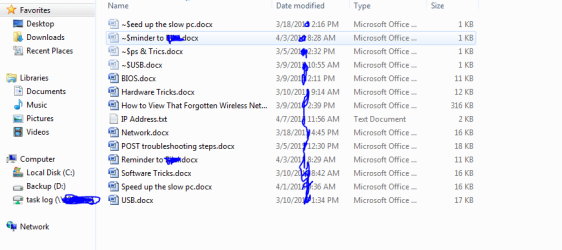
Solved why my files showing dim?

comptech

Banned
Local time
6:47 AM
Messages
149
Location
Mauritius
See this image i uploaded why this files shows in dim?...
:(
 

Attachments

  • Seven forum.PNG
    Seven forum.PNG
    21 KB · Views: 1

My Computer My Computer

Computer type
PC/Desktop
OS
Windows 7 Ultimate 64 bit
CPU
Intel pentium 3
Motherboard
MSI
Memory
2GB RAM DDR 3
Graphics Card(s)
Intel HD Graphics
Sound Card
Realtek Audio
Monitor(s) Displays
zenware
Screen Resolution
1680x1050
Hard Drives
80 GB
Case
i-Max
Cooling
Cooler Master
Keyboard
A4TECH
Mouse
edvan
Antivirus
Avast Anti virus 2015
Browser
Google chrome
Thanks for the reply...
but i already did this option still no use!!!!!!
 

My Computer My Computer

Computer type
PC/Desktop
OS
Windows 7 Ultimate 64 bit
CPU
Intel pentium 3
Motherboard
MSI
Memory
2GB RAM DDR 3
Graphics Card(s)
Intel HD Graphics
Sound Card
Realtek Audio
Monitor(s) Displays
zenware
Screen Resolution
1680x1050
Hard Drives
80 GB
Case
i-Max
Cooling
Cooler Master
Keyboard
A4TECH
Mouse
edvan
Antivirus
Avast Anti virus 2015
Browser
Google chrome
Thanks for the reply...
but i already did this option still no use!!!!!!

Then it surely is a virus. Do a Full scan. And did you put that "~$" in the beginning for every file?
 

My Computer My Computer

Computer type
PC/Desktop
Computer Manufacturer/Model Number
Custom Build
OS
Windows 8.1
CPU
Intel - Core i7 4.2GHz
Motherboard
Intel
Memory
8 GB
Graphics Card(s)
Nvidea GeForce 7800GT 2GB
Screen Resolution
1980 X 1280
Hard Drives
1 TB Toshiba
500 GB SATA
Internet Speed
Download - 30 Mbps, Upload - 10 Mbps
Antivirus
BitDefender Internet Security
Browser
Mozilla Firefox,Google Chrome,Internet Explorer
They're temporary files made when the proper files are saving. Not sure why they're still there.
 

My Computer My Computer

Computer type
PC/Desktop
Computer Manufacturer/Model Number
Custom Build
OS
W7 Pro x64 SP1 | W10 Pro IP x64 | W8.1 Pro x64 VM | Linux Mint VM
CPU
i7-4790k @ 4GHz (4.4GHz Boost)
Motherboard
ASUS Sabertooth Z87 (BIOS Rev 2004)
Memory
16GB DDR3 Kingston HyperX Fury @ 1600MHz CL 9-9-9-27
Graphics Card(s)
EVGA GTX 980 Classified
Sound Card
Realtek Onboard
Monitor(s) Displays
Samsung S27D390
Screen Resolution
1920 x 1080
Hard Drives
240GB Intel 520 Series SSD |
Samsung 850 EVO 120GB SSD |
2TB WD Caviar Black |
2TB WD Caviar Green
PSU
Corsair HX850-80 Gold Modular
Case
Cooler Master Silencio 650
Cooling
Corsair H80i w/2 x Corsair SP120 | 2 x 120mm Noctua NF-S12B
Keyboard
Microsoft Sidewinder X4
Mouse
Gigabyte M6900 optical
Internet Speed
152mb
Antivirus
F-Secure
Browser
Firefox 38.0
Other Info
Backup Rig: Win 7 Pro 64-bit | AMD A10-5800k | ASUS F2A85-V Pro | 8GB Samsung DDR3 @1600MHz | 120GB Toshiba SDD | 2TB Seagate HDD | Cooler Master Silencio 550
@prithvi
Run full scan with no virus!!!!
@boozad
ya thought of that because when i working with file it showed up dim... after i save it goes from there.. but now when i not even use that files it showed up dim...:(
 

My Computer My Computer

Computer type
PC/Desktop
OS
Windows 7 Ultimate 64 bit
CPU
Intel pentium 3
Motherboard
MSI
Memory
2GB RAM DDR 3
Graphics Card(s)
Intel HD Graphics
Sound Card
Realtek Audio
Monitor(s) Displays
zenware
Screen Resolution
1680x1050
Hard Drives
80 GB
Case
i-Max
Cooling
Cooler Master
Keyboard
A4TECH
Mouse
edvan
Antivirus
Avast Anti virus 2015
Browser
Google chrome
Delete them then, you don't need them. Check the master files still open correctly after deletion, if not then restore them from the Recycle Bin.
 

My Computer My Computer

Computer type
PC/Desktop
Computer Manufacturer/Model Number
Custom Build
OS
W7 Pro x64 SP1 | W10 Pro IP x64 | W8.1 Pro x64 VM | Linux Mint VM
CPU
i7-4790k @ 4GHz (4.4GHz Boost)
Motherboard
ASUS Sabertooth Z87 (BIOS Rev 2004)
Memory
16GB DDR3 Kingston HyperX Fury @ 1600MHz CL 9-9-9-27
Graphics Card(s)
EVGA GTX 980 Classified
Sound Card
Realtek Onboard
Monitor(s) Displays
Samsung S27D390
Screen Resolution
1920 x 1080
Hard Drives
240GB Intel 520 Series SSD |
Samsung 850 EVO 120GB SSD |
2TB WD Caviar Black |
2TB WD Caviar Green
PSU
Corsair HX850-80 Gold Modular
Case
Cooler Master Silencio 650
Cooling
Corsair H80i w/2 x Corsair SP120 | 2 x 120mm Noctua NF-S12B
Keyboard
Microsoft Sidewinder X4
Mouse
Gigabyte M6900 optical
Internet Speed
152mb
Antivirus
F-Secure
Browser
Firefox 38.0
Other Info
Backup Rig: Win 7 Pro 64-bit | AMD A10-5800k | ASUS F2A85-V Pro | 8GB Samsung DDR3 @1600MHz | 120GB Toshiba SDD | 2TB Seagate HDD | Cooler Master Silencio 550
@BOOZAD
ya i tried it i deleted every thing that is dim.. even after that the files open good...thank you so much boozad... for your time...
:)
 

My Computer My Computer

Computer type
PC/Desktop
OS
Windows 7 Ultimate 64 bit
CPU
Intel pentium 3
Motherboard
MSI
Memory
2GB RAM DDR 3
Graphics Card(s)
Intel HD Graphics
Sound Card
Realtek Audio
Monitor(s) Displays
zenware
Screen Resolution
1680x1050
Hard Drives
80 GB
Case
i-Max
Cooling
Cooler Master
Keyboard
A4TECH
Mouse
edvan
Antivirus
Avast Anti virus 2015
Browser
Google chrome
You're welcome. I'm not sure why the temporary files didn't auto delete when the master file had saved though, see if it happens again and let us know.
 

My Computer My Computer

Computer type
PC/Desktop
Computer Manufacturer/Model Number
Custom Build
OS
W7 Pro x64 SP1 | W10 Pro IP x64 | W8.1 Pro x64 VM | Linux Mint VM
CPU
i7-4790k @ 4GHz (4.4GHz Boost)
Motherboard
ASUS Sabertooth Z87 (BIOS Rev 2004)
Memory
16GB DDR3 Kingston HyperX Fury @ 1600MHz CL 9-9-9-27
Graphics Card(s)
EVGA GTX 980 Classified
Sound Card
Realtek Onboard
Monitor(s) Displays
Samsung S27D390
Screen Resolution
1920 x 1080
Hard Drives
240GB Intel 520 Series SSD |
Samsung 850 EVO 120GB SSD |
2TB WD Caviar Black |
2TB WD Caviar Green
PSU
Corsair HX850-80 Gold Modular
Case
Cooler Master Silencio 650
Cooling
Corsair H80i w/2 x Corsair SP120 | 2 x 120mm Noctua NF-S12B
Keyboard
Microsoft Sidewinder X4
Mouse
Gigabyte M6900 optical
Internet Speed
152mb
Antivirus
F-Secure
Browser
Firefox 38.0
Other Info
Backup Rig: Win 7 Pro 64-bit | AMD A10-5800k | ASUS F2A85-V Pro | 8GB Samsung DDR3 @1600MHz | 120GB Toshiba SDD | 2TB Seagate HDD | Cooler Master Silencio 550
Yes ofcourse...
 

My Computer My Computer

Computer type
PC/Desktop
OS
Windows 7 Ultimate 64 bit
CPU
Intel pentium 3
Motherboard
MSI
Memory
2GB RAM DDR 3
Graphics Card(s)
Intel HD Graphics
Sound Card
Realtek Audio
Monitor(s) Displays
zenware
Screen Resolution
1680x1050
Hard Drives
80 GB
Case
i-Max
Cooling
Cooler Master
Keyboard
A4TECH
Mouse
edvan
Antivirus
Avast Anti virus 2015
Browser
Google chrome
Back
Top