
Hello all,
I've downloaded a filter lame.ax in codecs.com. They say: In order to install LAME DirectShow Filter to your computer, copy the "lame.ax" file in C:\WINDOWS\system32 and run the batch file called "RegLAME_DS.bat".
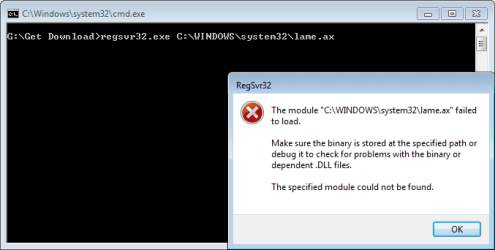
After copy, I run the batch file: regsvr32.exe C:\WINDOWS\system32\lame.ax, but failed.
Also run in the box of Search programs is similarly failed. Repeatedly tried, but in vain.
Why cannot always be, what was missing in my computer? It was same with my old XP too.
Is there someone who can help me why this happens? Thanks in advance.
Screenshot attached.
I've downloaded a filter lame.ax in codecs.com. They say: In order to install LAME DirectShow Filter to your computer, copy the "lame.ax" file in C:\WINDOWS\system32 and run the batch file called "RegLAME_DS.bat".
After copy, I run the batch file: regsvr32.exe C:\WINDOWS\system32\lame.ax, but failed.
Also run in the box of Search programs is similarly failed. Repeatedly tried, but in vain.
Why cannot always be, what was missing in my computer? It was same with my old XP too.
Is there someone who can help me why this happens? Thanks in advance.
Screenshot attached.
Attachments
My Computer
At a glance
Windows 7 Ult x64AMD X4 Quad Core 3.1GHzDDR3 16GBRadeon R5 230 2GB
- Computer type
- PC/Desktop
- Computer Manufacturer/Model Number
- own assembly
- OS
- Windows 7 Ult x64
- CPU
- AMD X4 Quad Core 3.1GHz
- Motherboard
- Gigabyte socket FM2+
- Memory
- DDR3 16GB
- Graphics Card(s)
- Radeon R5 230 2GB
- Sound Card
- Xonar D-KARAX
- Monitor(s) Displays
- ViewSonic 24'
- Hard Drives
- SSD + WDC
- PSU
- Antec VP500W
- Antivirus
- Kaspersky
- Browser
- Firefox

