Solved Why sometimes My Documents and sometimes Documents ?

MJMdv6

New member
Local time
3:37 PM
Messages
14
I have set my new computer up with 2 users, User1 and User2.

User1 is an administrator with a password and user2 is an ordinary user with no password.

For user1, I can navigate via C:\users\user1 . . and I can see My Documents and I have successfully imported data. I can NOT navigate to Documents but I know it is there because that is where Outlook puts my pst files.

For User2, I can navigate to Documents and I have successfully imported data here but I cannot see My Documents (only a shortcut which I am denied access.

What is even weirder is that my XP computer can 'see' all the files in User1 My Documents but not the imported files in User2 Documents.

Can somebody please explain just what is going on. Thank you.
 

My Computer

Computer Manufacturer/Model Number
HP Pavilion dv6
OS
Windows 7 Home 64 bit

My Computer

Computer Manufacturer/Model Number
HP Pavilion Elite 495UK
OS
Windows 7 Ultimate SP1 64-Bit
CPU
Intel Core i7 870 @ 2.93GHz
Motherboard
MSI 2A9C (CPU1)
Memory
8Gb Dual-Channel DDR3 @ 664MHz
Graphics Card(s)
nVidia GeForce GTX 460 1024MB dedicated RAM
Sound Card
Realtek HD Audio
Monitor(s) Displays
HP2310i
Screen Resolution
1920 x 1080
Hard Drives
1x1954GB Hitachi HDS22020ALA 330 (RAID), 1x1954GB Hitachi External for backup and storage
PSU
460W
Case
HP Elite
Cooling
Air cooled
Keyboard
Logitech K750 solar-powered keyboard
Mouse
Logitech Wireless M180 mouse
Internet Speed
2Mb
Other Info
Pure Avanti Flow Internet Radio with iPod Dock, 64Gb iPod, HP USB Speakers, Sony MDR-V500 Headphones, Sony Vaio F-Series Laptop
Thank you, seavixen32.

This certainly clarifies the libraries scenario but I don't think it helps me on my two basic problems.

Why can I 'navigate' to My Documents in one user and Documents in the other ?

Why can't I see imported files on user2 across the network, although I can see other files in the Documents folder ?

Also, now that I've read all this stuff, what have I actually got to do, in terms of pointing and clicking, to reach all these options that are discussed ?

Sorry to be abit slow. I don't really care where Windows puts all this data, or how it categorises it, but I still need to be able to access it across the network from XP.

Thanks for your help.
 

My Computer

Computer Manufacturer/Model Number
HP Pavilion dv6
OS
Windows 7 Home 64 bit
I believe the confusion comes from "My " part of the folder name. The real location of the Documents is "C:\Users\[username]\Documents" you can confirm this by clicking on the address bar while in your documents folder. The "My " part comes from the desktop.ini file contained within.

Now the confusing part, their is a directory called "My Documents" within the user's directory, which should give "Access Denied." Because it is a junction to the real Documents folder.
 

My Computer

Computer type
PC/Desktop
Computer Manufacturer/Model Number
Alienware Aurora ALX R4
OS
Windows 10 Pro (x64)
CPU
Intel Core i7-3930K (3.2GHz - 4.5GHz)
Motherboard
Alienware Aurora-R4 x79
Memory
4x Samsung 4GB PC3-12800 DDR3 (16GB 1600MHz)
Graphics Card(s)
Nvidia Geforce GTX 690
Sound Card
SteelSeries Siberia Elite
Monitor(s) Displays
Dell UltraSharp U3011
Screen Resolution
2560x1600
Hard Drives
Samsung 850 Pro 256 GB, Seagate 1TB Desktop Hybrid HDD, 2x Western Digital 4TB Green HDD
PSU
875W Some Dell PSU <.<
Case
Alienware Aurora ALX
Cooling
Custom Liquid Cooling (EK CPU & GPU blocks) dual EK 480RAD
Keyboard
Logitech G710+ Mechanical
Mouse
Logitech G700s
Internet Speed
Verizon Fios (50 mbps average)
Other Info
Server: Intel NUC D54250WYK: i5-4250U, 16GB, 256 GB mSATA, Windows Server 2012 R2
Last edited:

My Computer

Computer Manufacturer/Model Number
HP Pavilion Elite 495UK
OS
Windows 7 Ultimate SP1 64-Bit
CPU
Intel Core i7 870 @ 2.93GHz
Motherboard
MSI 2A9C (CPU1)
Memory
8Gb Dual-Channel DDR3 @ 664MHz
Graphics Card(s)
nVidia GeForce GTX 460 1024MB dedicated RAM
Sound Card
Realtek HD Audio
Monitor(s) Displays
HP2310i
Screen Resolution
1920 x 1080
Hard Drives
1x1954GB Hitachi HDS22020ALA 330 (RAID), 1x1954GB Hitachi External for backup and storage
PSU
460W
Case
HP Elite
Cooling
Air cooled
Keyboard
Logitech K750 solar-powered keyboard
Mouse
Logitech Wireless M180 mouse
Internet Speed
2Mb
Other Info
Pure Avanti Flow Internet Radio with iPod Dock, 64Gb iPod, HP USB Speakers, Sony MDR-V500 Headphones, Sony Vaio F-Series Laptop
Yes, logicearth, this is exactly what is confusing me.

In one user's folders there is this shortcut to My Documents folder ( 'Access Denied' ) and also a Documents folder. In the other there is a My Documents folder, which I can readily access, but there is not a Documents folder which I can see.

Can you explain this ?
 

My Computer

Computer Manufacturer/Model Number
HP Pavilion dv6
OS
Windows 7 Home 64 bit
Only the 'Documents' folder is real. Windows 7 uses libraries and junction points. Your 'My Documents' folder IS, as logicearth wrote, C:\Users\%USERPROFILE%\Documents. Browsing to 'My Documents' brings you to the ACTUAL folder located under your username.

I only use one account per computer, and so I am not sure, but I don't think one user can access another user's folders. Use the 'Public' folders to share files between users.

Hope this helps,
Rªnce
 

My Computer

Computer type
PC/Desktop
Computer Manufacturer/Model Number
Dell Precision M6500 / Dell Insprion 3847
OS
Windows 7 Pro 32bit / Windows 7 Professional
CPU
Intel Core i7-620M Duel Core 2.66GHz / Intel Core i5-4460
Memory
4.0 GB / 8.0 GB
Graphics Card(s)
1.0 GB NVIDIA Quadro FX 2800M / Intel HD Graphics
Screen Resolution
1440x900 / 1920x1080
Thank you all for your help.

Your advice prompted me to examine this situation in DOS (which I do understand ! ). There, I found by using CD and DIR, that there is in fact a folder called Documents within each user and it does contain all the files that I thought it should.

My only confusion now is why Windows 7 needs to pretend that My Documents exists and, even more, why one of my users has a navigable folder in Win7 called My Documents but not a navigable folder called Documents.

However, I now have better things to do than worry myself over the vagaries of Microsoft logic and I can get on with starting to use my new computer in anger.

I am grateful for all the support I have received and I now consider this Thread answered and closed.
 

My Computer

Computer Manufacturer/Model Number
HP Pavilion dv6
OS
Windows 7 Home 64 bit
My understanding is, the "My Documents" link is to trick old programs (which dump "stuff" in "My Documents") into actually dumping their "stuff" in "Documents" in Windows 7

There should be a button for you to click, to alert the moderators that the thread is closed.
If you don't see it, click on the red and white triangle (in the top right corner of any one of your posts) and leave a message saying that you consider the thread to be solved. :)
 

My Computer

Computer type
PC/Desktop
Computer Manufacturer/Model Number
n/a
OS
W7 Ultimate SP1, LM19.2 MATE, W10 Home 1703, W10 Pro 1703 VM, #All 64 bit
CPU
AMD Phenom II x6 1100T, 3.3 GHz
Motherboard
ASUS M4A88T-M/USB3 (AM3)
Memory
12GB DDR3 1333 G-Skill (4GB x 2), G-Skill (2GB x 2)
Graphics Card(s)
NVIDIA GeForce GTX 660
Sound Card
Realtek?
Monitor(s) Displays
Samsung S23B350
Screen Resolution
1920x1080
Hard Drives
WD Green 2TB (SATA), WD Green 3TB (SATA), WD Blue 4TB (SATA), WD Blue 6TB (SATA)
PSU
Cooler Master
Case
Antec GX300 Tower
Cooling
3x Antec TRICOOL 120mm Fans
Mouse
Wired Optical
Internet Speed
DSL
Antivirus
Avast
Browser
Pale Moon (64 bit)
Other Info
2018-12-27 Upgraded HDDs
2015-12-10 Upgraded case, graphics card, storage
2015-08-15 Upgraded motherboard & RAM
2015-07-15 Upgraded LM17.1 to LM17.2
Sorry. Am I going loopy or something.

I cannot see any button to press, or a tick mark, or a red and white triangle.

I will try to follow the link in the Information box and see if that will close the Thread.
 

My Computer

Computer Manufacturer/Model Number
HP Pavilion dv6
OS
Windows 7 Home 64 bit
Scroll through to the end of the thread where you should see a green 'Thread Resolved' button.
 

My Computer

Computer Manufacturer/Model Number
HP Pavilion Elite 495UK
OS
Windows 7 Ultimate SP1 64-Bit
CPU
Intel Core i7 870 @ 2.93GHz
Motherboard
MSI 2A9C (CPU1)
Memory
8Gb Dual-Channel DDR3 @ 664MHz
Graphics Card(s)
nVidia GeForce GTX 460 1024MB dedicated RAM
Sound Card
Realtek HD Audio
Monitor(s) Displays
HP2310i
Screen Resolution
1920 x 1080
Hard Drives
1x1954GB Hitachi HDS22020ALA 330 (RAID), 1x1954GB Hitachi External for backup and storage
PSU
460W
Case
HP Elite
Cooling
Air cooled
Keyboard
Logitech K750 solar-powered keyboard
Mouse
Logitech Wireless M180 mouse
Internet Speed
2Mb
Other Info
Pure Avanti Flow Internet Radio with iPod Dock, 64Gb iPod, HP USB Speakers, Sony MDR-V500 Headphones, Sony Vaio F-Series Laptop
I am going loopy !

What fooled me was that none of these things showed up until I made a new post.

I'm with it now and know what to do in the future.

Tnks, anyway.
 

My Computer

Computer Manufacturer/Model Number
HP Pavilion dv6
OS
Windows 7 Home 64 bit
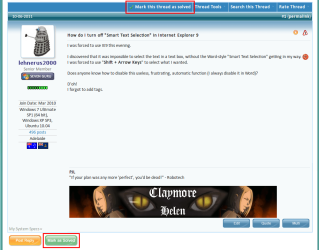
Maybe these pictures will help.

Any post in this thread
(when you are logged in, you should choose one of your own though).

Triangle.png


Your original post should show the buttons in the red boxes (when you are logged in).

Solved.png

Scroll through to the end of the thread where you should see a green 'Thread Resolved' button.

Thanks seavixen32. :)
 
Last edited:

My Computer

Computer type
PC/Desktop
Computer Manufacturer/Model Number
n/a
OS
W7 Ultimate SP1, LM19.2 MATE, W10 Home 1703, W10 Pro 1703 VM, #All 64 bit
CPU
AMD Phenom II x6 1100T, 3.3 GHz
Motherboard
ASUS M4A88T-M/USB3 (AM3)
Memory
12GB DDR3 1333 G-Skill (4GB x 2), G-Skill (2GB x 2)
Graphics Card(s)
NVIDIA GeForce GTX 660
Sound Card
Realtek?
Monitor(s) Displays
Samsung S23B350
Screen Resolution
1920x1080
Hard Drives
WD Green 2TB (SATA), WD Green 3TB (SATA), WD Blue 4TB (SATA), WD Blue 6TB (SATA)
PSU
Cooler Master
Case
Antec GX300 Tower
Cooling
3x Antec TRICOOL 120mm Fans
Mouse
Wired Optical
Internet Speed
DSL
Antivirus
Avast
Browser
Pale Moon (64 bit)
Other Info
2018-12-27 Upgraded HDDs
2015-12-10 Upgraded case, graphics card, storage
2015-08-15 Upgraded motherboard & RAM
2015-07-15 Upgraded LM17.1 to LM17.2
You're very welcome.

Don't think you've got a monopoly on 'loopiness' - in our house I get accused of it every day. I mean, what exactly is wrong with, "Get up woman, it's time to make me a cup of tea!" :rolleyes:
 

My Computer

Computer Manufacturer/Model Number
HP Pavilion Elite 495UK
OS
Windows 7 Ultimate SP1 64-Bit
CPU
Intel Core i7 870 @ 2.93GHz
Motherboard
MSI 2A9C (CPU1)
Memory
8Gb Dual-Channel DDR3 @ 664MHz
Graphics Card(s)
nVidia GeForce GTX 460 1024MB dedicated RAM
Sound Card
Realtek HD Audio
Monitor(s) Displays
HP2310i
Screen Resolution
1920 x 1080
Hard Drives
1x1954GB Hitachi HDS22020ALA 330 (RAID), 1x1954GB Hitachi External for backup and storage
PSU
460W
Case
HP Elite
Cooling
Air cooled
Keyboard
Logitech K750 solar-powered keyboard
Mouse
Logitech Wireless M180 mouse
Internet Speed
2Mb
Other Info
Pure Avanti Flow Internet Radio with iPod Dock, 64Gb iPod, HP USB Speakers, Sony MDR-V500 Headphones, Sony Vaio F-Series Laptop
Back
Top