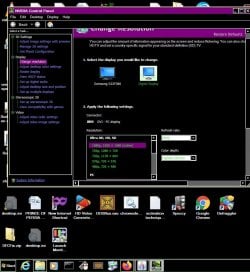
why there was a change in the name of the device.

jraju

New member
Member
VIP
Local time
3:06 AM
Messages
759
Hi, i enclose a pc control panel display settings and nvidia control panel display.
I have only one monitor display.
The pc does not show the correct monitor name, instead it shows, a unknown, samsung syncmaster n3. How do i know, that the two are refflecting the same monitor or differentlyl.
The picture speaks more
 

Attachments
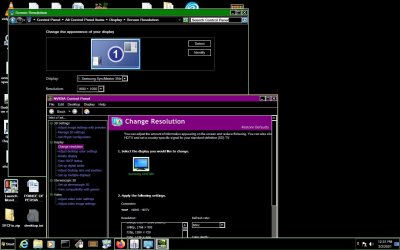
  • displaysettings in Display and nvidia.jpg
    displaysettings in Display and nvidia.jpg
    126.3 KB · Views: 4

My Computer My Computer

At a glance

Microsoft Windows 7 Ultimate 64-bit 7601 Mult...Intel(R) Core(TM)2 Duo CPU E7200 @ 2.53GHz4.00 GBNVIDIA GeForce 210
Computer type
PC/Desktop
Computer Manufacturer/Model Number
custom build
OS
Microsoft Windows 7 Ultimate 64-bit 7601 Multiprocessor Free Service Pack 1
CPU
Intel(R) Core(TM)2 Duo CPU E7200 @ 2.53GHz
Motherboard
To be filled by O.E.M. To be filled by O.E.M.
Memory
4.00 GB
Graphics Card(s)
NVIDIA GeForce 210
Sound Card
(1) NVIDIA High Definition Audio (2) Realtek High Definiti
Screen Resolution
1920 x 1080 x 32 bits (4294967296 colors) @ 60 Hz
Hard Drives
ST3500312CS ATA Device
Interesting that I can find reference to a 3NE but not to the other designation.

Can you change the display name in Device Manager?
 

My Computer My Computer

At a glance

Windows 7 Pro SP1 64 bit8 GB
Computer type
Laptop
Computer Manufacturer/Model Number
Dell M6500 Precision Work Station
OS
Windows 7 Pro SP1 64 bit
Memory
8 GB
Screen Resolution
1920x
Internet Speed
30 Mbps
Antivirus
Norton Security
Browser
IE 11
Hi, w2, will try, but why it has happened in two different names. I have not heard the samsung syncmaster ne3, and checking it , it was a crt monitor or crt tv and not led . But my moniter is led monitor.
Normally the display shows correctly until recentlly, when i changed the graphics card to nvidia.
nvidia now shows the correct, but windows display wrongly gives the name.
Moreover, did you see the connector, it shows as hdmi to tv, but actually it is hdmi to pc ,

I use a spliltter to get the hdmi connection both to my pc and tv from the available one hdmi port on the cpu
Will this cause this kind of errors.
 

My Computer My Computer

At a glance

Microsoft Windows 7 Ultimate 64-bit 7601 Mult...Intel(R) Core(TM)2 Duo CPU E7200 @ 2.53GHz4.00 GBNVIDIA GeForce 210
Computer type
PC/Desktop
Computer Manufacturer/Model Number
custom build
OS
Microsoft Windows 7 Ultimate 64-bit 7601 Multiprocessor Free Service Pack 1
CPU
Intel(R) Core(TM)2 Duo CPU E7200 @ 2.53GHz
Motherboard
To be filled by O.E.M. To be filled by O.E.M.
Memory
4.00 GB
Graphics Card(s)
NVIDIA GeForce 210
Sound Card
(1) NVIDIA High Definition Audio (2) Realtek High Definiti
Screen Resolution
1920 x 1080 x 32 bits (4294967296 colors) @ 60 Hz
Hard Drives
ST3500312CS ATA Device
Hi, w2, will try, but why it has happened in two different names. I have not heard the samsung syncmaster ne3, and checking it , it was a crt monitor or crt tv and not led . But my moniter is led monitor.
Normally the display shows correctly until recentlly, when i changed the graphics card to nvidia.
nvidia now shows the correct, but windows display wrongly gives the name.
Moreover, did you see the connector, it shows as hdmi to tv, but actually it is hdmi to pc ,

I use a spliltter to get the hdmi connection both to my pc and tv from the available one hdmi port on the cpu
Will this cause this kind of errors.

You should be fine if you are wanting the same image on both devices. Nvidia thinking what it is does not matter as long as the right signal is passed through. It might cause some issues with the splitter if you need to watch HDCP content but that is rare these days. It is probably picking up the EID info of the TV vs your monitor is all. Extended Display Identification Data - Wikipedia

Edit: you can still get 1080p at 60hz on your monitor and tv right? After setting it in the Nvidia Control Panel? Also just checked and i think nvidia just says HDTV as the input in that spot if it's HDMI regardless perhaps as my projector says the same.
 

My Computer My Computer

At a glance

10 Pro x64Ryzen 9 3900X64GB(4x16GB) DDR4EVGA 1080ti FTW3
Computer type
PC/Desktop
Computer Manufacturer/Model Number
Custom
OS
10 Pro x64
CPU
Ryzen 9 3900X
Motherboard
Asrock x370 Tachi
Memory
64GB(4x16GB) DDR4
Graphics Card(s)
EVGA 1080ti FTW3
Sound Card
ASUS Xonar Essence STX (V4 Bursons), ODAC rev B, NFB-11, O2
Monitor(s) Displays
3xASUS PB278Q/R, Optoma HD142X
Screen Resolution
3x1440p, 1080p
Hard Drives
512GB 850 EVO(OS, Programs)
4TB (Movies)
3TB (Downloads)
3TB (Programs)
1TB HDD (Games)
2x6TB R1 (videos)
PSU
AX760
Case
Fractal Define R5
Cooling
NH-D15S
Keyboard
Massdrop Ctrl with Box Navy's
Mouse
G903, Alioth XXL Mat
Internet Speed
280/40
Antivirus
MBAM, ESET
Browser
Canary 64 Bit
Other Info
I also own a Thinkpad P50 Xeon 4K, X220T, X1C5
thanks rvc. can i use the splitter. Yes, i do not have problem in video at all. the issue is the audio. i find my tv icon in playback setting greyed as error nonplugged.
How do i check the splitter pass the signal of audio is one of the issue. I find all the three lights glowing with red indicator in my orei 1x2 splitter. the video i get the correct image as in pc, as the screen size is almost identical, 22 inch monitor, 21.5 inch tv screen.
i am clueless about the audio issue, as my pc plays the audio in my pc speaker , and i could not route it thro, to tv , as playback icon is greyed, when i connect the hdmi to tv cable.
I send herewith the picture, of the issue and would like to get help

nvidia drivers, as famous, also have so many bugs like this. contacted nvidia chat support, but they change the drivers version and close the topic always. Will enclose the actual picture , when tv is in hdmi source mode
now the selected resolution in browser firefox is like stretched one, and i cannot find some menus. I know that both tv and pc supports 1920x1080 but, nvidia shows resolution as less 1680x1050
 

Attachments

  • hdmi connected with tv and tv dhmi source off position.jpg
    hdmi connected with tv and tv dhmi source off position.jpg
    114.5 KB · Views: 1

My Computer My Computer

At a glance

Microsoft Windows 7 Ultimate 64-bit 7601 Mult...Intel(R) Core(TM)2 Duo CPU E7200 @ 2.53GHz4.00 GBNVIDIA GeForce 210
Computer type
PC/Desktop
Computer Manufacturer/Model Number
custom build
OS
Microsoft Windows 7 Ultimate 64-bit 7601 Multiprocessor Free Service Pack 1
CPU
Intel(R) Core(TM)2 Duo CPU E7200 @ 2.53GHz
Motherboard
To be filled by O.E.M. To be filled by O.E.M.
Memory
4.00 GB
Graphics Card(s)
NVIDIA GeForce 210
Sound Card
(1) NVIDIA High Definition Audio (2) Realtek High Definiti
Screen Resolution
1920 x 1080 x 32 bits (4294967296 colors) @ 60 Hz
Hard Drives
ST3500312CS ATA Device
I also wish to state that there is no dvi port in the back of pc. only have one vga and hdmi port.
Now when i check by plugging in tv in hdmi mode, the audio device is not all shown. I do not know, what to do .
peculiar, if i just plug vga to vga and hdmi to hdmitv, the playback icon works.
if i use the splitter, i run in to this audio problems.
can i use dvi to hdmi to connect cpu dvi to pc monitor to hdmi port on pc and another to straight to tv.
this will improve the quality of video in pc as well as in hdmi.
i uselessly bought this splitter , i think.
 

My Computer My Computer

At a glance

Microsoft Windows 7 Ultimate 64-bit 7601 Mult...Intel(R) Core(TM)2 Duo CPU E7200 @ 2.53GHz4.00 GBNVIDIA GeForce 210
Computer type
PC/Desktop
Computer Manufacturer/Model Number
custom build
OS
Microsoft Windows 7 Ultimate 64-bit 7601 Multiprocessor Free Service Pack 1
CPU
Intel(R) Core(TM)2 Duo CPU E7200 @ 2.53GHz
Motherboard
To be filled by O.E.M. To be filled by O.E.M.
Memory
4.00 GB
Graphics Card(s)
NVIDIA GeForce 210
Sound Card
(1) NVIDIA High Definition Audio (2) Realtek High Definiti
Screen Resolution
1920 x 1080 x 32 bits (4294967296 colors) @ 60 Hz
Hard Drives
ST3500312CS ATA Device
How did you change the graphics card? I have the same computer (not this one) as you do and I'd have to remove the back to add a chip. I should mention that, as far as I know) the graphics card/chip is a NVIDIA chip. When I got the computer, the chip would blue screen often (it still does). I tried to update the driver and none of the later ones would work. When I asked the Dell professional help about it, they said they had to modify the chip to fit on the mobo and the driver can't be updated. The only way to get rid of the blue screens, according to them, is to do a factory restore. That works for a little while but back they come. Who wants to do a factory restore along with all the Windows updates and software reinstall. I could create an image but it's still a hassle.
 

My Computer My Computer

At a glance

Windows 7 Pro SP1 64 bit8 GB
Computer type
Laptop
Computer Manufacturer/Model Number
Dell M6500 Precision Work Station
OS
Windows 7 Pro SP1 64 bit
Memory
8 GB
Screen Resolution
1920x
Internet Speed
30 Mbps
Antivirus
Norton Security
Browser
IE 11
Hi, W2, I had not changed the graphics card . A technician changed it . Do you mean you have the same card, geforce 210.
Nvidia should set it right. My samsng customer help says, that the drivers are the issue in changing the source of display etc etc.
Nvidia do not support by phone now, only chat is available.
The generic one that came with the hardware , did not allow, to download the drive.
What it says, some xml error when i try to give my correct gmail password.
whenever i chat with the person, they simply give roll back drivers and says that it is Edid issue.
 

My Computer My Computer

At a glance

Microsoft Windows 7 Ultimate 64-bit 7601 Mult...Intel(R) Core(TM)2 Duo CPU E7200 @ 2.53GHz4.00 GBNVIDIA GeForce 210
Computer type
PC/Desktop
Computer Manufacturer/Model Number
custom build
OS
Microsoft Windows 7 Ultimate 64-bit 7601 Multiprocessor Free Service Pack 1
CPU
Intel(R) Core(TM)2 Duo CPU E7200 @ 2.53GHz
Motherboard
To be filled by O.E.M. To be filled by O.E.M.
Memory
4.00 GB
Graphics Card(s)
NVIDIA GeForce 210
Sound Card
(1) NVIDIA High Definition Audio (2) Realtek High Definiti
Screen Resolution
1920 x 1080 x 32 bits (4294967296 colors) @ 60 Hz
Hard Drives
ST3500312CS ATA Device
Hi, rvc, i expect reply from you regarding the audio issue.
we know that hdmi carries both video and audio and no need for separate audio connection.
Hi, rvc, I also want your opinion on the following point
can i use dvi to hdmi to connect cpu dvi to pc monitor to hdmi port on pc and another to straight to tv.
this will improve the quality of video in pc as well as in hdmi.
 

My Computer My Computer

At a glance

Microsoft Windows 7 Ultimate 64-bit 7601 Mult...Intel(R) Core(TM)2 Duo CPU E7200 @ 2.53GHz4.00 GBNVIDIA GeForce 210
Computer type
PC/Desktop
Computer Manufacturer/Model Number
custom build
OS
Microsoft Windows 7 Ultimate 64-bit 7601 Multiprocessor Free Service Pack 1
CPU
Intel(R) Core(TM)2 Duo CPU E7200 @ 2.53GHz
Motherboard
To be filled by O.E.M. To be filled by O.E.M.
Memory
4.00 GB
Graphics Card(s)
NVIDIA GeForce 210
Sound Card
(1) NVIDIA High Definition Audio (2) Realtek High Definiti
Screen Resolution
1920 x 1080 x 32 bits (4294967296 colors) @ 60 Hz
Hard Drives
ST3500312CS ATA Device
My apologies. I don't know what I was smoking when I said I have the same computer as you do. :o

What is the model number for your monitor and TV?

Does your monitor allow you to set the "input." For instance, I have a Viewsonic and I can push a button which allows me to control the "input" to either DVI or D sub.
 

My Computer My Computer

At a glance

Windows 7 Pro SP1 64 bit8 GB
Computer type
Laptop
Computer Manufacturer/Model Number
Dell M6500 Precision Work Station
OS
Windows 7 Pro SP1 64 bit
Memory
8 GB
Screen Resolution
1920x
Internet Speed
30 Mbps
Antivirus
Norton Security
Browser
IE 11
Hi, you mean in the tv. My tv model is samsung ua22f5100ar and the monitor is samsung s22f380. My splitter is 1.4 hdcp complaint. I do not know about the hdmi cable version. But saw something like 4k high speed support.
There are 2 hdmi port available in tv input, one hdmi stb, and the other hdmi2/dvi and now the stb is connected to this port and the hdmi1 port, i have connected the hdmi cable to the pc thro orei hdmi 1x2 splitter, which is 1.
4hdcp compliant as per the description of the splitter in amazon.in
There are two menus in hdmi2/dvi like components , hdmi, here in hdmi submenu I select PC.
there are some more menus like you mentioned in this drop down menu.
Am I correct in choosing the port in tv and also in the sub menu W2
Should I change the hdmi cable to some other please
The audio is the problematic area, and the nvidia control panel, shows the connection of digital device, is not supported by hdcp.
what to do further
 

My Computer My Computer

At a glance

Microsoft Windows 7 Ultimate 64-bit 7601 Mult...Intel(R) Core(TM)2 Duo CPU E7200 @ 2.53GHz4.00 GBNVIDIA GeForce 210
Computer type
PC/Desktop
Computer Manufacturer/Model Number
custom build
OS
Microsoft Windows 7 Ultimate 64-bit 7601 Multiprocessor Free Service Pack 1
CPU
Intel(R) Core(TM)2 Duo CPU E7200 @ 2.53GHz
Motherboard
To be filled by O.E.M. To be filled by O.E.M.
Memory
4.00 GB
Graphics Card(s)
NVIDIA GeForce 210
Sound Card
(1) NVIDIA High Definition Audio (2) Realtek High Definiti
Screen Resolution
1920 x 1080 x 32 bits (4294967296 colors) @ 60 Hz
Hard Drives
ST3500312CS ATA Device
I wonder if you can get sound on your TV is you connected it via the USB port on the PC to the USB port on the TV?
 

My Computer My Computer

At a glance

Windows 7 Pro SP1 64 bit8 GB
Computer type
Laptop
Computer Manufacturer/Model Number
Dell M6500 Precision Work Station
OS
Windows 7 Pro SP1 64 bit
Memory
8 GB
Screen Resolution
1920x
Internet Speed
30 Mbps
Antivirus
Norton Security
Browser
IE 11
yes, that is the one of the port available for hdmi connection. I have not connected to the usb port. There is a hdmi port near the usb port called hdmi1 . I connect the hdmi wire from there to the hdmi port of the splitter . The splitter has two hdmi ports and one main port powered by usb on one side. On one other port, i connect the hdmi to pc.
The problem is , the audio playback option in sound settings. It is greyed and shown as unplugged.
 

My Computer My Computer

At a glance

Microsoft Windows 7 Ultimate 64-bit 7601 Mult...Intel(R) Core(TM)2 Duo CPU E7200 @ 2.53GHz4.00 GBNVIDIA GeForce 210
Computer type
PC/Desktop
Computer Manufacturer/Model Number
custom build
OS
Microsoft Windows 7 Ultimate 64-bit 7601 Multiprocessor Free Service Pack 1
CPU
Intel(R) Core(TM)2 Duo CPU E7200 @ 2.53GHz
Motherboard
To be filled by O.E.M. To be filled by O.E.M.
Memory
4.00 GB
Graphics Card(s)
NVIDIA GeForce 210
Sound Card
(1) NVIDIA High Definition Audio (2) Realtek High Definiti
Screen Resolution
1920 x 1080 x 32 bits (4294967296 colors) @ 60 Hz
Hard Drives
ST3500312CS ATA Device
I was talking about using a USB cable to connect between the PC and TV. Running out of ideas.
 

My Computer My Computer

At a glance

Windows 7 Pro SP1 64 bit8 GB
Computer type
Laptop
Computer Manufacturer/Model Number
Dell M6500 Precision Work Station
OS
Windows 7 Pro SP1 64 bit
Memory
8 GB
Screen Resolution
1920x
Internet Speed
30 Mbps
Antivirus
Norton Security
Browser
IE 11
Hi, I am also running of out of ideas. would someone through light on this
 

My Computer My Computer

At a glance

Microsoft Windows 7 Ultimate 64-bit 7601 Mult...Intel(R) Core(TM)2 Duo CPU E7200 @ 2.53GHz4.00 GBNVIDIA GeForce 210
Computer type
PC/Desktop
Computer Manufacturer/Model Number
custom build
OS
Microsoft Windows 7 Ultimate 64-bit 7601 Multiprocessor Free Service Pack 1
CPU
Intel(R) Core(TM)2 Duo CPU E7200 @ 2.53GHz
Motherboard
To be filled by O.E.M. To be filled by O.E.M.
Memory
4.00 GB
Graphics Card(s)
NVIDIA GeForce 210
Sound Card
(1) NVIDIA High Definition Audio (2) Realtek High Definiti
Screen Resolution
1920 x 1080 x 32 bits (4294967296 colors) @ 60 Hz
Hard Drives
ST3500312CS ATA Device
If you go to Sound, right click on the greyed out speakers, and select properties, what is shown there for the connections?

Is there a HDMI digital output device in the Playback options? Perhaps a screenshot of what's there?
 

My Computer My Computer

At a glance

Windows 7 Pro SP1 64 bit8 GB
Computer type
Laptop
Computer Manufacturer/Model Number
Dell M6500 Precision Work Station
OS
Windows 7 Pro SP1 64 bit
Memory
8 GB
Screen Resolution
1920x
Internet Speed
30 Mbps
Antivirus
Norton Security
Browser
IE 11
Hi, W2, I contacted the Orei support and came to know about a edid switch included in the splitter. This had to be slided to left to copy/tv mode and this edid switch with hdmi , the unplugged problem resolved. I also bought hdmi 2.0 version for a best quality picture and sound.
There was no mention of this edid switch in the purchase page of the item.
If you do not use this , the default would only power up the splitter but not correctly configured. Thanks for your replies
 

My Computer My Computer

At a glance

Microsoft Windows 7 Ultimate 64-bit 7601 Mult...Intel(R) Core(TM)2 Duo CPU E7200 @ 2.53GHz4.00 GBNVIDIA GeForce 210
Computer type
PC/Desktop
Computer Manufacturer/Model Number
custom build
OS
Microsoft Windows 7 Ultimate 64-bit 7601 Multiprocessor Free Service Pack 1
CPU
Intel(R) Core(TM)2 Duo CPU E7200 @ 2.53GHz
Motherboard
To be filled by O.E.M. To be filled by O.E.M.
Memory
4.00 GB
Graphics Card(s)
NVIDIA GeForce 210
Sound Card
(1) NVIDIA High Definition Audio (2) Realtek High Definiti
Screen Resolution
1920 x 1080 x 32 bits (4294967296 colors) @ 60 Hz
Hard Drives
ST3500312CS ATA Device
Hi, W2, I contacted the Orei support and came to know about a edid switch included in the splitter. This had to be slided to left to copy/tv mode and this edid switch with hdmi , the unplugged problem resolved. I also bought hdmi 2.0 version for a best quality picture and sound.
There was no mention of this edid switch in the purchase page of the item.
If you do not use this , the default would only power up the splitter but not correctly configured. Thanks for your replies

Ah nice to hear it got resolved. You should mark the thread as solved then if your good.
 

My Computer My Computer

At a glance

10 Pro x64Ryzen 9 3900X64GB(4x16GB) DDR4EVGA 1080ti FTW3
Computer type
PC/Desktop
Computer Manufacturer/Model Number
Custom
OS
10 Pro x64
CPU
Ryzen 9 3900X
Motherboard
Asrock x370 Tachi
Memory
64GB(4x16GB) DDR4
Graphics Card(s)
EVGA 1080ti FTW3
Sound Card
ASUS Xonar Essence STX (V4 Bursons), ODAC rev B, NFB-11, O2
Monitor(s) Displays
3xASUS PB278Q/R, Optoma HD142X
Screen Resolution
3x1440p, 1080p
Hard Drives
512GB 850 EVO(OS, Programs)
4TB (Movies)
3TB (Downloads)
3TB (Programs)
1TB HDD (Games)
2x6TB R1 (videos)
PSU
AX760
Case
Fractal Define R5
Cooling
NH-D15S
Keyboard
Massdrop Ctrl with Box Navy's
Mouse
G903, Alioth XXL Mat
Internet Speed
280/40
Antivirus
MBAM, ESET
Browser
Canary 64 Bit
Other Info
I also own a Thinkpad P50 Xeon 4K, X220T, X1C5
Great!
 

My Computer My Computer

At a glance

Windows 7 Pro SP1 64 bit8 GB
Computer type
Laptop
Computer Manufacturer/Model Number
Dell M6500 Precision Work Station
OS
Windows 7 Pro SP1 64 bit
Memory
8 GB
Screen Resolution
1920x
Internet Speed
30 Mbps
Antivirus
Norton Security
Browser
IE 11
Back
Top