Windows 7 doesn't recognize my external hard drive

tricon7

New member
Local time
5:14 AM
Messages
7
I"ve had a Simpletech external hard drive for a few years now, and it's worked great on every computer that's had Windows XP (it's a plug and play). However, I just bought a new laptop with Windows 7, and when I tried to plug it in to the USB port on it, it just told me "USB device not recognized." The power light comes on, too. This is a brand new computer, so I'm not taking it apart to reassemble anything, and the external HD still works fine on my XP computers, so I know it has to be something about Windows 7 it doesn't like.

Help!
 

My Computer

OS
Windows 7
Check your device manager and make sure that your USB drivers are up to date...
 

My Computer

Computer type
PC/Desktop
Computer Manufacturer/Model Number
LENOVO K450 @3.0GHZ
OS
64-bit Windows 8.1 Pro
CPU
Core(TM) i5 CPU 4330 Haswell @ 3.20GHz
Motherboard
LENOVO
Memory
12.00 GB
Graphics Card(s)
Intel(R) HD Graphics
Sound Card
Intel HD integtrated
Monitor(s) Displays
HP 25' ISP Monitor
Screen Resolution
1900/1020
Hard Drives
(1) ST1000DM003-1CH162 (2) Generic STORAGE DEVICE USB Device (3) Generic STORAGE DEVICE USB Device
Internet Speed
100mb down/10mb up
I did this - all the drivers are up to date. Still no solution.
 

My Computer

OS
Windows 7
Does it show up in Disk Management?

Is the external IDE or SATA?

Have you tried booting with the external plugged in?

Can you give us some specs on your new laptop?
 

My Computer

Computer type
PC/Desktop
Computer Manufacturer/Model Number
76~2.0
OS
Windows 7 Ult x64 - SP1/ Windows 8 Pro x64
CPU
Intel Core i5-3570K 4.6GHz
Motherboard
Gigabyte GA-Z77X UD3H, f18
Memory
8GB (2X4GB) DDR3 1600 Corsair Vengeance CL8 1.5v
Graphics Card(s)
Sapphire HD 7770 Vapor-X OC 1GB DDR5
Sound Card
Onboard VIA VT2021
Monitor(s) Displays
22" LCD Dell
Screen Resolution
1680x1050
Hard Drives
Samsung 840Pro 128GB SSD,
Seagate Barracuda 500GB SATA2 7200rpm 32MB cache, Seagate Barracuda 1TB SATA2 7200rpm 32MB cache,
PSU
Corsair HX650W
Case
Cooler Master Storm Scout
Cooling
Corsair H80 2x12cm Noctua NF P12 , 2x14cm case fans
Keyboard
Logitech Wave
Mouse
CM Sentinel
Internet Speed
Dismal
Antivirus
Avast
Browser
Opera Next
Other Info
Haswell laptop: HP Envy 17t-j, i7-4700MQ, GeForce 740M 2GB DDR3, 17.3" Full HD 1920x1080, 16GB RAM, Samsung 840 Pro 128GB, 1TB Hitachi 7200 HDD,
Desktop: eSATA ports,
External eSATA Seagate 500GB SATA2 7200rpm,
External WD USB 500GB
Does it show up in Disk Management?

Is the external IDE or SATA?

Have you tried booting with the external plugged in?

Can you give us some specs on your new laptop?


It doesn't show up anywhere. I don't know if it's IDE or SATA. I've rebooted with it plugged in - no difference. My new laptop is what you'd expect with a new one - Windows 7, lots of space, several USB ports. Can you be specific about what specs you want?
 

My Computer

OS
Windows 7
Use Speccy and complete your System Spec info.


SPECCY- System Information Tool
http://www.piriform.com/speccy

Operating System, CPU and Temp, Ram, Motherboard, Graphics, Hard Drives, Optical Drives, Audio, Peripherals, Network info.
Simply put—this is the best and it’s free!
 

My Computer

Computer Manufacturer/Model Number
Toshiba Satellite S875D-S7239 laptop
OS
MS Windows 7 Ultimate SP1 64-bit
CPU
AMD A10-4600M
Motherboard
AMD Pumori (Socket FT1)
Memory
6.00 GB Dual-Channel DDR3 @ 798MHz (11-11-12-28)
Graphics Card(s)
AMD Radeon HD 7660G
Sound Card
High Definition Audio Device
Monitor(s) Displays
Generic PnP Monitor (1600x900@60Hz)
Screen Resolution
1600x900@60Hz
Hard Drives
SSD 119GB Corsair CSSD-V128GB2 ATA Device
Keyboard
Standard PS/2 Keyboard
Mouse
HP Wireless Optical Mobile Mouse Model FHA-3410
Internet Speed
What the local pub, local coffee shop offers.
Other Info
Optical Drive:MATSHITA BD-CMB UJ160B ATA Device


Also have an Asus ha1002xp netbook with Win 7 Ultimate installed.
Use Speccy and complete your System Spec info.


SPECCY- System Information Tool
http://www.piriform.com/speccy

Operating System, CPU and Temp, Ram, Motherboard, Graphics, Hard Drives, Optical Drives, Audio, Peripherals, Network info.
Simply put—this is the best and it’s free!

I have no idea what you're asking. Are you trying to sell me something?
 

My Computer

OS
Windows 7
Click the link posted by karlsnooks, download the program, it's free.

Run it, it will tell you all of your computers specs.

In the lower left corner of any of your posts click the "My System Specs", then click "Update your System Specs".

System Specs and update system specs.PNG

Fill in all the info you can, this will help us to get a resolution to your problem.
 

My Computer

Computer type
PC/Desktop
Computer Manufacturer/Model Number
76~2.0
OS
Windows 7 Ult x64 - SP1/ Windows 8 Pro x64
CPU
Intel Core i5-3570K 4.6GHz
Motherboard
Gigabyte GA-Z77X UD3H, f18
Memory
8GB (2X4GB) DDR3 1600 Corsair Vengeance CL8 1.5v
Graphics Card(s)
Sapphire HD 7770 Vapor-X OC 1GB DDR5
Sound Card
Onboard VIA VT2021
Monitor(s) Displays
22" LCD Dell
Screen Resolution
1680x1050
Hard Drives
Samsung 840Pro 128GB SSD,
Seagate Barracuda 500GB SATA2 7200rpm 32MB cache, Seagate Barracuda 1TB SATA2 7200rpm 32MB cache,
PSU
Corsair HX650W
Case
Cooler Master Storm Scout
Cooling
Corsair H80 2x12cm Noctua NF P12 , 2x14cm case fans
Keyboard
Logitech Wave
Mouse
CM Sentinel
Internet Speed
Dismal
Antivirus
Avast
Browser
Opera Next
Other Info
Haswell laptop: HP Envy 17t-j, i7-4700MQ, GeForce 740M 2GB DDR3, 17.3" Full HD 1920x1080, 16GB RAM, Samsung 840 Pro 128GB, 1TB Hitachi 7200 HDD,
Desktop: eSATA ports,
External eSATA Seagate 500GB SATA2 7200rpm,
External WD USB 500GB
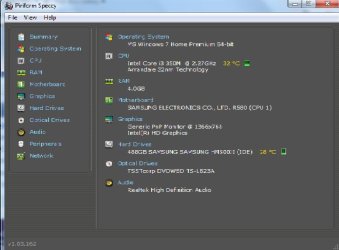
Ok, here's the specs on my new computer. I didn't know how to do a copy and paste, so it's here as an attachment. Thanks.
 

Attachments

  • System-info.jpg
    System-info.jpg
    35.8 KB · Views: 310

My Computer

OS
Windows 7
Don't know if this will help ... but I routinely use an external drive adapter to plugin drives for reformatting, repartitioning, and other such stuff. When I do that, the drive does NOT appear in the drive list.

What I have to do is the following:
1) Go into Disk Management
2) Scroll down the page until I see the entry for the drive -- usuall near the bottom
3) Notice that it says "Offline"
4) Right-click and select "Online"

After that, the drive is assigned a letter and it then appears both in the drive list in my file manager and is available for use.

I think that, sometimes, drives attached via USB have to be manually "mounted" in this manner.

Try this and see if it works.
 

My Computer

Computer type
PC/Desktop
Computer Manufacturer/Model Number
Custom
OS
Win7 Pro 32-bit, Win8 Pro 32-bit
CPU
AMD Phenom II X6 1090T
Motherboard
Gigabyte
Memory
4GB ddr3 1300
Graphics Card(s)
AMD HD 4290 onboard
Sound Card
Builtin Realtek HD Audio
Monitor(s) Displays
Samsung 24" widescreen, LG 23" widescreen
Screen Resolution
1920x1200/1920x1080
Hard Drives
Kingston 256GB SSD
Keyboard
Logitech Illuminated Keyboard
Mouse
Logitech M705 wireless mouse
Antivirus
Norton Av 2013
Browser
IE v10
What's the specific model of that external hard drive?
OP should look at their web site IMHO, this could easily be not compatible with Windows 7.
However, if the internal drive can be removed from the enclosure, it might still be salvageable.
I have a SATA/IDE external to USB drive device (around $20) for this purpose.
If tons of space is needed, easy fix, USB enclosures and whatever drive you want to cram in them or that one, just buy based on 2.5/3.5 size of drive and the connector type, SATA or IDE.
------
Made me laugh when he asked if Speccy was something someone was trying to sell him.
Thanks for that. :D
 

My Computer

Computer type
PC/Desktop
Computer Manufacturer/Model Number
Self Built Custom
OS
Windows 7 Ultimate Retail Box (64-bit installed) + Service Pack 1
CPU
AMD FX-8350 CPU v1.15 (or 1.0F) BIOS was required!
Motherboard
MSI 890FXA-GD70
Memory
8G CAS-7 G-Skill DDR3 @1333 (2 fours) [mobo nonOC max rec'd]
Graphics Card(s)
Radeon HD 7950 [3 gigs of GDDR5] MSI Twin Frozr model
Sound Card
Realtek High Definition Audio (onboard mobo, ALC-889 chip)
Monitor(s) Displays
2 WS LED Monitors: One LG One Viewsonic
Screen Resolution
1920 by 1080
Hard Drives
SSD for OS: Samsung 840 Pro
SSD for VM and utilities: Adata SX900
7200 RPM SATA HDs for the rest: Hitachi and Seagate
PSU
Corsair TX850 - 850W max, in service since August 2010.
Case
Thermaltake Armor A90
Cooling
Thermaltake Spin Q CPU Cooler, in service since August 2010
Keyboard
Logitech G11
Mouse
Logitech M310 Wireless
Internet Speed
100 Megabit broadband supposedly upgraded from 50 (Cable)
Antivirus
Bitdefender Internet Security 2014 suite
Browser
Pale Moon 64-bit main, also IceDragon, Opera, and Maxthon.
Other Info
CompTIA A+ certified (220-800 series) in July 2013.
Ok, what I've learned so far - my newer laptop with Windows 7 uses power saving features (as most of them do now). The newer external hard drives use half the power of the older ones, while possessing twice the storage space(!) So the current laptops only provide half the amperage that my older ext. HD needs. Thus, my ext. HD isn't provided with enough power to "start" and be recognized by my laptop.

So I wonder if Windows 7 has a way to bump up the power to the USB ports? If someone can assist with this, it would keep me from having to buy a new ext. HD.
 

My Computer

OS
Windows 7
external hdd not recognised

hi, im new to this... i am working on a sony vaio vpceh laptop for a friend... he wants everything backed up on an external hard drive. i bought a seagate slim 500gb drive to back up on but the laptop doesnt recognise it. i tried the same hdd on my acer laptop and works fine. i also tried a brand new sandisk 8gb usb drive and it did exactly the same. however when i tried my old sandisk usb stick it worked on the sony laptop. in device manager the drive is recognised but with an yellow exclamation mark and in disk management theres nothing there. this has really baffled me i hope someone can help me on this asap. thank you.
 

My Computer

Computer type
Laptop
Computer Manufacturer/Model Number
sony vaio
OS
windows 7 64 bit home premium
Back
Top