
I have Guest access set up on my Linksys E1200 router. My neighbor and I have an agreement so that he can use my internet connection via the guest access, avoiding the possibility that he can "see" my network. He uses a NetGear signal booster and his PS3 connects thru that to my wi-fi.
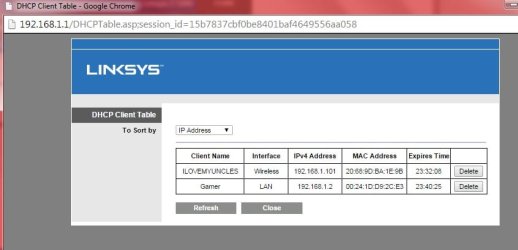
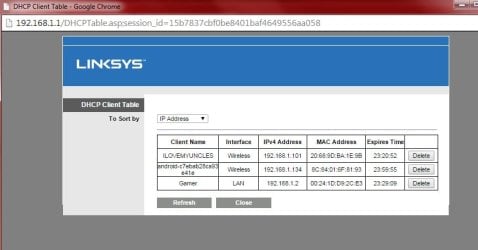
My first issue comes up when I look at my DHCP client list. As seen in the first client list below, my wireless laptop and my wired desktop units show up, but I don't see his PS3. I setup my tablet to connect thru the guest access and it doesn't show, either. Once I change the tablet back to my normal wireless access, it shows on my DHCP list (second thumbnail). The User Manual for the router says that I should be able to see the guest users, but they don't show up, nor does the neighbor's extender (I'm not sure that I should, but it's worth noting).
I'm considering shutting down the guest access and telling the neighbor that he's screwed unless I can find a solution. No skin off my back as I've been considering giving him the boot anyhow.
My second issue (which may be solved by denying guest access, anyhow) is that his extender uses the same 2.4 GHz channel that my router uses for wi-fi, and I sometimes believe that this is causing issues with my signal strength. I use a Wi-Fi Analyzer app on my tablet, and it shows that the channels for my main SSID, the guest SSID and his extender are all on channel 11. I look at the channel ratings and, of course, channel 11 has the lowest rating. When I changed the broadcast channel to 4, everything followed (guest and extender) and the rating for channel 4 drops.
Should I just drop the guest access and tell the neighbor to find a new source? I don't want to let him on my main SSID and I don't like the idea that I can't see him or his devices in my DHCP list.
My first issue comes up when I look at my DHCP client list. As seen in the first client list below, my wireless laptop and my wired desktop units show up, but I don't see his PS3. I setup my tablet to connect thru the guest access and it doesn't show, either. Once I change the tablet back to my normal wireless access, it shows on my DHCP list (second thumbnail). The User Manual for the router says that I should be able to see the guest users, but they don't show up, nor does the neighbor's extender (I'm not sure that I should, but it's worth noting).
I'm considering shutting down the guest access and telling the neighbor that he's screwed unless I can find a solution. No skin off my back as I've been considering giving him the boot anyhow.
My second issue (which may be solved by denying guest access, anyhow) is that his extender uses the same 2.4 GHz channel that my router uses for wi-fi, and I sometimes believe that this is causing issues with my signal strength. I use a Wi-Fi Analyzer app on my tablet, and it shows that the channels for my main SSID, the guest SSID and his extender are all on channel 11. I look at the channel ratings and, of course, channel 11 has the lowest rating. When I changed the broadcast channel to 4, everything followed (guest and extender) and the rating for channel 4 drops.
Should I just drop the guest access and tell the neighbor to find a new source? I don't want to let him on my main SSID and I don't like the idea that I can't see him or his devices in my DHCP list.
Attachments
My Computer
At a glance
Microsoft Windows 10 Home Build 15036Intel(R) Core(TM) i7-860 @ 2.80GHz4.00 GBNVIDIA GeForce GTX 750
- Computer type
- PC/Desktop
- Computer Manufacturer/Model Number
- iBuyPower NZXT
- OS
- Microsoft Windows 10 Home Build 15036
- CPU
- Intel(R) Core(TM) i7-860 @ 2.80GHz
- Motherboard
- Gigabyte Technology Co., Ltd. P55-UD3L
- Memory
- 4.00 GB
- Graphics Card(s)
- NVIDIA GeForce GTX 750
- Sound Card
- (1) Line 6 UX2 (2) Realtek High Definition Audio
- Monitor(s) Displays
- 23" acer
- Screen Resolution
- 1920 x 1080 x 32 bits (4294967296 colors) @ 60 Hz
- Hard Drives
- (1) WDC WD5000AAKS-00D2B0 ATA Device (2) Seagate FreeAgent Go 250G USB Device
- Cooling
- Corsair H75 liquid cooler (Very easy to install, actually)
- Internet Speed
- 60M cable modem-->Linksys E1200-->1Gbps net card
- Browser
- Chrome
- Other Info
- This is probably the longest I've ever had a Windows machine run without having to restore it to scratch. I'm used to restoring to "factory" about every 2 yrs. I've run with Win7 since new in 2009 and only recently (Nov, '14) restored to clean up the machine from all my 'xperimenting. LOL!! I may never need another machine.
Upgraded to 10 when it was still free, then installed 2017 update.


