Reference this thread:
http://www.sevenforums.com/network-sharing/27738-amazing-network-problem-3.html
Router: D-Link d-524 V4000
Ethernet: Nforce via mobo Gigabyte GM-A570SLIv2
I am having similar problems as with the linked thread. What happened with me was I needed to download drivers for my 2nd pc because the wireless had issues. So I unplugged my Cat-5 cable from my main pc that was working and then plugged it into my 2nd pc. I downlaoded the drivers and then reconnected the cable back into the main pc. That's when the problems began. My 2nd pc is the exact same setup as my main other than the processor is different and it works great. Things I have done:
1. Connected straight to DSL modem.
2. Reset both modem/router
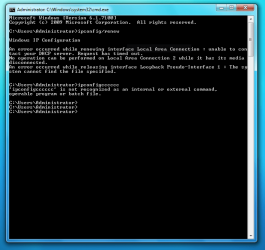
3. IPconfig shows the 169 IP.
4. Pinged the NIC with no loss of packets.
5. Reloaded the drivers via mobo CD(Vista x64)
6. Started in safe mode w/networking
7. Restarted DHCP Client
8. Verified configuration matched the other pc.
9. Reinstalled Iv4 using c:/windows/inf
10. Bought a PCI adapter in case the mobo connection was bad. Didn't work either.
I can't even access the router or modem on the main pc. I tried a static IP but will try what was suggested in the linked thread when I get home today. If you need snipits I can do that once I get home. I'll provide anything you need. Most of the snipits in the link thread have the same info as mine would that's why I linked it. Thanks in advance for the help.
http://www.sevenforums.com/network-sharing/27738-amazing-network-problem-3.html
Router: D-Link d-524 V4000
Ethernet: Nforce via mobo Gigabyte GM-A570SLIv2
I am having similar problems as with the linked thread. What happened with me was I needed to download drivers for my 2nd pc because the wireless had issues. So I unplugged my Cat-5 cable from my main pc that was working and then plugged it into my 2nd pc. I downlaoded the drivers and then reconnected the cable back into the main pc. That's when the problems began. My 2nd pc is the exact same setup as my main other than the processor is different and it works great. Things I have done:
1. Connected straight to DSL modem.
2. Reset both modem/router
3. IPconfig shows the 169 IP.
4. Pinged the NIC with no loss of packets.
5. Reloaded the drivers via mobo CD(Vista x64)
6. Started in safe mode w/networking
7. Restarted DHCP Client
8. Verified configuration matched the other pc.
9. Reinstalled Iv4 using c:/windows/inf
10. Bought a PCI adapter in case the mobo connection was bad. Didn't work either.
I can't even access the router or modem on the main pc. I tried a static IP but will try what was suggested in the linked thread when I get home today. If you need snipits I can do that once I get home. I'll provide anything you need. Most of the snipits in the link thread have the same info as mine would that's why I linked it. Thanks in advance for the help.
My Computer
At a glance
Windows 7 Home Premium x64AMD Phenom II X4 9458 GB G-Skill 1.5v DDR 3 1333Mhz(2) MSI 512MB GTS 250 SLI
- Computer Manufacturer/Model Number
- Home built
- OS
- Windows 7 Home Premium x64
- CPU
- AMD Phenom II X4 945
- Motherboard
- ASUS M4N98TD EVO AM3 NVIDIA nForce 980a SLI
- Memory
- 8 GB G-Skill 1.5v DDR 3 1333Mhz
- Graphics Card(s)
- (2) MSI 512MB GTS 250 SLI
- Sound Card
- Soundblaster Audigy 2 platinum
- Monitor(s) Displays
- Samsung 2255BW 22"
- Screen Resolution
- 1650 x 1050
- Hard Drives
- 2 WD 250GB 7500RPM
- PSU
- Antec TP-750. The ultimate bang for the buck PSU
- Case
- Raidmax
- Cooling
- Sycthe Slipstream cooling fans(4)
- Keyboard
- Zboard Merc
- Mouse
- Logitech MX-518
- Internet Speed
- 3MB
- Other Info
- LG Blu-Ray/DVD combo drive/LG DVD-RW w/ lightscribe