widescreen resolutions lost.

Domeri

New member
Local time
5:22 PM
Messages
19
[Fixed] widescreen resolutions lost.

First of all, I'd like tell how satisfied I've been with windows 7. It's fast, reliable, stable (even RC have been for me) and everything have been working A+ up until now.

This morning when I spent some time on computer before leaving to work, everything worked as they've worked so far. Now when I got back from work some 8-9 hours later, something was terribly wrong. My 22" LCD isn't recognized anymore and thus native resolution 1680*1050 isn't an option anymore. I really don't know what happened. I'm bit confused how it, what ever it is, happened.

My gfx is Geforce 8800GTS.

I've tried to update my Drivers, rebooting, fiddle with NVIDIA Control panel, nothing.

I know I'm missing something here but I don't know what. Help please =(


Thank you.
 
Last edited:

My Computer

Computer Manufacturer/Model Number
N/A
OS
Windows 7 Home Premium 64
CPU
AMD Athlon X2 6000+
Motherboard
Gigabyte GA-MA78GM-S2H
Memory
Corsair 2gb DDR2 and Kingston 2gb DDR2 @ 800mhz
Graphics Card(s)
RADEON HD 5750 1GDDR (ASUS)
Sound Card
Sound Blaster X-Fi
Monitor(s) Displays
Acer AL2216W 22" Widescreen
Screen Resolution
1680*1050
Hard Drives
2*500Gb Seagate Barracuda 7200.12 @ RAID 0
PSU
Nexus NS-5000 500w
Case
Antec three hundred
Cooling
Air
Keyboard
Some cheap Logitech keyboard
Mouse
Logitech G5
Internet Speed
10mb/2mb
Other Info
Self built Rig.
Did you update your monitor driver via windows update?
 

My Computer

OS
OS
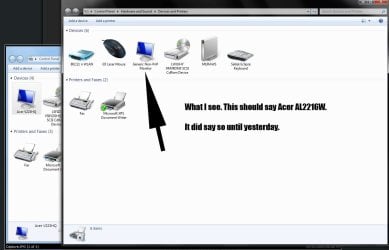
Windows update doesn't find them, the ones I downloaded from Acer's homepage for AL2216W won't install, and when ever I try to Update the drivers windows tells me that generic-non-PnP-monitor driver is the best one available and up-to-date.
 

My Computer

Computer Manufacturer/Model Number
N/A
OS
Windows 7 Home Premium 64
CPU
AMD Athlon X2 6000+
Motherboard
Gigabyte GA-MA78GM-S2H
Memory
Corsair 2gb DDR2 and Kingston 2gb DDR2 @ 800mhz
Graphics Card(s)
RADEON HD 5750 1GDDR (ASUS)
Sound Card
Sound Blaster X-Fi
Monitor(s) Displays
Acer AL2216W 22" Widescreen
Screen Resolution
1680*1050
Hard Drives
2*500Gb Seagate Barracuda 7200.12 @ RAID 0
PSU
Nexus NS-5000 500w
Case
Antec three hundred
Cooling
Air
Keyboard
Some cheap Logitech keyboard
Mouse
Logitech G5
Internet Speed
10mb/2mb
Other Info
Self built Rig.
Windows update doesn't find them, the ones I downloaded from Acer's homepage for AL2216W won't install, and when ever I try to Update the drivers windows tells me that generic-non-PnP-monitor driver is the best one available and up-to-date.
I have acer too...
Try to uninstall your monitor in device manager and reboot...
 

My Computer

OS
OS
Sorry didn't work. I even tried to switch plug in port on gfx, it didn't help. I noticed that there was an update on Windows Defender but I Doubt that could've caused it.

Instead of it being problem with my monitor, could it be with my graphics card? if so, I have the latest 190.62 drivers for my 8800GTS, maybe if I should downgrade them, could that work?
 

My Computer

Computer Manufacturer/Model Number
N/A
OS
Windows 7 Home Premium 64
CPU
AMD Athlon X2 6000+
Motherboard
Gigabyte GA-MA78GM-S2H
Memory
Corsair 2gb DDR2 and Kingston 2gb DDR2 @ 800mhz
Graphics Card(s)
RADEON HD 5750 1GDDR (ASUS)
Sound Card
Sound Blaster X-Fi
Monitor(s) Displays
Acer AL2216W 22" Widescreen
Screen Resolution
1680*1050
Hard Drives
2*500Gb Seagate Barracuda 7200.12 @ RAID 0
PSU
Nexus NS-5000 500w
Case
Antec three hundred
Cooling
Air
Keyboard
Some cheap Logitech keyboard
Mouse
Logitech G5
Internet Speed
10mb/2mb
Other Info
Self built Rig.
You can try. I have latest 190.62 drivers and everything is fine with my monitor resolution...
 

My Computer

OS
OS
Have you tried to make custom 1680*1050 resolution in nVidia CP???
 

My Computer

OS
OS
Yes i have but kicks me back to 1600*1024. 1600*1200 does work tho.
 

My Computer

Computer Manufacturer/Model Number
N/A
OS
Windows 7 Home Premium 64
CPU
AMD Athlon X2 6000+
Motherboard
Gigabyte GA-MA78GM-S2H
Memory
Corsair 2gb DDR2 and Kingston 2gb DDR2 @ 800mhz
Graphics Card(s)
RADEON HD 5750 1GDDR (ASUS)
Sound Card
Sound Blaster X-Fi
Monitor(s) Displays
Acer AL2216W 22" Widescreen
Screen Resolution
1680*1050
Hard Drives
2*500Gb Seagate Barracuda 7200.12 @ RAID 0
PSU
Nexus NS-5000 500w
Case
Antec three hundred
Cooling
Air
Keyboard
Some cheap Logitech keyboard
Mouse
Logitech G5
Internet Speed
10mb/2mb
Other Info
Self built Rig.
maybe I Expressed my self bit unclear. When I select a resolution "Not supported" by my Monitor and select it, screen goes black and the resolution it changes to is 1600*1024. After that I change it to 1600*1200 because it looks bit cleaner and the text is readable.

I'll upload a video to YT tomorrow to explain it better.
 

My Computer

Computer Manufacturer/Model Number
N/A
OS
Windows 7 Home Premium 64
CPU
AMD Athlon X2 6000+
Motherboard
Gigabyte GA-MA78GM-S2H
Memory
Corsair 2gb DDR2 and Kingston 2gb DDR2 @ 800mhz
Graphics Card(s)
RADEON HD 5750 1GDDR (ASUS)
Sound Card
Sound Blaster X-Fi
Monitor(s) Displays
Acer AL2216W 22" Widescreen
Screen Resolution
1680*1050
Hard Drives
2*500Gb Seagate Barracuda 7200.12 @ RAID 0
PSU
Nexus NS-5000 500w
Case
Antec three hundred
Cooling
Air
Keyboard
Some cheap Logitech keyboard
Mouse
Logitech G5
Internet Speed
10mb/2mb
Other Info
Self built Rig.
maybe I Expressed my self bit unclear. When I select a resolution "Not supported" by my Monitor and select it, screen goes black and the resolution it changes to is 1600*1024. After that I change it to 1600*1200 because it looks bit cleaner and the text is readable.

I'll upload a video to YT tomorrow to explain it better.
I understand what you want to tell me, dont bother to upload video, except....
Better upload...;)
Did you tried to downgrade drivers?
 

My Computer

OS
OS
Sorry but downgrading didn't help either. =( is there any way to manually tell windows which display I have? or is there something I can do in recovery console?
 

My Computer

Computer Manufacturer/Model Number
N/A
OS
Windows 7 Home Premium 64
CPU
AMD Athlon X2 6000+
Motherboard
Gigabyte GA-MA78GM-S2H
Memory
Corsair 2gb DDR2 and Kingston 2gb DDR2 @ 800mhz
Graphics Card(s)
RADEON HD 5750 1GDDR (ASUS)
Sound Card
Sound Blaster X-Fi
Monitor(s) Displays
Acer AL2216W 22" Widescreen
Screen Resolution
1680*1050
Hard Drives
2*500Gb Seagate Barracuda 7200.12 @ RAID 0
PSU
Nexus NS-5000 500w
Case
Antec three hundred
Cooling
Air
Keyboard
Some cheap Logitech keyboard
Mouse
Logitech G5
Internet Speed
10mb/2mb
Other Info
Self built Rig.
Interesting thing was that I saw my monitor driver in windows update this morning...
It was optional update...
Run windows update and then check for updates...
 

My Computer

OS
OS
No I'm not seeing an update for acer in windows update =/
 

My Computer

Computer Manufacturer/Model Number
N/A
OS
Windows 7 Home Premium 64
CPU
AMD Athlon X2 6000+
Motherboard
Gigabyte GA-MA78GM-S2H
Memory
Corsair 2gb DDR2 and Kingston 2gb DDR2 @ 800mhz
Graphics Card(s)
RADEON HD 5750 1GDDR (ASUS)
Sound Card
Sound Blaster X-Fi
Monitor(s) Displays
Acer AL2216W 22" Widescreen
Screen Resolution
1680*1050
Hard Drives
2*500Gb Seagate Barracuda 7200.12 @ RAID 0
PSU
Nexus NS-5000 500w
Case
Antec three hundred
Cooling
Air
Keyboard
Some cheap Logitech keyboard
Mouse
Logitech G5
Internet Speed
10mb/2mb
Other Info
Self built Rig.
here you go.
 

Attachments

  • effinmonitor.jpg
    effinmonitor.jpg
    78.2 KB · Views: 127

My Computer

Computer Manufacturer/Model Number
N/A
OS
Windows 7 Home Premium 64
CPU
AMD Athlon X2 6000+
Motherboard
Gigabyte GA-MA78GM-S2H
Memory
Corsair 2gb DDR2 and Kingston 2gb DDR2 @ 800mhz
Graphics Card(s)
RADEON HD 5750 1GDDR (ASUS)
Sound Card
Sound Blaster X-Fi
Monitor(s) Displays
Acer AL2216W 22" Widescreen
Screen Resolution
1680*1050
Hard Drives
2*500Gb Seagate Barracuda 7200.12 @ RAID 0
PSU
Nexus NS-5000 500w
Case
Antec three hundred
Cooling
Air
Keyboard
Some cheap Logitech keyboard
Mouse
Logitech G5
Internet Speed
10mb/2mb
Other Info
Self built Rig.
So, your monitor was recognized as acerAL2216 till yesterday...
When you uninstalled your monitor in device manager and reboot nothing happened...
 

My Computer

OS
OS

My Computer

Computer Manufacturer/Model Number
custom built
OS
Windows 7 Home Basic 64bit
CPU
Intel Core 2 Duo 6420 (2.13 Ghz)
Motherboard
Asus P5B-E Plus
Memory
2x1 GB Kingston KVR DDR2 800Mhz
Graphics Card(s)
Saphire ATI HD4870 512MB
Sound Card
Creative Audigy 4 PCI
Monitor(s) Displays
Samsung SyncMaster T220
Screen Resolution
1680x1050
Hard Drives
WD 320GB (Sata2)
Maxtor 250GB (ATA133)
Maxtor 80GB (ATA133)
PSU
Coolermaster Silent Pro 700Watt
Case
Chieftec midi tower case
Cooling
stock cpu cooler/fan
Keyboard
Logitech UltraX Premium Keyboard (usb 2.0)
Mouse
Logitech MX518 gaming grade optical mouse 1800dpi(usb2.0)
Yes it was. Like I said in first post Yesterday morning everything was working fine, but not later that same day and that's when I came and asked help here. When I uninstalled the drivers in Device manager and rebooted, yes, nothing happened.

What makes this problem very odd is that i've been using windows 7 since the RC version was published and I haven't had any problems until now.
 

My Computer

Computer Manufacturer/Model Number
N/A
OS
Windows 7 Home Premium 64
CPU
AMD Athlon X2 6000+
Motherboard
Gigabyte GA-MA78GM-S2H
Memory
Corsair 2gb DDR2 and Kingston 2gb DDR2 @ 800mhz
Graphics Card(s)
RADEON HD 5750 1GDDR (ASUS)
Sound Card
Sound Blaster X-Fi
Monitor(s) Displays
Acer AL2216W 22" Widescreen
Screen Resolution
1680*1050
Hard Drives
2*500Gb Seagate Barracuda 7200.12 @ RAID 0
PSU
Nexus NS-5000 500w
Case
Antec three hundred
Cooling
Air
Keyboard
Some cheap Logitech keyboard
Mouse
Logitech G5
Internet Speed
10mb/2mb
Other Info
Self built Rig.
Try this one.

http://global-download.acer.com/GDFiles%5CDriver/Monitor/Monitor_Acer_1.0.0.0_Vistax86XPx86_AL2216W.zip?acerid=633794439748296159&Step1=Monitor&Step2=AL%20Series&Step3=AL2216W&OS=V10&LC=en&SC=PA_7


Install manually throught Device Manager: right click on generic monitor, choose update driver, find the folder where you extracted the contents of the linked zip file..etc
Then reboot the computer.
I was thinking about that...
But he said that didn't work...
 

My Computer

OS
OS
Back
Top