
You are using an out of date browser. It may not display this or other websites correctly.
You should upgrade or use an alternative browser.
You should upgrade or use an alternative browser.
Wilders Security Forum
- Thread starter noels7
- Start date

zigzag3143
New member
- Local time
- 5:35 PM
- Messages
- 27,140
Hi
Does anyone know what happened to Wilders Security Forums.
Have not been able to access for approx 1 week.
noels7
Its up here
My Computer
- Computer Manufacturer/Model Number
- HP Pavillion dv-7 1005 Tx
- OS
- Win 8 Release candidate 8400
- Memory
- 4 gigs
- Graphics Card(s)
- Nvidia 9600M
- Sound Card
- HD built-in
- Monitor(s) Displays
- 17" Wxga
- Screen Resolution
- 1440x900
- Cooling
- none
- Internet Speed
- 45Mb down 5Mb up
This is the message I continually get:
"The server at Wilders Security Forums - Powered by vBulletin is taking too long to respond."
Same result with Firefox, IE, cleaned cache cookies etc.
No problem accessing all other sites/forums
Don't suppose Australian government has blocked access for some reason?
noels7
"The server at Wilders Security Forums - Powered by vBulletin is taking too long to respond."
Same result with Firefox, IE, cleaned cache cookies etc.
No problem accessing all other sites/forums
Don't suppose Australian government has blocked access for some reason?
noels7
My Computer
- OS
- Windows 7 Ultimate x64

- Local time
- 10:35 PM
- Messages
- 16,784
I can get there fine.
My Computers
System One System Two
-
- Computer type
- PC/Desktop
- OS
- 7 X64
- CPU
- i5 8400
- Motherboard
- gigabyte b365m ds3h
- Memory
- 2x8gb 3200mhz
- Hard Drives
- various
- PSU
- pure power 11 400w cm
- Case
- Coolermaster
- Cooling
- cryorig m9i
-
- Computer type
- PC/Desktop
- OS
- 7x64
- CPU
- g5400
- Motherboard
- ga b365m ds3h
- Memory
- 8gb ddr4 2400
- PSU
- xfx pro 450w

- Local time
- 4:35 PM
- Messages
- 18,396
Fine here too.
Could always -
Ping the site. Cmd prompt - ping wilderssecurity.com
Run tracert. Cmd prompt - tracert wilderssecurity.com
Clear your dns cache. Cmd prompt - ipconfig/flushdns
Reinitialize your network adapter.
Reboot router.
Check in router settings if anything has been added in about it. Access - your IP address in your browser address bar.
Check your Hosts file just in case. Windows/System32/drivers/etc - hosts
Check if any firewall/AV is interfering.
Could always -
Ping the site. Cmd prompt - ping wilderssecurity.com
Run tracert. Cmd prompt - tracert wilderssecurity.com
Clear your dns cache. Cmd prompt - ipconfig/flushdns
Reinitialize your network adapter.
Reboot router.
Check in router settings if anything has been added in about it. Access - your IP address in your browser address bar.
Check your Hosts file just in case. Windows/System32/drivers/etc - hosts
Check if any firewall/AV is interfering.
My Computer
- Computer type
- PC/Desktop
- Computer Manufacturer/Model Number
- Airbot 2.0
- OS
- Windows 7 Ultimate x64 SP1
- CPU
- Core i7 920 (D0) @ 4Ghz, *26c idle *65c full load on air
- Motherboard
- Asus P6X58D Premium - Sata 6Gb/s - USB 3.0
- Memory
- 12GB DDR3 Corsair Dominator -CMD12GX3M6A1600C8 at 1600MHz
- Graphics Card(s)
- Zotac Geforce GTX 770
- Sound Card
- ASUS Xonar D2X
- Monitor(s) Displays
- 1 LG 24" Flatron W2453V-PF 1 Samsung 24" P2450H both 2ms RT
- Screen Resolution
- 1920x1080@60hz
- Hard Drives
- 1 Samsung 250GB 840 Evo SSD
1 OCZ Vertex2 180GB SSD
1 TB Samsung Spinpoint F1 7200RPM 32MB cache
2 500GB WD Caviar Blacks 7200RPM 32MB cache (WD5001AALS)
Pioneer DVD Burner DVR-S18M
- PSU
- Corsair HX1000W
- Case
- Cooler Master HAF 932
- Cooling
- Case Fans *3 230mm, *1 140mm/CPU - *Tuniq Tower 120 Extreme
- Keyboard
- Logitech Wireless MK700
- Mouse
- Logitech Wireless MK700
- Internet Speed
- DL 15 Mbps UL 0.98 Mbps
- Antivirus
- None
- Browser
- Firefox Nightly
- Other Info
- Processor-7.7 *RAM- 7.9 *Graphics-7.9 *Gaming Graphics- 7.9 *SSD- 7.8 W.E.I final score= 7.7
*Phone- LG Nexus 5

- Local time
- 4:35 PM
- Messages
- 2,913
No problem here, either. Have you tried using a computer at your local library to try to access the website?
My Computer
- Computer Manufacturer/Model Number
- Dell XPS 15 L502x
- OS
- Windows 7 Ultimate x64 SP1
- CPU
- Core i7-2670QM
- Memory
- 8GB DDR3 PC3-10600
- Graphics Card(s)
- Intel HD Graphics 3000 + GeForce GT 540M
- Screen Resolution
- 1920x1080
- Hard Drives
- 1TB 5400RPM Seagate
no problems here
My Computer
- Computer type
- PC/Desktop
- Computer Manufacturer/Model Number
- HP PAVILION P7-1071sc,TOSHIBA P200, HP G62
- OS
- win7 ultimate 64bit , win7 home premium 32bit
- CPU
- Intel core i5 2,90GHZ
- Motherboard
- Sandy Bridge 32nm Technology
- Memory
- 12GT DDR3
- Graphics Card(s)
- NVIDIA GeForce GT 530 2GT
- Sound Card
- IDT High Definition Audio CODEC
- Monitor(s) Displays
- Samsung SMB2330HD (1920x1080@60Hz)
- Screen Resolution
- 1920 X 1080
- Hard Drives
- WDC WD5000AJS¨22A8B0 ATA 500GB
MAXTOR EXTERNAL 320GB
- Keyboard
- LOGITECH CORDLESS
- Mouse
- LOGITECH CORDLESS
- Internet Speed
- 24MB
- Antivirus
- Kaspersky Internet Security 2013
- Browser
- Chrome,Firefox

All is well i just looked in there myself 
My Computer
- Computer Manufacturer/Model Number
- acer 7720
- OS
- windows 7
- CPU
- 2.66
- Motherboard
- intel
- Memory
- 6GB
- Graphics Card(s)
- ATI
- Sound Card
- REALTEK
- Monitor(s) Displays
- SAMSUNG
- Screen Resolution
- 1680 x 1050
- Hard Drives
- WD X 3 TB
- PSU
- 1200
- Case
- ACER
- Cooling
- FAN
- Keyboard
- LOGITECH
- Mouse
- LOGITECH
- Internet Speed
- 8MB

I just got off Wilders to come here. Wilders Security Forums - Powered by vBulletin
My Computer
- Computer Manufacturer/Model Number
- DELLXPS 8300
- OS
- WIN7 x64 Home Premium SP1
- CPU
- Intel Core i5-2400 processor(6MB Cache, 3.1GHz)
- Memory
- 8 GB RAM
- Hard Drives
- 1.5TB C Drive
Many thanks for your replies
Still no luck. Cannot understand why I can access any forum/site on FF and IE except Wilders.
My system : win7 ultimate X64 6gig memory, all drivers/win7 etc updates current
Ping the site. Cmd prompt - ping wilderssecurity.com(request timed out)
Run tracert. Cmd prompt - tracert wilderssecurity.com(request timed out)
Clear your dns cache. Cmd prompt - ipconfig/flushdns(system says cannot find)
Reinitialize your network adapter. (?)
Reboot router.(turned cable modem off 5mins then rebooted comp and restart modem)
Check in router settings if anything has been added in about it. Access - your IP address in your browser address bar. (?)
Check your Hosts file just in case. Windows/System32/drivers/etc - hosts(still original -created 14/7/09)
Check if any firewall/AV is interfering. (disabled MSE,shutdown Prevx, quit Look n Stop -still unable to connect to Wilders)
Strange that even with backup hard drive installed, main HD removed problem still exists. Modem activity indicates nothing while attempting to connect to
Wilders Security Forums - Powered by vBulletin
Further help/advice would be greatly appreciated.
noels7
Still no luck. Cannot understand why I can access any forum/site on FF and IE except Wilders.
My system : win7 ultimate X64 6gig memory, all drivers/win7 etc updates current
Ping the site. Cmd prompt - ping wilderssecurity.com(request timed out)
Run tracert. Cmd prompt - tracert wilderssecurity.com(request timed out)
Clear your dns cache. Cmd prompt - ipconfig/flushdns(system says cannot find)
Reinitialize your network adapter. (?)
Reboot router.(turned cable modem off 5mins then rebooted comp and restart modem)
Check in router settings if anything has been added in about it. Access - your IP address in your browser address bar. (?)
Check your Hosts file just in case. Windows/System32/drivers/etc - hosts(still original -created 14/7/09)
Check if any firewall/AV is interfering. (disabled MSE,shutdown Prevx, quit Look n Stop -still unable to connect to Wilders)
Strange that even with backup hard drive installed, main HD removed problem still exists. Modem activity indicates nothing while attempting to connect to
Wilders Security Forums - Powered by vBulletin
Further help/advice would be greatly appreciated.
noels7
My Computer
- OS
- Windows 7 Ultimate x64

I'm not sure what your problem might be but I have one thing you can try. The IP address of wilderssecurity.com is 65.175.38.194. Copy and paste the IP address into the address bar and see if that works. You can also the test you did in command prompt using the IP address.
My Computer
- Computer type
- Laptop
- Computer Manufacturer/Model Number
- Toshiba P775-S7100
- OS
- Windows 7 Professional SP1 64-bit
- CPU
- Intel Core i5-2450M @2.5 GHz
- Memory
- 6 GB DDR3 1333MHz
- Graphics Card(s)
- Intel HD 3000
- Monitor(s) Displays
- Built-in 17.3" LED; 22" Insignia NS-L22Q-10A
- Screen Resolution
- 1600x900; 1360x768
- Hard Drives
- 750 GB Hitachi
1TB Seagate FreeAgent External
- Internet Speed
- Verizon DSL Speed(Down/Up): 3360 Kbps / 800 Kbps
- Antivirus
- MSE and MBAM Pro
- Browser
- IE10
- Local time
- 4:35 PM
- Messages
- 18,396
Many thanks for your replies
Still no luck. Cannot understand why I can access any forum/site on FF and IE except Wilders.
My system : win7 ultimate X64 6gig memory, all drivers/win7 etc updates current
Ping the site. Cmd prompt - ping wilderssecurity.com(request timed out)
Run tracert. Cmd prompt - tracert wilderssecurity.com(request timed out)
Clear your dns cache. Cmd prompt - ipconfig/flushdns(system says cannot find)
Reinitialize your network adapter. (?)
Reboot router.(turned cable modem off 5mins then rebooted comp and restart modem)
Check in router settings if anything has been added in about it. Access - your IP address in your browser address bar. (?)
Check your Hosts file just in case. Windows/System32/drivers/etc - hosts(still original -created 14/7/09)
Check if any firewall/AV is interfering. (disabled MSE,shutdown Prevx, quit Look n Stop -still unable to connect to Wilders)
Strange that even with backup hard drive installed, main HD removed problem still exists. Modem activity indicates nothing while attempting to connect to
Wilders Security Forums - Powered by vBulletin
Further help/advice would be greatly appreciated.
noels7
System doesn't recognize ipconfig/flushdns.
 Hmm, OK.
 It's enabled and started in Services, right?
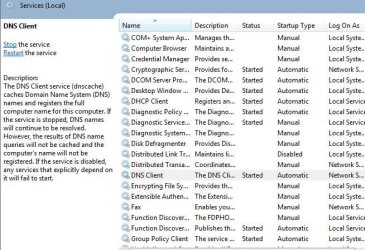
Reinitialize network adapter - Disable/re-enable it from the Network and Sharing Center. But if you rebooted the router or system that would have done it anyways.
Check in Router settings - Can't get into your router settings and take a look around?
Check if any firewall/AV - Did you try rebooting the system after completely disabling all of them, and then checking?
Have you tried to access the site in Safe Mode with Networking?
Tried a different DNS server besides your own ISP providers, like OpenDns or Google?
Googles DNS-
8.8.8.8
8.8.4.4
OpenDNS -
208.67.222.222
208.67.220.220
My Computer
- Computer type
- PC/Desktop
- Computer Manufacturer/Model Number
- Airbot 2.0
- OS
- Windows 7 Ultimate x64 SP1
- CPU
- Core i7 920 (D0) @ 4Ghz, *26c idle *65c full load on air
- Motherboard
- Asus P6X58D Premium - Sata 6Gb/s - USB 3.0
- Memory
- 12GB DDR3 Corsair Dominator -CMD12GX3M6A1600C8 at 1600MHz
- Graphics Card(s)
- Zotac Geforce GTX 770
- Sound Card
- ASUS Xonar D2X
- Monitor(s) Displays
- 1 LG 24" Flatron W2453V-PF 1 Samsung 24" P2450H both 2ms RT
- Screen Resolution
- 1920x1080@60hz
- Hard Drives
- 1 Samsung 250GB 840 Evo SSD
1 OCZ Vertex2 180GB SSD
1 TB Samsung Spinpoint F1 7200RPM 32MB cache
2 500GB WD Caviar Blacks 7200RPM 32MB cache (WD5001AALS)
Pioneer DVD Burner DVR-S18M
- PSU
- Corsair HX1000W
- Case
- Cooler Master HAF 932
- Cooling
- Case Fans *3 230mm, *1 140mm/CPU - *Tuniq Tower 120 Extreme
- Keyboard
- Logitech Wireless MK700
- Mouse
- Logitech Wireless MK700
- Internet Speed
- DL 15 Mbps UL 0.98 Mbps
- Antivirus
- None
- Browser
- Firefox Nightly
- Other Info
- Processor-7.7 *RAM- 7.9 *Graphics-7.9 *Gaming Graphics- 7.9 *SSD- 7.8 W.E.I final score= 7.7
*Phone- LG Nexus 5
Just spoke to a friend approx 100kms from me; they have the same problem also.
Any other Australians able/unable to get into Wilders.
Ip address in address bar produces same result.
noels7
Any other Australians able/unable to get into Wilders.
Ip address in address bar produces same result.
noels7
My Computer
- OS
- Windows 7 Ultimate x64
Could be a location /ISP issue - no problems accessing the site here. (QLD/Exetel)
My Computer
- Computer type
- PC/Desktop
- Computer Manufacturer/Model Number
- Systems by SmartEyeball
- OS
- 8 Pro x64
- CPU
- i7 3770K 4.6GHz
- Motherboard
- ASUS P8Z77 WS
- Memory
- 16GB G.Skill Trident X 2666mhz
- Graphics Card(s)
- x2 EVGA 780 Ti Superclocked SLI
- Sound Card
- SB X-FI Surround 5.1 PRO USB / ATH-AD900 Headphones
- Monitor(s) Displays
- x3 Dell U2410 / 58" Samsung
- Screen Resolution
- 5760*1200/ 1920*1200
- Hard Drives
- 2x Intel 520 240GB (RAID 0) * 2x WD Caviar Blacks 2TB (RAID 0) * 2TB WD Caviar Black * Sony Optirac DVD
- PSU
- Silverstone Strider Evolution 1200W
- Case
- Thermaltake Level 10 GT Snow Edition
- Cooling
- Noctua NH-D14
- Keyboard
- Topre Realforce // Ducky Shine MX Black // Filco Ninja TKL
- Mouse
- Thermaltake Theron (Highly Recommended) + Razer Imperator
- Antivirus
- MSE
- Browser
- IE, FF, WaterFox
- Other Info
- GT Extreme V2 Sim Racing Cockpit + 40" LCD and K/B Mouse stand ▼
Fanatec CSR Elite Wheel + Clubsport V1 Pedals + CSR shifter/7G-H ▼Saitek X52 Pro ▼ TrackIR 5 Pro
Buttkicker v2 Seat Rumbler with Dedicated 5.1 and Sub Woofer attached to frame ▼
=
Bloody Big Grin
Are you using Firefox browser with the No Script ext.? If so, and Wilders is forbidden, that might keep it from accessing.Many thanks for your replies
Still no luck. Cannot understand why I can access any forum/site on FF and IE except Wilders.
My system : win7 ultimate X64 6gig memory, all drivers/win7 etc updates current
Ping the site. Cmd prompt - ping wilderssecurity.com(request timed out)
Run tracert. Cmd prompt - tracert wilderssecurity.com(request timed out)
Clear your dns cache. Cmd prompt - ipconfig/flushdns(system says cannot find)
Reinitialize your network adapter. (?)
Reboot router.(turned cable modem off 5mins then rebooted comp and restart modem)
Check in router settings if anything has been added in about it. Access - your IP address in your browser address bar. (?)
Check your Hosts file just in case. Windows/System32/drivers/etc - hosts(still original -created 14/7/09)
Check if any firewall/AV is interfering. (disabled MSE,shutdown Prevx, quit Look n Stop -still unable to connect to Wilders)
Strange that even with backup hard drive installed, main HD removed problem still exists. Modem activity indicates nothing while attempting to connect to
Wilders Security Forums - Powered by vBulletin
Further help/advice would be greatly appreciated.
noels7
My Computer
- Computer Manufacturer/Model Number
- DELLXPS 8300
- OS
- WIN7 x64 Home Premium SP1
- CPU
- Intel Core i5-2400 processor(6MB Cache, 3.1GHz)
- Memory
- 8 GB RAM
- Hard Drives
- 1.5TB C Drive

That's a good suggestion. I've also had adblock addons which caused a site to time out when an ad was trying to reach a remote site.Are you using Firefox browser with the No Script ext.? If so, and Wilders is forbidden, that might keep it from accessing.
My Computer
- Computer Manufacturer/Model Number
- Self
- OS
- Main - Windows 7 Pro SP1 64-Bit; 2nd - Windows Server 2008 R2
- CPU
- Main - Core i7 2600K; 2nd - Core i7 920
- Motherboard
- Main - Asus P8Z68-V Pro/Gen3; 2nd - Gigabyte GA-EX58-UDR3
- Memory
- Main - 16GB Corsair Vengeance; 2nd - 12GB Corsair Vengeance
- Graphics Card(s)
- Main - XFX Radeon 6870 1GB; 2nd - XFX Radeon 4870 1GB
- Sound Card
- Both: Onboard Realtek Azalia
- Monitor(s) Displays
- Main - Hann 25" + I-INC 25" + Acer 23"; 2nd - Upgrading Soon
- Screen Resolution
- Main - 1920x1080 (All Three Monitors); 2nd - Upgrading Soon
- Hard Drives
- Main - (1) Crucial M4 128GB (Boot)
Main - (1) Seagate 2TB 64MB Cache (Data)
Main - (1) Seagate 2TB 64MB Cache (Data Backup)
2nd - (1) Intel X25-M SSD 80GB (Boot)
2nd - (3) Seagate 1TB 32MB Cache (Data Backup)
2nd - (1) Seagate 320GB (Because)
- PSU
- Main - OCZ 600W Modular; 2nd - OCZ 600W
- Case
- Main - Thermaltake Element G; 2nd - NZXT something or other
- Cooling
- Main - Corsair H80; 2nd - Prolimatech Megahalems
- Keyboard
- Main - Razer Reclusa; 2nd - Old MS Keyboard
- Mouse
- Main - Logitech MX Revolution; 2nd - Old MS Mouse
- Internet Speed
- 20Mbps Time-Warner Cable
Airbot/smarteyeball/Heyyou thanks for your replies.
AirBot
1. yes it is started auto in Services.
2. Tried safe mode with networking -still no connect.
3. Tried DNS server alternatives - still no connect to Wilders
Heyyou
same problem when I use IE. Haven't had any updates to either browser since problem began.
smarteyeball
I think this must be an ISP problem. I use Bigpond Cable (only one available in South Australia). The "just spoke to a friend approx 100kms from me; they have the same problem also" also uses Bigpond but on ASDL2.
Have tried to contact Bigpond Tech Support - gave up after waiting for 10 mins in a queue for a 'human' to answer. Will try again later.
noels7
AirBot
1. yes it is started auto in Services.
2. Tried safe mode with networking -still no connect.
3. Tried DNS server alternatives - still no connect to Wilders
Heyyou
same problem when I use IE. Haven't had any updates to either browser since problem began.
smarteyeball
I think this must be an ISP problem. I use Bigpond Cable (only one available in South Australia). The "just spoke to a friend approx 100kms from me; they have the same problem also" also uses Bigpond but on ASDL2.
Have tried to contact Bigpond Tech Support - gave up after waiting for 10 mins in a queue for a 'human' to answer. Will try again later.
noels7
My Computer
- OS
- Windows 7 Ultimate x64
Have tried to contact Bigpond Tech Support - gave up after waiting for 10 mins in a queue for a 'human' to answer. Will try again later.
noels7
Yeah... appealing prospect isn't it?

Are you a member of Whirlpool forums?
It might be worthwhile asking in the BigPond section if other Bigpond users are having the same issue with the site. 2 Bigpond users could be a coincidence, any more than that it's at Bigponds end.
I presume you haven't made any changes to your routers settings prior to Wilders becoming blocked?
Also, the results will undoubtedly be the same as FF and IE, but perhaps try a third browser (Opera, Chrome etc ) - If nothing else you can conclusively rule out browsers as a cause.
My Computer
- Computer type
- PC/Desktop
- Computer Manufacturer/Model Number
- Systems by SmartEyeball
- OS
- 8 Pro x64
- CPU
- i7 3770K 4.6GHz
- Motherboard
- ASUS P8Z77 WS
- Memory
- 16GB G.Skill Trident X 2666mhz
- Graphics Card(s)
- x2 EVGA 780 Ti Superclocked SLI
- Sound Card
- SB X-FI Surround 5.1 PRO USB / ATH-AD900 Headphones
- Monitor(s) Displays
- x3 Dell U2410 / 58" Samsung
- Screen Resolution
- 5760*1200/ 1920*1200
- Hard Drives
- 2x Intel 520 240GB (RAID 0) * 2x WD Caviar Blacks 2TB (RAID 0) * 2TB WD Caviar Black * Sony Optirac DVD
- PSU
- Silverstone Strider Evolution 1200W
- Case
- Thermaltake Level 10 GT Snow Edition
- Cooling
- Noctua NH-D14
- Keyboard
- Topre Realforce // Ducky Shine MX Black // Filco Ninja TKL
- Mouse
- Thermaltake Theron (Highly Recommended) + Razer Imperator
- Antivirus
- MSE
- Browser
- IE, FF, WaterFox
- Other Info
- GT Extreme V2 Sim Racing Cockpit + 40" LCD and K/B Mouse stand ▼
Fanatec CSR Elite Wheel + Clubsport V1 Pedals + CSR shifter/7G-H ▼Saitek X52 Pro ▼ TrackIR 5 Pro
Buttkicker v2 Seat Rumbler with Dedicated 5.1 and Sub Woofer attached to frame ▼
=
Bloody Big Grin

Any other Australians able/unable to get into Wilders.
I have no problems getting to the site (ISP = Internode, Location = Adelaide). Sounds like a BigPond/Telstra issue....
My Computer
- Computer type
- PC/Desktop
- Computer Manufacturer/Model Number
- Golden Mk. I.4
- OS
- Windows 10 Pro x64 ; Xubuntu x64
- CPU
- Intel i7 860 @ 2.80 GHz O/C'ed to 4.0GHz
- Motherboard
- Gigabyte P55A-UD3R Rev.1. Award BIOS F13
- Memory
- 16GB Corsair Vengance DDR3 @ 661 MHz Dual Channel (9-9-9-24)
- Graphics Card(s)
- EVGA NVidia GTX 560 1024MB
- Sound Card
- Realtek Integrated
- Monitor(s) Displays
- Dual Samsung SyncMaster 2494HS
- Screen Resolution
- 1920*1080 and 1920*1080
- Hard Drives
- 1*Samsung 840 EVO 120GB SSD;
1*OCZ Vertex 2 60GB SSD;
2*Samsung F3 SpinPoint 1TB in RAID0;
1*Samsung F1 SpinPoint 1TB;
2*Western Digital 1TB External USB 3.0
1*Western Digital 500GB External USB 3.0
1*Seagate 500GB External USB 2.0
- PSU
- Thermaltake ToughPower QFan 750W
- Case
- Thermaltake Element S VK60001W2Z
- Cooling
- Corsair H60 Water Cooling, 2*230mm and 2*80mm case fans
- Keyboard
- Logitech G110
- Mouse
- Logitech MX518
Grasping at straws, if you're using a firewall or something else with blocking ability,
could you try marking Wilders as an exclusion.
could you try marking Wilders as an exclusion.
My Computer
- Computer Manufacturer/Model Number
- DELLXPS 8300
- OS
- WIN7 x64 Home Premium SP1
- CPU
- Intel Core i5-2400 processor(6MB Cache, 3.1GHz)
- Memory
- 8 GB RAM
- Hard Drives
- 1.5TB C Drive
Similar threads
- Replies
- 4
- Views
- 2K
- Replies
- 4
- Views
- 4K
