
You are using an out of date browser. It may not display this or other websites correctly.
You should upgrade or use an alternative browser.
You should upgrade or use an alternative browser.
Will Acronis work on SSD?
- Thread starter Rockrz
- Start date

Not sure. I don't use Acronis. But you probably have to image the 100MB system partition and the C partition. Preformatting those on the SSD cannot hurt. The 100MB system partition has to be a primary partition.
I use free Macrium for those operations. Why spend money.
I use free Macrium for those operations. Why spend money.
My Computer
- Computer Manufacturer/Model Number
- HP, Dell, Gateway, Toshiba - 4 laptops and 2 desktops
- OS
- Vista, Windows7, Mint Mate, Zorin, Windows 8
- CPU
- from 1.6GHz Duo to i7
- Monitor(s) Displays
- 2x HP w2207
- Hard Drives
- 5x HDD, 7x SSD, 12x Externals
- Keyboard
- with trackball - no mices
- Mouse
- Trackball mice
- Internet Speed
- DSL 6000
The Acronis website says it does all that for you... I was just curious if I should format the SSD to it will be recognized which ya have t6o do sometime with a standard drive.
I use Acronis for onging imaging operations and it's only $50 which is subsidized by the government cause I write it off my company taxes
I use Acronis for onging imaging operations and it's only $50 which is subsidized by the government cause I write it off my company taxes
My Computer
- OS
- Windows 7 64bit
Well... I got it installed OK. Bought the latest version of Acronis (it's only $50) just to make sure it would do the trick without any problems and it did. It was just like installing a standard hard drive.
But, I'm kinda disappointed cause it doesn't seem to be hardly any faster than the WD 10k drive I was using for my C drive. Is there anything else I'm supposed to do in order to get the full benefit of having an SSD?
Windows installed some drivers automatically at first boot up and told me to reboot, so it sounds like Win 7 recognizes this is an SSD.
But, I'm kinda disappointed cause it doesn't seem to be hardly any faster than the WD 10k drive I was using for my C drive. Is there anything else I'm supposed to do in order to get the full benefit of having an SSD?
Windows installed some drivers automatically at first boot up and told me to reboot, so it sounds like Win 7 recognizes this is an SSD.
My Computer
- OS
- Windows 7 64bit
And, is enabling AHCI a requirement?
http://www.sevenforums.com/tutorials/61869-ahci-enable-windows-7-vista.html?filter
The value in the registry was already at ' 0 ' so apparently AHCI was already enabled in Windows.
Anything else I should be lookin at?
It just don't seem to be much faster than what I had... I can tell a little bit, but not real much.
My Computer
- OS
- Windows 7 64bit

Download AS SSD, open the program and run the benchmark. Post a snip of the program here and the experts will have a look.
Download AS SSD benchmark 1.7.4739 - FileHippo.com
http://www.sevenforums.com/tutorials/9733-screenshots-files-upload-post-seven-forums.html
A Guy
Download AS SSD benchmark 1.7.4739 - FileHippo.com
http://www.sevenforums.com/tutorials/9733-screenshots-files-upload-post-seven-forums.html
A Guy
My Computer
- Computer type
- PC/Desktop
- OS
- Windows 10 Home x64
- CPU
- INTEL Core i5-750 Quad-Core 3.37GHz
- Motherboard
- ASUS P7P55D
- Memory
- HyperX Fury Black Series 8GB (2 x 4GB) 1866Mhz
- Graphics Card(s)
- EVGA GeForce GTX 750 Superclocked 1GB 128-Bit GDDR5
- Monitor(s) Displays
- LG 32MA68HY 32" IPS
- Screen Resolution
- 1920 x 1080
- Hard Drives
- Samsung 840 Evo 120GB, SEAGATE 500GB Barracuda® 7200.12, SATA 3 Gb/s, 7200 RPM, 16MB cache
- PSU
- ANTEC TruePower New TP-550, 80 PLUS, 550W
- Case
- ANTEC Three Hundred Illusion
- Cooling
- COOLER MASTER Hyper 212 Plus, 4 x 120mm 1 x 140mm Noctua's
- Internet Speed
- 85 + Mbps
- Antivirus
- Avast
- Browser
- Vivaldi
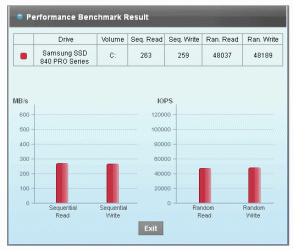
Well, I did install the Samsung Magician and ran their benchmark and saw the notice that each time this is done is decreases the life of the drive.
I also ran their OS Optimizer and disabled Superfetch, defrag, and indexing which should help.
Here's the benchmark I got...
http://www.sevenforums.com/attachment.php?attachmentid=248831&stc=1&d=1357460370
I also ran their OS Optimizer and disabled Superfetch, defrag, and indexing which should help.
Here's the benchmark I got...
http://www.sevenforums.com/attachment.php?attachmentid=248831&stc=1&d=1357460370
Attachments
My Computer
- OS
- Windows 7 64bit
The reason I suggested AS SSD is it will tell you info about the driver and the alignment
http://www.sevenforums.com/tutorials/113967-ssd-alignment.html
You don't have to run the benchmark to get this info with AS SSD BTW, just open the program. But I wouldn't worry too much about decreasing the life A few benches won't shorten the life. The others can then compare the results, which they cannot do with the magician results.

SSD Life - freeware version info
It will take a looong time to wear it out
A Guy
http://www.sevenforums.com/tutorials/113967-ssd-alignment.html
You don't have to run the benchmark to get this info with AS SSD BTW, just open the program. But I wouldn't worry too much about decreasing the life
A few benches won't shorten the life. The others can then compare the results, which they cannot do with the magician results.
SSD Life - freeware version info
It will take a looong time to wear it out
A Guy
My Computer
- Computer type
- PC/Desktop
- OS
- Windows 10 Home x64
- CPU
- INTEL Core i5-750 Quad-Core 3.37GHz
- Motherboard
- ASUS P7P55D
- Memory
- HyperX Fury Black Series 8GB (2 x 4GB) 1866Mhz
- Graphics Card(s)
- EVGA GeForce GTX 750 Superclocked 1GB 128-Bit GDDR5
- Monitor(s) Displays
- LG 32MA68HY 32" IPS
- Screen Resolution
- 1920 x 1080
- Hard Drives
- Samsung 840 Evo 120GB, SEAGATE 500GB Barracuda® 7200.12, SATA 3 Gb/s, 7200 RPM, 16MB cache
- PSU
- ANTEC TruePower New TP-550, 80 PLUS, 550W
- Case
- ANTEC Three Hundred Illusion
- Cooling
- COOLER MASTER Hyper 212 Plus, 4 x 120mm 1 x 140mm Noctua's
- Internet Speed
- 85 + Mbps
- Antivirus
- Avast
- Browser
- Vivaldi
This chart is useless for us because we cannot compare to anything. But there is something definitely wrong with your SSD. For starters, check the alignment. http://www.sevenforums.com/tutorials/113967-ssd-alignment.html?ltr=SWell, I did install the Samsung Magician and ran their benchmark and saw the notice that each time this is done is decreases the life of the drive.
I also ran their OS Optimizer and disabled Superfetch, defrag, and indexing which should help.
Here's the benchmark I got...
http://www.sevenforums.com/attachment.php?attachmentid=248831&stc=1&d=1357460370
My Computer
- Computer Manufacturer/Model Number
- HP, Dell, Gateway, Toshiba - 4 laptops and 2 desktops
- OS
- Vista, Windows7, Mint Mate, Zorin, Windows 8
- CPU
- from 1.6GHz Duo to i7
- Monitor(s) Displays
- 2x HP w2207
- Hard Drives
- 5x HDD, 7x SSD, 12x Externals
- Keyboard
- with trackball - no mices
- Mouse
- Trackball mice
- Internet Speed
- DSL 6000
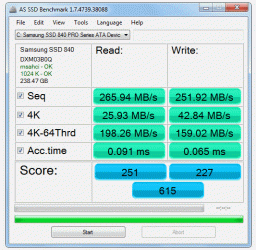
OK, here's a couple of screen shots from both progs that have been suggested...
http://www.sevenforums.com/attachment.php?attachmentid=248895&stc=1&d=1357492476
http://www.sevenforums.com/attachment.php?attachmentid=248895&stc=1&d=1357492476
Attachments
My Computer
- OS
- Windows 7 64bit
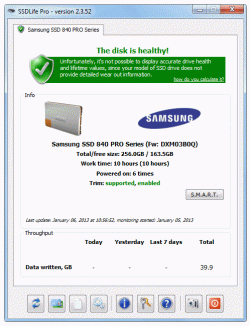
Here's the other one...
http://www.sevenforums.com/attachment.php?attachmentid=248896&stc=1&d=1357492564
http://www.sevenforums.com/attachment.php?attachmentid=248896&stc=1&d=1357492564
Attachments
My Computer
- OS
- Windows 7 64bit
Your nums look pretty good. I wonder why you have a performance problem.
Check your boot time. Here is how:
Open Event Viewer (type into Start/Search) and go down the line to Event 100 like this;
Eventvwr
Applications and Service Logs
Microsoft
Windows
Diagnostics - performance
Operational
Event ID 100
Check your boot time. Here is how:
Open Event Viewer (type into Start/Search) and go down the line to Event 100 like this;
Eventvwr
Applications and Service Logs
Microsoft
Windows
Diagnostics - performance
Operational
Event ID 100
My Computer
- Computer Manufacturer/Model Number
- HP, Dell, Gateway, Toshiba - 4 laptops and 2 desktops
- OS
- Vista, Windows7, Mint Mate, Zorin, Windows 8
- CPU
- from 1.6GHz Duo to i7
- Monitor(s) Displays
- 2x HP w2207
- Hard Drives
- 5x HDD, 7x SSD, 12x Externals
- Keyboard
- with trackball - no mices
- Mouse
- Trackball mice
- Internet Speed
- DSL 6000
Your nums look pretty good. I wonder why you have a performance problem.
I'm probably not... it's probably just me.
I kept reading about SSDs and how everyone was saying they are mega fast, and I can tell it's a little faster... but it doesn't seem to be so much faster that it's really impressive.
Maybe my machine was performing very well to start with as I do have it over clocked, got 32gigs of ram and I was running the high end WD 10K hard drive... so, it may just be me.
Everything is performing just fine and is slightly faster than before installing the SSD.
I just figured it's be so fast that when you walk in the room the progs you want opened are opening er somethin. Maybe I took the reviews of SSD too literally cause folk be using some big adjectives when describing their SSD experience.
My Computer
- OS
- Windows 7 64bit
I have added something to my above post. Could you post your Event 100 number.
My Computer
- Computer Manufacturer/Model Number
- HP, Dell, Gateway, Toshiba - 4 laptops and 2 desktops
- OS
- Vista, Windows7, Mint Mate, Zorin, Windows 8
- CPU
- from 1.6GHz Duo to i7
- Monitor(s) Displays
- 2x HP w2207
- Hard Drives
- 5x HDD, 7x SSD, 12x Externals
- Keyboard
- with trackball - no mices
- Mouse
- Trackball mice
- Internet Speed
- DSL 6000
I found Event Viewer, but I don't see anywhere that says Event ID 100
I can tell ya that when it boots it is quicker cause the Microsoft flower thingy doesn't even get to come together like it used to and the computer is booting into it's normal screen
I can tell ya that when it boots it is quicker cause the Microsoft flower thingy doesn't even get to come together like it used to and the computer is booting into it's normal screen
My Computer
- OS
- Windows 7 64bit
Keep going down the line.
My Computer
- Computer Manufacturer/Model Number
- HP, Dell, Gateway, Toshiba - 4 laptops and 2 desktops
- OS
- Vista, Windows7, Mint Mate, Zorin, Windows 8
- CPU
- from 1.6GHz Duo to i7
- Monitor(s) Displays
- 2x HP w2207
- Hard Drives
- 5x HDD, 7x SSD, 12x Externals
- Keyboard
- with trackball - no mices
- Mouse
- Trackball mice
- Internet Speed
- DSL 6000
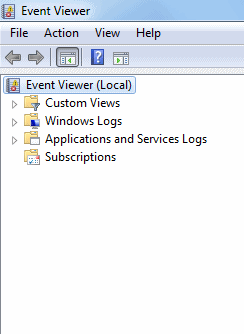
That's all the selections on the left side to choose from.
Do I click on one of these to get to Event ID 100 ?
Here's the selections I see...
http://www.sevenforums.com/attachment.php?attachmentid=248901&stc=1&d=1357498776
Do I click on one of these to get to Event ID 100 ?
Here's the selections I see...
http://www.sevenforums.com/attachment.php?attachmentid=248901&stc=1&d=1357498776
Attachments
My Computer
- OS
- Windows 7 64bit
Refer to my post #32 how to continue. You have to double click on the corresponding settings each time starting with 'Applications and Services log'.
My Computer
- Computer Manufacturer/Model Number
- HP, Dell, Gateway, Toshiba - 4 laptops and 2 desktops
- OS
- Vista, Windows7, Mint Mate, Zorin, Windows 8
- CPU
- from 1.6GHz Duo to i7
- Monitor(s) Displays
- 2x HP w2207
- Hard Drives
- 5x HDD, 7x SSD, 12x Externals
- Keyboard
- with trackball - no mices
- Mouse
- Trackball mice
- Internet Speed
- DSL 6000
Similar threads

- Replies
- 1
- Views
- 4K

- Replies
- 1
- Views
- 830
- Replies
- 2
- Views
- 4K