Will Clean Install of Win 7 Obliterate Satellite Connection?

Unchecked the automatic activation. Now I'm asked to choose automatic protection. Use recommended? Install important updates only? Ask me later? I had automatic updates with Vista. Sometimes they failed to install. Would it be better to install only important updates? Or do it manually?

Karen
 

My Computer My Computer

At a glance

Windows 7 home premium 32 bit
OS
Windows 7 home premium 32 bit
Seven is really good with automatic updates. I couldn't think not to set it on on all the rigs in our household.

That said, the following is my personal way to do this. I choose always at this point Ask me later. Update settings is also only a few clicks away when you have Seven set up and running.

Kari
 

My Computer My Computer

At a glance

Windows 10 Pro x64 EN-GB1.6 GHz Intel Core i7-720QM Processor6 GBATI Mobility Radeon HD 5850 Graphics
Computer type
Laptop
Computer Manufacturer/Model Number
HP ENVY 17-1150eg
OS
Windows 10 Pro x64 EN-GB
CPU
1.6 GHz Intel Core i7-720QM Processor
Memory
6 GB
Graphics Card(s)
ATI Mobility Radeon HD 5850 Graphics
Sound Card
Beats sound system with integrated subwoofer
Monitor(s) Displays
17" laptop display, 22" LED and 32" Full HD TV through HDMI
Screen Resolution
1600*900 (1), 1920*1080 (2&3)
Hard Drives
Internal: 2 x 500 GB SATA Hard Disk Drive 7200 rpm
External: 2TB for backups, 3TB USB3 network drive for media
Cooling
As Envy runs a bit warm, I have it on a Cooler Master pad
Keyboard
Logitech diNovo Media Desktop Laser (bluetooth)
Mouse
Logitech Performance Mouse MX
Internet Speed
50/10 Mbps VDSL
Antivirus
Windows Defender 4.3.9431.0
Browser
Maxthon 3.5.2., IE11
Wow..... My desktop only has a recycle bin on it, lol. Nothing like when getting a new computer that comes loaded with JUNK. This is great. Now all I need to do is reload all my personal JUNK on it, lol.

One problem I see is that I'm getting wavy lines on the task bar..... I had the same problem with Vista, and switched the display to look like XP and the problem was solved. I'm not seeing that option, or I've forgotten where I found it.

Karen
 

My Computer My Computer

At a glance

Windows 7 home premium 32 bit
OS
Windows 7 home premium 32 bit
Hi Karen, Is your satellite connection up and running now?

Be sure to check optional updates for newer drivers. Once you install the latest Display driver, if the display problem persists, change your Screen Resolution by rightclicking the desktop.

Here are some other tips to get a perfect reinstall based on hundreds done:

The installer is mostly driver-complete, with newer arriving quickly via optional Windows Updates. Any drivers then missing in Device Manager can be found on the Support Downloads webpage for your model computer or device. http://www.sevenforums.com/tutorials/1649-clean-install-windows-7-a.html

Install updates and then programs slowly over time to gauge performance after each. Don't let any programs write themselves into msconfig>Startup as they become freeloaders on your RAM/CPU and can spy on you. I only allow AV and gadgets. http://www.sevenforums.com/tutorials/1401-startup-programs-change.html

Use a lightweight free AV like MS Security Essentials which works perfectly with Windows 7 Firewall. http://www.microsoft.com/security_essentials/

When it is finished, clean and order the HD perfectly using state-of-the-art free CCleaner then Auslogics Disk and Registry defraggers monthly. CCleaner - Free software downloads and software reviews - CNET Download.com
Auslogics Disk Defrag - Reviews and free Auslogics Disk Defrag downloads at Download.com
Auslogics Registry Defrag - Free software downloads and software reviews - CNET Download.com

Then save a Win7 Backup image externally so you never have to reinstall again, just reimage the HD or replacement using DVD or Repair CD. http://www.sevenforums.com/tutorials/663-backup-complete-computer-create-image-backup.html
 
Main thing first: are you on the net with your newly installed Seven already?
 

My Computer My Computer

At a glance

Windows 10 Pro x64 EN-GB1.6 GHz Intel Core i7-720QM Processor6 GBATI Mobility Radeon HD 5850 Graphics
Computer type
Laptop
Computer Manufacturer/Model Number
HP ENVY 17-1150eg
OS
Windows 10 Pro x64 EN-GB
CPU
1.6 GHz Intel Core i7-720QM Processor
Memory
6 GB
Graphics Card(s)
ATI Mobility Radeon HD 5850 Graphics
Sound Card
Beats sound system with integrated subwoofer
Monitor(s) Displays
17" laptop display, 22" LED and 32" Full HD TV through HDMI
Screen Resolution
1600*900 (1), 1920*1080 (2&3)
Hard Drives
Internal: 2 x 500 GB SATA Hard Disk Drive 7200 rpm
External: 2TB for backups, 3TB USB3 network drive for media
Cooling
As Envy runs a bit warm, I have it on a Cooler Master pad
Keyboard
Logitech diNovo Media Desktop Laser (bluetooth)
Mouse
Logitech Performance Mouse MX
Internet Speed
50/10 Mbps VDSL
Antivirus
Windows Defender 4.3.9431.0
Browser
Maxthon 3.5.2., IE11
The computer is online, and I'm going to install my AVG and spyware with updates before I do anything else. Then I'll install Firefox and other programs.

Karen
 

My Computer My Computer

At a glance

Windows 7 home premium 32 bit
OS
Windows 7 home premium 32 bit

My Computer My Computer

At a glance

Windows 10 Pro x64 EN-GB1.6 GHz Intel Core i7-720QM Processor6 GBATI Mobility Radeon HD 5850 Graphics
Computer type
Laptop
Computer Manufacturer/Model Number
HP ENVY 17-1150eg
OS
Windows 10 Pro x64 EN-GB
CPU
1.6 GHz Intel Core i7-720QM Processor
Memory
6 GB
Graphics Card(s)
ATI Mobility Radeon HD 5850 Graphics
Sound Card
Beats sound system with integrated subwoofer
Monitor(s) Displays
17" laptop display, 22" LED and 32" Full HD TV through HDMI
Screen Resolution
1600*900 (1), 1920*1080 (2&3)
Hard Drives
Internal: 2 x 500 GB SATA Hard Disk Drive 7200 rpm
External: 2TB for backups, 3TB USB3 network drive for media
Cooling
As Envy runs a bit warm, I have it on a Cooler Master pad
Keyboard
Logitech diNovo Media Desktop Laser (bluetooth)
Mouse
Logitech Performance Mouse MX
Internet Speed
50/10 Mbps VDSL
Antivirus
Windows Defender 4.3.9431.0
Browser
Maxthon 3.5.2., IE11
The computer is online, and I'm going to install my AVG and spyware with updates before I do anything else. Then I'll install Firefox and other programs.

Karen

May I suggest your try MS Security Essentials which is the favorite around here right now. It and Avast are lightweight, nearly invisible and work perfectly with the Win7 firewall. http://www.microsoft.com/security_essentials/

AVG bloated up a few years back and has fallen out of favor.

You might also use the opportunity to try IE8 which in Win7 is finally perfected and IMO blows away the other browsers.
 
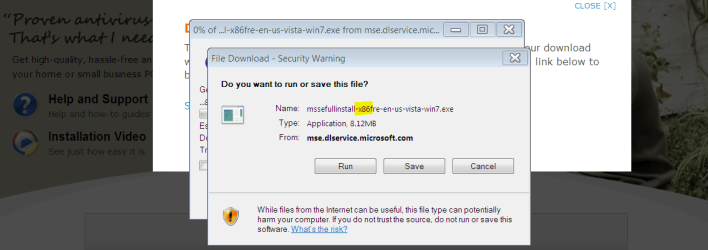
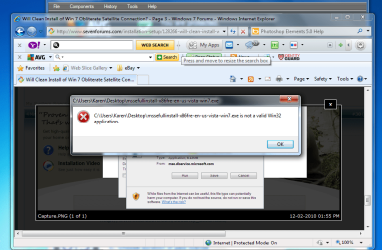
I downloaded the Windows Security Essentials but am told it's not a valid Win 32 application. Is that perhaps because I haven't activated my Windows 7 yet?
 

My Computer My Computer

At a glance

Windows 7 home premium 32 bit
OS
Windows 7 home premium 32 bit
I uploaded an image of what I get when I double click to install the program. It isn't showing up here, but it shows down below that it's attached, so I hope you see it.

Karen
 

Attachments

  • screenshot.png
    screenshot.png
    80.8 KB · Views: 6

My Computer My Computer

At a glance

Windows 7 home premium 32 bit
OS
Windows 7 home premium 32 bit
That seems to have worked.... now on to the next problem. When I click on Computer and look at the files, it seems there are a lot of files that were on the computer before I did the "clean" install. What's up with THAT? Do I need to start from Square 1 and do this all over again?

Meanwhile, I've reinstalled AVG and it's plugging away..... It's been checking Windows.old for what seems like hours.

I thought this was going to be easy when the installation went so smoothly. But I can see it's going to take me days, if not longer, to get this computer back to being acceptable. At least I seem to be able to download files.... the Windows Security file downloaded okay..... even though I can't install it.

Karen
 

My Computer My Computer

At a glance

Windows 7 home premium 32 bit
OS
Windows 7 home premium 32 bit
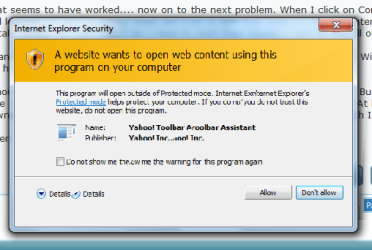
Here's another problem.... How do I get rid of this window popping up over and over and over again. I can't click for it to not show itself again. It comes up repeatedly on the same page. It's annoying.

Karen
 

Attachments

  • screenshot2.png
    screenshot2.png
    20.8 KB · Views: 5

My Computer My Computer

At a glance

Windows 7 home premium 32 bit
OS
Windows 7 home premium 32 bit
Since you asked about how clean you reinstalled: Did you boot from the Win7 DVD to Delete, repartition and format your HD before install, or run the installer from your old OS?

This makes a difference. If you have infected or corrupt code, it is not overwritten even by deleting and formatting until you wipe the HD first before install: http://www.sevenforums.com/tutorials/91339-ssd-hdd-optimize-windows-reinstallation.html
http://www.sevenforums.com/tutorials/1649-clean-install-windows-7-a.html
My own tips on getting a perfect reinstall, based on hundreds done: http://www.sevenforums.com/installation-setup/125874-re-install-windows-7-a.html#post1086729

Uninstall Yahoo toolbar assistant in Control panel>Programs and Features. These toolbars will sneak in on other installs if you dont' watch for them and uncheck the option. Each one destablizes the OS some. I would only use the search box built into Internet Explorer. If the Firewall warning will not take a checkmark to avoid asking you in future, it might portend corruption on the drive.

Did you get MSE installed? I see you referred to AVG being installed. The error for MSE if not remedied by installing as Administrator can also be an early indication of corruption. Best to wipe the HD to get fully clean and put away all doubts about corrupt or infected code remaining.
 
Karen Welcome to sevenforums
I agree with Greg. If you didnot boot from the 7 install dvd then you did not do the clean install. Did you put the 7 dvd in your dvd drive and then turn your pc off and back on. This causes the dvd to boot it may say press any key to start the dvd. This would seem to be the cause of all the old files? Good luck to you with your install :D
 

My Computer My Computer

At a glance

Windows 7 Ulti. x64AMD Phenom 8450 triple-core 2.10 ghz4GBATI Radion HD 3200
Computer Manufacturer/Model Number
Gateway GT5692
OS
Windows 7 Ulti. x64
CPU
AMD Phenom 8450 triple-core 2.10 ghz
Memory
4GB
Graphics Card(s)
ATI Radion HD 3200
Monitor(s) Displays
Gateway FPD1775W
Screen Resolution
1280x720
Hard Drives
465.6613 Gibibytes
I believe earlier in this thread she said she did a "custom" install, leaving a Window.old folder in place. It's basically a clean install.
 

My Computer My Computer

At a glance

Windows 7 Pro/32 Academic. Build 7600Intel 2.3 Duo core4 GB DDRNvidia GeForce 9500 GT
Computer Manufacturer/Model Number
Custom Build
OS
Windows 7 Pro/32 Academic. Build 7600
CPU
Intel 2.3 Duo core
Motherboard
EliteGroup G31T-M
Memory
4 GB DDR
Graphics Card(s)
Nvidia GeForce 9500 GT
Sound Card
Built in
Monitor(s) Displays
Viewsonic 15" 4:3
Screen Resolution
1280 x 1024
Hard Drives
WD Caviar Black 750 GB
WD 250 GB External
PSU
Antec 450w
Keyboard
Standard windows
Mouse
Logitech USB
Internet Speed
Bellsouth DSL 6.0
No panic, Karen. That windows.old folder contains your Vista files, including My Documents, My Pictures and so on. Just copy your personal files from there to your Seven user folders, and you can delete the windows.old folder.

It seems you already installed VG. You do not need two antivirus applications, so if you are happy with it, forget MSE. I'm a MSE user, it works well for me, but in AV applications, there are almost as many opinions as there are users. You are used to AVG, it might be the right one for you.

Kari
 

My Computer My Computer

At a glance

Windows 10 Pro x64 EN-GB1.6 GHz Intel Core i7-720QM Processor6 GBATI Mobility Radeon HD 5850 Graphics
Computer type
Laptop
Computer Manufacturer/Model Number
HP ENVY 17-1150eg
OS
Windows 10 Pro x64 EN-GB
CPU
1.6 GHz Intel Core i7-720QM Processor
Memory
6 GB
Graphics Card(s)
ATI Mobility Radeon HD 5850 Graphics
Sound Card
Beats sound system with integrated subwoofer
Monitor(s) Displays
17" laptop display, 22" LED and 32" Full HD TV through HDMI
Screen Resolution
1600*900 (1), 1920*1080 (2&3)
Hard Drives
Internal: 2 x 500 GB SATA Hard Disk Drive 7200 rpm
External: 2TB for backups, 3TB USB3 network drive for media
Cooling
As Envy runs a bit warm, I have it on a Cooler Master pad
Keyboard
Logitech diNovo Media Desktop Laser (bluetooth)
Mouse
Logitech Performance Mouse MX
Internet Speed
50/10 Mbps VDSL
Antivirus
Windows Defender 4.3.9431.0
Browser
Maxthon 3.5.2., IE11
I connected and looked over Karen's new install and see no evidence in logs of corruption or infection. There were so many updates cued the MSE install error might have been for lack of one of them.

Windows Updates had a slew of drivers including the full chipset, display, ethernet and sound. This is why it's especially important to go first to Optional Windows Updates to get drivers newer than the installer has since the installer is over a year old now. (SP1 anyone?)

Karen is still tempted to start over with a cleaner install to wiped HD due to former OS issues, but may proceed awhile with this install to see how performance pans out. She knows we are here to help her so there is not reason to be afraid of "losing" anything - only gains are made from clean reinstalls!
 
Greg, that's good news. Well done Karin.
 

My Computer My Computer

At a glance

Windows 10 Pro x64 EN-GB1.6 GHz Intel Core i7-720QM Processor6 GBATI Mobility Radeon HD 5850 Graphics
Computer type
Laptop
Computer Manufacturer/Model Number
HP ENVY 17-1150eg
OS
Windows 10 Pro x64 EN-GB
CPU
1.6 GHz Intel Core i7-720QM Processor
Memory
6 GB
Graphics Card(s)
ATI Mobility Radeon HD 5850 Graphics
Sound Card
Beats sound system with integrated subwoofer
Monitor(s) Displays
17" laptop display, 22" LED and 32" Full HD TV through HDMI
Screen Resolution
1600*900 (1), 1920*1080 (2&3)
Hard Drives
Internal: 2 x 500 GB SATA Hard Disk Drive 7200 rpm
External: 2TB for backups, 3TB USB3 network drive for media
Cooling
As Envy runs a bit warm, I have it on a Cooler Master pad
Keyboard
Logitech diNovo Media Desktop Laser (bluetooth)
Mouse
Logitech Performance Mouse MX
Internet Speed
50/10 Mbps VDSL
Antivirus
Windows Defender 4.3.9431.0
Browser
Maxthon 3.5.2., IE11
I installed all the updates.... critical and recommended. Only one NVidia one failed to install. I'm still getting the wavy lines.... .but that's minor compared to what COULD be going on, I suppose. I'll deal with more of it tomorrow.

I have a new problem though..... the computer doesn't seem to recognize my DVD drive now. THAT could be a big problem!

Karen
 

My Computer My Computer

At a glance

Windows 7 home premium 32 bit
OS
Windows 7 home premium 32 bit
Back
Top