Will not boot into any of the 3 safe mode options

chocaholic

New member
Local time
6:44 AM
Messages
18
Last week I was looking at a friends latpop bluescreen issue. I wanted to boot into safe mode, however it would not boot into any of the 3 safe mode options, it goes thru loading the safe mode files and then reboots back into normal mode. It will boot normally and works great.

I have done the following

  • The PC disk has been checked with chkdsk and had no errors.
  • checked memory for errors
  • the laptop had some weird software installed and additional search engine toolbars which I removed using the program uninstall feature, adwcleaner and malwarebytes which detected and removed a lot of issues. The laptop has Norton Internet Security running on it full time.
  • sfc /scannnow and it did correct a number of files, but did not fix safe mode option.
  • All updates had been applied
  • I looked at doing a repair, whilst there were repair options, none of them where suitable to use.
  • Followed your instructions here and completed a repair install (thank you for the awesome instructions!) - didn't fix the safe mode option
What next I ask myself (and now you) ... do I need to fix this problem? If the laptop has further issues the only option would be to do a total rebuild if I cannot boot into normal mode. Completing a total rebuild when he PC is fully functional seems a lot of work for a laptop that is working, however it is probably going to be a lot less painful to rebuild in a controlled working environment then when the computer has had issues.

Any other suggestions of how I could fix this problem without a total rebuild?
 

My Computer My Computer

At a glance

Windows 7 Professional 64 bit
Computer type
Laptop
Computer Manufacturer/Model Number
HP
OS
Windows 7 Professional 64 bit
Last week I was looking at a friends latpop bluescreen issue. I wanted to boot into safe mode, however it would not boot into any of the 3 safe mode options, it goes thru loading the safe mode files and then reboots back into normal mode. It will boot normally and works great.

I have done the following

  • The PC disk has been checked with chkdsk and had no errors.
  • checked memory for errors
  • the laptop had some weird software installed and additional search engine toolbars which I removed using the program uninstall feature, adwcleaner and malwarebytes which detected and removed a lot of issues. The laptop has Norton Internet Security running on it full time.
  • sfc /scannnow and it did correct a number of files, but did not fix safe mode option.
  • All updates had been applied
  • I looked at doing a repair, whilst there were repair options, none of them where suitable to use.
  • Followed your instructions here and completed a repair install (thank you for the awesome instructions!) - didn't fix the safe mode option
What next I ask myself (and now you) ... do I need to fix this problem? If the laptop has further issues the only option would be to do a total rebuild if I cannot boot into normal mode. Completing a total rebuild when he PC is fully functional seems a lot of work for a laptop that is working, however it is probably going to be a lot less painful to rebuild in a controlled working environment then when the computer has had issues.

Any other suggestions of how I could fix this problem without a total rebuild?
So it starts safe mode. When does it recvert to boot to normal mode? After logon, or.....
Does it crash in safe mode (a BSOD is on the screen for a split second)?
 

My Computer My Computer

At a glance

Microsoft Windows 7 Home Premium 64-bits 7601...Intel(R) Core(TM) i3 CPU M 370 @ 2.40GHz4,00 GBATI Mobility Radeon HD 5400 Series
Computer type
Laptop
Computer Manufacturer/Model Number
ACER ASPIRE 5742G
OS
Microsoft Windows 7 Home Premium 64-bits 7601 Multiprocessor Free Service Pack 1
CPU
Intel(R) Core(TM) i3 CPU M 370 @ 2.40GHz
Motherboard
Acer Aspire 5742G
Memory
4,00 GB
Graphics Card(s)
ATI Mobility Radeon HD 5400 Series
Sound Card
(1) AMD High Definition Audio Device (2) Realtek High Defi
Screen Resolution
1366 x 768 x 32 bits (4294967296 colors) @ 60 Hz
Hard Drives
WDC WD5000BEVT-22ZAT0
Cannot Boot into Safe Mode

When selecting safe mode, it goes through the loading files stage, then the windows safe mode login page is shown and then the screen goes black and starts windows normally. No BSOD screen.
 

My Computer My Computer

At a glance

Windows 7 Professional 64 bit
Computer type
Laptop
Computer Manufacturer/Model Number
HP
OS
Windows 7 Professional 64 bit
When selecting safe mode, it goes through the loading files stage, then the windows safe mode login page is shown and then the screen goes black and starts windows normally. No BSOD screen.
So you see the logon screen with all user accounts. Does it restart after or before clicking on the username?

Actually it does reboot the computer. It could be a normal shutdown/boot but that is clearly visible... so not happening. It crashes and you see a BSOD for about 0.1 sec.

Do this How To Disable the Automatic Restart on System Failure in Windows 7 and you see the BSOD in case of BSOD.
 

My Computer My Computer

At a glance

Microsoft Windows 7 Home Premium 64-bits 7601...Intel(R) Core(TM) i3 CPU M 370 @ 2.40GHz4,00 GBATI Mobility Radeon HD 5400 Series
Computer type
Laptop
Computer Manufacturer/Model Number
ACER ASPIRE 5742G
OS
Microsoft Windows 7 Home Premium 64-bits 7601 Multiprocessor Free Service Pack 1
CPU
Intel(R) Core(TM) i3 CPU M 370 @ 2.40GHz
Motherboard
Acer Aspire 5742G
Memory
4,00 GB
Graphics Card(s)
ATI Mobility Radeon HD 5400 Series
Sound Card
(1) AMD High Definition Audio Device (2) Realtek High Defi
Screen Resolution
1366 x 768 x 32 bits (4294967296 colors) @ 60 Hz
Hard Drives
WDC WD5000BEVT-22ZAT0
You may also look into a http://www.sevenforums.com/tutorials/3413-repair-install.html
This should fix any issues, and be done rather quick as well without affecting the files and programs.
Might be the best option to, as it could fix issues that the malware that was on the system was causing.
You might also want to run full scans with malwarebyes and norton that you have on the machine. Preferably a boot scan in norton.
Also you could do this to check for system file problems. http://www.sevenforums.com/tutorials/1538-sfc-scannow-command-system-file-checker.html
 

My Computer My Computer

At a glance

Windows 10 ProAMD Ryzen 5 2400G Processor with Radeon RX Ve...G.SKILL Ripjaws V Series 16GB (2 x 8GB) 288-P...2047MB NVIDIA GeForce GTX 1060 6GB (EVGA)
Computer type
PC/Desktop
Computer Manufacturer/Model Number
Custom Built
OS
Windows 10 Pro
CPU
AMD Ryzen 5 2400G Processor with Radeon RX Vega 11 Graphics
Motherboard
ASRock X470 Master SLI/AC AM4 AMD Promontory X470 SATA 6Gb/s
Memory
G.SKILL Ripjaws V Series 16GB (2 x 8GB) 288-Pin DDR4 SDRAM D
Graphics Card(s)
2047MB NVIDIA GeForce GTX 1060 6GB (EVGA)
Sound Card
Motherboard Built in
Monitor(s) Displays
Acer R240HY bidx 23.8-Inch IPS HDMI DVI VGA (1920 x 1080) Wi
Screen Resolution
1920 x 1080
Hard Drives
1TB Sandisk SSD PLUS (Main drive)
500 GB Seagate 7200 RPM (Games)
500 GB Western Digital 7200 RPM (Virtual Machines)
PSU
CORSAIR TX Series TX650M 650W 80+ Gold Modular Power Supply
Case
CORSAIR CARBIDE SPEC-02 Mid-Tower Gaming Case, Red LED Fan
Cooling
220mm, two 120mm, and four 60mm fans
Keyboard
Wired Dell keyboard
Mouse
Wireless Logitech mouse
Internet Speed
250mb down, 30mb up
Antivirus
Panda Cloud Antivirus
Browser
Chrome-ish x64
Other Info
Your awesome for reading this.
You may also look into a http://www.sevenforums.com/tutorials/3413-repair-install.html
This should fix any issues, and be done rather quick as well without affecting the files and programs.
Might be the best option to, as it could fix issues that the malware that was on the system was causing.
You might also want to run full scans with malwarebyes and norton that you have on the machine. Preferably a boot scan in norton.
Also you could do this to check for system file problems. http://www.sevenforums.com/tutorials/1538-sfc-scannow-command-system-file-checker.html

Already tried these options - see first post except the Norton boot scan...I believe this option is not available in Norton anymore. Boot time protection is set to aggressive.
 

My Computer My Computer

At a glance

Windows 7 Professional 64 bit
Computer type
Laptop
Computer Manufacturer/Model Number
HP
OS
Windows 7 Professional 64 bit
When selecting safe mode, it goes through the loading files stage, then the windows safe mode login page is shown and then the screen goes black and starts windows normally. No BSOD screen.
So you see the logon screen with all user accounts. Does it restart after or before clicking on the username?

Actually it does reboot the computer. It could be a normal shutdown/boot but that is clearly visible... so not happening. It crashes and you see a BSOD for about 0.1 sec.

Do this How To Disable the Automatic Restart on System Failure in Windows 7 and you see the BSOD in case of BSOD.
Went through this process and can confirm there is no BSOD
 

My Computer My Computer

At a glance

Windows 7 Professional 64 bit
Computer type
Laptop
Computer Manufacturer/Model Number
HP
OS
Windows 7 Professional 64 bit
No BSOD??? What happens then? A normal shutdown/reboot?
 

My Computer My Computer

At a glance

Microsoft Windows 7 Home Premium 64-bits 7601...Intel(R) Core(TM) i3 CPU M 370 @ 2.40GHz4,00 GBATI Mobility Radeon HD 5400 Series
Computer type
Laptop
Computer Manufacturer/Model Number
ACER ASPIRE 5742G
OS
Microsoft Windows 7 Home Premium 64-bits 7601 Multiprocessor Free Service Pack 1
CPU
Intel(R) Core(TM) i3 CPU M 370 @ 2.40GHz
Motherboard
Acer Aspire 5742G
Memory
4,00 GB
Graphics Card(s)
ATI Mobility Radeon HD 5400 Series
Sound Card
(1) AMD High Definition Audio Device (2) Realtek High Defi
Screen Resolution
1366 x 768 x 32 bits (4294967296 colors) @ 60 Hz
Hard Drives
WDC WD5000BEVT-22ZAT0
Des the crash, reboot or whatever happen before or after logon?
 

My Computer My Computer

At a glance

Microsoft Windows 7 Home Premium 64-bits 7601...Intel(R) Core(TM) i3 CPU M 370 @ 2.40GHz4,00 GBATI Mobility Radeon HD 5400 Series
Computer type
Laptop
Computer Manufacturer/Model Number
ACER ASPIRE 5742G
OS
Microsoft Windows 7 Home Premium 64-bits 7601 Multiprocessor Free Service Pack 1
CPU
Intel(R) Core(TM) i3 CPU M 370 @ 2.40GHz
Motherboard
Acer Aspire 5742G
Memory
4,00 GB
Graphics Card(s)
ATI Mobility Radeon HD 5400 Series
Sound Card
(1) AMD High Definition Audio Device (2) Realtek High Defi
Screen Resolution
1366 x 768 x 32 bits (4294967296 colors) @ 60 Hz
Hard Drives
WDC WD5000BEVT-22ZAT0
Des the crash, reboot or whatever happen before or after logon?

There is no crash just comes up with the safe mode logon page and within seconds the screen goes black and it starts booting into normal mode
 

My Computer My Computer

At a glance

Windows 7 Professional 64 bit
Computer type
Laptop
Computer Manufacturer/Model Number
HP
OS
Windows 7 Professional 64 bit
Des the crash, reboot or whatever happen before or after logon?

There is no crash just comes up with the safe mode logon page and within seconds the screen goes black and it starts booting into normal mode
So the problem is just BEFORE logon. A system can only start booting:
  • after normal shutdown
  • after crash
  • after power on
Please check "event log" for problems at that time.
 

My Computer My Computer

At a glance

Microsoft Windows 7 Home Premium 64-bits 7601...Intel(R) Core(TM) i3 CPU M 370 @ 2.40GHz4,00 GBATI Mobility Radeon HD 5400 Series
Computer type
Laptop
Computer Manufacturer/Model Number
ACER ASPIRE 5742G
OS
Microsoft Windows 7 Home Premium 64-bits 7601 Multiprocessor Free Service Pack 1
CPU
Intel(R) Core(TM) i3 CPU M 370 @ 2.40GHz
Motherboard
Acer Aspire 5742G
Memory
4,00 GB
Graphics Card(s)
ATI Mobility Radeon HD 5400 Series
Sound Card
(1) AMD High Definition Audio Device (2) Realtek High Defi
Screen Resolution
1366 x 768 x 32 bits (4294967296 colors) @ 60 Hz
Hard Drives
WDC WD5000BEVT-22ZAT0
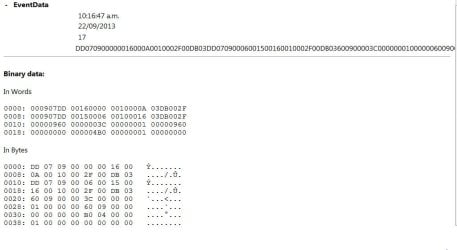
There is nothing recorded in the event logs during safe mode stage. There is an error recorded after booting into normal mode

"The previous system shutdown at <time> on <date> was unexpected." event ID 6008

To me it pointing towards a corrupt file or could it be a registry setting. I would have thought this would have been fixed when I performed the repair install.
 

My Computer My Computer

At a glance

Windows 7 Professional 64 bit
Computer type
Laptop
Computer Manufacturer/Model Number
HP
OS
Windows 7 Professional 64 bit
There is nothing recorded in the event logs during safe mode stage. There is an error recorded after booting into normal mode

"The previous system shutdown at <time> on <date> was unexpected." event ID 6008

To me it pointing towards a corrupt file or could it be a registry setting. I would have thought this would have been fixed when I performed the repair install.

"The previous system shutdown at <time> on <date> was unexpected." event ID 6008... so a crash. Tell me details about this event in event log.
 

My Computer My Computer

At a glance

Microsoft Windows 7 Home Premium 64-bits 7601...Intel(R) Core(TM) i3 CPU M 370 @ 2.40GHz4,00 GBATI Mobility Radeon HD 5400 Series
Computer type
Laptop
Computer Manufacturer/Model Number
ACER ASPIRE 5742G
OS
Microsoft Windows 7 Home Premium 64-bits 7601 Multiprocessor Free Service Pack 1
CPU
Intel(R) Core(TM) i3 CPU M 370 @ 2.40GHz
Motherboard
Acer Aspire 5742G
Memory
4,00 GB
Graphics Card(s)
ATI Mobility Radeon HD 5400 Series
Sound Card
(1) AMD High Definition Audio Device (2) Realtek High Defi
Screen Resolution
1366 x 768 x 32 bits (4294967296 colors) @ 60 Hz
Hard Drives
WDC WD5000BEVT-22ZAT0
"The previous system shutdown at <time> on <date> was unexpected." event ID 6008... so a crash. Tell me details about this event in event log.[/QUOTE]

See attached screenshot of event...I hope that is what you are looking for.
 

Attachments

  • Event-Error.JPG
    Event-Error.JPG
    51.7 KB · Views: 1

My Computer My Computer

At a glance

Windows 7 Professional 64 bit
Computer type
Laptop
Computer Manufacturer/Model Number
HP
OS
Windows 7 Professional 64 bit

My Computer My Computer

At a glance

Microsoft Windows 7 Home Premium 64-bits 7601...Intel(R) Core(TM) i3 CPU M 370 @ 2.40GHz4,00 GBATI Mobility Radeon HD 5400 Series
Computer type
Laptop
Computer Manufacturer/Model Number
ACER ASPIRE 5742G
OS
Microsoft Windows 7 Home Premium 64-bits 7601 Multiprocessor Free Service Pack 1
CPU
Intel(R) Core(TM) i3 CPU M 370 @ 2.40GHz
Motherboard
Acer Aspire 5742G
Memory
4,00 GB
Graphics Card(s)
ATI Mobility Radeon HD 5400 Series
Sound Card
(1) AMD High Definition Audio Device (2) Realtek High Defi
Screen Resolution
1366 x 768 x 32 bits (4294967296 colors) @ 60 Hz
Hard Drives
WDC WD5000BEVT-22ZAT0
There is no bluescreen dump file created. The current setting for bluescreen is kernel memory dump. It is really looking like I will need to rebuild the machine from scratch. :(
 

My Computer My Computer

At a glance

Windows 7 Professional 64 bit
Computer type
Laptop
Computer Manufacturer/Model Number
HP
OS
Windows 7 Professional 64 bit
There is no bluescreen dump file created. The current setting for bluescreen is kernel memory dump. It is really looking like I will need to rebuild the machine from scratch. :(
I used google and indeed no crash (most likely). I think it's a service that fails to start (for whatever reason) and is triggering shutdown. Really nothing relevant in event log?
 

My Computer My Computer

At a glance

Microsoft Windows 7 Home Premium 64-bits 7601...Intel(R) Core(TM) i3 CPU M 370 @ 2.40GHz4,00 GBATI Mobility Radeon HD 5400 Series
Computer type
Laptop
Computer Manufacturer/Model Number
ACER ASPIRE 5742G
OS
Microsoft Windows 7 Home Premium 64-bits 7601 Multiprocessor Free Service Pack 1
CPU
Intel(R) Core(TM) i3 CPU M 370 @ 2.40GHz
Motherboard
Acer Aspire 5742G
Memory
4,00 GB
Graphics Card(s)
ATI Mobility Radeon HD 5400 Series
Sound Card
(1) AMD High Definition Audio Device (2) Realtek High Defi
Screen Resolution
1366 x 768 x 32 bits (4294967296 colors) @ 60 Hz
Hard Drives
WDC WD5000BEVT-22ZAT0
Not one thing is written to the event log during the safe mode boot process.

I checked what services are started in safe mode on my laptop and there is only svchost.exe and lsass.exe Both of these executable would be used in normal mode as well which works fine. I am thinking it could be a driver file which is replaced by the proper hardware driver in normal mode. What do you think?

I am running out of time...they want their laptop back at the end of the weekend. So If I need to rebuild it then I really need to start Friday They are not comfortable not being able to boot into safe mode if there is a problem.
 

My Computer My Computer

At a glance

Windows 7 Professional 64 bit
Computer type
Laptop
Computer Manufacturer/Model Number
HP
OS
Windows 7 Professional 64 bit
Not one thing is written to the event log during the safe mode boot process.

I checked what services are started in safe mode on my laptop and there is only svchost.exe and lsass.exe Both of these executable would be used in normal mode as well which works fine. I am thinking it could be a driver file which is replaced by the proper hardware driver in normal mode. What do you think?

I am running out of time...they want their laptop back at the end of the weekend. So If I need to rebuild it then I really need to start Friday They are not comfortable not being able to boot into safe mode if there is a problem.
Registry key HKEY_LOCAL_MACHINE\SYSTEM\CurrentControlSet\Control\SafeBoot has all the services that start in safemode. There are a lot! Even EventLog is in that list so Events will be logged in eventlog and eventviewer works. Many events should be logged in eventlog during safe mode. Unless.... it crashes before eventlog service is running.

svchost.exe isn't a service. It is sort of container that runs multiple services svchost.exe - Wikipedia, the free encyclopedia
 

My Computer My Computer

At a glance

Microsoft Windows 7 Home Premium 64-bits 7601...Intel(R) Core(TM) i3 CPU M 370 @ 2.40GHz4,00 GBATI Mobility Radeon HD 5400 Series
Computer type
Laptop
Computer Manufacturer/Model Number
ACER ASPIRE 5742G
OS
Microsoft Windows 7 Home Premium 64-bits 7601 Multiprocessor Free Service Pack 1
CPU
Intel(R) Core(TM) i3 CPU M 370 @ 2.40GHz
Motherboard
Acer Aspire 5742G
Memory
4,00 GB
Graphics Card(s)
ATI Mobility Radeon HD 5400 Series
Sound Card
(1) AMD High Definition Audio Device (2) Realtek High Defi
Screen Resolution
1366 x 768 x 32 bits (4294967296 colors) @ 60 Hz
Hard Drives
WDC WD5000BEVT-22ZAT0
Run in elevated command prompt:

Code:
sfc/scannow
no integrity violations?
 

My Computer My Computer

At a glance

Microsoft Windows 7 Home Premium 64-bits 7601...Intel(R) Core(TM) i3 CPU M 370 @ 2.40GHz4,00 GBATI Mobility Radeon HD 5400 Series
Computer type
Laptop
Computer Manufacturer/Model Number
ACER ASPIRE 5742G
OS
Microsoft Windows 7 Home Premium 64-bits 7601 Multiprocessor Free Service Pack 1
CPU
Intel(R) Core(TM) i3 CPU M 370 @ 2.40GHz
Motherboard
Acer Aspire 5742G
Memory
4,00 GB
Graphics Card(s)
ATI Mobility Radeon HD 5400 Series
Sound Card
(1) AMD High Definition Audio Device (2) Realtek High Defi
Screen Resolution
1366 x 768 x 32 bits (4294967296 colors) @ 60 Hz
Hard Drives
WDC WD5000BEVT-22ZAT0
Back
Top