Solved Will not boot past "welcome" screen

JoeN

New member
Member
Local time
3:56 AM
Messages
68
I could sure use some help, been trying to upgrade my wife's computer from XP pro to win. 7 home prem. 64 bit. I am on my 3rd install, the 1st two times it was user error (my fault) that created the problem, this 3rd time I was much more careful but something is just not right.

Problem - after I sign in with "password" I get to the "welcome" screen and the small circle just spins forever.

I have done a lot of research and found a lot of possible fixes but nothing works.

This is a custom built system (by me) and worked perfectly with XP Pro, I recently did the same conversion on my computer system and had NO problems, I am using "OEM" install disks purchased from the Egg.

HDD - (120GB Seagate)
Power Supply - 500w antec
RAM - (Corsair 2GB DDR2 XMS PC2 6400)
CPU - Intel core2duo 6300 OC'D to 2.10mhz

Tested HDD with Crystaldiskinfo w/ HDD Smart Monitoring - no problem
Tested RAM with Windows built in RAM test (2 passes) -no problem

I have run:
Avast - boot scan, smart scan, full scan - all OK
SFC - OK
Disk Ck. -OK
Malwarebytes - OK
Reinstalled GeForce driver
Root Kit scan w/Spybot - OK
Defraged HDD
Crap Cleaner

The system WILL boot fine in "safe mode"

Most drivers are from "manufacturer" not just M$ generic

I have tried tracking down "error" info from "event viewer" not much help, did try a couple of "fixes" to no avail.

I am not opposed to "reinstalling" again but if there is a hardware problem I would be wasting my time.

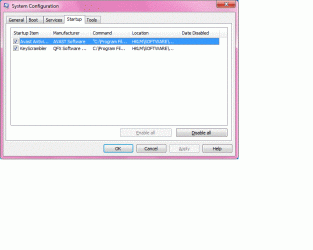
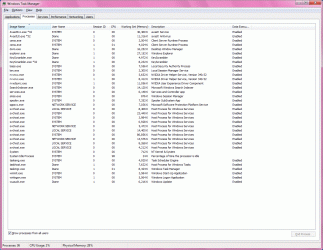
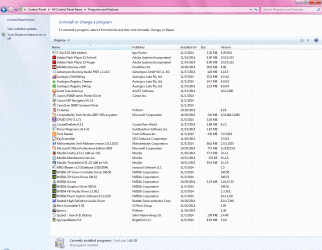
Attached are screen shots from a fresh reboot, before I did anything on the computer -

I would appreciate any input from you guys as to what to try or where to turn -

Thank you

Joe
 

Attachments
  • programs.gif
    programs.gif
    300.6 KB · Views: 5
  • msconfig.gif
    msconfig.gif
    41.3 KB · Views: 0
  • task mgr..gif
    task mgr..gif
    132.6 KB · Views: 1

My Computer

Computer type
PC/Desktop
Computer Manufacturer/Model Number
custom build
OS
win. 7 64 bit Home Premium
CPU
Intel i7 920 overclocked
Motherboard
Asus P6T
Memory
Corsair 6GB overclocked
Graphics Card(s)
Nivida GTX 960
Monitor(s) Displays
ViewSonic 2365 @ 1920 x 1080 DVI
Hard Drives
80 GB Segate
Antivirus
Avast
Browser
IE & Firefox
How did you get so many programs right after a clean install?
Did you install all Windows updates?
Spybot years ago was a great program. Haven't heard anything good about it in 5 years.
What is Key Scrambler?
The way to get most drivers when installing Windows 7 is let Windows 7 install the drivers and then check Device Manager for problems.

Check and see how much free space you have on your 80 gb drive.

Better yet read through this Tutorial by Greg. Their is lots of good information so take your time.

http://www.sevenforums.com/tutorials/219487-clean-reinstall-factory-oem-windows-7-a.html
 

My Computer

Computer type
PC/Desktop
Computer Manufacturer/Model Number
Home made Desktop
OS
Windows 10 Pro. 64/ version 1709 Windows 7 Pro/64
CPU
Intel i7-6800K @ 4.3
Motherboard
ASUS X-99 Deluxe II
Memory
Corsair Platinum 16 gig @2400
Graphics Card(s)
EVGA GTX 1070 OC
Monitor(s) Displays
Asus 27" LED LCD/VE278Q
Screen Resolution
1920-1080 or 1280-720 HDMI
Hard Drives
INTEL SSD 730-240 Gb Sata 3.0/
PSU
EVGA Platium 1200W
Case
Phanteks Luxe Tempered Glass 8 fans/ one radiator
Cooling
XSPC/ Water Cooled CPU
Keyboard
Das 4 Professional
Mouse
Logitech M705/MX Anywhere 2-S
Internet Speed
100 mbits
Antivirus
Microsoft Security Essentials/ Malwarebytes Premium 3.0/ SAS
Browser
I.E. 11 default/Firefox/ ISP Time Warner Cable/Spectrum
Other Info
LG BluRay Burner/
Sound system-KLipsch-THX/
Icy Dock ssd Hot Swap bays.
There are 80GB + free on the 120GB Hd

All updates have been applied

Only use SB to control "start up" and occasional malware scans and "root kit" scans

Key Scrambler hides your key strokes, been using it for a couple of years, never been a problem, have it installed on my computer

No driver issues I can see

I have read the Tutorial you linked, I just went over it again and may have not done a "custom install" correctly, that is regarding the "boot partition"

The problem only occurs at boot, if I get by the "welcome" screen the computer runs great !

If you or anybody else does not think there is a hardware problem, I will reinstall

Thanks

Joe
 

My Computer

Computer type
PC/Desktop
Computer Manufacturer/Model Number
custom build
OS
win. 7 64 bit Home Premium
CPU
Intel i7 920 overclocked
Motherboard
Asus P6T
Memory
Corsair 6GB overclocked
Graphics Card(s)
Nivida GTX 960
Monitor(s) Displays
ViewSonic 2365 @ 1920 x 1080 DVI
Hard Drives
80 GB Segate
Antivirus
Avast
Browser
IE & Firefox
I put the "install disk" in and booted into it and went as far as "custom install" to see what was there - see below

Disk 0 unallocated space (size = 100mb) (free = 100mb)
Disk 0 Partition 1 (size = 111.7GB) (free = 82.2GB)


Shouldn't the "unallocated space" have the MBR in it, instead of being empty ?

How do I correct this, run a "system repair" from the install disk or reinstall the OS.


Joe
 

My Computer

Computer type
PC/Desktop
Computer Manufacturer/Model Number
custom build
OS
win. 7 64 bit Home Premium
CPU
Intel i7 920 overclocked
Motherboard
Asus P6T
Memory
Corsair 6GB overclocked
Graphics Card(s)
Nivida GTX 960
Monitor(s) Displays
ViewSonic 2365 @ 1920 x 1080 DVI
Hard Drives
80 GB Segate
Antivirus
Avast
Browser
IE & Firefox
before you try a clean install this is just a long shot but I have had this issue on a computer before and I ran a chkdsk in safe mode and it cleared up the issue no problem. Let me know how it goes.
 

My Computer

Computer type
PC/Desktop
Computer Manufacturer/Model Number
custom build
OS
Windows 7 pro 64bit
CPU
Intel Core i5-3470 Ivy Bridge Quad-Core 3.2GHz
Motherboard
ASRock Z75 Pro3 LGA 1155 Intel Z75 HDMI SATA 6Gb/s USB 3.0 A
Memory
G.SKILL Ripjaws Series 8GB SDRAM 1600 PC312800
Graphics Card(s)
Nivida Geforce 600
Monitor(s) Displays
Two dell 27" displays
Screen Resolution
1280x768
Hard Drives
256 GB 3.5" seagate
500 GB 2.5" WD
Internet Speed
25/5
Antivirus
Microsoft securtiy essentials, advanced system care 8
Browser
Chrome

My Computer

Computer type
PC/Desktop
Computer Manufacturer/Model Number
Home made Desktop
OS
Windows 10 Pro. 64/ version 1709 Windows 7 Pro/64
CPU
Intel i7-6800K @ 4.3
Motherboard
ASUS X-99 Deluxe II
Memory
Corsair Platinum 16 gig @2400
Graphics Card(s)
EVGA GTX 1070 OC
Monitor(s) Displays
Asus 27" LED LCD/VE278Q
Screen Resolution
1920-1080 or 1280-720 HDMI
Hard Drives
INTEL SSD 730-240 Gb Sata 3.0/
PSU
EVGA Platium 1200W
Case
Phanteks Luxe Tempered Glass 8 fans/ one radiator
Cooling
XSPC/ Water Cooled CPU
Keyboard
Das 4 Professional
Mouse
Logitech M705/MX Anywhere 2-S
Internet Speed
100 mbits
Antivirus
Microsoft Security Essentials/ Malwarebytes Premium 3.0/ SAS
Browser
I.E. 11 default/Firefox/ ISP Time Warner Cable/Spectrum
Other Info
LG BluRay Burner/
Sound system-KLipsch-THX/
Icy Dock ssd Hot Swap bays.
@ Sugarcake18, I did another checkdisk with both boxes checked this time, same result, all OK

I also set up "services" according to Black Viper for win. 7, same as I have on my computer

Nothing has changed, sometimes the computer boots fine and runs great, other times it hangs at the "welcome" screen after entering password, I then force a shut down and boot into "safe mode" (which boots up fine) then try to do a "normal" start up.

I am using the troublesome computer right now as it booted after a "safe mode" start

I am thinking another reinstall is in the future, but 1st I would like to try the "repair" program included on the Win. Install disk, any thoughts on doing that ??

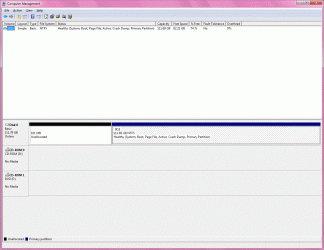
Here is a screen capture of Computer Management from this computer

Any more thoughts about this mess ?

Joe
 

Attachments

  • Computer Management.gif
    Computer Management.gif
    229.4 KB · Views: 4

My Computer

Computer type
PC/Desktop
Computer Manufacturer/Model Number
custom build
OS
win. 7 64 bit Home Premium
CPU
Intel i7 920 overclocked
Motherboard
Asus P6T
Memory
Corsair 6GB overclocked
Graphics Card(s)
Nivida GTX 960
Monitor(s) Displays
ViewSonic 2365 @ 1920 x 1080 DVI
Hard Drives
80 GB Segate
Antivirus
Avast
Browser
IE & Firefox
@ Sugarcake18, I did another checkdisk with both boxes checked this time, same result, all OK

I also set up "services" according to Black Viper for win. 7, same as I have on my computer

Nothing has changed, sometimes the computer boots fine and runs great, other times it hangs at the "welcome" screen after entering password, I then force a shut down and boot into "safe mode" (which boots up fine) then try to do a "normal" start up.

I am using the troublesome computer right now as it booted after a "safe mode" start

I am thinking another reinstall is in the future, but 1st I would like to try the "repair" program included on the Win. Install disk, any thoughts on doing that ??

Here is a screen capture of Computer Management from this computer

Any more thoughts about this mess ?

Joe

I agree I think at this point it would be best to go ahead with the repair disk and from there if no luck go ahead with a clean install. The only other thing I would try is when you can get it to load run a HDD checker and see if it fails any tests for example burnintest is what i use and it will let you know if there are any problems with your disk.

PassMark BurnInTest software - PC Reliability and Load Testing
 

My Computer

Computer type
PC/Desktop
Computer Manufacturer/Model Number
custom build
OS
Windows 7 pro 64bit
CPU
Intel Core i5-3470 Ivy Bridge Quad-Core 3.2GHz
Motherboard
ASRock Z75 Pro3 LGA 1155 Intel Z75 HDMI SATA 6Gb/s USB 3.0 A
Memory
G.SKILL Ripjaws Series 8GB SDRAM 1600 PC312800
Graphics Card(s)
Nivida Geforce 600
Monitor(s) Displays
Two dell 27" displays
Screen Resolution
1280x768
Hard Drives
256 GB 3.5" seagate
500 GB 2.5" WD
Internet Speed
25/5
Antivirus
Microsoft securtiy essentials, advanced system care 8
Browser
Chrome
Another question, if and when I do a clean install of win. 7, and I get to the "custom" option of what drive to install to, exactly what is the correct way, here is what I will be seeing -

Disk 0 unallocated space (size = 100mb) (free = 100mb)
Disk 0 Partition 1 (size = 111.7GB) (free = 82.2GB)

Do I move the "partition 1" to the top and format and leave the "unallocated space" alone ?
Do I delete the "unallocated space" and "format" the "partition 1" ?
Or should I "delete" instead of formatting ?

Thanks again


Joe
 

My Computer

Computer type
PC/Desktop
Computer Manufacturer/Model Number
custom build
OS
win. 7 64 bit Home Premium
CPU
Intel i7 920 overclocked
Motherboard
Asus P6T
Memory
Corsair 6GB overclocked
Graphics Card(s)
Nivida GTX 960
Monitor(s) Displays
ViewSonic 2365 @ 1920 x 1080 DVI
Hard Drives
80 GB Segate
Antivirus
Avast
Browser
IE & Firefox
After reading again the link "Layback Bear" posted in thread # 2,(Clean Reinstall - Factory OEM Windows 7 ) I see and think I understand better what to do from item #6 - that is: Click "next" after deleting all partitions to let the installer create and format your installation partition for you, ignore the small boot partition which will be created.

In other words - everything needs to read "unallocated" and the installer will take care of the rest

That sound right ???


Thanks


Joe
 

My Computer

Computer type
PC/Desktop
Computer Manufacturer/Model Number
custom build
OS
win. 7 64 bit Home Premium
CPU
Intel i7 920 overclocked
Motherboard
Asus P6T
Memory
Corsair 6GB overclocked
Graphics Card(s)
Nivida GTX 960
Monitor(s) Displays
ViewSonic 2365 @ 1920 x 1080 DVI
Hard Drives
80 GB Segate
Antivirus
Avast
Browser
IE & Firefox
Sounds like you're using a bunch of XPired methods for trying to install Win7 including using the Black Viper which is absolutely unneeded for an OS as lean as Win7 with no unnecessary overhead. Win7 solved that issue and became the Black Viper by setting all Services not absolutely needed at Startup to Manual on Fast Triggers. It is a perfect OS not needing any tweaking when there's a perfect install on adequate hardware.

So I would let go of the old methods not needed in the first feather light OS, follow only the steps and use only the tools and methods in Clean Reinstall Windows 7, and you will get and keep a perfect install to the exact extent you do.
 
If you are using Black Viper you did not read and follow Gregs Tutorial.

@JoeN

I highly recommend following Greg's instructions and tutorial.
No where in that tutorial does it mention using Black Viper or any other program like it.
 

My Computer

Computer type
PC/Desktop
Computer Manufacturer/Model Number
Home made Desktop
OS
Windows 10 Pro. 64/ version 1709 Windows 7 Pro/64
CPU
Intel i7-6800K @ 4.3
Motherboard
ASUS X-99 Deluxe II
Memory
Corsair Platinum 16 gig @2400
Graphics Card(s)
EVGA GTX 1070 OC
Monitor(s) Displays
Asus 27" LED LCD/VE278Q
Screen Resolution
1920-1080 or 1280-720 HDMI
Hard Drives
INTEL SSD 730-240 Gb Sata 3.0/
PSU
EVGA Platium 1200W
Case
Phanteks Luxe Tempered Glass 8 fans/ one radiator
Cooling
XSPC/ Water Cooled CPU
Keyboard
Das 4 Professional
Mouse
Logitech M705/MX Anywhere 2-S
Internet Speed
100 mbits
Antivirus
Microsoft Security Essentials/ Malwarebytes Premium 3.0/ SAS
Browser
I.E. 11 default/Firefox/ ISP Time Warner Cable/Spectrum
Other Info
LG BluRay Burner/
Sound system-KLipsch-THX/
Icy Dock ssd Hot Swap bays.
In regards to the original problem, "system hangs at the Welcome Screen" I have "reinstalled" again and things seem to be behaving much better now, about 1/3 of the way to reinstalling everything and NO "hangs" @ reboots.

As for "Black Viper", yes I did notice that many items were set to "manual" instead of "auto" as in XP, however there are items I will never use that I feel can be disabled safely and just use Black Viper as a reference, I have done this on my own system with aboslutely NO problems, I do however appreciate your input and explanation and will keep it in mind for future use.

So for now, as long as the new install keeps going smooth, I will mark this thread "solved" even though I am not sure what the problem with the past install was.


Thank again for all the help


Joe
 

My Computer

Computer type
PC/Desktop
Computer Manufacturer/Model Number
custom build
OS
win. 7 64 bit Home Premium
CPU
Intel i7 920 overclocked
Motherboard
Asus P6T
Memory
Corsair 6GB overclocked
Graphics Card(s)
Nivida GTX 960
Monitor(s) Displays
ViewSonic 2365 @ 1920 x 1080 DVI
Hard Drives
80 GB Segate
Antivirus
Avast
Browser
IE & Firefox
Back
Top