Solved Will not connect automatically to router

I do not understand the questions about interference as my problem is getting connected automatically.

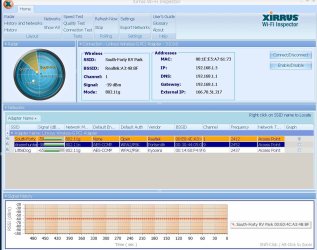
I have downloaded the WI FI Tester and am going to tery to attach a print screen copy. I used the atttach icon on top and hope it worked.
 

Attachments

  • WI FI Test.jpg
    WI FI Test.jpg
    176.2 KB · Views: 11

My Computer My Computer

OS
Ultimate 64
When I go to Manage wireless networks, there are no networks listed to remove, even though I am connected to one. Then when I try to add a network, I enter all the correct info (I did this for both networks available) I get a box stating "Access is denied".

This is very bizarre behaviour from Win7...

Are you sure you have the latest driver for your revision of this wireless adapter? There are 4 HW rivisions of this card, you will have to open case to look at label on card to determine if version 1.0, 2.0, etc...
Linksys by Cisco - WMP54G Support

Are you certain that you do not have any Linksys software installed other than the drivers? If there is anything Linksys showing in Control Panel/Programs & Features remove it! Another possiblity... have you recently upgraded this card from a previous? If so look for that card manufacturers software and remove it as well.

Please keep us updated...
 

My Computer My Computer

Computer Manufacturer/Model Number
Homebrew PC - "Alpha_Dawg"
OS
Windows 7 Ultimate 64 bit Steve Ballmer Signature Edition
CPU
Intel Core 2 Quad - Q9550 - 2.83GHz stock - OC'd to 3.6GHz
Motherboard
Gigabyte EP45-UD3P
Memory
4GB DDR2 800MHz (PC6400) OCZ Reaper
Graphics Card(s)
Nvidia GE Force 8800 GTS
Sound Card
Asus Xonar DX
Monitor(s) Displays
Samsung SyncMaster 2333HD
Screen Resolution
1920 x 1080
Hard Drives
WD Caviar Black 750GB - 7200RPM - 32MB cache
WD Caviar Green 1.5TB - 5400RPM - 64MB cache
WD Caviar Green 2.0TB - 5400RPM - 64MB cache
PSU
PC Power & Cooling Silencer 750
Case
Gigabyte 3D Aurora
Cooling
Case is Air - 5ea. 120mm fans (mix of Arctic and Xigmatec)
Keyboard
MS Natural Wireless KB
Mouse
MS Wireless Mouse
Internet Speed
50 mbps down/5 mbps up
Other Info
AVerMedia - AVerTVHD G2 Dual Tuner Card
Thanks for posting the Xirrus snap shot, it looks good, we just want to make sure. :D
You may also try disabling any unnecessary Startup Apps and Services. Click on Start and type msconfig press enter. Pls. disable Bonjour Service as well.

What type of AV/Security/Firewall Software do you have installed?
 

My Computer My Computer

Computer Manufacturer/Model Number
Lenovo Desktop/Samsung Laptop
OS
Win7 & Win8 64bit
CPU
Intel i5
Internet Speed
Charter-20 Mbps
Antivirus
Avast
Browser
FF, IE9 and Chrome
I have not installed a new card. This is the one I used on this machine with XP and then WIN7, andI think it was working OK a while ago.

It sort of come to mind that I started having problems after I installed SP1.

I uninstalled SP1 a couple of days ago just in case and it made no difference.

I am also having a problem with several of my Adobe programs not loading because they hang up when loading 'ExporterAVI.prm'. I can not find any info about this problem anywhere on the Net including Adobe.

Thinking the problem was a bad WIN7, yesterday I did a nondestructive, in-place, total reinstall of WIN7, hoping that would help. It did not.

I have decided that I will have to live with this problem for another month until I have more time to reformat and start from scratch.

If you have more ideas, I am willing to try.

Thanks for all the suggestions.
 

My Computer My Computer

OS
Ultimate 64
So are you using a third party software to manage connections or native Windows?
 

My Computer My Computer

Computer Manufacturer/Model Number
Lenovo ThinkPad T60
OS
Windows 7 Ultimate 64Bit
CPU
GenuineIntel Intel(R) Core(TM) DuoCore T2400 @ 1.83GHz
Motherboard
Intel(R) 82801G (ICH7 Family)
Memory
2.00 GB
Graphics Card(s)
Mobile Intel(R) 945 Express Chipset
Sound Card
SoundMAX Integrated Digital HD Audio
Monitor(s) Displays
ThinkPad Display
Screen Resolution
1400x1050
Hard Drives
100Gb SATA
Keyboard
Standard Keyboard
Mouse
HID-compliant Mouse
Internet Speed
Cable Broadband - 54Mbps
Other Info
Intel(R) PRO/1000 PL Network Connection
11a/b/g Wireless LAN Mini PCI Express Adapter
Every thing is native Windows 7 to my knowledge.
 

My Computer My Computer

OS
Ultimate 64
Are you certain that you do not have any Linksys software installed other than the drivers? If there is anything Linksys showing in Control Panel/Programs & Features remove it! Another possiblity... have you recently upgraded this card from a previous? If so look for that card manufacturers software and remove it as well.

Please keep us updated...
 

My Computer My Computer

Computer Manufacturer/Model Number
Homebrew PC - "Alpha_Dawg"
OS
Windows 7 Ultimate 64 bit Steve Ballmer Signature Edition
CPU
Intel Core 2 Quad - Q9550 - 2.83GHz stock - OC'd to 3.6GHz
Motherboard
Gigabyte EP45-UD3P
Memory
4GB DDR2 800MHz (PC6400) OCZ Reaper
Graphics Card(s)
Nvidia GE Force 8800 GTS
Sound Card
Asus Xonar DX
Monitor(s) Displays
Samsung SyncMaster 2333HD
Screen Resolution
1920 x 1080
Hard Drives
WD Caviar Black 750GB - 7200RPM - 32MB cache
WD Caviar Green 1.5TB - 5400RPM - 64MB cache
WD Caviar Green 2.0TB - 5400RPM - 64MB cache
PSU
PC Power & Cooling Silencer 750
Case
Gigabyte 3D Aurora
Cooling
Case is Air - 5ea. 120mm fans (mix of Arctic and Xigmatec)
Keyboard
MS Natural Wireless KB
Mouse
MS Wireless Mouse
Internet Speed
50 mbps down/5 mbps up
Other Info
AVerMedia - AVerTVHD G2 Dual Tuner Card
I solved the problem by REFORMATTING & REINSTALLING.

I was having some problems with several Adobe programs so that was the simplest solution.

Now I can connect automatically and my Adobe programs work.

I have a different problem now but will start a new thread for that problem.

Thanks for all the suggestions.

Lee
 

My Computer My Computer

OS
Ultimate 64
Thanks for posting back the resolution.

Glad all is sorted.
 

My Computer My Computer

Computer Manufacturer/Model Number
Lenovo Desktop/Samsung Laptop
OS
Win7 & Win8 64bit
CPU
Intel i5
Internet Speed
Charter-20 Mbps
Antivirus
Avast
Browser
FF, IE9 and Chrome
Back
Top
