
Will not reconize dual boot

chris989

New member
Local time
6:52 AM
Messages
15
History.
I have ran windows 7 forever. Installed windows 10 on a separate SSD in my system and everything worked as it should.
While screwing with 10 and all its short comings, I choose to reinstall 10 again and start fresh. (setting search feature would not work)

After the reinstall, 10 would not allow dual boot. Windows 7 would not show in any boot manager or program even thought all the files were still on its independent SSD. I also could not boot from USB.

I booted to bios and disabled UEFI boot. Now the system boots to windows 7 and in 7 i can not get the option to dual boot. It does not recognized 10 although all of the files are still in place. The boot manager now is present on start up but only windows 7 is an option.

What am i missing? I can reinstall 10 again to its own partition but would rather not if there is a simple fix.

thanks,
Chris
 

My Computer

Computer type
PC/Desktop
Computer Manufacturer/Model Number
HP elite desk
OS
Microsoft Windows 7 Home Premium 64-bit 7601 Multiprocessor Free Service Pack 1
CPU
Intel(R) Core(TM) i7-4770 CPU @ 3.40GHz
Motherboard
Hewlett-Packard 1998
Memory
16.00 GB
Graphics Card(s)
(1) AMD Radeon HD 7000 series (2) Intel(R) HD Graphics 460
Sound Card
(1) High Definition Audio Device (2) Realtek High Definiti
Monitor(s) Displays
NEC EA224 NEC EA193
Screen Resolution
(1) 1600 x 900 x 32 bits (4294967296 colors) @ 60 Hz (2) 1
Hard Drives
(1) SanDisk Ultra II 480GB ATA Device

(2) ST500DM002-1BD142 ATA Device
Win 7 isn't compatible with secure boot and fast boot (BIOS settings).
Win 7 can be installed as UEFI-GPT but if Win 7 is Legacy - MBR and Win 10 is UEFI-GPT, You can boot win 7 if BIOS is set as Legacy and Win 10 as UEFI but you won't have dual boot.

Please edit your profile with ALL your hardware specs. It will help us to help you
System Info - See Your System Specs

Please post a whole window Disk Manager image of your drives. Don't forget to expand the columns so we can read them. How to Post a Screenshot of Disk Management | Tutorials
If you have a MiniTool or AOMEI Partition use it instead or Windows disk manager.
 

My Computers

System One System Two

  • Computer type
    PC/Desktop
    Computer Manufacturer/Model Number
    custom build
    OS
    Windows 7 HP 64
    CPU
    i5 6600K - 800MHz to 4200MHz
    Motherboard
    GA-Z170-HD3P
    Memory
    4+4G GSkill DDR4 3000
    Graphics Card(s)
    IG - Intel 530
    Monitor(s) Displays
    Samsung 226BW
    Screen Resolution
    1680x1050
    Hard Drives
    (1) -1 SM951 – 128GB M.2 AHCI PCIe SSD drive for Windows 7 and Lubuntu
    (2) -1 WD SATA 3 - 1T for Data
    (3) -1 WD SATA 3 - 1T for backup
    PSU
    Thermaltake 450W TR2 gold
    Keyboard
    Old and good Chicony mechanical keyboard
    Mouse
    Logitech mX performance - 9 buttons (had to disable some)
    Internet Speed
    500Mb/s
    Browser
    Firefox 64
    Other Info
    TinyWall firewall
  • Computer type
    Laptop
    System Manufacturer/Model Number
    Asus Q550LF
    OS
    Windows 7 Pro
    CPU
    i7-4500U 800MHz to 3.0GHz
    Motherboard
    Asus Q550LF
    Memory
    (4+4)G DDR3 1600
    Graphics Card(s)
    IG intel 4400 + NVIDIA GeForce GT 745M
    Sound Card
    Realtek
    Monitor(s) Displays
    LG Display LP156WF4-SPH1
    Screen Resolution
    1920 x 1080
    Hard Drives
    BX500 120G SSD for Windows and programs +
    1T HDD for data
    Internet Speed
    500 Mb/s
    Browser
    Firefox
    Other Info
    TinyWall firewall
disk management.JPG

- - - Updated - - -

Win 7 isn't compatible with secure boot and fast boot (BIOS settings).
Win 7 can be installed as UEFI-GPT but if Win 7 is Legacy - MBR and Win 10 is UEFI-GPT, You can boot win 7 if BIOS is set as Legacy and Win 10 as UEFI but you won't have dual boot.

Please edit your profile with ALL your hardware specs. It will help us to help you
System Info - See Your System Specs

Please post a whole window Disk Manager image of your drives. Don't forget to expand the columns so we can read them. How to Post a Screenshot of Disk Management | Tutorials
If you have a MiniTool or AOMEI Partition use it instead or Windows disk manager.


I used the disk manager in windows 7 and made the partitions. When I first installed 10 the dual boot window would load and i could choose 7 or 10. Never a problem. When i was looking at the system info it say windows seven was installed 5.11.22. That is not correct, I have not messed with the 7 operating system in years.

The linux partition is empty, nothing installed there
 

My Computer

Computer type
PC/Desktop
Computer Manufacturer/Model Number
HP elite desk
OS
Microsoft Windows 7 Home Premium 64-bit 7601 Multiprocessor Free Service Pack 1
CPU
Intel(R) Core(TM) i7-4770 CPU @ 3.40GHz
Motherboard
Hewlett-Packard 1998
Memory
16.00 GB
Graphics Card(s)
(1) AMD Radeon HD 7000 series (2) Intel(R) HD Graphics 460
Sound Card
(1) High Definition Audio Device (2) Realtek High Definiti
Monitor(s) Displays
NEC EA224 NEC EA193
Screen Resolution
(1) 1600 x 900 x 32 bits (4294967296 colors) @ 60 Hz (2) 1
Hard Drives
(1) SanDisk Ultra II 480GB ATA Device

(2) ST500DM002-1BD142 ATA Device
Disk 0 is mbr partition style.

Disk 1 is gpt partition style.

You should be able to add a boot menu entry to the bcd store on Disk 1 ( efi partition ) that points at the win 7 partition.

1. In bios settings make sure secure boot is OFF

2. Set it to uefi and bios. It might say something like "Both" or Uefi first ( which implies both).

3. Boot into windows 10.

4. Open an administrator command prompt and type :

bcdboot ?:\windows /f bios

then press enter.

[Replace ? above with the win7 letter as seen from win10 ]
 

My Computers

System One System Two

  • Computer type
    PC/Desktop
    OS
    7 X64
    CPU
    i5 8400
    Motherboard
    gigabyte b365m ds3h
    Memory
    2x8gb 3200mhz
    Hard Drives
    various
    PSU
    pure power 11 400w cm
    Case
    Coolermaster
    Cooling
    cryorig m9i
  • Computer type
    PC/Desktop
    OS
    7x64
    CPU
    g5400
    Motherboard
    ga b365m ds3h
    Memory
    8gb ddr4 2400
    PSU
    xfx pro 450w
If you want to have independent boot able drives, you can convert the win 7 drive from Legacy-MBR to UEFI - GPT booting from a Win 10 USB installation drive, launch a CMD window (Shift+F10) and run mbr2gpt.exe from a CMD window. It is important that you detach drive 1 - Win 10 (SATA or power cable) from the MB. (don't try to convert without making a drive image as a backup)
To choose witch one to boot you launch the boot menu (normally F12) during POST. If you do nothing during POST it will boot the priority drive set on BIOS.
 

My Computers

System One System Two

  • Computer type
    PC/Desktop
    Computer Manufacturer/Model Number
    custom build
    OS
    Windows 7 HP 64
    CPU
    i5 6600K - 800MHz to 4200MHz
    Motherboard
    GA-Z170-HD3P
    Memory
    4+4G GSkill DDR4 3000
    Graphics Card(s)
    IG - Intel 530
    Monitor(s) Displays
    Samsung 226BW
    Screen Resolution
    1680x1050
    Hard Drives
    (1) -1 SM951 – 128GB M.2 AHCI PCIe SSD drive for Windows 7 and Lubuntu
    (2) -1 WD SATA 3 - 1T for Data
    (3) -1 WD SATA 3 - 1T for backup
    PSU
    Thermaltake 450W TR2 gold
    Keyboard
    Old and good Chicony mechanical keyboard
    Mouse
    Logitech mX performance - 9 buttons (had to disable some)
    Internet Speed
    500Mb/s
    Browser
    Firefox 64
    Other Info
    TinyWall firewall
  • Computer type
    Laptop
    System Manufacturer/Model Number
    Asus Q550LF
    OS
    Windows 7 Pro
    CPU
    i7-4500U 800MHz to 3.0GHz
    Motherboard
    Asus Q550LF
    Memory
    (4+4)G DDR3 1600
    Graphics Card(s)
    IG intel 4400 + NVIDIA GeForce GT 745M
    Sound Card
    Realtek
    Monitor(s) Displays
    LG Display LP156WF4-SPH1
    Screen Resolution
    1920 x 1080
    Hard Drives
    BX500 120G SSD for Windows and programs +
    1T HDD for data
    Internet Speed
    500 Mb/s
    Browser
    Firefox
    Other Info
    TinyWall firewall
Disk 0 is mbr partition style.

Disk 1 is gpt partition style.

You should be able to add a boot menu entry to the bcd store on Disk 1 ( efi partition ) that points at the win 7 partition.

1. In bios settings make sure secure boot is OFF

2. Set it to uefi and bios. It might say something like "Both" or Uefi first ( which implies both).

3. Boot into windows 10.

4. Open an administrator command prompt and type :

bcdboot ?:\windows /f bios

then press enter.

[Replace ? above with the win7 letter as seen from win10 ]
Hello,
I booted to bios, it was already these settings

Legacy=enabled
secure=disabled
fast=disabled

No option for both

Still booting to boot options but only 7 is listed.

When i first installed 10 i did nothing the a beginner/novice would do and it worked. How did i jack it up?

Can i just format and reinstall 10 on it own ssd?
 

My Computer

Computer type
PC/Desktop
Computer Manufacturer/Model Number
HP elite desk
OS
Microsoft Windows 7 Home Premium 64-bit 7601 Multiprocessor Free Service Pack 1
CPU
Intel(R) Core(TM) i7-4770 CPU @ 3.40GHz
Motherboard
Hewlett-Packard 1998
Memory
16.00 GB
Graphics Card(s)
(1) AMD Radeon HD 7000 series (2) Intel(R) HD Graphics 460
Sound Card
(1) High Definition Audio Device (2) Realtek High Definiti
Monitor(s) Displays
NEC EA224 NEC EA193
Screen Resolution
(1) 1600 x 900 x 32 bits (4294967296 colors) @ 60 Hz (2) 1
Hard Drives
(1) SanDisk Ultra II 480GB ATA Device

(2) ST500DM002-1BD142 ATA Device
If BIOS is set to Legacy boot it will only boot to Win 7 as Win 10 is UEFI.

You have to convert Win 7 to EFI - GPT or convert Win 10 to Legacy-MBR

Please edit your profile with ALL your hardware specs. It will help us to help you
System Info - See Your System Specs
 
Last edited:

My Computers

System One System Two

  • Computer type
    PC/Desktop
    Computer Manufacturer/Model Number
    custom build
    OS
    Windows 7 HP 64
    CPU
    i5 6600K - 800MHz to 4200MHz
    Motherboard
    GA-Z170-HD3P
    Memory
    4+4G GSkill DDR4 3000
    Graphics Card(s)
    IG - Intel 530
    Monitor(s) Displays
    Samsung 226BW
    Screen Resolution
    1680x1050
    Hard Drives
    (1) -1 SM951 – 128GB M.2 AHCI PCIe SSD drive for Windows 7 and Lubuntu
    (2) -1 WD SATA 3 - 1T for Data
    (3) -1 WD SATA 3 - 1T for backup
    PSU
    Thermaltake 450W TR2 gold
    Keyboard
    Old and good Chicony mechanical keyboard
    Mouse
    Logitech mX performance - 9 buttons (had to disable some)
    Internet Speed
    500Mb/s
    Browser
    Firefox 64
    Other Info
    TinyWall firewall
  • Computer type
    Laptop
    System Manufacturer/Model Number
    Asus Q550LF
    OS
    Windows 7 Pro
    CPU
    i7-4500U 800MHz to 3.0GHz
    Motherboard
    Asus Q550LF
    Memory
    (4+4)G DDR3 1600
    Graphics Card(s)
    IG intel 4400 + NVIDIA GeForce GT 745M
    Sound Card
    Realtek
    Monitor(s) Displays
    LG Display LP156WF4-SPH1
    Screen Resolution
    1920 x 1080
    Hard Drives
    BX500 120G SSD for Windows and programs +
    1T HDD for data
    Internet Speed
    500 Mb/s
    Browser
    Firefox
    Other Info
    TinyWall firewall
No option for both

then you should convert your mbr disk to gpt. You can try megahertz suggestion of mbr2gpt.exe , but it is very fussy and might refuse.
 

My Computers

System One System Two

  • Computer type
    PC/Desktop
    OS
    7 X64
    CPU
    i5 8400
    Motherboard
    gigabyte b365m ds3h
    Memory
    2x8gb 3200mhz
    Hard Drives
    various
    PSU
    pure power 11 400w cm
    Case
    Coolermaster
    Cooling
    cryorig m9i
  • Computer type
    PC/Desktop
    OS
    7x64
    CPU
    g5400
    Motherboard
    ga b365m ds3h
    Memory
    8gb ddr4 2400
    PSU
    xfx pro 450w
Is there a simple way to just format the the MBR drive to GPT? There is nothing on there i need. I am back to using windows 7 and only need 10 for turbo tax and some trading software.

I cannot make the switch to 10 until i can find a way to change the background color from 225 to anything else. Not sure why microsoft removed the option of windows and appearance in 10?

change colors.JPG
 

My Computer

Computer type
PC/Desktop
Computer Manufacturer/Model Number
HP elite desk
OS
Microsoft Windows 7 Home Premium 64-bit 7601 Multiprocessor Free Service Pack 1
CPU
Intel(R) Core(TM) i7-4770 CPU @ 3.40GHz
Motherboard
Hewlett-Packard 1998
Memory
16.00 GB
Graphics Card(s)
(1) AMD Radeon HD 7000 series (2) Intel(R) HD Graphics 460
Sound Card
(1) High Definition Audio Device (2) Realtek High Definiti
Monitor(s) Displays
NEC EA224 NEC EA193
Screen Resolution
(1) 1600 x 900 x 32 bits (4294967296 colors) @ 60 Hz (2) 1
Hard Drives
(1) SanDisk Ultra II 480GB ATA Device

(2) ST500DM002-1BD142 ATA Device
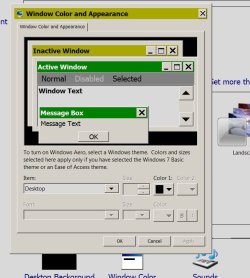
Is there a simple way to just format the the MBR drive to GPT? There is nothing on there i need. I am back to using windows 7 and only need 10 for turbo tax and some trading software.

Your windows 7 is on the mbr disk.

If you want to change it gpt you can try mbr2gpt.exe as megahertz suggested.
 

My Computers

System One System Two

  • Computer type
    PC/Desktop
    OS
    7 X64
    CPU
    i5 8400
    Motherboard
    gigabyte b365m ds3h
    Memory
    2x8gb 3200mhz
    Hard Drives
    various
    PSU
    pure power 11 400w cm
    Case
    Coolermaster
    Cooling
    cryorig m9i
  • Computer type
    PC/Desktop
    OS
    7x64
    CPU
    g5400
    Motherboard
    ga b365m ds3h
    Memory
    8gb ddr4 2400
    PSU
    xfx pro 450w
Your windows 7 is on the mbr disk.

If you want to change it gpt you can try mbr2gpt.exe as megahertz suggested.

Sorry, This is not my wheel house and get the acronyms mixed up... I just used the CMD and cleaned the 10 SSD of all partitions and and rest it.. I rebooted and it looks like it will install windows 10 again like before. Before i mess with this anymore I need to double check my backups and make a current ISO.

Thanks again,, Will report back to close this topic.
 

My Computer

Computer type
PC/Desktop
Computer Manufacturer/Model Number
HP elite desk
OS
Microsoft Windows 7 Home Premium 64-bit 7601 Multiprocessor Free Service Pack 1
CPU
Intel(R) Core(TM) i7-4770 CPU @ 3.40GHz
Motherboard
Hewlett-Packard 1998
Memory
16.00 GB
Graphics Card(s)
(1) AMD Radeon HD 7000 series (2) Intel(R) HD Graphics 460
Sound Card
(1) High Definition Audio Device (2) Realtek High Definiti
Monitor(s) Displays
NEC EA224 NEC EA193
Screen Resolution
(1) 1600 x 900 x 32 bits (4294967296 colors) @ 60 Hz (2) 1
Hard Drives
(1) SanDisk Ultra II 480GB ATA Device

(2) ST500DM002-1BD142 ATA Device
This issue is all about MBR vs. GPT. The Windows 10 SSD cleaned is your opportunity to convert it to MBR. You do not want to install Windows 10 in GPT/UEFI style again.
 

My Computer

Computer type
PC/Desktop
OS
Windows 7 Home Premium
Because of your apparent bios limitations, it would be wise to have both os installed in the same mode.
 

My Computers

System One System Two

  • Computer type
    PC/Desktop
    OS
    7 X64
    CPU
    i5 8400
    Motherboard
    gigabyte b365m ds3h
    Memory
    2x8gb 3200mhz
    Hard Drives
    various
    PSU
    pure power 11 400w cm
    Case
    Coolermaster
    Cooling
    cryorig m9i
  • Computer type
    PC/Desktop
    OS
    7x64
    CPU
    g5400
    Motherboard
    ga b365m ds3h
    Memory
    8gb ddr4 2400
    PSU
    xfx pro 450w
It's particulary helpful at having a boot selection created.
 

My Computer

Computer type
PC/Desktop
OS
Windows 7 Home Premium
Back
Top