Will x86 and x64 on same network cause any issues?

eyc

New member
Local time
11:26 AM
Messages
26
I was hoping that some of the better (than my) minds here could weigh in on something for me.

I'm revamping my folks' computer systems. I purchased three computers for them:

1) Desktop PC:
Intel Core 2 Duo E7500 (2.93GHz); 4GB RAM

2) Home Theater PC:
Intel Core 2 Duo E7500 (2.93GHz); 2GB RAM

3) Laptop PC:
Intel Core 2 Duo T7100 (1.8GHz); 2GB RAM

Should I install Windows 7 x64 on the Desktop PC and x86 on the HTPC and Laptop? Or should I go with x86 on all the machines for consistency? My parents probably will not be expanding these systems ever. They will use the desktop pc for single purpose programs (i.e., burning CDs and DVDs, light Photoshop, etc); the HTPC for blurays, and watching 720p videos; and laptop for email and browsing.

That said, should I just go with x86 on all machines for ease? Is there any particular reason I should go with x64 on the Desktop?

(I might throw 4GB into the HTPC. If I do, and I have two machines with 4GB, should I go with x64 on those two, and x86 on the laptop? Will that cause any issues?)

Any advice would be greatly appreciated.
 

My Computer My Computer

Computer Manufacturer/Model Number
Shuttle SG31G2 Barebones
OS
Windows 7
CPU
Intel Core 2 Quad Q9550 @ 2.83GHz, 12MB Cache
Motherboard
Stock Intel G31
Memory
G.SKILL 4GB (2 x 2GB) DDR2 800
Graphics Card(s)
Onboard GMA 3100
Sound Card
Realtec ALC888
Monitor(s) Displays
Samsung 2333sw 23"
Screen Resolution
1920 x 1080
Hard Drives
Western Digital Caviar Black 640GB 7200 RPM
I have similar laptop. x64 runs fine.
 

My Computer My Computer

OS
OS
Oh... I forgot...
There shouldn't be any issues.
 

My Computer My Computer

OS
OS
I have similar laptop. x64 runs fine.

Ah. Interesting. I never thought about putting x64 on the 2GB machines. Is there any disadvantage in installing x64 on a 2GB machine, particularly where I have x86 at the ready?

If on balance, x86 would work better on the 2GB machine, then, my next question is my first: is there any reason why x86 and x64 would be incompatible on the network?

Sassa said:
Oh... I forgot...
There shouldn't be any issues.

Posted at the same time. Got it. Thank you, Sassa. So, if I have x64 and x86 in hand, I should just go ahead an install x64 on the 2GB laptop too?
 

My Computer My Computer

Computer Manufacturer/Model Number
Shuttle SG31G2 Barebones
OS
Windows 7
CPU
Intel Core 2 Quad Q9550 @ 2.83GHz, 12MB Cache
Motherboard
Stock Intel G31
Memory
G.SKILL 4GB (2 x 2GB) DDR2 800
Graphics Card(s)
Onboard GMA 3100
Sound Card
Realtec ALC888
Monitor(s) Displays
Samsung 2333sw 23"
Screen Resolution
1920 x 1080
Hard Drives
Western Digital Caviar Black 640GB 7200 RPM
Is there any disadvantage or reason not to install x64 on a 2GB machine
I can speak for myself... No disadvantage for me.
If on balance, x86 would work better on the 2GB machine
Again speaking for myself... x64 works better than x86 for me.
is there any reason why x86 and x64 would be incompatible on the network?
No as far as I know.
 

My Computer My Computer

OS
OS
So, if I have x64 and x86 in hand, I should just go ahead an install x64 on the 2GB laptop too?
As I mentioned...
Speaking for myself... x64 works better than x86 for me.
 

My Computer My Computer

OS
OS
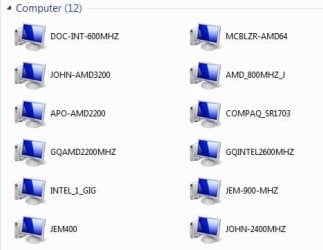
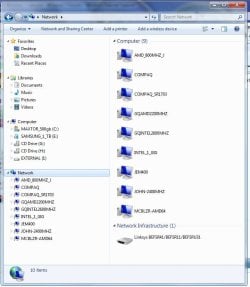
I have a mixture of x86 & x64 boxes on my network. From as low as a dual pent 400mhz with win7. No major problems.
 

Attachments

  • NetWork_Computers.JPG
    NetWork_Computers.JPG
    67 KB · Views: 62
  • Network_12_win.JPG
    Network_12_win.JPG
    24.6 KB · Views: 32

My Computer My Computer

Computer type
PC/Desktop
Computer Manufacturer/Model Number
Built them myself, Science Experiments !
OS
Win7 Enterprise, Win7 x86 (Ult 7600), Win7 x64 Ult 7600, TechNet RTM on AMD x64 (2.8Ghz)
CPU
AMD fx8350 4ghz, AMD-32 2400mhz, AMD-64 3200mhz, AMDx64 2.8G
Motherboard
SIS 755, ECS-K8M890M-M (Ult 7600), GigaByte & others
Memory
2gb, 4gb on the Ult 7600, 4gb on Technet RTM, 32gb on FX8350
Graphics Card(s)
Draw my own Graphics, several nVidia cards
Sound Card
on motherboard
Monitor(s) Displays
19" flat scr, 28" I-Inc widescr,22" Emprex Widescr, 23" Acer
Screen Resolution
1280 x 1024, 1440 x 900, 1920 x 1080
Hard Drives
6 pata Ide HD's & 2 Sata HD's
added 80gb external on Ult 7600 computer,
numerous extra 1tb, 2TB, 3Tb SATA HD's
A collection of ext HD Docks w/ HDs
PSU
430w, 550w, 600w, 700, 800, etc
Case
All Generic Full Towers
Cooling
Open Air & a few fans, some w/ colored LEDs
Keyboard
Compaq & Dell recycled from GoodWill
Mouse
Made in China Optical Wired Mouse
Internet Speed
Fast Cable InterNet
Antivirus
AVG Free on 24 different Desktops, NO Problems!
Browser
IE 8 is preferred, but use FireFox sometimes
Other Info
Linksys Routers, switches, & Hubs
Too Many USB Flash Drives to count, Biggest is 64GB !
Eight computers in my home network.
Sixteen computers at my business network.
Linked via TeamViewer !
Lots of old used spare computer parts everywhere!
x86 would be easier


For the tasks you have described your parents using the computers for, 2 GB of ram should work fine for all of the computers listed with both x86 or x64 versions of windows 7. I would suggest definitely upgrading to 4 GB for power users that multitask or use memory hogs like virtual machines or video editing.

Now days hardware and software companies build x64 and x86 drivers for their products, older products especially printers may only have x86 drivers. X86 would be my bet for the most painless upgrade. If the operating systems are all x86 at this time keep in mind that you can do an upgrade to windows 7 x86 and maintain windows files and profiles while if you are going x86 to x64 you will not be able to do an "upgrade" and will have to do a "clean install". This is a little confusing as you can use the x64 windows 7 upgrade DVD, the installation will just not be able to do a typical upgrade you will chose the clean install option and will loose all windows settings. You can loose files too if you are not careful.
 

My Computer My Computer

Computer Manufacturer/Model Number
Home Built
OS
Windows 7 RC
CPU
Intel Core 2 Duo E6850
Motherboard
Gigabyte s Series
Memory
4 gb
Graphics Card(s)
NVIDIA GeForce 8800 GT
Sound Card
Realtek Hi Def onboard
Monitor(s) Displays
19" LCD
Hard Drives
WD 1500 10,00 rpm, WD 3200 7,200 rpm
Back
Top