win 12 can not rip

lvpeat

New member
Local time
1:49 PM
Messages
13
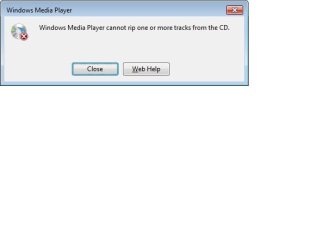
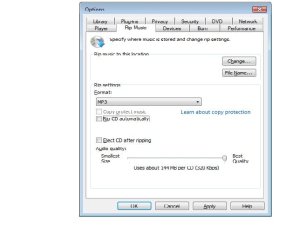
I am running win 7 wmp 12. I can not rip. The rip area under tools, rip, change location is not grayed out but there is nothing there. If I try to rip, I get an error message, that some songs can not be ripped. Please help.
I have reviewed most of your posts, man there is a lot but found no answer.
I was running xp, did a clean install. I have not been able to rip since day one.
 

My Computer

Computer Manufacturer/Model Number
hp pavilion a 1600 n
OS
win 7
CPU
amd athlon 64 dual core
Memory
3.44
Graphics Card(s)
on board
Hmmm, could you please post a screenshot, I am not exactly sure what you meant. Also, please include the rip tab in the options window.
 

My Computer

Computer type
Laptop
Computer Manufacturer/Model Number
Custom
OS
Windows 7 Home Premium x64
CPU
Intel Core i5 2500K
Motherboard
MSI MS-7750
Memory
8GB DDR3
Graphics Card(s)
nVidia GeForce GTX650 Ti BOOST
Sound Card
Realtek
Monitor(s) Displays
21' Philips
Screen Resolution
Full HD
Hard Drives
1TB
PSU
500W
win 7 wmp 12 can not rip

Is this the screen shot you need?
 

Attachments

My Computer

Computer Manufacturer/Model Number
hp pavilion a 1600 n
OS
win 7
CPU
amd athlon 64 dual core
Memory
3.44
Graphics Card(s)
on board

My Computer

Computer type
PC/Desktop
Computer Manufacturer/Model Number
Self Built
OS
Win 10 Pro x64
CPU
Intel I5-2500K @3.3GHz
Motherboard
Asrock P67 Extreme4
Memory
16GB G.Skill Ripjaws X (4x4GB)
Graphics Card(s)
EVGA GeForce 750 Ti SC 2GB
Sound Card
ASUS Xonar DG 5.1 Channels 24-bit 96KHz PCI Interface Sound
Monitor(s) Displays
auria eq2367
Screen Resolution
1920 x 1080
Hard Drives
250GB Samsung 850 EVO SSD
1TB WD Blue
1TB Hitachi
PSU
SeaSonic X 650W 80 Plus Gold
Case
Corsair Obsidian 750D
Cooling
Corsair H60, Three 140mm case fans
Keyboard
Logitech Wireless Keyboard K520
Mouse
Logitech Wireless Mouse M310
Internet Speed
Wave Broadband ~ 100 dn 5 up
Antivirus
Windows Defender, Malwarebytes Premium
Browser
Edge, IE11, Chrome
Other Info
Laptop specs: HP g7-1365dx /
CPU: AMD A6-3420M APU with Radeon(tm) HD Graphics /
RAM: Crucial 8Gb (2x4Gb) /
SSD: Crucial M4-CT128M4SSD2 ATA Device/ FW 000F /
GFX: AMD Radeon HD 6520G /
OS: Windows 10 Pro x64
win 7 wmp 12 can not rip

Sorry. I am a super novice. I will try again. see attached
 

Attachments

  • 2.jpg
    2.jpg
    9.8 KB · Views: 30
  • Untitled.jpg
    Untitled.jpg
    27.8 KB · Views: 41

My Computer

Computer Manufacturer/Model Number
hp pavilion a 1600 n
OS
win 7
CPU
amd athlon 64 dual core
Memory
3.44
Graphics Card(s)
on board
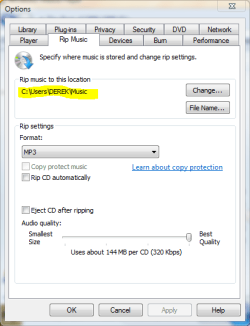
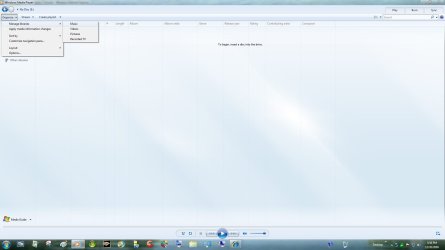
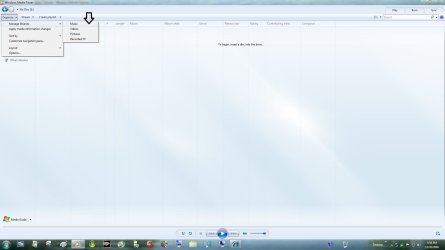
Here you go lvpeat, I just tried to rip a cd and got the same issue. then I found this solution from microsoft, it just doesn't know where to put it. just follow the steps in the answer to direct it to a location. mine started ripping just fine once it knew where to put it. And don't worry about the novice thing, EVERYBODY is at one point. :D
 

Attachments

  • wmp answer.PNG
    wmp answer.PNG
    20 KB · Views: 109
  • wmp answer 2.PNG
    wmp answer 2.PNG
    17 KB · Views: 49
Last edited:

My Computer

Computer type
PC/Desktop
Computer Manufacturer/Model Number
Self Built
OS
Win 10 Pro x64
CPU
Intel I5-2500K @3.3GHz
Motherboard
Asrock P67 Extreme4
Memory
16GB G.Skill Ripjaws X (4x4GB)
Graphics Card(s)
EVGA GeForce 750 Ti SC 2GB
Sound Card
ASUS Xonar DG 5.1 Channels 24-bit 96KHz PCI Interface Sound
Monitor(s) Displays
auria eq2367
Screen Resolution
1920 x 1080
Hard Drives
250GB Samsung 850 EVO SSD
1TB WD Blue
1TB Hitachi
PSU
SeaSonic X 650W 80 Plus Gold
Case
Corsair Obsidian 750D
Cooling
Corsair H60, Three 140mm case fans
Keyboard
Logitech Wireless Keyboard K520
Mouse
Logitech Wireless Mouse M310
Internet Speed
Wave Broadband ~ 100 dn 5 up
Antivirus
Windows Defender, Malwarebytes Premium
Browser
Edge, IE11, Chrome
Other Info
Laptop specs: HP g7-1365dx /
CPU: AMD A6-3420M APU with Radeon(tm) HD Graphics /
RAM: Crucial 8Gb (2x4Gb) /
SSD: Crucial M4-CT128M4SSD2 ATA Device/ FW 000F /
GFX: AMD Radeon HD 6520G /
OS: Windows 10 Pro x64
  • Like
Reactions: JMH
win 7 wmp 12 can not rip

I tried that before. On mine there is no location to change. It is blank. Not grayed out but blank.
 

My Computer

Computer Manufacturer/Model Number
hp pavilion a 1600 n
OS
win 7
CPU
amd athlon 64 dual core
Memory
3.44
Graphics Card(s)
on board

My Computer

Computer Manufacturer/Model Number
Sony Vaio Z46GDU
OS
Windows 7 Ultimate x86-64
CPU
[email protected] 1066MHz FSB
Motherboard
Sony branded
Memory
6GB DDR3 1066MHz
Graphics Card(s)
9300M GS 256MB Dedicated (Speed) + Intel4500MHD (Stamina)
Sound Card
Realtek HD Audio
Monitor(s) Displays
13.1' WXGA
Screen Resolution
1600x900
Hard Drives
320GB 7200RPM w/ 16MB cache
Internet Speed
1MB/s
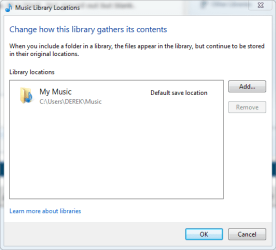
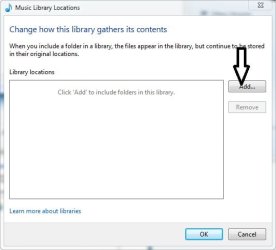
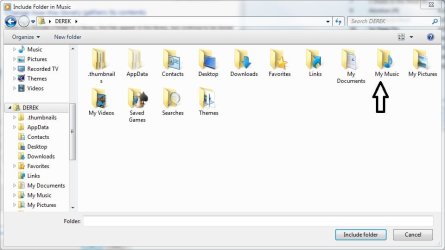
So was mine, you need to tell it where to put your music. if you click on the add button ( in the second screenshot ) you can pick a location, like "My Music" which is where I put mine.
 

Attachments

  • wmp answer 3.PNG
    wmp answer 3.PNG
    12.1 KB · Views: 26
  • Untitled.jpg
    Untitled.jpg
    72.3 KB · Views: 55

My Computer

Computer type
PC/Desktop
Computer Manufacturer/Model Number
Self Built
OS
Win 10 Pro x64
CPU
Intel I5-2500K @3.3GHz
Motherboard
Asrock P67 Extreme4
Memory
16GB G.Skill Ripjaws X (4x4GB)
Graphics Card(s)
EVGA GeForce 750 Ti SC 2GB
Sound Card
ASUS Xonar DG 5.1 Channels 24-bit 96KHz PCI Interface Sound
Monitor(s) Displays
auria eq2367
Screen Resolution
1920 x 1080
Hard Drives
250GB Samsung 850 EVO SSD
1TB WD Blue
1TB Hitachi
PSU
SeaSonic X 650W 80 Plus Gold
Case
Corsair Obsidian 750D
Cooling
Corsair H60, Three 140mm case fans
Keyboard
Logitech Wireless Keyboard K520
Mouse
Logitech Wireless Mouse M310
Internet Speed
Wave Broadband ~ 100 dn 5 up
Antivirus
Windows Defender, Malwarebytes Premium
Browser
Edge, IE11, Chrome
Other Info
Laptop specs: HP g7-1365dx /
CPU: AMD A6-3420M APU with Radeon(tm) HD Graphics /
RAM: Crucial 8Gb (2x4Gb) /
SSD: Crucial M4-CT128M4SSD2 ATA Device/ FW 000F /
GFX: AMD Radeon HD 6520G /
OS: Windows 10 Pro x64
To Frostmourne - I have tried several different audio disks withe same result. I want mwmp to work. Why use two different audio products? If I delete wmp, it could effect other parts of windows.
To Derekimo - good suggestions but I have tried the above but the music library,as in your second pic, does not appear.
 

My Computer

Computer Manufacturer/Model Number
hp pavilion a 1600 n
OS
win 7
CPU
amd athlon 64 dual core
Memory
3.44
Graphics Card(s)
on board
So you clicked on the arrow in the first pic, you should have gotten the second pic and if you click on the ADD button, you will get the third pic, and from there you choose your location that you want your music.
 

Attachments

  • wmp.jpg
    wmp.jpg
    72.6 KB · Views: 29
  • wmp 2.jpg
    wmp 2.jpg
    21.3 KB · Views: 12
  • wmp 3.PNG
    wmp 3.PNG
    40.8 KB · Views: 11

My Computer

Computer type
PC/Desktop
Computer Manufacturer/Model Number
Self Built
OS
Win 10 Pro x64
CPU
Intel I5-2500K @3.3GHz
Motherboard
Asrock P67 Extreme4
Memory
16GB G.Skill Ripjaws X (4x4GB)
Graphics Card(s)
EVGA GeForce 750 Ti SC 2GB
Sound Card
ASUS Xonar DG 5.1 Channels 24-bit 96KHz PCI Interface Sound
Monitor(s) Displays
auria eq2367
Screen Resolution
1920 x 1080
Hard Drives
250GB Samsung 850 EVO SSD
1TB WD Blue
1TB Hitachi
PSU
SeaSonic X 650W 80 Plus Gold
Case
Corsair Obsidian 750D
Cooling
Corsair H60, Three 140mm case fans
Keyboard
Logitech Wireless Keyboard K520
Mouse
Logitech Wireless Mouse M310
Internet Speed
Wave Broadband ~ 100 dn 5 up
Antivirus
Windows Defender, Malwarebytes Premium
Browser
Edge, IE11, Chrome
Other Info
Laptop specs: HP g7-1365dx /
CPU: AMD A6-3420M APU with Radeon(tm) HD Graphics /
RAM: Crucial 8Gb (2x4Gb) /
SSD: Crucial M4-CT128M4SSD2 ATA Device/ FW 000F /
GFX: AMD Radeon HD 6520G /
OS: Windows 10 Pro x64
To Frostmourne - I have tried several different audio disks withe same result. I want mwmp to work. Why use two different audio products? If I delete wmp, it could effect other parts of windows.
I can't speak for WMP12, as I have not ripped with it, but Exact Audio Copy is far superior to any prior WMP as a ripper, especially if your CD's are less than pristine.

And just because you rip with something different wouldn't mean you would have to delete WMP. You could still use it for everything else that it does. EAC is basically just a ripper/tagger, whereas WMP aspires to be a complete media manager.

I have 5 different programs that are capable of ripping CD's, but I only rip with EAC. If your CD's are spotless, then it's not as big a deal what ripper you use....then it comes down to which codec you want, etc....but that's a debate for another thread.:geek:
 

My Computer

Computer type
PC/Desktop
Computer Manufacturer/Model Number
Gigabyte Technology Co., Ltd.
OS
Win 7 Ultimate 64-bit SP1 (desktop)
CPU
Intel Core 2 Duo E8400
Motherboard
Gigabyte GA-EP35-DS3R
Memory
2x 2GB OCZ DDR II SDRAM PC2-6400
Graphics Card(s)
NVIDIA GeForce 9400GT
Monitor(s) Displays
HP 2009m(primary), Acer P191W
Screen Resolution
1600x900, 1440x900
Hard Drives
Internal:WD Caviar Black 640GB 32MB cache 7200RPM
External:Samsung Story Station 1TB HDD desktop drive
500GB Toshiba portable drive
PSU
Antec Earthwatts EA500D
Case
Antec Sonata III
Cooling
4 fans
Keyboard
Logitech Wave
Mouse
Logitech M-SBF90
Internet Speed
Slow due to home Wireless-G router
Antivirus
MSE, Hitman Pro, Malwarebytes
Browser
Chrome and Palemoon
Other Info
Laptop....Acer 5750Z-4835
15.6" HD Widescreen CineCrystal™ LED-backlit LCD Display: (1366x768 resolution, 16:9 aspect ratio)
Intel® Pentium® Processor B940 (2.0GHz, 2MB L3 cache)
Windows® 7 Home Premium,500GB Hard Drive,4GB DDR3 RAM, Intel® HD Graphics,8X DVD-Super Multi Double-Layer Drive
Multi-in-1 Digital Media Card Reader,802.11b/g/n Wi-Fi
Chrome and Palemoon, MSE, Hitman Pro
To Derekimo - The Music Library box does not open so there is nothing to add. I nyour last message, only the first pic appears. The second two do not appear.
 

My Computer

Computer Manufacturer/Model Number
hp pavilion a 1600 n
OS
win 7
CPU
amd athlon 64 dual core
Memory
3.44
Graphics Card(s)
on board
What happens when you click Organize> Manage Libraries> Music ?
 

My Computer

Computer type
PC/Desktop
Computer Manufacturer/Model Number
Self Built
OS
Win 10 Pro x64
CPU
Intel I5-2500K @3.3GHz
Motherboard
Asrock P67 Extreme4
Memory
16GB G.Skill Ripjaws X (4x4GB)
Graphics Card(s)
EVGA GeForce 750 Ti SC 2GB
Sound Card
ASUS Xonar DG 5.1 Channels 24-bit 96KHz PCI Interface Sound
Monitor(s) Displays
auria eq2367
Screen Resolution
1920 x 1080
Hard Drives
250GB Samsung 850 EVO SSD
1TB WD Blue
1TB Hitachi
PSU
SeaSonic X 650W 80 Plus Gold
Case
Corsair Obsidian 750D
Cooling
Corsair H60, Three 140mm case fans
Keyboard
Logitech Wireless Keyboard K520
Mouse
Logitech Wireless Mouse M310
Internet Speed
Wave Broadband ~ 100 dn 5 up
Antivirus
Windows Defender, Malwarebytes Premium
Browser
Edge, IE11, Chrome
Other Info
Laptop specs: HP g7-1365dx /
CPU: AMD A6-3420M APU with Radeon(tm) HD Graphics /
RAM: Crucial 8Gb (2x4Gb) /
SSD: Crucial M4-CT128M4SSD2 ATA Device/ FW 000F /
GFX: AMD Radeon HD 6520G /
OS: Windows 10 Pro x64
Nothing.
 

My Computer

Computer Manufacturer/Model Number
hp pavilion a 1600 n
OS
win 7
CPU
amd athlon 64 dual core
Memory
3.44
Graphics Card(s)
on board
Try the same thing, but from the Windows Explorer.
Open the Explorer and right click Music under the Library tree entries and Properties. Click include a folder and choose. Make sure WMP12 is CLOSED before you do this. After you finish, open WMP, wait for it to update the library, you'll see "Updating library" at the bottom of the window, when it finishes go into rip settings again and see if the same directory you previously added is there... It should be.
 

My Computer

Computer type
Laptop
Computer Manufacturer/Model Number
Custom
OS
Windows 7 Home Premium x64
CPU
Intel Core i5 2500K
Motherboard
MSI MS-7750
Memory
8GB DDR3
Graphics Card(s)
nVidia GeForce GTX650 Ti BOOST
Sound Card
Realtek
Monitor(s) Displays
21' Philips
Screen Resolution
Full HD
Hard Drives
1TB
PSU
500W
dumb question. What is windows explorer and how do I find it, how do I get into it?
 

My Computer

Computer Manufacturer/Model Number
hp pavilion a 1600 n
OS
win 7
CPU
amd athlon 64 dual core
Memory
3.44
Graphics Card(s)
on board
Sopolias Falst - I found explorer and I got to the 'chose' part but what do I 'chose'?
 

My Computer

Computer Manufacturer/Model Number
hp pavilion a 1600 n
OS
win 7
CPU
amd athlon 64 dual core
Memory
3.44
Graphics Card(s)
on board
Click on include folder, and then select "my music" folder, then click include folder at the bottom. then you have a location for your music and will now be able to rip.
 

Attachments

  • explorer.jpg
    explorer.jpg
    38.7 KB · Views: 21
  • wmp 3.jpg
    wmp 3.jpg
    44.6 KB · Views: 8

My Computer

Computer type
PC/Desktop
Computer Manufacturer/Model Number
Self Built
OS
Win 10 Pro x64
CPU
Intel I5-2500K @3.3GHz
Motherboard
Asrock P67 Extreme4
Memory
16GB G.Skill Ripjaws X (4x4GB)
Graphics Card(s)
EVGA GeForce 750 Ti SC 2GB
Sound Card
ASUS Xonar DG 5.1 Channels 24-bit 96KHz PCI Interface Sound
Monitor(s) Displays
auria eq2367
Screen Resolution
1920 x 1080
Hard Drives
250GB Samsung 850 EVO SSD
1TB WD Blue
1TB Hitachi
PSU
SeaSonic X 650W 80 Plus Gold
Case
Corsair Obsidian 750D
Cooling
Corsair H60, Three 140mm case fans
Keyboard
Logitech Wireless Keyboard K520
Mouse
Logitech Wireless Mouse M310
Internet Speed
Wave Broadband ~ 100 dn 5 up
Antivirus
Windows Defender, Malwarebytes Premium
Browser
Edge, IE11, Chrome
Other Info
Laptop specs: HP g7-1365dx /
CPU: AMD A6-3420M APU with Radeon(tm) HD Graphics /
RAM: Crucial 8Gb (2x4Gb) /
SSD: Crucial M4-CT128M4SSD2 ATA Device/ FW 000F /
GFX: AMD Radeon HD 6520G /
OS: Windows 10 Pro x64
I tried the last idea and it did not work either.
Is there a way to uninstall wmp and reinstall?
 

My Computer

Computer Manufacturer/Model Number
hp pavilion a 1600 n
OS
win 7
CPU
amd athlon 64 dual core
Memory
3.44
Graphics Card(s)
on board
Back
Top