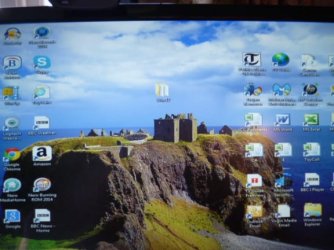
Win 32 icon on my desktop

telfordpeter

New member
Local time
2:26 PM
Messages
7
Location
Telford UK
Hi Everybody,
A WIN32 icon has just appeared on my desktop computer. It does not have the blue up arrow signifying that it is a shortcut. Checking the icon properties reveals that it's path is shown as C:\Users\Peter\Desktop.
The size is 207mb and contains 309 Files, 63 Folders.
I am worried that if I delete it, I could remove a huge amount of system data.
I have no idea how this icon appeared. All the other icons on my desktop have blue up arrows and definitely shortcuts but the WIN32 icon referred to above is a real mystery.
Any advice would really be appreciated.
Best wishes,
Peter
 

My Computer My Computer

Computer type
PC/Desktop
Computer Manufacturer/Model Number
Custom Built
OS
Windows 7 Professional 32 bit
CPU
Intel(R)Core(TM) i3-41
Memory
4gb
Hard Drives
C,D,E,F
Antivirus
MS Essentials,Malwarebytes,Trojan Remover
Browser
IE11
Scan your system for threats with a full scan, and can you take a snapshot of your desktop with the file and upload it here?
 

My Computer My Computer

Computer type
PC/Desktop
Computer Manufacturer/Model Number
Custom Built
OS
Windows 10 Pro
CPU
AMD Ryzen 5 2400G Processor with Radeon RX Vega 11 Graphics
Motherboard
ASRock X470 Master SLI/AC AM4 AMD Promontory X470 SATA 6Gb/s
Memory
G.SKILL Ripjaws V Series 16GB (2 x 8GB) 288-Pin DDR4 SDRAM D
Graphics Card(s)
2047MB NVIDIA GeForce GTX 1060 6GB (EVGA)
Sound Card
Motherboard Built in
Monitor(s) Displays
Acer R240HY bidx 23.8-Inch IPS HDMI DVI VGA (1920 x 1080) Wi
Screen Resolution
1920 x 1080
Hard Drives
1TB Sandisk SSD PLUS (Main drive)
500 GB Seagate 7200 RPM (Games)
500 GB Western Digital 7200 RPM (Virtual Machines)
PSU
CORSAIR TX Series TX650M 650W 80+ Gold Modular Power Supply
Case
CORSAIR CARBIDE SPEC-02 Mid-Tower Gaming Case, Red LED Fan
Cooling
220mm, two 120mm, and four 60mm fans
Keyboard
Wired Dell keyboard
Mouse
Wireless Logitech mouse
Internet Speed
250mb down, 30mb up
Antivirus
Panda Cloud Antivirus
Browser
Chrome-ish x64
Other Info
Your awesome for reading this.
Hi Everybody,
A WIN32 icon has just appeared on my desktop computer. It does not have the blue up arrow signifying that it is a shortcut. Checking the icon properties reveals that it's path is shown as C:\Users\Peter\Desktop.
The size is 207mb and contains 309 Files, 63 Folders.
I am worried that if I delete it, I could remove a huge amount of system data.
I have no idea how this icon appeared. All the other icons on my desktop have blue up arrows and definitely shortcuts but the WIN32 icon referred to above is a real mystery.
Any advice would really be appreciated.
Best wishes,
Peter

In addition to the post from andrew129260, did you install any new software or updates prior to the problem? Do you run an AV program and are the definitions up to date? Have you checked for malware?

As a possible solution you could try using a restore point created prior to the problem.

HTH
 

My Computer My Computer

Computer type
PC/Desktop
Computer Manufacturer/Model Number
Custom Built
OS
Windows 7 Professional x64
CPU
Intel i5 quad processor
Motherboard
DP67BG
Memory
16 GB
Graphics Card(s)
Radeon HD 5770
Sound Card
Realtek High Definition Audio
Monitor(s) Displays
Samsung SyncMaster
Screen Resolution
1920X1080
Hard Drives
WD 2TB (SATA Internal)
WD 1TB (USB External)
PSU
Corsair GS800
Case
Tower (Generic)
Cooling
3 Internal Fans
Keyboard
MS Wireless
Mouse
MS Optical Wired
Internet Speed
54 mbps
Antivirus
Emsisoft
Browser
IE-Version 9, Palemoon-Version 24.2.0
Scan your system for threats with a full scan, and can you take a snapshot of your desktop with the file and upload it here?
Hi Andrew,
Full scan hasn't removed the icon.
Photo of desktop attached.
Best wishes,
Peter
 

Attachments

  • P1000349.JPG
    P1000349.JPG
    85.1 KB · Views: 14

My Computer My Computer

Computer type
PC/Desktop
Computer Manufacturer/Model Number
Custom Built
OS
Windows 7 Professional 32 bit
CPU
Intel(R)Core(TM) i3-41
Memory
4gb
Hard Drives
C,D,E,F
Antivirus
MS Essentials,Malwarebytes,Trojan Remover
Browser
IE11
Win 32 Icon

Hi Sir George,
Have run AV with definitions up to date but nothing shows up. Please see photo I uploaded just now of my desktop.
I will run a system restore shortly and get back you asap. Thanks for your help.
Best wishes,
Peter


Hi Everybody,
A WIN32 icon has just appeared on my desktop computer. It does not have the blue up arrow signifying that it is a shortcut. Checking the icon properties reveals that it's path is shown as C:\Users\Peter\Desktop.
The size is 207mb and contains 309 Files, 63 Folders.
I am worried that if I delete it, I could remove a huge amount of system data.
I have no idea how this icon appeared. All the other icons on my desktop have blue up arrows and definitely shortcuts but the WIN32 icon referred to above is a real mystery.
Any advice would really be appreciated.
Best wishes,
Peter

In addition to the post from andrew129260, did you install any new software or updates prior to the problem? Do you run an AV program and are the definitions up to date? Have you checked for malware?

As a possible solution you could try using a restore point created prior to the problem.

HTH
 

My Computer My Computer

Computer type
PC/Desktop
Computer Manufacturer/Model Number
Custom Built
OS
Windows 7 Professional 32 bit
CPU
Intel(R)Core(TM) i3-41
Memory
4gb
Hard Drives
C,D,E,F
Antivirus
MS Essentials,Malwarebytes,Trojan Remover
Browser
IE11
Hi Sir George,
Cannot run a system restore due to the fact that the system restore dates keep disappearing, I am told that this may be due to a "dual boot" situation. This is being resolved shortly when Windows XP Pro will be removed from one of my drives.
If you have any more suggestions I would be grateful for your help as it cannot be correct to have a WIN32 folder on my desktop which is NOT a shortcut. I am concerned as to what may happen if I accidentally delete the icon. See the screen shot above.
Best wishes,
Peter Saphier
 

My Computer My Computer

Computer type
PC/Desktop
Computer Manufacturer/Model Number
Custom Built
OS
Windows 7 Professional 32 bit
CPU
Intel(R)Core(TM) i3-41
Memory
4gb
Hard Drives
C,D,E,F
Antivirus
MS Essentials,Malwarebytes,Trojan Remover
Browser
IE11
Back
Top