Solved Win 7 64 bit reserving 6+ gbs ram

Geertt2

New member
Local time
1:33 PM
Messages
9
Here are my specs,

Windows 7 home premium 64 bit
12 gig ram
Nvidia gtx 260
Asus mobo P7H55-M

THE PROBLEM:

I recently received extra ram chips from a friend as a gift (Kingston 4gbs x 2). So I plug that into my computers and ran it, as a result, in properties of computer, it shows total ram as being 12 then it says (5.97 available). Befor I installed the ram, I also noticed that when I had 4 gigs of ram ( 2 x 2 ) it was 4 gbs total, 1.97) available. I've been search for a solution to fix this problem because I am certain no drivers or hardware devices I have require 6 gigs of reserved ram.

solutions I HAVE TRIED:

1.) updated bios
2.) enable memory remap in bios
3.) check/uncheck max mem in msconfig settings
4.) reinstalled fresh windows 7 64 bit

All the above does not worked or worked partially. Anyone else have any other suggestions please? Thanks
 

My Computer My Computer

Computer Manufacturer/Model Number
N/A
OS
Windows 7 64 bit
CPU
Intel Core i5 760
Motherboard
AsusTek P7H55-M
Memory
12gigs DDR3 1333
Graphics Card(s)
Nvidia GeForce GTX 260
PSU
550 watt
Case
ATX
Here are my specs,

Windows 7 home premium 64 bit
12 gig ram
Nvidia gtx 260
Asus mobo P7H55-M

THE PROBLEM:

I recently received extra ram chips from a friend as a gift (Kingston 4gbs x 2). So I plug that into my computers and ran it, as a result, in properties of computer, it shows total ram as being 12 then it says (5.97 available). Befor I installed the ram, I also noticed that when I had 4 gigs of ram ( 2 x 2 ) it was 4 gbs total, 1.97) available. I've been search for a solution to fix this problem because I am certain no drivers or hardware devices I have require 6 gigs of reserved ram.

solutions I HAVE TRIED:

1.) updated bios
2.) enable memory remap in bios
3.) check/uncheck max mem in msconfig settings
4.) reinstalled fresh windows 7 64 bit

All the above does not worked or worked partially. Anyone else have any other suggestions please? Thanks

Actually it is supposed to do that. Win 7 handles ram differently. It puts ~half of the available ram into memory to speed up the loading of data pages. If that memory were to be needed elsewhere it would be released.

Its not a bug, its a feature.
 

My Computer My Computer

Computer Manufacturer/Model Number
HP Pavillion dv-7 1005 Tx
OS
Win 8 Release candidate 8400
CPU
[email protected]
Memory
4 gigs
Graphics Card(s)
Nvidia 9600M
Sound Card
HD built-in
Monitor(s) Displays
17" Wxga
Screen Resolution
1440x900
Cooling
none
Internet Speed
45Mb down 5Mb up
I checked bios again and even though windows says 12 gigs ram total, in bios it only says 6.111 gigs installed. Something fishy is going on.
 

My Computer My Computer

Computer Manufacturer/Model Number
N/A
OS
Windows 7 64 bit
CPU
Intel Core i5 760
Motherboard
AsusTek P7H55-M
Memory
12gigs DDR3 1333
Graphics Card(s)
Nvidia GeForce GTX 260
PSU
550 watt
Case
ATX
Try:

Removing and reseating the RAM

Putting the RAM in different slots

Test it with just the new sticks and see what it shows
 

My Computer My Computer

Computer Manufacturer/Model Number
Self
OS
Main - Windows 7 Pro SP1 64-Bit; 2nd - Windows Server 2008 R2
CPU
Main - Core i7 2600K; 2nd - Core i7 920
Motherboard
Main - Asus P8Z68-V Pro/Gen3; 2nd - Gigabyte GA-EX58-UDR3
Memory
Main - 16GB Corsair Vengeance; 2nd - 12GB Corsair Vengeance
Graphics Card(s)
Main - XFX Radeon 6870 1GB; 2nd - XFX Radeon 4870 1GB
Sound Card
Both: Onboard Realtek Azalia
Monitor(s) Displays
Main - Hann 25" + I-INC 25" + Acer 23"; 2nd - Upgrading Soon
Screen Resolution
Main - 1920x1080 (All Three Monitors); 2nd - Upgrading Soon
Hard Drives
Main - (1) Crucial M4 128GB (Boot)
Main - (1) Seagate 2TB 64MB Cache (Data)
Main - (1) Seagate 2TB 64MB Cache (Data Backup)
2nd - (1) Intel X25-M SSD 80GB (Boot)
2nd - (3) Seagate 1TB 32MB Cache (Data Backup)
2nd - (1) Seagate 320GB (Because)
PSU
Main - OCZ 600W Modular; 2nd - OCZ 600W
Case
Main - Thermaltake Element G; 2nd - NZXT something or other
Cooling
Main - Corsair H80; 2nd - Prolimatech Megahalems
Keyboard
Main - Razer Reclusa; 2nd - Old MS Keyboard
Mouse
Main - Logitech MX Revolution; 2nd - Old MS Mouse
Internet Speed
20Mbps Time-Warner Cable
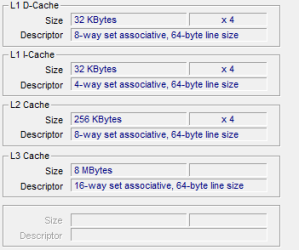
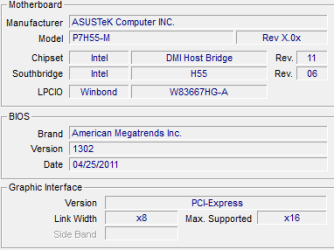
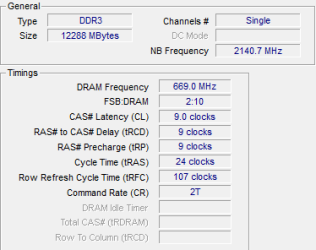
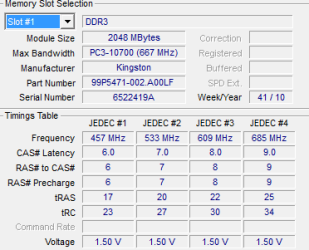
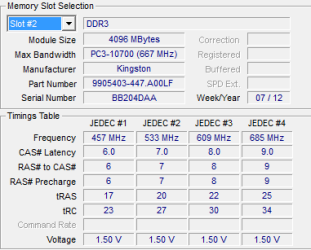
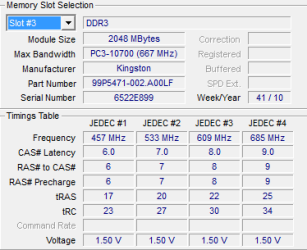
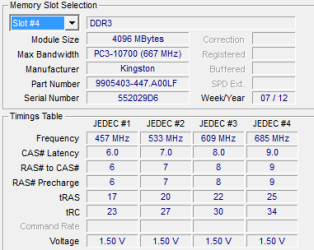
Just to provide us with more information, can you please post screenshots of what CPUID shows on the important tabs: CPU, CACHE, MAINBOARD, MEMORY, and then SPD for each of the four DIMM slots (I assume all four DIMM slots are now in use).

You say you have the original 2x2GB cards, as well as the new 2x4GB Kingston cards. Are the originals plus the new ones matched? We'll see from the CPUID images, but were the "gift" cards designated specifically by you as to part number for compatibility in your machine?


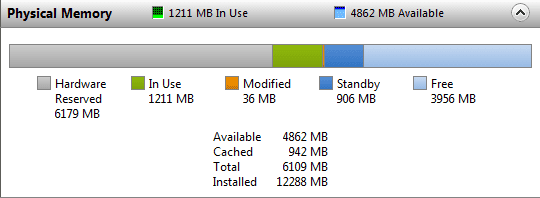
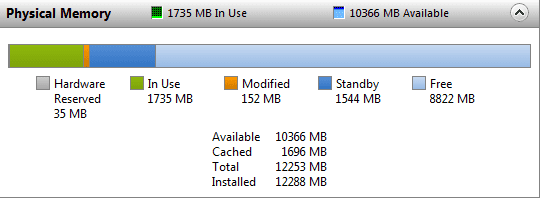
Also, if you run Taskmgr and click on the Performance tab and then push the Resource Monitor button and then select the Memory tab and look at the bottom of the screen to show the Physical Memory layout, what does it show (screenshot please?)?

On my 4GB machine (with 1GB ATI HD4850 video card) I show virtually all 4GB as "available". But I show essentially zero as "hardware reserved". What is "hardware reserved" on your 12GB machine? This is BIOS-related, and is tied to the hardware you have in the machine. What is your video card? Any other expansion cards?

(a) From Aida64 (used and free add up to 4GB):

aida64memory.jpg


(b) from Taskmgr (in-use and available add up to 4GB):

taskmgrmemory.jpg
 

My Computer My Computer

Computer type
PC/Desktop
Computer Manufacturer/Model Number
Home-built, two systems (1) and (2)
OS
Windows 7 Pro x64 (1), Win7 Pro X64 (2)
CPU
i5-3350p 3.1Ghz/6MB-cache (1); E8400 3.0Ghz/6MB-cache (2)
Motherboard
ASUS P8Z77-V Pro (1); ASUS P5Q3 (2)
Memory
8GB PC3-12800 DDR3 (1); 4GB PC3-10600 DDR3 (2)
Graphics Card(s)
ATI HD7750 (1), (see TV cards); ATI R7 250 (2)
Sound Card
Realtek ALC892 HD Audio (1); Realtek ALC1200 HD Audio (2)
Monitor(s) Displays
Eizo HD2441W LCD, Eizo S2433W (1); Eizo 24" S2433W (2)
Screen Resolution
1920x1200, 1920x1200 (1); 1920x1200 (2)
Hard Drives
(1) 1TB SATA-II (7200RPM), 2x2TB SATA-III (7200RPM), 250GB SATA-III (10000RPM) for OS; 2x2TB external USB 3.0

(2) 320GB SATA-II (7200RPM), 750GB SATA-II (7200RPM), 150GB SATA-II (10000RPM) for OS; 2TB external USB 3.0
PSU
Nesteq ECS-6001 600W (1); Nesteq ECS-5001 500W (2)
Case
Acousti-Case 360 (1) and (2)
Cooling
Noctua NH-U12P SE2 for CPU, 2x120mm case fans (1) and (2)
Keyboard
IBM PS/2 (1) and (2)
Mouse
Logitech MX Revolution wireless (1); Microsoft wired (2)
Internet Speed
100mbps down / 10mbps up
Antivirus
Microsoft Security Essentials; Malwarebyte Anti-Malware Pro
Browser
Firefox
Other Info
Ceton InfiniTV 4-tuner cablecard-enabled TV card as well as Hauppauge HVR-2250 OTA/ATSC 2-tuner TV card in (1), running under Win7 WMC
Ok, here are the screenshots. My video card is an Nvidia GTX 260 896 mb.

CPU.PNG

Cache.PNG

Mainboard.PNG

Memory.PNG

RM.PNG

Slot1.PNG

Slot2.PNG

Slot3.PNG

Slot4.PNG
 

My Computer My Computer

Computer Manufacturer/Model Number
N/A
OS
Windows 7 64 bit
CPU
Intel Core i5 760
Motherboard
AsusTek P7H55-M
Memory
12gigs DDR3 1333
Graphics Card(s)
Nvidia GeForce GTX 260
PSU
550 watt
Case
ATX
This problem has been solved, thanks everyone for helpful suggestions. What happened was I swapped the slots between my 4gb ram chips with my 2 gb ram chips, now I got 12 gigs of available ram out of 12 gigs of available ram. Thanks again!
 

My Computer My Computer

Computer Manufacturer/Model Number
N/A
OS
Windows 7 64 bit
CPU
Intel Core i5 760
Motherboard
AsusTek P7H55-M
Memory
12gigs DDR3 1333
Graphics Card(s)
Nvidia GeForce GTX 260
PSU
550 watt
Case
ATX
I've been trying to do research into the obvious problem... namely 6.1GB "hardware reserved". Pretty universal problem, lots of frustration, and not one definitive solution.

I even saw one guy claimed that increasing the vDIMM voltage from 1.50v to 1.65v solved his problem! I think this is normally associated with "overclocking" but I definitely am illiterate on this subject.

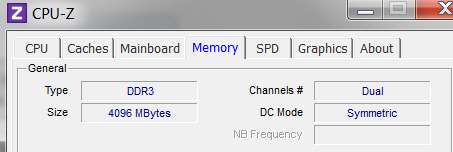
Anyway, I do see that everything looks good in terms of the two "gift" memory cards being a match for your original two. But I also see that CPUID says you're running memory as "single channel", which would not be correct. I don't know how your motherboard has the four DIMM slots colored which are usually set up to direct you as to insertion of pairs of memory cards. I know with older machines you put memory into #1 and #3 for "dual channel" operation (assuming they were colored that way), and then you added memory into #2 and #4. Newer boards had you insert memory into #1 and #2, and then #3 and #4. I don't know about your board. Typically two are blue and two are black, or something like that, showing you where the pairs go.

Do you have your 2GB and 4GB cards inserted into the color-matched DIMM slots?

But for sure, the obvious problems and clues right off the top are: (a) 6179 MB hardware reserved, and (b) single channel DDR3 memory mode.


I'm still researching.
 

My Computer My Computer

Computer type
PC/Desktop
Computer Manufacturer/Model Number
Home-built, two systems (1) and (2)
OS
Windows 7 Pro x64 (1), Win7 Pro X64 (2)
CPU
i5-3350p 3.1Ghz/6MB-cache (1); E8400 3.0Ghz/6MB-cache (2)
Motherboard
ASUS P8Z77-V Pro (1); ASUS P5Q3 (2)
Memory
8GB PC3-12800 DDR3 (1); 4GB PC3-10600 DDR3 (2)
Graphics Card(s)
ATI HD7750 (1), (see TV cards); ATI R7 250 (2)
Sound Card
Realtek ALC892 HD Audio (1); Realtek ALC1200 HD Audio (2)
Monitor(s) Displays
Eizo HD2441W LCD, Eizo S2433W (1); Eizo 24" S2433W (2)
Screen Resolution
1920x1200, 1920x1200 (1); 1920x1200 (2)
Hard Drives
(1) 1TB SATA-II (7200RPM), 2x2TB SATA-III (7200RPM), 250GB SATA-III (10000RPM) for OS; 2x2TB external USB 3.0

(2) 320GB SATA-II (7200RPM), 750GB SATA-II (7200RPM), 150GB SATA-II (10000RPM) for OS; 2TB external USB 3.0
PSU
Nesteq ECS-6001 600W (1); Nesteq ECS-5001 500W (2)
Case
Acousti-Case 360 (1) and (2)
Cooling
Noctua NH-U12P SE2 for CPU, 2x120mm case fans (1) and (2)
Keyboard
IBM PS/2 (1) and (2)
Mouse
Logitech MX Revolution wireless (1); Microsoft wired (2)
Internet Speed
100mbps down / 10mbps up
Antivirus
Microsoft Security Essentials; Malwarebyte Anti-Malware Pro
Browser
Firefox
Other Info
Ceton InfiniTV 4-tuner cablecard-enabled TV card as well as Hauppauge HVR-2250 OTA/ATSC 2-tuner TV card in (1), running under Win7 WMC
Well, we were both working together I guess. Took me 30 minutes of reading on the Interweb to finally post an "update".

Was it that mismatched DIMM slot color pair problem I suggested, where you'd put the wrong memory cards into the wrong slots from where you should have put them?
 

My Computer My Computer

Computer type
PC/Desktop
Computer Manufacturer/Model Number
Home-built, two systems (1) and (2)
OS
Windows 7 Pro x64 (1), Win7 Pro X64 (2)
CPU
i5-3350p 3.1Ghz/6MB-cache (1); E8400 3.0Ghz/6MB-cache (2)
Motherboard
ASUS P8Z77-V Pro (1); ASUS P5Q3 (2)
Memory
8GB PC3-12800 DDR3 (1); 4GB PC3-10600 DDR3 (2)
Graphics Card(s)
ATI HD7750 (1), (see TV cards); ATI R7 250 (2)
Sound Card
Realtek ALC892 HD Audio (1); Realtek ALC1200 HD Audio (2)
Monitor(s) Displays
Eizo HD2441W LCD, Eizo S2433W (1); Eizo 24" S2433W (2)
Screen Resolution
1920x1200, 1920x1200 (1); 1920x1200 (2)
Hard Drives
(1) 1TB SATA-II (7200RPM), 2x2TB SATA-III (7200RPM), 250GB SATA-III (10000RPM) for OS; 2x2TB external USB 3.0

(2) 320GB SATA-II (7200RPM), 750GB SATA-II (7200RPM), 150GB SATA-II (10000RPM) for OS; 2TB external USB 3.0
PSU
Nesteq ECS-6001 600W (1); Nesteq ECS-5001 500W (2)
Case
Acousti-Case 360 (1) and (2)
Cooling
Noctua NH-U12P SE2 for CPU, 2x120mm case fans (1) and (2)
Keyboard
IBM PS/2 (1) and (2)
Mouse
Logitech MX Revolution wireless (1); Microsoft wired (2)
Internet Speed
100mbps down / 10mbps up
Antivirus
Microsoft Security Essentials; Malwarebyte Anti-Malware Pro
Browser
Firefox
Other Info
Ceton InfiniTV 4-tuner cablecard-enabled TV card as well as Hauppauge HVR-2250 OTA/ATSC 2-tuner TV card in (1), running under Win7 WMC
For my mobo, The slots are
1.) Blue
2.) Black
3.) Blue
4.) Black

Before I put in the 2 new 4 gig rams, my previous old 2 gig rams were in slots #1 and #3. This caused the system to be 4gigs total (1.97 available).

When I first installed my new rams, I put them into slots #2 and #4. This caused the system to be 12gig total (3.57 available). That is when I started looking for solutions. After I reformatted my hard drive and reinstalled windows and updated bios, it went up to 12 gigs total (5.97 available). That is when I posted in this forum and profdlp mentioned to swap around with the ram slots.

My current ram slot setup is:
1.) Blue - 4
2.) Black - 2
3.) Blue - 4
4.) Black - 2

My previous setups were
1.) Blue - 2
2.) Black -4
3.) Blue - 2
4.) Black - 4

and :
1.) Blue - 2
2.) Black - empty
3.) Blue - 2
4.) Black - empty
 

My Computer My Computer

Computer Manufacturer/Model Number
N/A
OS
Windows 7 64 bit
CPU
Intel Core i5 760
Motherboard
AsusTek P7H55-M
Memory
12gigs DDR3 1333
Graphics Card(s)
Nvidia GeForce GTX 260
PSU
550 watt
Case
ATX
NRM.PNG

BTW, I have no idea why my mobo runs my ram chips as single channel. It was like that ever since I bought it and I have no idea if Im able to switch it to dual mode or if that is even possible.
 

My Computer My Computer

Computer Manufacturer/Model Number
N/A
OS
Windows 7 64 bit
CPU
Intel Core i5 760
Motherboard
AsusTek P7H55-M
Memory
12gigs DDR3 1333
Graphics Card(s)
Nvidia GeForce GTX 260
PSU
550 watt
Case
ATX
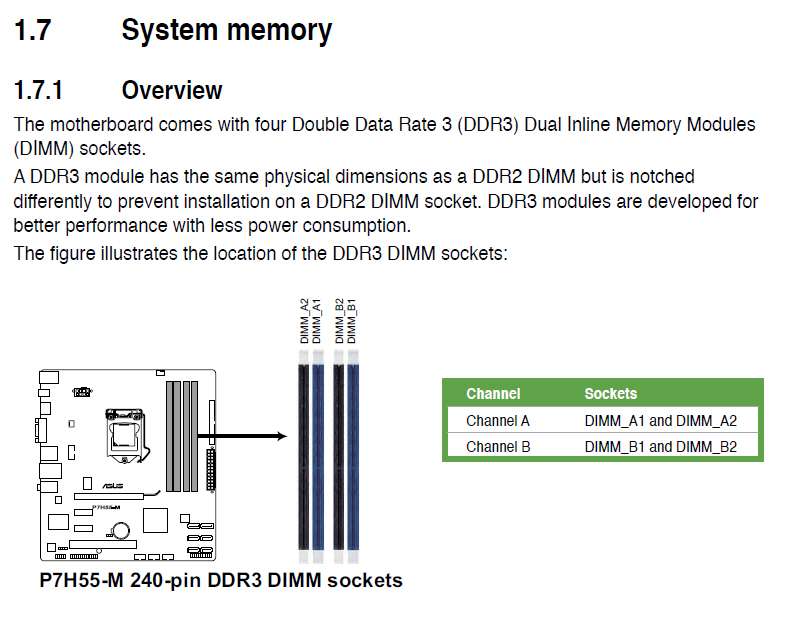
Well I'm sure you have the user manual for that board.

Seems to me that the applicable information is the following:

asusdimm.jpg


So, the two black slots are A2(#1) and B2(#3), and the two blue slots are A1(#2) and B1(#4).


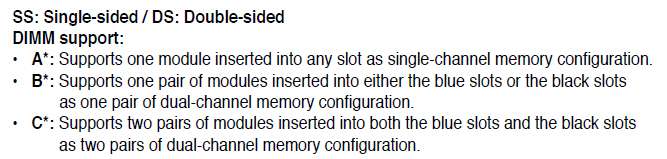
asusdimms.jpg


This says if you'd only installed one matching pair of cards (say the original 2x2GB pair) that as long as you installed it into either the blue pair of slots or black pair of slots that (a) you should have had DUAL-CHANNEL OPERATION, and (b) you should have had complete access to the total memory of the two cards.

That's what I would have thought.

Add a second pair of memory cards, and insert them into the other matching colored pair of slots, and you still have DUAL-CHANNEL operation.

That's what I would have thought.


asusdimm0.jpg


I think this says that if you mix things up, and say put a 2GB card and a 4GB card into the blue slot pair or black slot pair, or mixup a 4 card setup the same way, then there is a problem. That's when you lose memory, I would guess. Not really clear from their English which I can't quite follow.

But if you don't mix things up, and keep matching sizes in matching slot colors, that seems to be what they're asking you to do. And that's what you've done.


So now if you have FOUR CARDS and you put the 2 2GB cards in the blue slots, and the 2 4GB cards in the black slots, that seems perfect... no matter which pair is in which color slot. I don't see anything in the above quoted documentation that says you need to put the LARGER pair of cards in one color slot or the other, or that there is a negative impact if you don't conform as expected.

As long as the two cards in the blue slots are the same size, and the two cards in the black slots are the same size, I would think this should work perfectly and you should get all 12GB usable.


My current ram slot setup is:
1.) Blue - 4
2.) Black - 2
3.) Blue - 4
4.) Black - 2

My previous setups were
1.) Blue - 2
2.) Black -4
3.) Blue - 2
4.) Black - 4

and :
1.) Blue - 2
2.) Black - empty
3.) Blue - 2
4.) Black - empty
I don't see how the first is "correct" and works, and the other two are "incorrect".

I see 1 and 2 as effectively identical and should both give you 12GB, and 3 is simply a 4GB arrangement because you only had 2x2GB cards at the time.

All three should have seen essentially no "hardware reserved" result from any incorrect DIMM card placement.

I'm puzzled, obviously, since what you say you experienced doesn't seem to be wrong according to the manual.
 

My Computer My Computer

Computer type
PC/Desktop
Computer Manufacturer/Model Number
Home-built, two systems (1) and (2)
OS
Windows 7 Pro x64 (1), Win7 Pro X64 (2)
CPU
i5-3350p 3.1Ghz/6MB-cache (1); E8400 3.0Ghz/6MB-cache (2)
Motherboard
ASUS P8Z77-V Pro (1); ASUS P5Q3 (2)
Memory
8GB PC3-12800 DDR3 (1); 4GB PC3-10600 DDR3 (2)
Graphics Card(s)
ATI HD7750 (1), (see TV cards); ATI R7 250 (2)
Sound Card
Realtek ALC892 HD Audio (1); Realtek ALC1200 HD Audio (2)
Monitor(s) Displays
Eizo HD2441W LCD, Eizo S2433W (1); Eizo 24" S2433W (2)
Screen Resolution
1920x1200, 1920x1200 (1); 1920x1200 (2)
Hard Drives
(1) 1TB SATA-II (7200RPM), 2x2TB SATA-III (7200RPM), 250GB SATA-III (10000RPM) for OS; 2x2TB external USB 3.0

(2) 320GB SATA-II (7200RPM), 750GB SATA-II (7200RPM), 150GB SATA-II (10000RPM) for OS; 2TB external USB 3.0
PSU
Nesteq ECS-6001 600W (1); Nesteq ECS-5001 500W (2)
Case
Acousti-Case 360 (1) and (2)
Cooling
Noctua NH-U12P SE2 for CPU, 2x120mm case fans (1) and (2)
Keyboard
IBM PS/2 (1) and (2)
Mouse
Logitech MX Revolution wireless (1); Microsoft wired (2)
Internet Speed
100mbps down / 10mbps up
Antivirus
Microsoft Security Essentials; Malwarebyte Anti-Malware Pro
Browser
Firefox
Other Info
Ceton InfiniTV 4-tuner cablecard-enabled TV card as well as Hauppauge HVR-2250 OTA/ATSC 2-tuner TV card in (1), running under Win7 WMC
There seems to be some ambiguity in your description of your three setups.

You've called "blue" as slots #1 and #3. They're actually called A1 and B1, and from the physical picture shown as slots #2 and #4 (which is what I've called them) when starting from the LEFT.

Similarly, you've referred to the "black" slots as #2 and #4, but they're actually called A2 and B2 and from the physical picture shown appear to me as slots #1 and #3 when starting from the LEFT which is how I've named them.

That said, and with my reading of the manual and my comments above, are you and I really saying the same thing... or did you actually have the cards inserted incorrectly, or what?

Did you actually put the cards in the wrong slots, misreading A1 as slot 1, A2 as slot 2, etc.? Because that is not how it is laid out.

That's why they're color coded, to avoid ambiguity and confusion. Just put matching pairs of memory cards into matching color slots, and you (a) get dual-channel operation, and (b) get all memory used.

Clarification??


As I said originally, I can't see how you can possibly go wrong if you keep one pair of same-sized memory cards in the blue slots and the second pair of same-sized memory card in the black slots, no matter which pair goes in which color slots. As long as you keep the matched pairs of cards in the same colored slots, you can't make a mistake.
 

My Computer My Computer

Computer type
PC/Desktop
Computer Manufacturer/Model Number
Home-built, two systems (1) and (2)
OS
Windows 7 Pro x64 (1), Win7 Pro X64 (2)
CPU
i5-3350p 3.1Ghz/6MB-cache (1); E8400 3.0Ghz/6MB-cache (2)
Motherboard
ASUS P8Z77-V Pro (1); ASUS P5Q3 (2)
Memory
8GB PC3-12800 DDR3 (1); 4GB PC3-10600 DDR3 (2)
Graphics Card(s)
ATI HD7750 (1), (see TV cards); ATI R7 250 (2)
Sound Card
Realtek ALC892 HD Audio (1); Realtek ALC1200 HD Audio (2)
Monitor(s) Displays
Eizo HD2441W LCD, Eizo S2433W (1); Eizo 24" S2433W (2)
Screen Resolution
1920x1200, 1920x1200 (1); 1920x1200 (2)
Hard Drives
(1) 1TB SATA-II (7200RPM), 2x2TB SATA-III (7200RPM), 250GB SATA-III (10000RPM) for OS; 2x2TB external USB 3.0

(2) 320GB SATA-II (7200RPM), 750GB SATA-II (7200RPM), 150GB SATA-II (10000RPM) for OS; 2TB external USB 3.0
PSU
Nesteq ECS-6001 600W (1); Nesteq ECS-5001 500W (2)
Case
Acousti-Case 360 (1) and (2)
Cooling
Noctua NH-U12P SE2 for CPU, 2x120mm case fans (1) and (2)
Keyboard
IBM PS/2 (1) and (2)
Mouse
Logitech MX Revolution wireless (1); Microsoft wired (2)
Internet Speed
100mbps down / 10mbps up
Antivirus
Microsoft Security Essentials; Malwarebyte Anti-Malware Pro
Browser
Firefox
Other Info
Ceton InfiniTV 4-tuner cablecard-enabled TV card as well as Hauppauge HVR-2250 OTA/ATSC 2-tuner TV card in (1), running under Win7 WMC
Well, no matter whether you count DIMM slots from the right (as you did, and as CPUID also seems to), or from the left (as I did), the important thing is that it's alternating colors. So a blue/black pair is channel A, and the other blue/black pair is channel B. And the slots numbers start at #1 and go up to #4, with alternating colors.

So your screenshots from CPUID clearly show alternating 2/4/2/4 in four consecutive slot numbers 1-4, so no matter which side we start from they would have to end up paired properly color-wise. Since your description says it was the 2GB cards in 1 and 3, I'll assume you were counting from the right. And that's the one that TASKMGR shows 6.1GB "hardware reserved".

In other words, if your current now reversed 4/2/4/2 finally gives you 12GB available, then I would certainly have thought 2/4/2/4 also should give you 12GB available. Color paired, with equal size memory cards in each color pair of slots. That's the right way to do it. And yet, it did not.

And yet, the only thing you did was remove all four memory cards and reinsert them into the other colored DIMM slots.

And yet, there is nothing in the user manual (and I, too have an ASUS P5Q3 board with four DDR3 DIMM slots as well, and there's nothing in mine either) which suggests you need to put the larger size pair in the blue slots if your two pairs of cards are of different size.

I wonder if it was just the sheer removal of the four cards and reinserting them firmer, or more cleanly, or who knows what. And yet, CPUID was obviously able to read information about all four cards.

And yet, TASKMGR clearly shows 6.1GB "hardware reserved", so there must have been a reason. Either (a) you actually did have the cards mixed up in their slots... which you didn't because CPUID shows us what was really there, or (b) you didn't have the cards fully inserted, or (b) there is a secret ASUS need to have the larger pair in the blue slots.

I know you don't want to do it, but I'd go crazy until I figured this out. I'd open up the dumb case and swap the memory cards back the way they were originally (into the reversed colored slots from the way they currently are)... just to confirm that you again lose the 6.1GB to "hardware reserved", OR NOT.

If the memory is lost again, I'd definitely phone ASUS support. I see nothing in the manual requiring use of the blue slot pair for the larger memory card pair if the four cards are not all the same size.

If not, and you now still have all 12GB, then you have to assume it was something foolish or slightly nor correct that you must have done originally. Who knows.

I don't think I'll be able to sleep till this mystery is solved.
 

My Computer My Computer

Computer type
PC/Desktop
Computer Manufacturer/Model Number
Home-built, two systems (1) and (2)
OS
Windows 7 Pro x64 (1), Win7 Pro X64 (2)
CPU
i5-3350p 3.1Ghz/6MB-cache (1); E8400 3.0Ghz/6MB-cache (2)
Motherboard
ASUS P8Z77-V Pro (1); ASUS P5Q3 (2)
Memory
8GB PC3-12800 DDR3 (1); 4GB PC3-10600 DDR3 (2)
Graphics Card(s)
ATI HD7750 (1), (see TV cards); ATI R7 250 (2)
Sound Card
Realtek ALC892 HD Audio (1); Realtek ALC1200 HD Audio (2)
Monitor(s) Displays
Eizo HD2441W LCD, Eizo S2433W (1); Eizo 24" S2433W (2)
Screen Resolution
1920x1200, 1920x1200 (1); 1920x1200 (2)
Hard Drives
(1) 1TB SATA-II (7200RPM), 2x2TB SATA-III (7200RPM), 250GB SATA-III (10000RPM) for OS; 2x2TB external USB 3.0

(2) 320GB SATA-II (7200RPM), 750GB SATA-II (7200RPM), 150GB SATA-II (10000RPM) for OS; 2TB external USB 3.0
PSU
Nesteq ECS-6001 600W (1); Nesteq ECS-5001 500W (2)
Case
Acousti-Case 360 (1) and (2)
Cooling
Noctua NH-U12P SE2 for CPU, 2x120mm case fans (1) and (2)
Keyboard
IBM PS/2 (1) and (2)
Mouse
Logitech MX Revolution wireless (1); Microsoft wired (2)
Internet Speed
100mbps down / 10mbps up
Antivirus
Microsoft Security Essentials; Malwarebyte Anti-Malware Pro
Browser
Firefox
Other Info
Ceton InfiniTV 4-tuner cablecard-enabled TV card as well as Hauppauge HVR-2250 OTA/ATSC 2-tuner TV card in (1), running under Win7 WMC
This problem has been solved, thanks everyone for helpful suggestions. What happened was I swapped the slots between my 4gb ram chips with my 2 gb ram chips, now I got 12 gigs of available ram out of 12 gigs of available ram. Thanks again!
Glad you got it going! :)
 

My Computer My Computer

Computer Manufacturer/Model Number
Self
OS
Main - Windows 7 Pro SP1 64-Bit; 2nd - Windows Server 2008 R2
CPU
Main - Core i7 2600K; 2nd - Core i7 920
Motherboard
Main - Asus P8Z68-V Pro/Gen3; 2nd - Gigabyte GA-EX58-UDR3
Memory
Main - 16GB Corsair Vengeance; 2nd - 12GB Corsair Vengeance
Graphics Card(s)
Main - XFX Radeon 6870 1GB; 2nd - XFX Radeon 4870 1GB
Sound Card
Both: Onboard Realtek Azalia
Monitor(s) Displays
Main - Hann 25" + I-INC 25" + Acer 23"; 2nd - Upgrading Soon
Screen Resolution
Main - 1920x1080 (All Three Monitors); 2nd - Upgrading Soon
Hard Drives
Main - (1) Crucial M4 128GB (Boot)
Main - (1) Seagate 2TB 64MB Cache (Data)
Main - (1) Seagate 2TB 64MB Cache (Data Backup)
2nd - (1) Intel X25-M SSD 80GB (Boot)
2nd - (3) Seagate 1TB 32MB Cache (Data Backup)
2nd - (1) Seagate 320GB (Because)
PSU
Main - OCZ 600W Modular; 2nd - OCZ 600W
Case
Main - Thermaltake Element G; 2nd - NZXT something or other
Cooling
Main - Corsair H80; 2nd - Prolimatech Megahalems
Keyboard
Main - Razer Reclusa; 2nd - Old MS Keyboard
Mouse
Main - Logitech MX Revolution; 2nd - Old MS Mouse
Internet Speed
20Mbps Time-Warner Cable
One difference between the ram cards besides the size is that the 2 gig chips are smaller width wise than the 4 gig chips even tho they are the same exact brand. And to be more clear, I never mixed ram in a single colored slots. It's either 2 gigs in the blues or two gigs in black slots. I never did 2 gig in blue, two gig in black.

One other thing is the bios, if the bios recognize 12 gigs it will show 12 in windows, if bios shows 6, it will show 12 in windows with 6 being reserved. Maybe the bios for my mobo requires ram to be recognized a certain way. I'll test it again with my chips when i have the spare time.
 

My Computer My Computer

Computer Manufacturer/Model Number
N/A
OS
Windows 7 64 bit
CPU
Intel Core i5 760
Motherboard
AsusTek P7H55-M
Memory
12gigs DDR3 1333
Graphics Card(s)
Nvidia GeForce GTX 260
PSU
550 watt
Case
ATX
And to be more clear, I never mixed ram in a single colored slots. It's either 2 gigs in the blues or two gigs in black slots. I never did 2 gig in blue, two gig in black.
I really didn't think so. I should have clearly seen that after you posted the CPUID screenshots, which definitely identified alternating 2/4/2/4 cards in slots 1,2,3,4 (no matter whether they start from the right or left in the board picture from the manual).

Again, I overreacted a bit because I thought there was some confusion (which there was not), and you had obviously tried all combinations with the four cards, sticking strictly to matching card sizes in matching color slots, as you should have.


One other thing is the bios, if the bios recognize 12 gigs it will show 12 in windows, if bios shows 6, it will show 12 in windows with 6 being reserved.
Well.. THIS IS THE GIANT CLUE, which you never stated until now.

I would absolutely agree that if you saw only 6GB in the BIOS, that absolutely you were going to show "6GB hardware reserved" in Windows.

So you didn't really need to wait until you had "missing memory" in Windows to start diagnosing. The BIOS itself should have shown you all 12GB present, which it did not.

So either the cards were physically not inserted properly (which seems to not be the case, as CPUID showed all four cards present in the four slots), or there truly is a special BIOS requirement that the larger cards had to be in the blue slots (A1+B1) rather than in the black slots (A2+B2).


As far as the other issue goes (single-channel vs. dual-channel), there's still something not right going on. I have two machines (Supermicro C2SBX and ASUS P5Q3) and both have four DDR3 DIMM slots (color coded like yours), and I have 4GB in both machines (2x2GB in each), in slots #1 and #3 according to CPUID.

And in both machines CPUID shows that memory operation is in "dual-channel symmetric" mode:

dualchannel.jpg


There's something very strange about your corresponding CPUID screenshot, that shows "single-channel" mode with a specific NB Frequency (whatever that is) value. It's almost like you've done some "tweaking" of memory timings maybe, or overclocking adjustments, or something non-standard that's moved memory handling by the BIOS to other than "auto" which is the default.

biosclockings.jpg


Have you done anything in the BIOS with memory or CPU timing or voltages or anything?? There has to be an explanation for why even when you just had 2x2GB of memory, in slots #1 and #3 like mine, that you still do not show "dual-channel symmetric" operation but instead show "single channel". That is simply wrong, and counter-productive to performance in my opinion.


Maybe the bios for my mobo requires ram to be recognized a certain way. I'll test it again with my chips when i have the spare time.
Again, I'd phone ASUS on this, because the user manual says nothing like this.

I'm still very curious about the single-channel operation issue, as that is another "giant clue" you've done something in some BIOS settings somewhere that maybe you didn't realize the effect of until now.
 

My Computer My Computer

Computer type
PC/Desktop
Computer Manufacturer/Model Number
Home-built, two systems (1) and (2)
OS
Windows 7 Pro x64 (1), Win7 Pro X64 (2)
CPU
i5-3350p 3.1Ghz/6MB-cache (1); E8400 3.0Ghz/6MB-cache (2)
Motherboard
ASUS P8Z77-V Pro (1); ASUS P5Q3 (2)
Memory
8GB PC3-12800 DDR3 (1); 4GB PC3-10600 DDR3 (2)
Graphics Card(s)
ATI HD7750 (1), (see TV cards); ATI R7 250 (2)
Sound Card
Realtek ALC892 HD Audio (1); Realtek ALC1200 HD Audio (2)
Monitor(s) Displays
Eizo HD2441W LCD, Eizo S2433W (1); Eizo 24" S2433W (2)
Screen Resolution
1920x1200, 1920x1200 (1); 1920x1200 (2)
Hard Drives
(1) 1TB SATA-II (7200RPM), 2x2TB SATA-III (7200RPM), 250GB SATA-III (10000RPM) for OS; 2x2TB external USB 3.0

(2) 320GB SATA-II (7200RPM), 750GB SATA-II (7200RPM), 150GB SATA-II (10000RPM) for OS; 2TB external USB 3.0
PSU
Nesteq ECS-6001 600W (1); Nesteq ECS-5001 500W (2)
Case
Acousti-Case 360 (1) and (2)
Cooling
Noctua NH-U12P SE2 for CPU, 2x120mm case fans (1) and (2)
Keyboard
IBM PS/2 (1) and (2)
Mouse
Logitech MX Revolution wireless (1); Microsoft wired (2)
Internet Speed
100mbps down / 10mbps up
Antivirus
Microsoft Security Essentials; Malwarebyte Anti-Malware Pro
Browser
Firefox
Other Info
Ceton InfiniTV 4-tuner cablecard-enabled TV card as well as Hauppauge HVR-2250 OTA/ATSC 2-tuner TV card in (1), running under Win7 WMC
I have never done anything like over-clocking or personalized anything in bios. In fact, I even re-flashed bios with version 1302 bios for my computer before this problem occurred. After the re-flash, I never messed with bios except to check if memory mapping is enable which it is as default.

About the single channel and dual channel. Apparently it fixed itself when my ram recognition got fixed. I went back to CPUID to check the memory and what do you know, it became dual just like that.

NewMem.PNG
 

My Computer My Computer

Computer Manufacturer/Model Number
N/A
OS
Windows 7 64 bit
CPU
Intel Core i5 760
Motherboard
AsusTek P7H55-M
Memory
12gigs DDR3 1333
Graphics Card(s)
Nvidia GeForce GTX 260
PSU
550 watt
Case
ATX
Remarkable.

Well, the story had a happy ending.

Case closed.
 

My Computer My Computer

Computer type
PC/Desktop
Computer Manufacturer/Model Number
Home-built, two systems (1) and (2)
OS
Windows 7 Pro x64 (1), Win7 Pro X64 (2)
CPU
i5-3350p 3.1Ghz/6MB-cache (1); E8400 3.0Ghz/6MB-cache (2)
Motherboard
ASUS P8Z77-V Pro (1); ASUS P5Q3 (2)
Memory
8GB PC3-12800 DDR3 (1); 4GB PC3-10600 DDR3 (2)
Graphics Card(s)
ATI HD7750 (1), (see TV cards); ATI R7 250 (2)
Sound Card
Realtek ALC892 HD Audio (1); Realtek ALC1200 HD Audio (2)
Monitor(s) Displays
Eizo HD2441W LCD, Eizo S2433W (1); Eizo 24" S2433W (2)
Screen Resolution
1920x1200, 1920x1200 (1); 1920x1200 (2)
Hard Drives
(1) 1TB SATA-II (7200RPM), 2x2TB SATA-III (7200RPM), 250GB SATA-III (10000RPM) for OS; 2x2TB external USB 3.0

(2) 320GB SATA-II (7200RPM), 750GB SATA-II (7200RPM), 150GB SATA-II (10000RPM) for OS; 2TB external USB 3.0
PSU
Nesteq ECS-6001 600W (1); Nesteq ECS-5001 500W (2)
Case
Acousti-Case 360 (1) and (2)
Cooling
Noctua NH-U12P SE2 for CPU, 2x120mm case fans (1) and (2)
Keyboard
IBM PS/2 (1) and (2)
Mouse
Logitech MX Revolution wireless (1); Microsoft wired (2)
Internet Speed
100mbps down / 10mbps up
Antivirus
Microsoft Security Essentials; Malwarebyte Anti-Malware Pro
Browser
Firefox
Other Info
Ceton InfiniTV 4-tuner cablecard-enabled TV card as well as Hauppauge HVR-2250 OTA/ATSC 2-tuner TV card in (1), running under Win7 WMC
Yep, thanks for the help. If you are still curious, I can switch the ram back to check if I would lose ram, I can and would you a heads up.
 

My Computer My Computer

Computer Manufacturer/Model Number
N/A
OS
Windows 7 64 bit
CPU
Intel Core i5 760
Motherboard
AsusTek P7H55-M
Memory
12gigs DDR3 1333
Graphics Card(s)
Nvidia GeForce GTX 260
PSU
550 watt
Case
ATX
Back
Top