Win 7 and Win XP - tearing their eyes off (networking problem)

WhoIsIt

New member
Local time
1:24 AM
Messages
5
Hi everyone.
After reading pages and pages of material on this theme, and dealing with this for over a week, I decided to try to call for help here.

I've been having problems networking Win 7 and Win XP.
I tried everything I knew and everything new I read on the internet.

In Win 7:

leaving HomeGroup;
setting the network to Work Network and to Home Network
of course, setting the same name for the workgroup
pinging the XP computer (it works, they ping)
exploring the network map (the XP computer is shown with its' name but I can't right click it or access it)
tried start -> run -> \\xp computer ip address to no avail;
also, the same with the \\computer name - to no avail;
killed firewall;
ran network troubleshooter;
got really anxious;

In Win XP:

set the workgroup to the same name
xp doesn't see the win 7 computer in my network places, although I can ping it;
tried start -> run -> my own ip address (fixed the network issue with the other xp computers I have on the network)
tried start -> run -> \\win 7 ip address - no avail;
tried start -> run -> \\win 7 computer name
installed LLTD (Link Layer Topology Discovery) fix, which enabled the win 7 machine to see this one, but not the other way round.

Please, help.
I am starting to loose my nerves here. :)

I am also willing to allow TeamViewer helper to help me out, if anyone is interested. Written solution is preferable, of course.
 

My Computer My Computer

At a glance

Windows 7 Ultimate x86Core 2 Duo 1,4 ghz3 gbAti Radeon x1350
Computer Manufacturer/Model Number
HP Compaq 6820s
OS
Windows 7 Ultimate x86
CPU
Core 2 Duo 1,4 ghz
Memory
3 gb
Graphics Card(s)
Ati Radeon x1350
Monitor(s) Displays
1
Hard Drives
160 gb
Go through this tutorial about sharing with XP, click on the XP tab, it should help.
Sharing files and printers with different versions of Windows - Help & How-to - Microsoft Windows

This one is more general but has good info.
Networking home computers running different versions of Windows

Disabling simple file sharing on the XP machine can also help.

If you created a Homegroup on the Windows 7 machine you will want to leave it first.
http://www.sevenforums.com/tutorials/43980-homegroup-leave.html?filter

After going through all of that if you are still having file access problems try doing this registry adjustment on the Win 7 machine with the problem. Back up the registry first please.

Solution is really easy just modify one key in registry:
HKEY_LOCAL_MACHINE\SOFTWARE\Microsoft\Windows\CurrentVersion\Policies\System
create or modify 32-bit DWORD: LocalAccountTokenFilterPolicy
set the value to: 1

It's also important to point out that just about any A/V software can cause problems like this.

There are other things that can cause this these are just the most likely.
 
Last edited:

My Computer My Computer

At a glance

Windows 7 Ult, Windows 8.1 Pro,Q9650-4.275GHz, E8600 4.5GHz, E6750-3.8GHzG.Skill PC2 9600 1200Mhz 5 5 5 15 2TGTX480
Computer type
PC/Desktop
Computer Manufacturer/Model Number
Home built
OS
Windows 7 Ult, Windows 8.1 Pro,
CPU
Q9650-4.275GHz, E8600 4.5GHz, E6750-3.8GHz
Motherboard
Evga 780i FTW
Memory
G.Skill PC2 9600 1200Mhz 5 5 5 15 2T
Graphics Card(s)
GTX480
Sound Card
Asus Xonar D2
Monitor(s) Displays
HannsG
Screen Resolution
1680X1050
Hard Drives
GSkill Phoenix Pro 120GB SSD
PSU
ThermalTake Toughpower 1000Watt modular
Case
ThermalTake XaserV
Cooling
Xigmatek S1283
Keyboard
Logitech G15
Mouse
Logitech G9
Internet Speed
T1
I went through all those things, with no results. As a reminder, I want to stress out that in Win 7 network map, the other (Win XP) computer can be seen (made available after I installed the LLTD (Link Layer Topology Discovery) fix) but can't be accessed at all. Can't right-click it, can't enter it and see its shares.
BTW that computer works completely normal with a third computer (XP) that I have on the network, sharing works both ways.

I only had brief access to the shared files on the XP computer when my ISP had some problems and I had no access to internet. Then I could see the computer and access its shares.

Other way round, I tried opening those ports on both computers (especially for File and printer sharing) but the XP computer still cannot see the Win 7 or access its shares.

Anyway, I am more interested accessing the XP shares and files.
It's like something blocking the connection.

I have the free Avira antivirus installed on both of them, and Avira doesn't have firewall module.
 

My Computer My Computer

At a glance

Windows 7 Ultimate x86Core 2 Duo 1,4 ghz3 gbAti Radeon x1350
Computer Manufacturer/Model Number
HP Compaq 6820s
OS
Windows 7 Ultimate x86
CPU
Core 2 Duo 1,4 ghz
Memory
3 gb
Graphics Card(s)
Ati Radeon x1350
Monitor(s) Displays
1
Hard Drives
160 gb
Now I got a different image in Network map - it says:

Win 7 computer -> question mark -> Win XP computer -> Gateway -> Internet;

before it was:

Win 7 Computer -> gateway -> internet
..................................^
..................................|
Win XP Computer -------|


Something has changed.
 

My Computer My Computer

At a glance

Windows 7 Ultimate x86Core 2 Duo 1,4 ghz3 gbAti Radeon x1350
Computer Manufacturer/Model Number
HP Compaq 6820s
OS
Windows 7 Ultimate x86
CPU
Core 2 Duo 1,4 ghz
Memory
3 gb
Graphics Card(s)
Ati Radeon x1350
Monitor(s) Displays
1
Hard Drives
160 gb
Ok, can anyone please at least try to help me? I am very frustrated about this, and I have no intentions to buy external hard drives so I can access my data and transfer them, when I have a working network between my computers. Thank you upfront.
 

My Computer My Computer

At a glance

Windows 7 Ultimate x86Core 2 Duo 1,4 ghz3 gbAti Radeon x1350
Computer Manufacturer/Model Number
HP Compaq 6820s
OS
Windows 7 Ultimate x86
CPU
Core 2 Duo 1,4 ghz
Memory
3 gb
Graphics Card(s)
Ati Radeon x1350
Monitor(s) Displays
1
Hard Drives
160 gb
have you tried manually setting the ip address's? are you definately not using homegroup?, as this only works if all computers are windows 7. having it work when you have no internet suggests you have routing issues, what are you using for internet connection? installing additional software is just likely to make the situation worse, it is definately possible to network windows 7 with XP computers with standard settings and no additional software. It seems you have a router that is serving up LAN address's that is causing the problem.
 

My Computer My Computer

At a glance

Windows 7 Ultimate x641.80 GHz Intel Core 2 Duo processor T71003 gig ddr2NVIDIA GeForce 8400M GS
Computer Manufacturer/Model Number
HP dv6519tx
OS
Windows 7 Ultimate x64
CPU
1.80 GHz Intel Core 2 Duo processor T7100
Memory
3 gig ddr2
Graphics Card(s)
NVIDIA GeForce 8400M GS
Sound Card
Realtek High Definition Audio
Monitor(s) Displays
15.4” WXGA High Definition BrightView Widescreen
Screen Resolution
1280 x 800
Hard Drives
Hitachi 320 GB (5400 rpm)
PSU
90 W AC Power Adapter
Cooling
Kitchen plate under the lappy
Keyboard
101 key compatible
Mouse
Touch Pad with On/Off button and dedicated vertical Scroll
Internet Speed
Three Wireless internet prepaid using E160G USB dongle
Thank you for your reply.

I have cable modem that gives ip addresses to my computers. I cannot set them manually, as they are automatically given by the isp. The modem's uplink goes into a switch, and all other computers connect there through cables.

Interesting is that I can actually see the other computer in the network scheme, but I can't right click it or access it anyhow. How is that possible?!
 

My Computer My Computer

At a glance

Windows 7 Ultimate x86Core 2 Duo 1,4 ghz3 gbAti Radeon x1350
Computer Manufacturer/Model Number
HP Compaq 6820s
OS
Windows 7 Ultimate x86
CPU
Core 2 Duo 1,4 ghz
Memory
3 gb
Graphics Card(s)
Ati Radeon x1350
Monitor(s) Displays
1
Hard Drives
160 gb
Seems to me that the problem is because your ISP may not be using the same default gateway for all of your machines. ISP's should have no bussiness in the LAN IP world and I can't help but to think that allowing them to assign your IP's is part of the problem.

You should only be using a modem from them. After that you would normally use your own router to assign your machines an IP through DHCP using a common default gateway so that all your machines can share files.

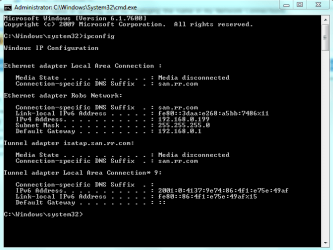
I'd like to see a screen shot of the ipconfig /all from at least two of your machines to determine if they are using the same default gateway. Picture of this below. :)
 

Attachments

  • ipconfig both connections.PNG
    ipconfig both connections.PNG
    15.9 KB · Views: 6

My Computer My Computer

At a glance

Windows 7 Ult, Windows 8.1 Pro,Q9650-4.275GHz, E8600 4.5GHz, E6750-3.8GHzG.Skill PC2 9600 1200Mhz 5 5 5 15 2TGTX480
Computer type
PC/Desktop
Computer Manufacturer/Model Number
Home built
OS
Windows 7 Ult, Windows 8.1 Pro,
CPU
Q9650-4.275GHz, E8600 4.5GHz, E6750-3.8GHz
Motherboard
Evga 780i FTW
Memory
G.Skill PC2 9600 1200Mhz 5 5 5 15 2T
Graphics Card(s)
GTX480
Sound Card
Asus Xonar D2
Monitor(s) Displays
HannsG
Screen Resolution
1680X1050
Hard Drives
GSkill Phoenix Pro 120GB SSD
PSU
ThermalTake Toughpower 1000Watt modular
Case
ThermalTake XaserV
Cooling
Xigmatek S1283
Keyboard
Logitech G15
Mouse
Logitech G9
Internet Speed
T1
Back
Top