Win 7 backup fails to complete

absc

New member
Local time
8:48 AM
Messages
35
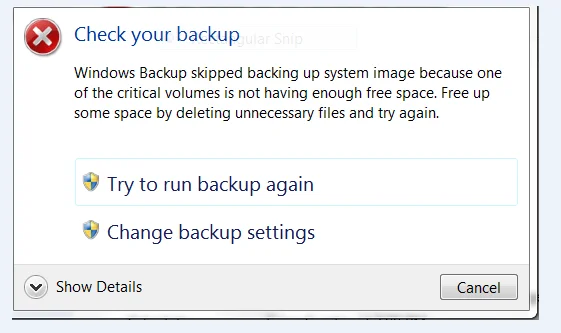
I have just installed a 250GB ssd for my OS, progs and a relatively small My Documents. I'm storing Pictures and Videos data on a 1TB internal disk and I have redirected My Videos and My Pictures to that drive. I'm backing up to an external 1 TB disk, but backup doesn't complete.
upload_2013-12-11_18-37-30-png.25950

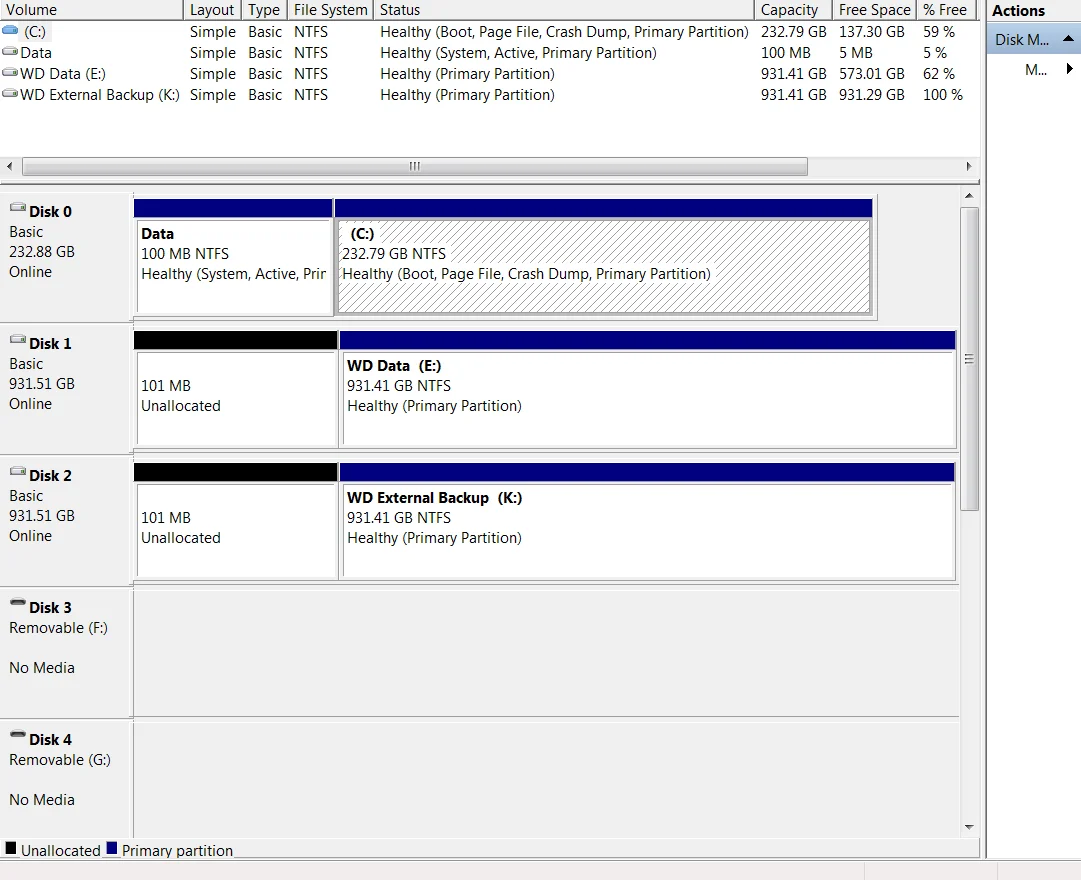
Properties shows 94 GB of the ssd used, leaving 137 GB free, and 358 GB of the data disk used, with 573 GB free. So what gives and how do I get a system backup? I have tried with My VIdeos and My Pictures folder locations restored to the default user folders which are empty and I get the same result.

I'm including the disk manager report.

PC is i7 with 8GB RAM running Windows 7 Pro.
upload_2013-12-11_18-47-52-png.25951
 

My Computer

Computer type
PC/Desktop
Computer Manufacturer/Model Number
LENOVO ThinkCentre M92p
OS
Windows 7 Pro 64
CPU
i7-3770
Motherboard
LENOVO MAHOBAY
Memory
8 GB
Graphics Card(s)
on board
Hard Drives
256 GB SSD primary and 1 TB for data
Antivirus
Norton
Browser
IE

My Computer

Computer type
PC/Desktop
Computer Manufacturer/Model Number
Custom Bulid/Self made
OS
Windows 11 x64
CPU
i5 2500K @ 3.3 GHz
Motherboard
ASUS P8 Z77 V pro
Memory
16 GB DDR 3 @ 1600Mhz
Graphics Card(s)
MSI 1050TI 4GB OC version
Sound Card
On Board (Realtek HD audio)
Monitor(s) Displays
Samsung 22" LCD
Screen Resolution
1920*1080
Hard Drives
Seagate 1 TB, WD 1TB, Seagate 2 TB ( I use a lot of space)
PSU
coolermaster 750 W
Case
Coolermaster HAF912
Cooling
Coolermaster hyper 212 EVO
Keyboard
Samsung
Mouse
Dell Wireless
Internet Speed
Wireless 50 Mbps
Antivirus
AVG 2016 Internet Security
Browser
Google Chrome
I agree with Archer.

If you purchase a Seagate, WD or Maxtor, you can get the Acronis Trueimage software (free) and make an image of your OS and

put it on your external hdd or another internal hdd.

If you need to recover your OS ( including programs, updates, etc) you can do it with a few clicks.

You can also use Easeus for free and any hdd will work.

Seagate - DiscWizard | Seagate

WD - WD Support


Easeus - EASEUS Todo Backup Free 6.1 Download for Windows / FileHorse.com

When downloading programs, pay attention to any garbage it might want to add.
Check "Custom" and uncheck the extras and on following pages, click "decline".
 

My Computer

Computer type
PC/Desktop
Computer Manufacturer/Model Number
Self-Built
OS
Windows 7 Professional X64
CPU
Core i7 (2nd gen) i7-2600K / 3.40GHz
Motherboard
ASUS P8Z77-V Intel 7 Series Motherboard
Memory
DDR3 2400MHz (OC) 16gb
Graphics Card(s)
Intel(R) HD Graphics 3000, -1988 Mb
Sound Card
8 ChannelsAudio Chipset Realtek ALC892
Monitor(s) Displays
LG 29UM65 Black 29"
Screen Resolution
2560 x 1080
Hard Drives
840 EVO 250 GB SSD ;2tb (2);Seagate;1tb Seagate; 750 gb Seagate; wd ext (2) 750 gb,WD 2tb X 2;WD 3TB Black
PSU
750 watt
Case
Thermaltake RX -1
Cooling
2120mm Fans Included 1Other Fan Ports 5x 200mm Fan Ports
Keyboard
Microsoft Digital Media Pro
Mouse
Microsoft Wireless 6000
Internet Speed
U-verse 18 mbps
Antivirus
MSE
Browser
Firefox, Chrome and my favorite: Pale Moon
Other Info
HdHomerun Dual Tuner.
SRS Audio Lab,
Pioneer BDR 208-DBK
PS3-What a difference in my Surround Sound Receiver!
HP 4540s - My new Toy.
Epson R280 Printer- To personalize my Dvds.
Canon MP 560 - For scanning.

My Computer

Computer type
Laptop
Computer Manufacturer/Model Number
ACER ASPIRE 5742G
OS
Microsoft Windows 7 Home Premium 64-bits 7601 Multiprocessor Free Service Pack 1
CPU
Intel(R) Core(TM) i3 CPU M 370 @ 2.40GHz
Motherboard
Acer Aspire 5742G
Memory
4,00 GB
Graphics Card(s)
ATI Mobility Radeon HD 5400 Series
Sound Card
(1) AMD High Definition Audio Device (2) Realtek High Defi
Screen Resolution
1366 x 768 x 32 bits (4294967296 colors) @ 60 Hz
Hard Drives
WDC WD5000BEVT-22ZAT0

My Computer

Computer Manufacturer/Model Number
HP, Dell, Gateway, Toshiba - 4 laptops and 2 desktops
OS
Vista, Windows7, Mint Mate, Zorin, Windows 8
CPU
from 1.6GHz Duo to i7
Monitor(s) Displays
2x HP w2207
Hard Drives
5x HDD, 7x SSD, 12x Externals
Keyboard
with trackball - no mices
Mouse
Trackball mice
Internet Speed
DSL 6000
It's the 100MB partition (it holds the bootmanager and bootmenu) that's almost full!
Why not simply delete that partition and do a startup repair? http://www.sevenforums.com/tutorials/71363-system-reserved-partition-delete.html
Good catch. But instead of 3 times Startup/Repair I would just copy the bootmgr to C and then get rid of the 100MB bugger.

http://www.sevenforums.com/tutorials/209885-bootmgr-move-c-easybcd.html
That copies bootmgr and bootmenu to C. It marks C as ACTIVE. All fine.
But what happens with WINRE if it's located on the 100MB partition??? Answer: it stays there. Very unlikely any relevant software or recovery stuff is in 100MB partition, but it is possible.
 

My Computer

Computer type
Laptop
Computer Manufacturer/Model Number
ACER ASPIRE 5742G
OS
Microsoft Windows 7 Home Premium 64-bits 7601 Multiprocessor Free Service Pack 1
CPU
Intel(R) Core(TM) i3 CPU M 370 @ 2.40GHz
Motherboard
Acer Aspire 5742G
Memory
4,00 GB
Graphics Card(s)
ATI Mobility Radeon HD 5400 Series
Sound Card
(1) AMD High Definition Audio Device (2) Realtek High Defi
Screen Resolution
1366 x 768 x 32 bits (4294967296 colors) @ 60 Hz
Hard Drives
WDC WD5000BEVT-22ZAT0
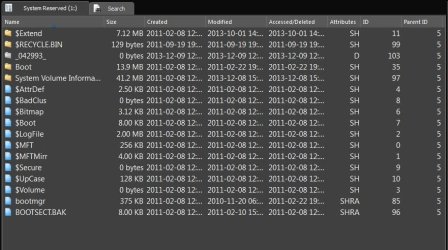
There's lots of things in that "System Reserved" partition you don't normally see. :eek:
 

Attachments

  • System Reserved.JPG
    System Reserved.JPG
    80.2 KB · Views: 3

My Computer

Computer type
PC/Desktop
Computer Manufacturer/Model Number
Built 2/11/2011
OS
Windows 7 Pro-x64
CPU
i7-2600 3.4GHz - 3.8GHz Turbo
Motherboard
Intel DH67BL-B3
Memory
8Gb - 2x4GB, Muskin 991770 PC3-1333
Graphics Card(s)
Integrated Intel HD 2000
Sound Card
Integrated Intel 10.1 HD, RealTek ALC892
Monitor(s) Displays
Asus LCD VH222H, Haier HL24XSL2a
Screen Resolution
1920x1080, 1920x1080
Hard Drives
Crucial SSD C300-128Gb,
Western Digital WD5002AALX - 500Gb,
Western Digital WD7501AALS - 750Gb
PSU
Seasonic 650W 80+ Gold Modular
Case
Rosewill Defender
Cooling
Stock CPU, Four 120mm case fans, PCH fan added
Keyboard
Logitech EX100 Y-RBH94 Wireless
Mouse
Logitech EX100 M-RCE95 Wireless
Internet Speed
3.0/1.5 Mbs
Antivirus
Microsoft Security Essentials
Browser
Microsoft Internet Explorer 11
Other Info
Antec Veris Premier-Multimedia IR Station,
Cyber Accoustics-3602 Speakers,
AFT XM-5U Card Reader,
Hauppauge TV-HVR-2250,
Sony LX300 USB Turntable
I wonder how the reserve partition got so full.
Opps carwiz we posted at the same time.
 

My Computer

Computer type
PC/Desktop
Computer Manufacturer/Model Number
Home made Desktop
OS
Windows 10 Pro. 64/ version 1709 Windows 7 Pro/64
CPU
Intel i7-6800K @ 4.3
Motherboard
ASUS X-99 Deluxe II
Memory
Corsair Platinum 16 gig @2400
Graphics Card(s)
EVGA GTX 1070 OC
Monitor(s) Displays
Asus 27" LED LCD/VE278Q
Screen Resolution
1920-1080 or 1280-720 HDMI
Hard Drives
INTEL SSD 730-240 Gb Sata 3.0/
PSU
EVGA Platium 1200W
Case
Phanteks Luxe Tempered Glass 8 fans/ one radiator
Cooling
XSPC/ Water Cooled CPU
Keyboard
Das 4 Professional
Mouse
Logitech M705/MX Anywhere 2-S
Internet Speed
100 mbits
Antivirus
Microsoft Security Essentials/ Malwarebytes Premium 3.0/ SAS
Browser
I.E. 11 default/Firefox/ ISP Time Warner Cable/Spectrum
Other Info
LG BluRay Burner/
Sound system-KLipsch-THX/
Icy Dock ssd Hot Swap bays.
The OP needs to get those "Boot" partitions off the other disks, unless he's booting from them.

Also, you can't run MSBackup to a disk that contains system files.
 

My Computer

Computer type
PC/Desktop
Computer Manufacturer/Model Number
Built 2/11/2011
OS
Windows 7 Pro-x64
CPU
i7-2600 3.4GHz - 3.8GHz Turbo
Motherboard
Intel DH67BL-B3
Memory
8Gb - 2x4GB, Muskin 991770 PC3-1333
Graphics Card(s)
Integrated Intel HD 2000
Sound Card
Integrated Intel 10.1 HD, RealTek ALC892
Monitor(s) Displays
Asus LCD VH222H, Haier HL24XSL2a
Screen Resolution
1920x1080, 1920x1080
Hard Drives
Crucial SSD C300-128Gb,
Western Digital WD5002AALX - 500Gb,
Western Digital WD7501AALS - 750Gb
PSU
Seasonic 650W 80+ Gold Modular
Case
Rosewill Defender
Cooling
Stock CPU, Four 120mm case fans, PCH fan added
Keyboard
Logitech EX100 Y-RBH94 Wireless
Mouse
Logitech EX100 M-RCE95 Wireless
Internet Speed
3.0/1.5 Mbs
Antivirus
Microsoft Security Essentials
Browser
Microsoft Internet Explorer 11
Other Info
Antec Veris Premier-Multimedia IR Station,
Cyber Accoustics-3602 Speakers,
AFT XM-5U Card Reader,
Hauppauge TV-HVR-2250,
Sony LX300 USB Turntable
Thanks to everyone who's contributed to this thread although many of the comments were above my head.

I got a disk and partition backup OK using Acronis True Image. I couldn't find where to make a system repair disk with Acronis so I made one using MS backup. Am I right in thinking that if I have a disaster I can boot up with the MS system repair disk and restore from the Acronis backup? I've never had to do a restore before!

I don't know why the c: system reserved partition is so full. I remember noticing before I reinstalled my programs, including a fairly massive video editor, that it was nearly empty. I'm thinking of uninstalling a few progs starting with the editor to see if gets rid of a few files. I'm very reluctant to simply delete files from it even if I knew how and I don't know enough to start fiddling with the registry. I'm worried that being nearly full the system will start getting unstable. Is there any way of increasing its size above a measly 100 MB without rebuilding the system?

What would happen if I do a disk clean?

Thanks
 

My Computer

Computer type
PC/Desktop
Computer Manufacturer/Model Number
LENOVO ThinkCentre M92p
OS
Windows 7 Pro 64
CPU
i7-3770
Motherboard
LENOVO MAHOBAY
Memory
8 GB
Graphics Card(s)
on board
Hard Drives
256 GB SSD primary and 1 TB for data
Antivirus
Norton
Browser
IE
Open the 100MB partition and see what's in it. Post a picture here.
 

My Computer

Computer Manufacturer/Model Number
HP, Dell, Gateway, Toshiba - 4 laptops and 2 desktops
OS
Vista, Windows7, Mint Mate, Zorin, Windows 8
CPU
from 1.6GHz Duo to i7
Monitor(s) Displays
2x HP w2207
Hard Drives
5x HDD, 7x SSD, 12x Externals
Keyboard
with trackball - no mices
Mouse
Trackball mice
Internet Speed
DSL 6000
I had a similar problem with Windows 7 imaging where the System Reserved partition was too full, but it had to do with shadow copies. Found an article stating that a third-party application was turning on the USN journal, and that was filling it (System Reserved partition) up. They gave a fancy way to check, and it seemed like that was it.

Fixed it by making the partition bigger (around 500 MB). This is moot, considering you got it to work via Acronis, though.
 
Last edited:

My Computer

Computer type
PC/Desktop
OS
Windows 7 Professional 32bit
Thanks to everyone who's contributed to this thread although many of the comments were above my head.

I got a disk and partition backup OK using Acronis True Image. I couldn't find where to make a system repair disk with Acronis so I made one using MS backup. Am I right in thinking that if I have a disaster I can boot up with the MS system repair disk and restore from the Acronis backup? I've never had to do a restore before!

I don't know why the c: system reserved partition is so full. I remember noticing before I reinstalled my programs, including a fairly massive video editor, that it was nearly empty. I'm thinking of uninstalling a few progs starting with the editor to see if gets rid of a few files. I'm very reluctant to simply delete files from it even if I knew how and I don't know enough to start fiddling with the registry. I'm worried that being nearly full the system will start getting unstable. Is there any way of increasing its size above a measly 100 MB without rebuilding the system?

What would happen if I do a disk clean?

Thanks

I couldn't find where to make a system repair disk with Acronis

Go to Tools - you will see that choice.
 

Attachments

  • SEAGATE PIC 12,13,13.jpg
    SEAGATE PIC 12,13,13.jpg
    163.1 KB · Views: 4

My Computer

Computer type
PC/Desktop
Computer Manufacturer/Model Number
Self-Built
OS
Windows 7 Professional X64
CPU
Core i7 (2nd gen) i7-2600K / 3.40GHz
Motherboard
ASUS P8Z77-V Intel 7 Series Motherboard
Memory
DDR3 2400MHz (OC) 16gb
Graphics Card(s)
Intel(R) HD Graphics 3000, -1988 Mb
Sound Card
8 ChannelsAudio Chipset Realtek ALC892
Monitor(s) Displays
LG 29UM65 Black 29"
Screen Resolution
2560 x 1080
Hard Drives
840 EVO 250 GB SSD ;2tb (2);Seagate;1tb Seagate; 750 gb Seagate; wd ext (2) 750 gb,WD 2tb X 2;WD 3TB Black
PSU
750 watt
Case
Thermaltake RX -1
Cooling
2120mm Fans Included 1Other Fan Ports 5x 200mm Fan Ports
Keyboard
Microsoft Digital Media Pro
Mouse
Microsoft Wireless 6000
Internet Speed
U-verse 18 mbps
Antivirus
MSE
Browser
Firefox, Chrome and my favorite: Pale Moon
Other Info
HdHomerun Dual Tuner.
SRS Audio Lab,
Pioneer BDR 208-DBK
PS3-What a difference in my Surround Sound Receiver!
HP 4540s - My new Toy.
Epson R280 Printer- To personalize my Dvds.
Canon MP 560 - For scanning.
PSCO2007; said:
Go to Tools - you will see that choice.
Thanks. The screen is quite different for WD but I managed it. I had it before but I misread the file size as 300 odd GB instead of MB and thought it wasn't what I wanted.

Open the 100MB partition and see what's in it.
How? I can't find it even with explorer set to show hidden folders.

BillDing; said:
Fixed it by making the partition bigger
How did you do this? Disk Manager has Expand Volume greyed out even after shrinking the c: partition to make room.


Thanks again everyone.
 

My Computer

Computer type
PC/Desktop
Computer Manufacturer/Model Number
LENOVO ThinkCentre M92p
OS
Windows 7 Pro 64
CPU
i7-3770
Motherboard
LENOVO MAHOBAY
Memory
8 GB
Graphics Card(s)
on board
Hard Drives
256 GB SSD primary and 1 TB for data
Antivirus
Norton
Browser
IE
How? I can't find it even with explorer set to show hidden folders.
You have to assign a letter to it in Disk Management and then you double click on it in Computer.
 

My Computer

Computer Manufacturer/Model Number
HP, Dell, Gateway, Toshiba - 4 laptops and 2 desktops
OS
Vista, Windows7, Mint Mate, Zorin, Windows 8
CPU
from 1.6GHz Duo to i7
Monitor(s) Displays
2x HP w2207
Hard Drives
5x HDD, 7x SSD, 12x Externals
Keyboard
with trackball - no mices
Mouse
Trackball mice
Internet Speed
DSL 6000
whs; said:
You have to assign a letter to it in Disk Management and then you double click on it in Computer.
Tried that and I can see it now but when I open it it says the folder is empty. Properties shows the volume nearly full.
 

My Computer

Computer type
PC/Desktop
Computer Manufacturer/Model Number
LENOVO ThinkCentre M92p
OS
Windows 7 Pro 64
CPU
i7-3770
Motherboard
LENOVO MAHOBAY
Memory
8 GB
Graphics Card(s)
on board
Hard Drives
256 GB SSD primary and 1 TB for data
Antivirus
Norton
Browser
IE
whs; said:
You have to assign a letter to it in Disk Management and then you double click on it in Computer.

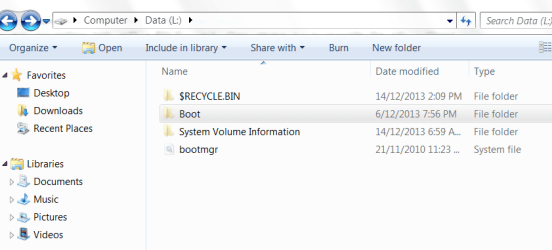
I've unchecked Hide Protected Operating System Files and I can see these filesCapture.PNG.
Recycle Bin shows 4 KB, Boot shows 13.9 MB of what look like a whole bunch of language files, System Volume 0 KB, Boot Manager 379 KB. Properties still show the volume used space as 94.8 MB with 5.11.MB free.

Played around a bit but can't find anything else.
 

My Computer

Computer type
PC/Desktop
Computer Manufacturer/Model Number
LENOVO ThinkCentre M92p
OS
Windows 7 Pro 64
CPU
i7-3770
Motherboard
LENOVO MAHOBAY
Memory
8 GB
Graphics Card(s)
on board
Hard Drives
256 GB SSD primary and 1 TB for data
Antivirus
Norton
Browser
IE
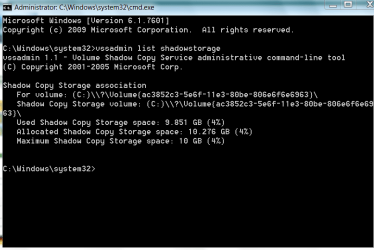
Hmm, it somehow does not add up. The only other space could be shadowstorage which you don't see here. Run the command below in elevated command prompt and see whether there is any Allocated space for this partition letter.

vssadmin list shadowstorage
 

My Computer

Computer Manufacturer/Model Number
HP, Dell, Gateway, Toshiba - 4 laptops and 2 desktops
OS
Vista, Windows7, Mint Mate, Zorin, Windows 8
CPU
from 1.6GHz Duo to i7
Monitor(s) Displays
2x HP w2207
Hard Drives
5x HDD, 7x SSD, 12x Externals
Keyboard
with trackball - no mices
Mouse
Trackball mice
Internet Speed
DSL 6000
Hmm, it somehow does not add up. The only other space could be shadowstorage which you don't see here. Run the command below in elevated command prompt and see whether there is any Allocated space for this partition letter.

vssadmin list shadowstorage
I don't see anything relating to data volume L:, but I do see that the allocated space in c: is nearly exhausted
 

Attachments

  • Capture.PNG
    Capture.PNG
    14.3 KB · Views: 1

My Computer

Computer type
PC/Desktop
Computer Manufacturer/Model Number
LENOVO ThinkCentre M92p
OS
Windows 7 Pro 64
CPU
i7-3770
Motherboard
LENOVO MAHOBAY
Memory
8 GB
Graphics Card(s)
on board
Hard Drives
256 GB SSD primary and 1 TB for data
Antivirus
Norton
Browser
IE
Right, there is nothing for L. And don't worry about C. That is a round robin FiFo system. The space will always be reused.
 

My Computer

Computer Manufacturer/Model Number
HP, Dell, Gateway, Toshiba - 4 laptops and 2 desktops
OS
Vista, Windows7, Mint Mate, Zorin, Windows 8
CPU
from 1.6GHz Duo to i7
Monitor(s) Displays
2x HP w2207
Hard Drives
5x HDD, 7x SSD, 12x Externals
Keyboard
with trackball - no mices
Mouse
Trackball mice
Internet Speed
DSL 6000
Back
Top